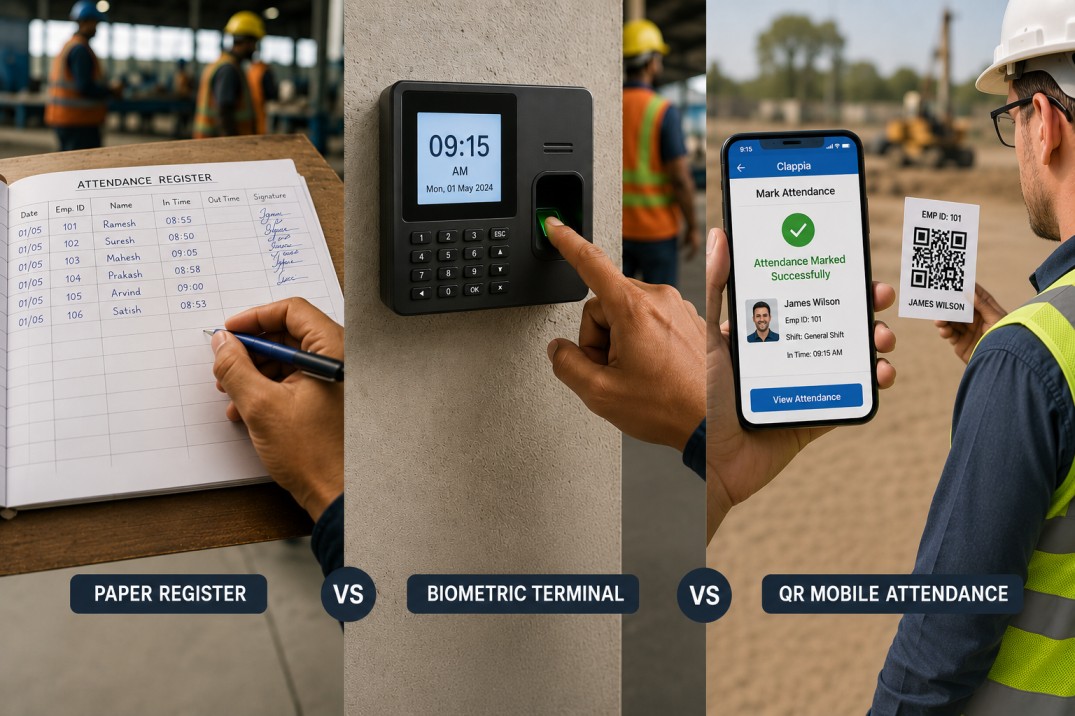
Attendance tracking is one of those operational tasks that most organisations solve once and then live with for years, even when the solution is clearly failing. Paper registers fill up, get damaged, or go missing. Biometric terminals queue up in the morning, require maintenance contracts, and stop working when the network goes down. Neither produces payroll-ready data without someone manually transferring numbers into a spreadsheet. The reconciliation that happens at the end of each month is less a process than a recovery exercise.
A QR code-based attendance system built in Clappia takes a different approach. Each employee carries a unique QR code. Scanning it on a mobile device records the punch, pulls the employee's details and pay parameters automatically, handles post-midnight shift attribution correctly, calculates worked hours per segment, and accumulates monthly totals in a wages sheet, all without a single manual transfer step. This article compares the three approaches across the specific pain points that make traditional systems expensive to run at scale.
| Capability | Paper Register | Biometric Terminal | QR Mobile Attendance |
|---|---|---|---|
| Hardware required | Register, pens | Fingerprint or face scanner, server | Any Android or iOS phone |
| Employee identity at punch | Self-reported; no verification | Biometric match at the terminal | QR code tied to employee master record |
| Payroll data auto-fill | None; manual entry | None; time only | Wages, designation, department, pay type pulled automatically on scan |
| Post-midnight shift handling | Manual dating decision | Terminal date only; midnight crossing misattributed without manual correction | After midnight flag on scan; system attributes punch to correct calendar day automatically |
| Multi-segment shifts (in/out/in) | Multiple rows or columns, error-prone | Requires multiple terminal interactions; rarely tracked as segments | Up to three in/out segments per day with per-segment hour calculations |
| Hour calculation | Manual arithmetic or formula spreadsheet | Terminal software; requires export | Calculated automatically per segment and totalled per day |
| Monthly rollup | Manual aggregation | Export and manual processing | Automatic accumulation in wages sheet; recalculates when specific days are edited |
| Duplicate punch detection | Not possible | Terminal-level timeout only | Time-gap check on same employee and date; flags rapid re-scans |
| Data availability | Physical register at one location | On terminal or exported file | Immediately available in Clappia from any device with access |
| Month-end processing time | Several hours to days | Hours, depending on export process | Near-zero; data accumulates continuously |
Paper registers require someone to physically read every entry and transfer the hours into a payroll system. A team of fifty people working varied shifts produces hundreds of individual entries per week. Biometric terminals improve on this slightly because the timestamps are digital, but the export-and-process cycle is still a manual step. The data does not know anything about an employee's designation, pay rate, or department: it is a timestamp and nothing more.
In the QR system, reconciliation is not a month-end task because there is nothing to reconcile. Each scan pulls the employee's pay parameters from a central employee master at the moment of scanning, so every attendance record already contains the context needed for payroll: department, designation, wage rate, pay type, account details. The wages sheet accumulates totals continuously and is always current.
This is the problem that paper and biometric systems handle worst. A worker who clocks in at 22:00 and clocks out at 02:00 has worked across two calendar days. A paper register records two entries on two different dates with no automatic connection between them. A biometric terminal records a punch on day one and a punch on day two, and the payroll software that processes the export has to be configured to understand that these belong to the same shift, which most small and mid-sized systems are not set up to do correctly.
The QR system addresses this directly. When a post-midnight punch is recorded, the operator confirms an After Midnight flag on the scan. The system then attributes that punch to the previous calendar day, ensuring the shift is counted correctly regardless of what time the clock says when the scan happens. The attendance ledger stores the companion date for each punch segment so the timeline of the shift is unambiguous.
Post-midnight shift misattribution is one of the most common payroll errors in shift-based workforces. Fixing it manually at month-end costs more time than any time-saving the original system provided.
The month-end process in a paper or biometric-based system involves extracting raw data, cleaning it, summing hours per employee, checking for anomalies, and transferring the results to wherever payroll is calculated. Each of those steps is a point of failure. The QR system's wages sheet absorbs worked hours incrementally as each day's attendance ledger is completed. There is no extraction step because the data is already in the right place in the right format.
The system also handles a specific edge case that creates errors in manual rollups: when attendance records are edited after the fact, the monthly totals update correctly. If the 9th or 10th of a month is edited, the wages sheet recalculates by substituting the new hours for the previous value rather than adding to it. This prevents the double-counting that happens in spreadsheet-based systems when a correction is entered as an additional row.
The system consists of four connected apps in Clappia. Understanding how they relate to each other is useful before looking at the individual components.
| App | Role |
|---|---|
| Employee Master | The single source of truth for all employee data. Each employee record generates a unique QR code. Pay parameters, department, designation, and account details are stored here and pulled automatically on every scan. |
| Attendance Scanner | The mobile scan app. Operators scan the employee's QR code to record a punch. The app auto-fills employee details, records the timestamp, and handles post-midnight attribution via a confirmation flag. |
| Attendance Ledger | The per-day record for each employee. Stores up to three in/out time segments, calculates hours per segment and total daily hours, and holds payroll context for downstream processing. |
| Wages Sheet | The monthly accumulation of worked hours per employee. Receives data from the attendance ledger as each day closes and recalculates when specific dates are edited. |
When an operator scans an employee's QR code using the Attendance Scanner app, the following fields populate automatically from the Employee Master:
The operator confirms the attendance date (which defaults to today) and time (which defaults to the current time). If the punch is after midnight on a shift that started the previous day, the operator marks the After Midnight flag as Yes. The system uses this flag to attribute the punch to the correct calendar day.
Behind the scenes, the app builds a composite key from the employee identifier and the correct attendance date (adjusted for the midnight flag). This key is used by the automation to find or create the corresponding record in the Attendance Ledger.
Each employee has one Attendance Ledger record per day. The ledger supports up to three in/out segments: pairs of times that represent a period of work. Each segment has its own hours and minutes calculation, and the three segments roll up into a daily total.
The first scan of the day creates the ledger record and sets the first time in. Each subsequent scan updates the same record: the second scan sets the first time out and stamps an exit time, the third scan sets the second time in, and so on up to six timestamps across three segments. The system emails the operator a confirmation on each update beyond the first punch.
For post-midnight segments, each segment has a companion date field and a midnight flag. If a segment crosses midnight, the companion date stores the next calendar day so the time calculation covers the full duration correctly. The Formula blocks in the ledger compute hours and minutes per segment:
The Wages Sheet holds one record per employee per month. As each day's Attendance Ledger closes, the day's total hours and minutes are added to the running monthly total. The sheet does not re-sum from scratch each time; it increments the running total by adding the current day's value.
Two specific dates in the month, the 9th and the 10th, have dedicated hour and minute buckets in the wages sheet. When a ledger record dated the 9th is edited, the wages sheet updates the 9th-specific buckets and recalculates the monthly total as:
The same logic applies on the 10th. This approach handles the case where an attendance record is corrected after it was first submitted: the monthly total reflects the updated value rather than double-counting the original and the correction.
The scanner includes a lightweight fraud deterrent. Each time a scan is saved, the system retrieves the earliest scan for the same employee and date combination and checks whether the gap between that timestamp and the current scan is less than 10 time units. If it is, the system flags it. This check does not block the submission; it creates a read-only signal that can be monitored for patterns of rapid re-scans, which can indicate proxy scanning or system misuse.
This is simpler than biometric anti-spoofing but serves a different purpose: it catches timing anomalies rather than identity anomalies. For most organisations, a check that flags punches within seconds or minutes of each other covers the most common attendance manipulation patterns.
The choice depends on four factors: workforce size, shift complexity, payroll integration requirements, and existing hardware investment.
| Factor | Paper Register | Biometric Terminal | QR Mobile Attendance |
|---|---|---|---|
| Workforce size | Works for very small teams where reconciliation is quick | Scales reasonably up to the capacity of installed terminals | Scales to any size; multiple devices can scan simultaneously |
| Post-midnight shifts | Manual correction required every time | Requires custom configuration or manual correction | Handled natively via the After Midnight flag |
| Multi-segment shifts | Impractical beyond two segments | Not supported in most standard terminal software | Up to three segments with automatic per-segment calculations |
| Payroll integration | None; manual entry to payroll system | Timestamp data only; pay parameters entered separately | Pay parameters auto-filled at scan; wages sheet ready for payroll processing |
| Infrastructure cost | Near zero | Significant hardware and maintenance cost | Mobile device per scanning point; no dedicated hardware |
| Offline use | Works anywhere | Requires power and network | Works offline; data syncs when connectivity returns |
For operations with simple day shifts and small teams, the overhead of either a biometric system or a QR app may be more than the problem warrants. Paper works. For operations with multiple shifts, overnight workers, varied pay structures, or a payroll team spending significant time on manual reconciliation each month, the QR system's automation closes each of those gaps specifically.
The Attendance Scanner app runs on the Clappia mobile app, available on Android and iOS. Scanning works natively through the device camera; no dedicated scanner hardware is needed. For sites where network connectivity is unreliable, Clappia's offline mode allows punches to be recorded and queued locally. The automated workflows that update the ledger and wages sheet fire after the submission syncs when connectivity returns.
The Employee Master data that populates on each scan needs to be cached on the device for offline lookups to work. This happens automatically when the app is opened on Wi-Fi. For field sites or factory floors with intermittent connectivity, the recommended practice is to ensure the scanning device has synced the employee master before the shift begins.
For user permissions, the recommended structure is:
| Role | Access Level | What They Can Do |
|---|---|---|
| Operator or Supervisor | Submit Only | Scan QR codes and submit punches; view their own scan history |
| HR or Payroll Team | View and Edit | View and correct attendance ledger entries; review wages sheet |
| Admin | Full Access | Manage employee master; configure app settings; access all records |
Paper registers and biometric terminals both solve the basic problem of recording when someone was present, but neither solves the problems that make attendance management expensive: post-midnight shift attribution, multi-segment time calculations, payroll context at the point of capture, and automatic monthly accumulation. Each of those gaps requires manual work to close, and that manual work compounds across a workforce and across months.
A QR-based attendance system built in Clappia addresses each gap at the point of capture. The scan pulls pay parameters automatically, the After Midnight flag attributes punches to the correct calendar day, the attendance ledger calculates hours per segment and per day, and the wages sheet accumulates monthly totals with correction-safe recalculation. The result is a payroll-ready dataset that builds itself as each shift closes, rather than one that requires reconstruction at month-end.
To build this system, start by creating your employee master in Clappia and configuring it to generate a unique QR code per employee. The scanner, ledger, and wages sheet follow from there. The complete setup requires no coding and runs on standard mobile devices.
L374, 1st Floor, 5th Main Rd, Sector 6, HSR Layout, Bengaluru, Karnataka 560102, India
3500 S DuPont Hwy, Dover,
Kent 19901, Delaware, USA


.svg)




3500 S DuPont Hwy, Dover,
Kent 19901, Delaware, USA
L374, 1st Floor, 5th Main Rd, Sector 6, HSR Layout, Bengaluru, Karnataka 560102, India


.avif)