


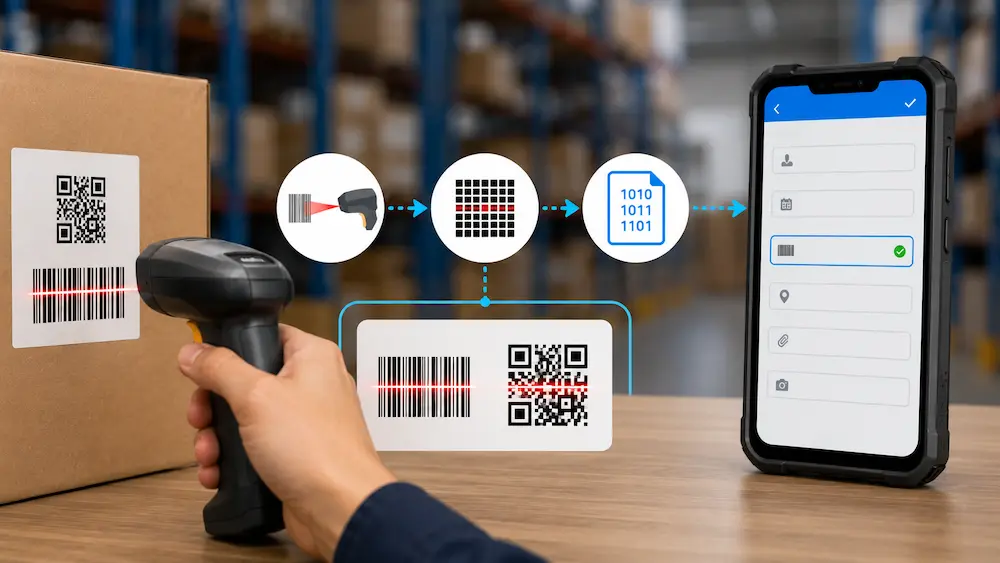
A scan feels instant. You point a device at a code, it beeps, and the data appears. But between the beep and the data, four things happen in a few milliseconds: light hits the code, a sensor reads the reflection, software decodes the pattern, and the result is sent somewhere. Understanding those four steps makes everything else about scanning, why some codes need a laser and others a camera, why a scanner works without any setup, easy to reason about.
This is a plain-English explainer of how barcode and QR code scanning actually works, from optics to output. At the end, we will connect it to the one question every explainer skips: once a code is decoded, where does the data go?
The Four Steps of Every Scan
Whether it is a laser scanner at a checkout or a phone reading a QR code, the same sequence runs every time.
- Illuminate. The scanner lights up the code, with a laser, an LED, or just ambient light for a camera. Dark bars and modules absorb light; light areas reflect it.
- Capture. A sensor (a photodiode in a laser scanner, a CCD or CMOS image sensor in a camera-based reader) catches the reflected light and converts it into an electrical signal. The signal mirrors the pattern of dark and light.
- Decode. The scanner's processor turns that signal into digits and characters by applying the rules of the specific code type, called a symbology, such as UPC, Code 128, QR, or Data Matrix. Error-correction checks confirm the read is accurate.
- Output. The decoded value is sent to a connected device or app as if it had been typed.
From illuminate to output, the whole thing takes milliseconds. Everything else is a variation on these four steps.
Step 1 and 2: How a Code Becomes a Signal
A barcode is a pattern of dark bars and light spaces. A QR code is a grid of dark and light squares called modules. Both work the same way optically: dark areas absorb light, light areas reflect it, and a sensor measures the difference.
A laser scanner sweeps a beam across a 1D barcode and a photodiode measures the reflected light over time. The widths of the bars and spaces become a timed sequence of high and low signals.
A camera-based reader (a CCD or CMOS imager, the kind in your phone) photographs the whole code at once. Instead of sweeping a line, it captures the full two-dimensional pattern in a single frame, which is why a camera can read both 1D barcodes and 2D codes like QR.
Either way, the output of this stage is an electrical signal that represents the pattern of light and dark.
Step 3: How Decoding Turns a Pattern Into Data
The raw signal is just light and dark. Decoding is what turns it into "SKU 4099" or a URL.
The processor first identifies the symbology, the rule set the code follows. A UPC barcode encodes digits one way; a Code 128 barcode another; a QR code another still. Once it knows the rules, it maps the pattern to characters.
This is also where reliability comes from. Most codes carry built-in checks:
- Barcodes often include a check digit, a redundancy value that confirms the rest of the code was read correctly.
- QR codes use Reed-Solomon error correction, defined in the ISO/IEC 18004 standard, which can recover the data even when up to 30% of the code is damaged or obscured. It is why a QR code with a logo in the middle or a scuff across it still scans.
If the decode succeeds, you get the beep and the green light. If it fails, the scanner simply tries again on the next frame until it reads or gives up.
1D Barcodes vs 2D QR Codes
The decode step differs because the two formats store data differently.
A 1D barcode stores data in the widths of vertical lines, read in one direction. It holds a small amount of data, typically a short product number, and must be roughly aligned with the scanner to read. Fast and cheap, which is why it dominates checkout and high-volume receiving.
A 2D QR code stores data in a grid, both horizontally and vertically, so it holds far more (thousands of characters versus a couple dozen). The three square finder patterns in its corners tell the scanner its orientation, so it reads from any angle, even upside down. Combined with error correction, that makes QR codes more forgiving in messy real-world conditions.
Neither is "better." Barcodes win on speed and simplicity for short IDs; QR codes win on data capacity, angle tolerance, and damage resistance.
Step 4: Where the Decoded Data Goes (The Part That Matters)
Here is the step every explainer rushes past, and the one that actually decides whether scanning saves you any time. A scan is only useful if the decoded value reaches the system that needs it. There are two common paths.
Hardware scanner as a keyboard. Most dedicated barcode scanners connect over USB, Bluetooth, or a wireless dongle and behave as a Human Interface Device, the same category as a keyboard. When you scan, the decoded value is "typed" into whatever field currently has focus on the connected device. No driver, no software, no integration. This is why a scanner works the moment you plug it in: to the computer, it is just a very fast typist.
Camera on the device running the app. When a phone or tablet scans, the camera and the app are on the same device, so the decoded value can be handed straight to the app, no connection step at all.
Both paths end the same way: a decoded value needs a field to land in. That field is the whole point.
How This Works in Clappia
This is where the four steps connect to a real workflow. Because a hardware scanner acts as a keyboard and a phone camera lives on the same device as the app, the decoded value drops straight into a Clappia form, with nothing to integrate.
Clappia's QR Code and Barcode Scanner block handles the camera path directly. You add the block to a form, and when a worker scans, the decoded value populates that field. It reads QR codes plus the major barcode formats, UPC, EAN, Code 128, Code 39, Data Matrix, and Aztec, so one block covers most codes you will meet. If a code is scuffed or distorted, manual entry is available as a fallback.
A few things make it practical on a real floor:
- Zero-click capture. You can set the scanner to open automatically when the app opens, so a worker creates a submission without touching the screen, useful for high-speed receiving or no-touch attendance.
- Scan to look up, not just to fill. A scanned code can pull related details from another Clappia app. Scan an asset tag and the form fills in its name, location, and last service date from your master record.
- Works offline. Scans are captured and stored on the device even with no signal, then sync automatically when the connection returns, so warehouse dead zones do not break the workflow.
- More than a value. On scan, Clappia can also capture GPS location, attach a photo, update a record, or trigger an approval, so the scan becomes the start of a process, not just a number in a box.
And if you use dedicated hardware scanners, they work too. Because they output to the focused field like a keyboard, a Bluetooth or USB scanner enters its value straight into the open Clappia field, no separate setup.
Frequently Asked Questions
How does a barcode scanner read a code?It lights the code, a sensor measures the reflected light to capture the pattern of bars and spaces, the processor decodes that pattern using the code's symbology rules, and the result is output to a connected device. The whole sequence takes milliseconds.
What is the difference between a barcode and a QR code scanner?A 1D barcode scanner (often a laser) reads vertical lines in one direction and must be roughly aligned. A QR or 2D scanner uses a camera-style imager to capture the full grid at once, reads from any angle, and handles more data. Camera-based imagers can read both 1D and 2D codes.
Do I need a special app to scan a barcode?For QR codes, most modern phones scan natively in the camera app. For 1D barcodes, a phone often needs a dedicated app or block. In an app like Clappia, the built-in scanner block reads both without any extra app.
How does a phone camera scan a QR code?The camera photographs the whole code, software locates the three corner finder patterns to fix orientation, then decodes the grid and applies error correction. It reads in roughly 200 to 300 milliseconds, from any angle.
Can I scan without dedicated hardware?Yes. A smartphone or tablet camera can scan both barcodes and QR codes. Dedicated hardware scanners are faster for high-volume work, but for most workflows a phone running the right app is enough.
Where does the scanned data actually go?A hardware scanner outputs the value to the focused field like a keyboard; a phone hands it to the app on the same device. In Clappia, the decoded value lands directly in the form field, where it can fill data, look up a record, or trigger a workflow.
In Short
Every scan, laser or camera, barcode or QR, runs the same four steps: illuminate, capture, decode, output. The first three are physics and software. The fourth, output, is the one that decides whether scanning actually helps, because a decoded value is only useful when it reaches the right field in the right system.
That is the easy part with Clappia. A scanned code, from a phone camera or a hardware scanner, lands straight in your form and becomes the first step of a real workflow. See how barcode and QR scanning works inside Clappia, or start building for free.




.svg)



