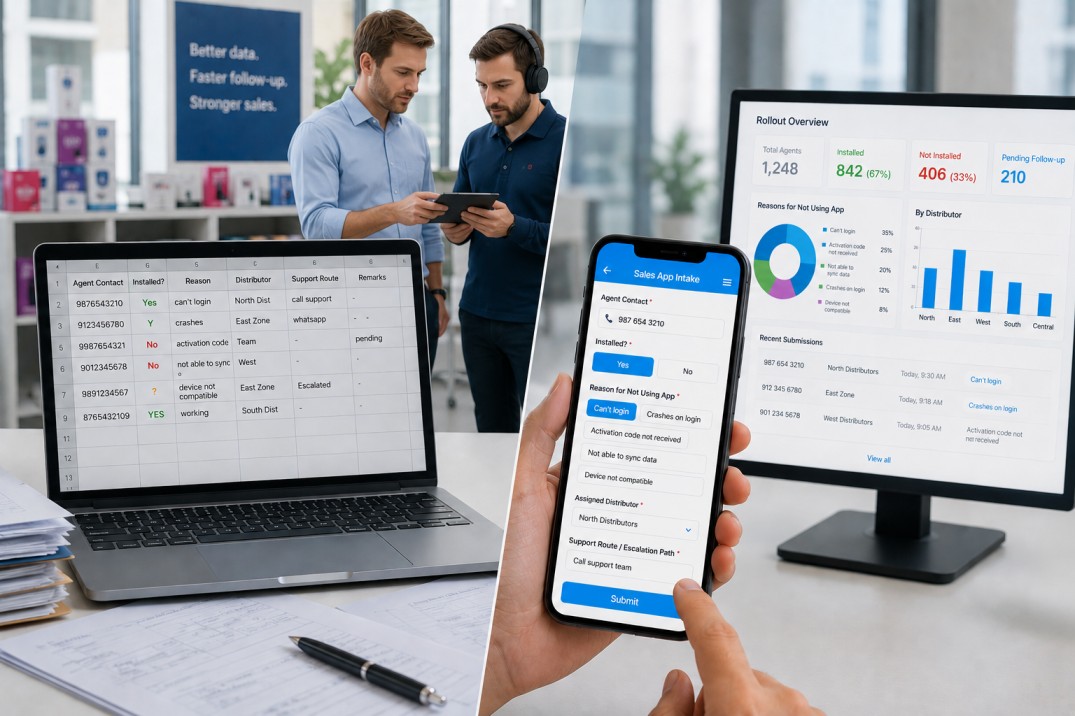
A spreadsheet is usually the first tool a team reaches for when rolling out a new sales app to a network of field users. It is fast to set up, everyone knows how to use it, and it requires no technical configuration. For the first week or two, it works. Then it starts to fail.
Columns get added inconsistently. Coordinators enter free text where a dropdown was implied. Rows are left half-complete. The reasons column becomes a mix of shorthand, full sentences, and blank cells. By the time a manager tries to understand adoption blockers across the network, the spreadsheet is more work to interpret than the original conversations were.
A structured mobile intake form built in Clappia, a no-code platform for field operations apps, addresses each of these problems at the point of data entry rather than after the fact. This article compares the two approaches across the specific pain points that make spreadsheet tracking unreliable for sales app rollouts.
| Problem | Spreadsheet Tracker | Structured Mobile Form |
|---|---|---|
| Inconsistent data entry | Each coordinator uses different formats, abbreviations, and column interpretations | Every field has a defined type: phone number, Yes/No, or a fixed list of options; free text is reserved for fields that genuinely need it |
| Missing required information | No enforcement; rows submitted with blank contact numbers, missing distributors, or no support route | Required fields block submission until filled; the form cannot be sent with critical information absent |
| Adoption blocker capture | Free text in a Notes or Reason column; entries range from detailed paragraphs to a single word | A predefined list of blocker options displayed as selectable chips; the coordinator taps one option rather than typing |
| Distributor attribution | Often left blank or entered inconsistently across rows | A required radio selector with the distributor list defined in advance; no submission completes without one |
| Support route documentation | A Notes column that accumulates unstructured text of varying quality | A dedicated required text field for the escalation path; separate from other notes so it is always findable |
| Mobile usability | Editing a shared spreadsheet on a phone is slow and error-prone | Designed for mobile; chip selectors, collapsed sections, and default values reduce interaction time |
| Reporting and filtering | Manual filtering or pivot tables; someone has to do the analysis | Clappia's Analytics feature builds dashboards directly on the live submission data with no export step |
Every column in a spreadsheet is an open text field by default. Whether the coordinator enters Yes, yes, Y, Installed, or TRUE in the installation status column depends entirely on what they think the column means. Over a rollout with dozens of coordinators and hundreds of agents, the variation accumulates into a dataset that cannot be filtered or counted reliably without a cleanup step.
The mobile form replaces every field where inconsistency is possible with a structured block. In Clappia, a block is a specific field type. Installation status becomes a Yes/No block that stores exactly Yes or No. The assigned distributor becomes a Radio Button block that stores exactly one of the predefined distributor names. The agent's contact number becomes a Phone Number block that validates the format before the form can be submitted. Free text is used only for the support route field, where the content genuinely varies by case.
Structured data entry is not about restricting what coordinators can say. It is about ensuring that the same information is always stored in the same format, so the team that analyses it later does not have to clean it first.
In a spreadsheet, nothing stops a coordinator from submitting a row with a blank distributor column or no contact number. The row exists in the sheet, it looks like a record, and it will be counted in any totals. The incompleteness only surfaces when someone tries to act on it and finds the information they need is not there.
In the mobile form, three fields are marked as required: the agent's contact number, the assigned distributor, and the support route. In Clappia, required fields block submission: the form will not send until those fields are filled. This is not an optional reminder; it is a hard constraint enforced at the moment of entry. A coordinator cannot submit a record without a contact number to follow up on, a distributor to attribute it to, and a support path to follow.
The contact number field uses a Phone Number block that also validates the format, catching entries that are too short, contain letters, or are otherwise malformed. The distributor field uses a Radio Button block that presents a predefined list, so the value is always one of the valid options. The support route uses a Multi-Line Text block that accepts free text but cannot be left blank.
The most analytically valuable field in a rollout tracker is the one that captures why an agent is not using the app. In a spreadsheet, this column is almost always free text, and free text adoption blocker data is hard to act on at scale. Consider what a spreadsheet's reason column looks like after a month: entries might include "phone too old", "old android", "needs smart phone", "android version", and "device issue", all of which mean the same thing but will not aggregate correctly in a filter or pivot table.
The mobile form captures this using a Radio Button block with a predefined list of blocker options. In Clappia, Radio Button options are displayed as chips on mobile, meaning each option is a tappable button. The coordinator selects one rather than typing, and the stored value is always exactly one of the defined options. Every entry in the blocker field is immediately filterable, countable, and comparable across time periods.
A typical blocker list for a mobile sales app rollout covers the categories that actually drive non-adoption: device compatibility, operating system, connectivity, activation code, and desktop-only users. Adding an Other option preserves the ability to capture edge cases without forcing them into a category that does not fit.
Field coordinators are not sitting at a desk when they fill in rollout records. They are standing next to an agent, often under time pressure. Editing a shared spreadsheet on a phone means navigating to the right row, tapping into a cell, typing a value, and moving to the next column. On a small screen, this is slow and prone to typos.
The mobile form is designed for this context. The four fields that apply to every interaction (installation status, activation code, contact number, and email) are expanded by default and immediately visible when the form opens. The three fields that only apply to some interactions (blocker reason, distributor, and support route) are collapsed by default. In Clappia, a collapsed section shows only its heading; the coordinator taps the heading to expand it when needed. This keeps the form looking short for standard interactions while still making the detail accessible.
Radio Button chips are tap-to-select rather than type-to-enter. The agent's contact number field defaults to the correct country code so the coordinator only enters the local digits. Draft saving means an interrupted form is not lost. None of these features are available in a shared spreadsheet on a phone.
One concern teams sometimes raise when switching from a spreadsheet to an app is that they will need to build complex automation to replicate what they were doing manually. For this intake form, the answer is no. In Clappia, workflows are optional. The form captures and stores structured data for follow-up, and that data is immediately usable by coordinators reviewing submissions in Clappia's submissions view without any automation in place.
The value comes from the structure, not from the automation. A searchable, filterable list of submissions where every record has a valid contact number, a distributor attribution, and a support route is more actionable than a spreadsheet with a thousand rows of inconsistent text, even without a single automated workflow. When the process matures and the team is ready to add automation (such as an email to the assigned distributor when a new intake is submitted), Clappia's workflow feature supports that without rebuilding the form.
Generating a report from a spreadsheet rollout tracker requires someone to clean the data, apply filters or write pivot tables, and export or share the result. This is a recurring manual task, and the quality of the report depends on the quality of the underlying data, which, as described above, tends to be inconsistent.
Clappia's Analytics feature builds dashboards directly on the submission data without any export step. Because the data is structured (consistent field types, predefined options, required fields enforced), the dashboards are accurate from the first day. Useful views for a sales app rollout include:
None of these views require data cleaning because the data never needed cleaning. Structured entry at the point of capture is what makes real-time reporting possible.
Spreadsheets are not categorically wrong for tracking rollouts. They are reasonable for very small pilots where one or two coordinators are managing a handful of agents, the rollout duration is short, and reporting is informal. The problems described in this article emerge at scale: more coordinators, more agents, longer duration, and a management team that needs to understand adoption patterns across the network.
| Use a Spreadsheet When | Use the Mobile Form When |
|---|---|
| The team is one or two people managing a short pilot | Multiple coordinators are working across a distributed network |
| Reporting is informal and ad hoc | Management needs regular, accurate adoption data by distributor or region |
| The rollout covers a small number of agents | The rollout covers dozens or hundreds of agents |
| The data will be manually reviewed by the same person who entered it | Follow-up will be handled by different team members who need consistent records |
| No mobile data entry is involved | Coordinators are filling in records in the field on their phones |
The Clappia mobile app, available on Android and iOS, presents the intake form in the same layout as the builder but optimised for a phone screen. Coordinators access it through the app, and submissions sync to the server in real time when connectivity is available.
For coordinators working in areas with unreliable connectivity, Clappia's offline mode allows the form to be filled in and saved as a draft without a network connection. The submission syncs automatically when connectivity returns. This is a practical advantage over a shared spreadsheet, which requires a live connection to edit in most collaboration tools.
For user permissions, field coordinators are given Submit Only access so they can fill in and submit the form and view their own records. Managers are given View access to see all submissions across the network and filter by distributor, date, or installation status. Admins have Full Access to manage the form configuration.
The core difference between a spreadsheet and a structured mobile intake form is not the tool itself but what happens to the data. A spreadsheet accepts any input and stores it without validation. A structured form with defined field types, required fields, and predefined options ensures that every record is complete and consistent from the moment it is submitted.
For a sales app rollout across a distributed field network, that consistency is what makes the data usable: for follow-up, for reporting, and for identifying which blockers to address first. A spreadsheet can track a small pilot. A structured form in Clappia scales with the rollout without generating the cleanup work that makes spreadsheet tracking unsustainable.
To build the intake form described in this article, visit Clappia and create a new app. The form can be built and deployed to your field team on the same day.
L374, 1st Floor, 5th Main Rd, Sector 6, HSR Layout, Bengaluru, Karnataka 560102, India
3500 S DuPont Hwy, Dover,
Kent 19901, Delaware, USA


.svg)




3500 S DuPont Hwy, Dover,
Kent 19901, Delaware, USA
L374, 1st Floor, 5th Main Rd, Sector 6, HSR Layout, Bengaluru, Karnataka 560102, India

.jpg)