.webp)
Timesheet software is a digital solution that records, manages, and analyzes employee work hours across projects, tasks, and shifts. Modern businesses depend on employee timesheet software to automate time tracking, eliminate manual timesheet errors, improve payroll accuracy, and gain real-time visibility into workforce productivity and attendance patterns.
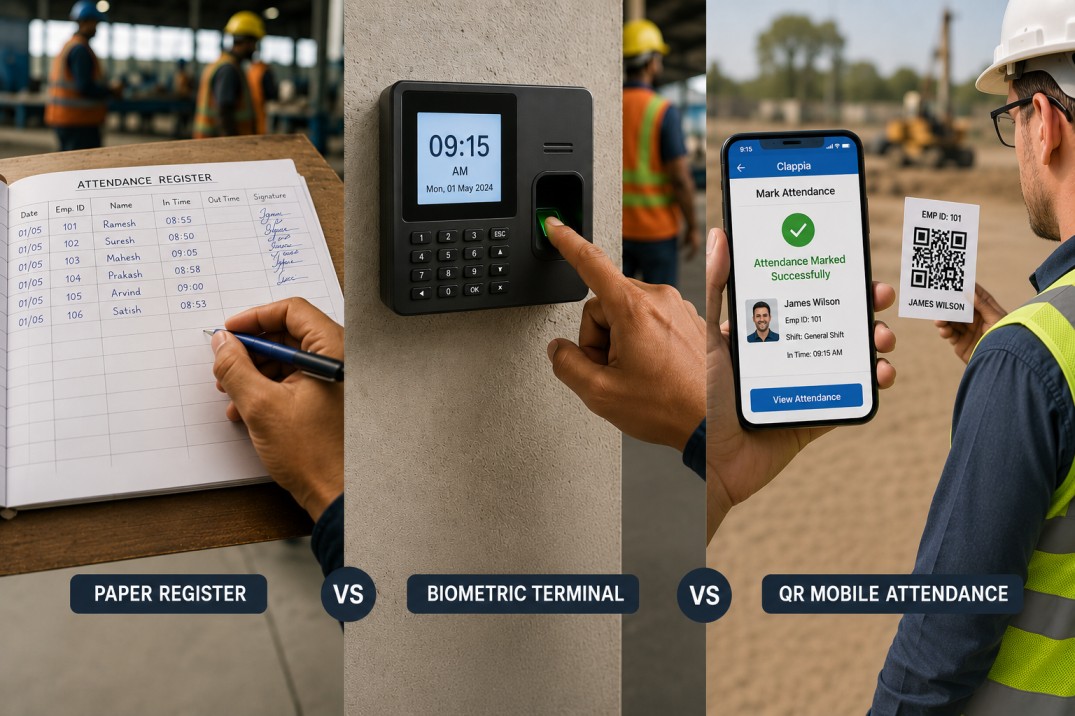
As organizations transition away from spreadsheets and paper-based timesheets, online timesheet software and mobile time tracking apps have become essential tools for managing remote teams, field employees, hourly workers, and project-based work efficiently.
Manual time tracking creates serious operational problems—inaccurate entries, missed hours, payroll disputes, and wasted administrative time. Automated timesheet software ensures consistent and accurate time records while streamlining payroll processing and project billing. With accurate timesheets, businesses save money, improve employee satisfaction, and maintain compliance with labor laws.
The right timesheet management system provides features like clock in clock out tracking, automated timesheet approvals, GPS location verification, project time allocation, expense tracking, and seamless payroll integration. These capabilities transform how businesses track employee hours and manage their workforce.
Timesheet software follows a structured workflow that mirrors real business operations while automating tedious manual processes.
Employees log time using multiple flexible methods including manual daily or weekly entries, automated clock in clock out timers, mobile timesheet apps for field work, and project or task-based time allocation. This flexibility supports office staff, remote teams, freelancers, consultants, and field workers who need different ways to record their working hours.
Modern timesheet apps allow employees to track time from anywhere using web browsers, mobile devices, tablets, or desktop applications. Some systems offer advanced features like automatic time capture, idle time detection, and background tracking that eliminates the need to manually start timers.
Submitted timesheets go through manager approval workflows ensuring accuracy of reported hours, compliance with company policies, validation of overtime hours, and verification of billable time. Multi-level approval systems allow different managers to review time entries for their teams while maintaining audit trails of all changes.
Approval workflows reduce payroll errors by catching mistakes before processing. Managers can quickly identify missing timesheets, unusual time entries, or potential time theft issues through dashboard views and automated alerts.
Once approved, timesheet data automatically converts into payroll-ready reports, project cost analysis, productivity and utilization metrics, billable hours summaries, and compliance and audit records. Real-time dashboards provide instant visibility into labor costs, project budgets, team capacity, and workforce trends.
Advanced timesheet software generates detailed reports showing time spent per project, employee productivity patterns, overtime trends, budget vs actual comparisons, and forecasts for resource planning.
Paper timesheets and spreadsheets often result in incorrect entries, missed hours, calculation errors, and payroll disputes. Automated timesheet software ensures consistent and accurate time records while saving hours of administrative work each week.
Businesses using automated timesheets report saving between 5-7 hours per week on timesheet collection and payroll processing. This time savings translates directly to cost savings and allows staff to focus on higher-value work instead of chasing down missing timesheets.
Employee timesheet software integrates directly with payroll systems, reducing salary miscalculations, overtime errors, and compliance risks. Automated calculations eliminate math mistakes and ensure employees get paid correctly for every hour worked.
Payroll integration means timesheet data flows automatically into your payroll system without manual entry. This reduces payroll processing time from hours to minutes while maintaining accuracy. Systems can automatically calculate different pay rates for overtime, night shifts, weekend work, and holiday pay.
By analyzing how time is spent across tasks and projects, managers can identify inefficiencies, optimize workloads, improve employee performance, and make better resource allocation decisions. Time tracking creates accountability and helps teams focus on high-priority work.
Detailed time reports reveal patterns like which projects consume the most time, which tasks take longer than expected, and where teams may need additional training or support. This visibility enables continuous improvement and better project planning.
Timesheet management systems maintain detailed logs of working hours, approvals, changes, and historical data essential for labor law compliance, wage and hour audits, government reporting requirements, and legal protection. Audit trails show who entered time, when it was approved, and any modifications made.
For industries with strict compliance requirements like government contracting, healthcare, or construction, timesheet software provides DCAA compliance, FLSA adherence, accurate overtime tracking, and secure record retention.
GPS tracking, biometric verification, geofencing, IP address locking, and photo capture features prevent employees from clocking in when they're not actually at work. These security measures eliminate buddy punching where one employee clocks in for another.
Time theft costs businesses 2-5% of gross payroll annually. Timesheet software with location verification ensures employees are at approved job sites when they clock in, protecting your bottom line from fraudulent time entries.
The core feature of any timesheet software is flexible time entry supporting daily, weekly, or monthly timesheets, manual and automated timers, project-based and task-based tracking, and billable versus non-billable hour classification. Employees need intuitive interfaces that make time tracking fast and easy.
One-click timers start and stop automatically, eliminating the need to remember to log time. Calendar views show all time entries at a glance, making it easy to review and edit before submission.
A mobile timesheet app allows employees to log time from anywhere enabling remote teams and field workers to track hours on the go, supporting GPS-based location tracking for verification, and enabling offline time entry with automatic sync when connection returns.
Mobile accessibility is critical for field service businesses, construction companies, delivery services, and any organization with employees working outside the office. The best timesheet apps work on both iOS and Android devices with native mobile experiences.
Timesheet software enables organizations to track time spent per project, task-level effort tracking, client-specific billing hours, and budget vs actual analysis. This project time tracking is essential for consulting firms, agencies, IT services, professional services, and construction businesses that bill clients by the hour.
Detailed project reports show profitability analysis, cost overruns, resource utilization, and help identify which types of projects generate the best margins. This data drives better business decisions about which services to offer and how to price them.
Built-in approval workflows ensure data accuracy and accountability through multi-level approvals, automatic reminders for pending timesheets, notifications when employees forget to clock out, and audit trails of changes and approvals. Approval automation reduces administrative workload significantly.
Workflow rules can route timesheets to different managers based on department, project, or employee type. Approval hierarchies ensure the right people review time entries while maintaining efficient processing.
Timesheet software integrates seamlessly with payroll systems, accounting tools like QuickBooks and Xero, invoicing platforms, and ERP systems. This ensures faster payroll processing, accurate client billing, elimination of duplicate data entry, and real-time financial reporting.
Integration with payroll providers like ADP, Paychex, Gusto, and SurePayroll means timesheet data flows automatically without exports or imports. For professional services firms, integration with invoicing tools converts billable hours directly into client invoices.
GPS features verify employee locations when clocking in and out, create geofences around job sites that trigger automatic clock in reminders, track routes and distances traveled, and provide location history for compliance and verification. Location tracking is essential for field service management and mobile workforce management.
Geofencing creates virtual boundaries around work sites. When employees enter or leave these areas, the system can automatically start or stop time tracking, send reminders, or generate alerts for managers.
Automated overtime calculation based on labor laws, break time tracking for compliance, scheduling integration for shift planning, and alerts when employees approach overtime thresholds help control labor costs and ensure fair compensation. Different overtime rules can apply based on state, contract, or union requirements.
The software tracks regular hours, overtime, double time, and compensatory time automatically. Break tracking ensures compliance with mandatory rest periods and meal breaks required by labor laws.
Real-time analytics transform raw time data into insights including employee utilization reports, project cost and profitability analysis, overtime and compliance reports, attendance patterns and absence tracking, and workforce productivity dashboards. Data-driven insights help businesses optimize operations and control costs.
Customizable reports can be scheduled to run automatically and delivered to stakeholders via email. Export options include Excel, PDF, and CSV formats for further analysis or integration with other systems.
Time off requests and approvals, PTO balance tracking, accrual calculations, attendance patterns analysis, and absence points systems integrate with timesheet data for complete workforce management. Employees can request time off through the same system they use for timesheets.
Automated accrual rules calculate vacation time, sick leave, and other time off balances based on hours worked or tenure. Managers see team calendars showing who's scheduled to be out, making it easier to plan coverage.
Consultants and professional service firms need to track billable hours per client and project, generate detailed invoices based on time worked, analyze project profitability and margins, and forecast resource needs for upcoming projects. Accurate time tracking directly impacts revenue and cash flow.
Construction companies and field service businesses require mobile time tracking for job sites, GPS verification of employee locations, equipment hour tracking, and integration with project management systems. Field workers need to clock in from various locations throughout the day.
Healthcare organizations track staff schedules across multiple locations, manage complex shift patterns, ensure compliance with staffing requirements, and handle different pay rates for on-call and overtime hours. Accurate timesheets are critical for billing and compliance.
Technology companies allocate time to specific projects and clients, track sprint and task completion, analyze team velocity and productivity, and generate project cost reports for budget management. Development teams need to understand where time is actually spent versus estimates.
Manufacturing facilities track production employee hours, monitor shift attendance patterns, calculate productivity metrics, and integrate time data with production planning systems. Accurate attendance tracking ensures adequate staffing for production schedules.
Food service and hospitality businesses manage complex shift schedules, track tips and gratuity, handle variable hourly rates, and manage high employee turnover with easy onboarding. Quick service restaurants need simple time clocks that servers and kitchen staff can use during busy shifts.
Retail companies schedule employees across multiple locations, track hours for commission calculations, monitor peak staffing needs, and prevent time theft through location verification. Store managers need visibility into labor costs relative to sales revenue.
Companies with distributed workforces track time across time zones, provide flexible time tracking options, integrate with collaboration tools, and maintain productivity visibility without micromanagement. Remote workers appreciate timesheet systems that respect their autonomy while providing transparency.
Before evaluating timesheet software, define what you actually need. Are you simply logging hours for payroll? Do you need project time allocation and client billing? Will field employees need GPS tracking and mobile access? Do you require compliance features for government contracts?
Start with your biggest pain points—late timesheets, payroll errors, lack of visibility, manual data entry, or difficulty tracking billable hours. The right solution addresses your specific challenges without overwhelming you with unnecessary features.
The best timesheet software means nothing if employees won't use it. Look for intuitive interfaces that require minimal training, mobile apps that work reliably, quick time entry methods, and clear visibility into submitted vs pending timesheets. Low adoption rates doom any time tracking initiative.
Test the software with a small group before full rollout. Gather honest feedback about pain points and friction. The tool should make employees' lives easier, not add another administrative burden to their day.
Your timesheet software should integrate with your existing payroll system, accounting software, project management tools, and HR platforms. Seamless integrations eliminate double data entry and ensure consistency across systems.
Verify that integrations are native and automatic rather than requiring manual exports and imports. API access enables custom integrations if you have unique systems or workflows.
Choose software that grows with your business. Can it handle more employees as you hire? Does it support multiple locations, departments, or business units? Will it work if your team structure changes or you expand into new services?
Cloud-based timesheet software scales more easily than on-premise solutions. Look for flexible pricing that adjusts as your needs change rather than locking you into fixed contracts.
Employee timesheet data contains sensitive information about wages, work patterns, and locations. Ensure the software provides data encryption, role-based access controls, audit trails and change logs, compliance with labor laws, and regular security audits.
For businesses in regulated industries, verify that the software meets specific requirements like DCAA compliance for government contractors, HIPAA compliance for healthcare, or SOC 2 certification for data security.
Look beyond the monthly subscription price to understand total cost of ownership. Factor in implementation and setup costs, training and support expenses, integration development, ongoing maintenance, and potential for hidden fees.
Free timesheet software works for small teams but often limits features, users, or integrations. Paid plans typically range from $5-15 per user per month depending on capabilities. Calculate potential savings from reduced payroll errors and administrative time to justify the investment.
Reliable support is crucial when you're managing payroll and time tracking for your entire workforce. Evaluate support options like phone, email, and chat availability, response times and resolution speed, training resources and documentation, and account management for enterprise customers.
Read customer reviews focusing on support experiences. Poor support can make even the best software unusable when you encounter issues during critical periods like payroll processing.
While commercial timesheet software offers ready-made solutions, building a custom employee time tracking system with Clappia provides unlimited flexibility to match your exact business processes without unnecessary complexity or features you'll never use.
Clappia's no-code platform enables you to create a fully customized timesheet and attendance management system in days, not months. You get complete control over data fields, approval workflows, calculations, reports, and integrations while maintaining the simplicity your employees need for daily use.
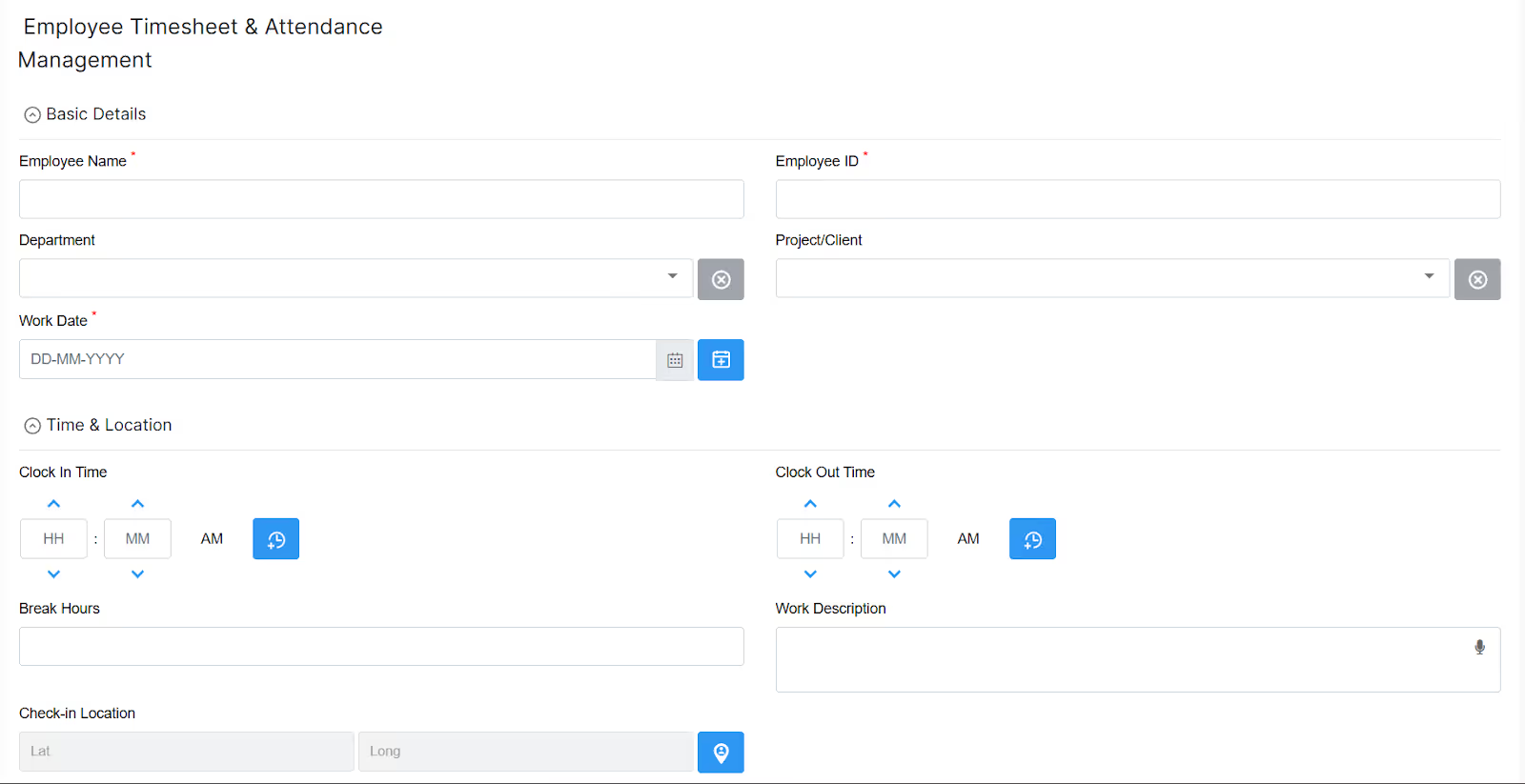
Start by creating a timesheet entry form in Clappia's app designer. Use the Date Selector and Time Selector blocks to capture work date and hours. Add Single Line Text fields for employee name and ID, Drop Down selectors for project or client selection, Number Input blocks for hour quantities, and Multi-Line Text for work descriptions.
The GPS Location block automatically captures where employees clock in, perfect for field service verification and attendance tracking. The Camera Only Upload block enables selfie verification to prevent buddy punching.
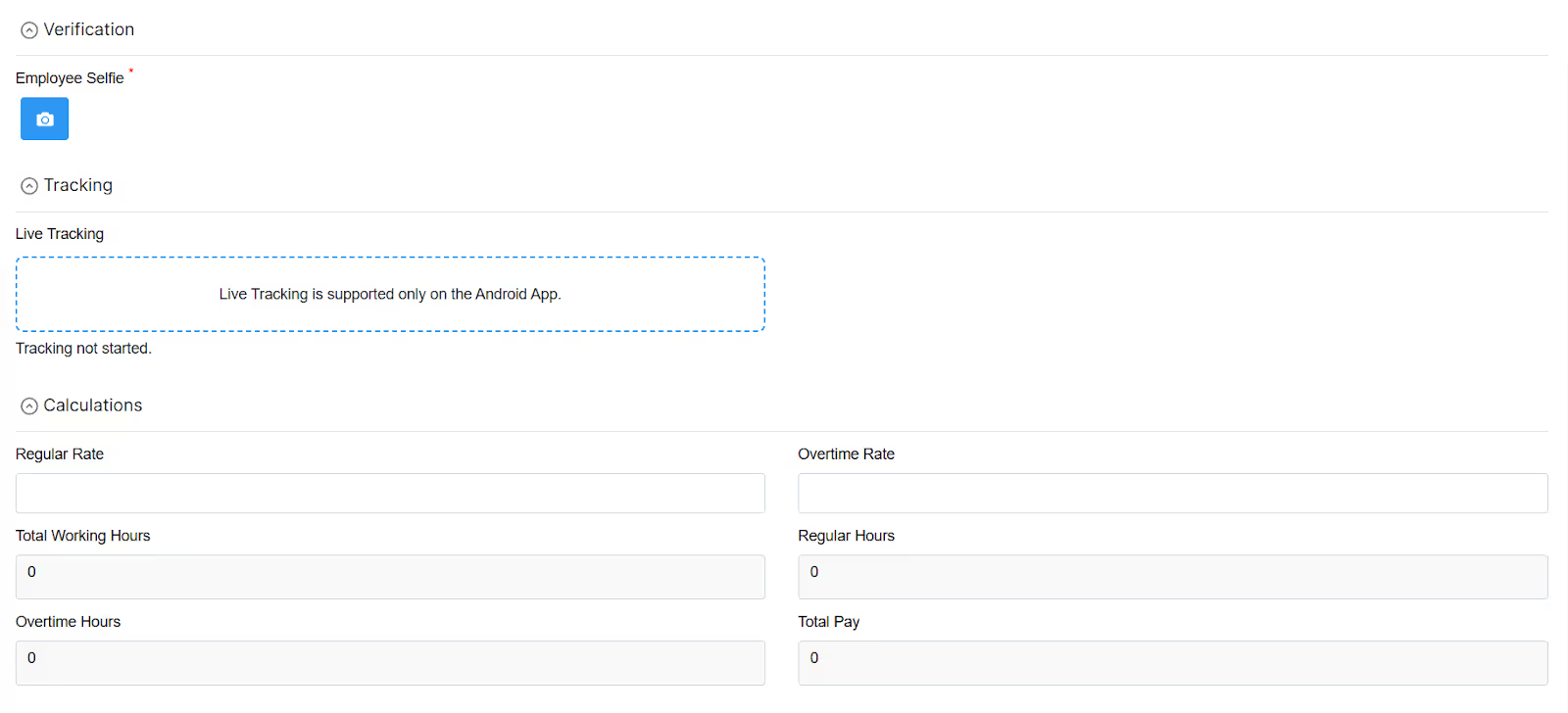
For businesses needing advanced location features, the Live Tracking block provides real-time route tracking and distance calculation for field employees and delivery drivers.
Use Clappia's Formula Block to automatically calculate total hours worked, overtime hours based on your rules, total pay amounts, and billable versus non-billable time. Excel-like formulas handle complex calculations without any coding.
The formula block can calculate different pay rates for regular hours, overtime, weekend shifts, and holiday pay. It automatically updates calculations as employees enter time data, eliminating manual math errors and speeding up the entire process.
Create multi-level approval workflows where timesheets route automatically to managers for review and approval. Clappia's workflow system sends email notifications to managers when timesheets are submitted and reminds them about pending approvals.
Workflows can route timesheets based on employee department, project assignment, or custom rules. Set up conditional routing so that timesheets with overtime automatically go to senior managers for additional approval.
Your custom timesheet app works automatically on Clappia's mobile app for iOS and Android. Employees can clock in and out from their phones, even in offline mode when they're in areas without internet connectivity. Data syncs automatically when connection returns.
For businesses wanting branded experiences, create white-labeled mobile apps with your company logo and name published to the App Store and Google Play Store.
Use Clappia's analytics features to create real-time timesheet dashboards showing total hours by employee, project, or date range. Bar graphs visualize hours worked across teams. Data tables provide detailed breakdowns for payroll processing.
Automated reports can be scheduled to run daily, weekly, or monthly and delivered automatically to managers and payroll staff via email.
Connect your custom timesheet app to your payroll system using Clappia's REST API integration. Time data flows automatically from approved timesheets into your payroll platform without manual exports or data entry.
For businesses using Google Sheets for payroll, Clappia syncs timesheet data directly into spreadsheets with real-time updates. Integration with database systems like MySQL, PostgreSQL, or SQL Server enables direct connections to ERP and accounting platforms.
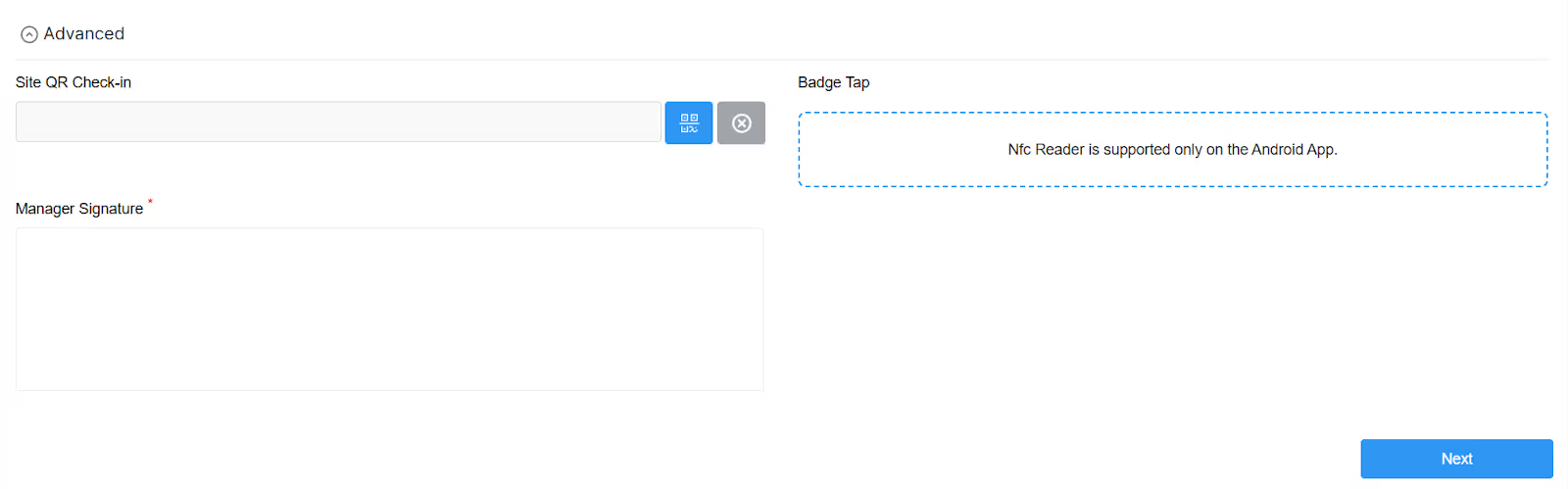
Enhance your timesheet system with powerful capabilities like QR Code Scanner for contactless employee check-in at job sites, NFC Reader for badge-based clock in systems on Android devices, Signature blocks for manager approvals and authorization, and AI-powered data extraction for processing paper timesheets or receipt images.
The Code Block enables advanced custom logic using JavaScript for complex overtime rules, integration with external systems, or sophisticated validation rules that go beyond standard formulas.
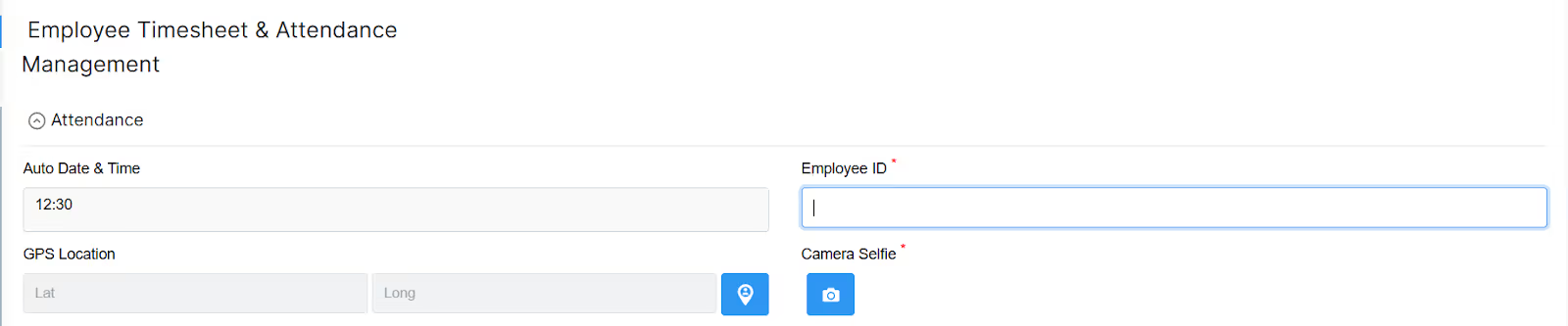
Build comprehensive employee attendance management by adding attendance tracking features to your timesheet app. Employees clock in and out with timestamp capture, GPS verification ensures location accuracy, and absence tracking monitors leave patterns.
Create an employee attendance tracker that connects with your timesheet system for unified workforce management. This integrated approach gives you complete visibility into both attendance and time allocation.
Building your employee timesheet system with Clappia provides several unique advantages over off-the-shelf software. You get exactly the fields, calculations, and workflows your business needs without paying for unused features. Changes and updates happen immediately through Clappia's visual designer without waiting for vendor development cycles or paying for customization.
Your custom system scales from a simple time tracker to a comprehensive workforce management platform as your needs grow. Start with basic time entry and gradually add project tracking, expense management, scheduling, and advanced analytics.
Getting started is free with unlimited apps. Build and test your timesheet system without any upfront investment. Professional plans starting at $5 per user per month include advanced features like white-labeled apps, increased submission limits, and priority support.
One of the biggest frustrations is employees forgetting to submit timesheets on time. Automated reminder notifications via email, SMS, or push notifications solve this problem. Set up daily reminders at specific times and escalating alerts for pending submissions.
Mobile timesheet apps make it easier for employees to enter time throughout the day rather than trying to remember everything at week's end. Quick entry methods and autofill features reduce friction and increase compliance.
Employees estimating hours from memory often leads to inaccurate billing and payroll issues. Real-time time tracking with start/stop timers captures actual work time. GPS and location verification prevents false entries.
Automatic validation rules catch obvious errors like overlapping time entries, impossibly long shifts, or missing break times before timesheets reach approval.
Timesheets sitting in approval queues delay payroll processing and frustrate employees. Automated workflows with escalation rules ensure timesheets don't get stuck. If a manager doesn't approve within a set timeframe, the system escalates to their manager or automatically approves based on rules.
Batch approval interfaces let managers review and approve multiple timesheets at once rather than clicking through each individually.
Clients questioning billable hours or managers disputing project time allocation creates conflict. Detailed time tracking with task descriptions, contemporaneous notes, and audit trails provides documentation to resolve disputes.
Project budgets and burn rate tracking give early warnings when projects are trending over budget, allowing course correction before significant overruns occur.
Meeting labor law requirements and passing audits requires detailed recordkeeping. Timesheet software with built-in compliance features automatically tracks breaks, calculates overtime correctly based on jurisdiction rules, maintains audit trails, and generates compliance reports.
DCAA-compliant timesheet systems meet requirements for government contractors. FLSA compliance features help private sector employers avoid wage and hour violations.
Artificial intelligence is transforming how businesses track and manage employee time. AI-powered timesheet software uses machine learning to suggest time entries based on calendar events and email activity, detect anomalies and potential errors, predict project completion times, and optimize team scheduling.
Natural language processing enables employees to enter time using voice commands or conversational interfaces. Instead of filling out forms, workers simply say "Log 3 hours to Project Alpha client work" and the system understands and records the entry.
Automated timesheet intelligence identifies patterns like employees consistently working overtime, projects requiring more time than budgeted, or peak productivity periods. These insights help managers make better decisions about resource allocation, project scoping, and workload distribution.
Integration between timesheet systems and productivity tools provides automatic time capture. The system tracks time spent in different applications, websites, or documents and suggests time entries based on actual activity. Employees simply review and approve rather than manually reconstructing their day.
As remote and hybrid work becomes permanent, timesheet software will continue evolving to support flexible work arrangements while maintaining visibility and accountability. Location-independent time tracking, global payroll integration, and distributed team coordination will be standard capabilities.
Timesheet software has evolved from basic time clocks to comprehensive workforce management platforms that drive business efficiency, ensure compliance, and provide strategic insights into how teams spend time. The right employee timesheet software eliminates payroll errors, prevents time theft, streamlines approval processes, and gives managers visibility they need to optimize operations.
When selecting timesheet software, focus on your specific needs rather than getting overwhelmed by feature lists. Small businesses might need simple time tracking and payroll integration. Professional services firms require detailed project time allocation and client billing. Field service companies need mobile access and GPS verification. Construction businesses want equipment tracking and job costing.
For organizations wanting complete control and customization, building a custom timesheet system with Clappia provides flexibility that off-the-shelf software cannot match. You can design workflows that perfectly match your business processes, add exactly the features you need, integrate with your existing systems, and modify the system as your needs change—all without writing code.
The transition from manual timesheets to automated time tracking delivers immediate benefits in accuracy, efficiency, and visibility. Employees spend less time on administrative tasks. Managers get real-time insights into labor costs and project status. Payroll staff process payments faster with fewer errors. The entire organization benefits from better data that drives smarter decisions.
Whether you choose commercial timesheet software or build a custom solution, the key is implementing a system that your team will actually use consistently. Focus on ease of use, provide proper training, communicate the benefits clearly, and continuously gather feedback to refine your approach.
Start improving your timesheet and attendance management today. Build your custom employee timesheet system for free with Clappia's no-code platform and see how quickly you can eliminate timesheet headaches while gaining powerful workforce insights.
A timesheet tool is a software application that helps track and record the time spent on tasks or projects. It allows users to log their working hours, categorize time entries, and generate reports. Benefits include accurate time tracking for billing and payroll, increased productivity through task insights, project transparency for monitoring progress, streamlined invoicing and payroll calculations, and valuable data analysis for resource allocation and project profitability. Timesheet tools offer efficient time tracking, project management, and reporting, leading to improved productivity, accurate billing, and informed decision-making.
L374, 1st Floor, 5th Main Rd, Sector 6, HSR Layout, Bengaluru, Karnataka 560102, India
3500 S DuPont Hwy, Dover,
Kent 19901, Delaware, USA


.svg)




3500 S DuPont Hwy, Dover,
Kent 19901, Delaware, USA
L374, 1st Floor, 5th Main Rd, Sector 6, HSR Layout, Bengaluru, Karnataka 560102, India
.webp)



.avif)

.jpg)