Clappia provides a complete alternative to Microsoft Forms that eliminates Zapier dependency entirely with native workflow automation built directly into forms—email notifications, database sync, REST API integrations, approvals, SMS/WhatsApp/Slack. Build forms with automation included, no third-party integration tools needed.
Zapier Community states: "Microsoft Forms doesn't have a Zap app integration." Users asking "How do I link Zapier to Microsoft Forms?" receive: impossible without workarounds. Microsoft Forms appears nowhere in Zapier's 7,000+ app directory. Organizations migrating from Google Forms discover critical automation gaps—Google Forms integrates seamlessly; Microsoft Forms doesn't.
Zapier's workaround: "Save Forms to Excel, use Excel as Zap trigger." This creates failures: Forms don't sync to Excel automatically unless users manually open files—60+ users report this problem. Excel updates occur intermittently, not real-time. Requires Office 365 Business accounts—consumer accounts can't reliably sync.
Users report: "Microsoft Forms Update Broke My Zapier Workflow." New sync requires manual Excel opening, breaking automations. Organizations need Power Automate alongside Zapier—requiring two separate automation platforms to achieve basic form workflows.
Zapier requires technical expertise: understanding triggers/actions, mapping fields, configuring logic, handling data formats, debugging failures. Form changes break Zaps—adding/removing fields requires updating mappings. Microsoft Forms → Excel → Zapier multiplies failure points.
Excel-based triggers aren't real-time. Zapier checks files every 15 minutes (free tier) or 5 minutes (paid tiers). Urgent submissions face delays. No mobile push, SMS, or WhatsApp without additional Zapier integrations requiring separate service setup and configuration for each notification channel.
Clappia provides both native automation for common workflows AND Zapier webhook integration when you need connections to Zapier's 7,000+ app ecosystem—giving you flexibility without forcing dependency on either approach.
Email workflows send automated notifications instantly—no Zapier required for basic email automation. Configure unlimited recipients, dynamic content with form field values, conditional routing, multiple templates, and PDF attachments. Notifications trigger immediately—zero delay for urgent tickets and approvals.
Customize subjects with form data: "New Support Ticket #[ID] - [Priority]" instead of generic subjects. Include complete form details in email body without external links.
Microsoft Forms + Zapier limitation: Requires Microsoft Forms → Excel → Zapier pipeline with sync delays, polling intervals, and Excel file dependency. No instant notifications. Complex setup needed for conditional logic and multi-recipient emails.
Clappia advantage: Built-in email automation for instant notifications. Optional Zapier webhook integration available when you need email marketing platforms like Mailchimp or Campaign Monitor from Zapier's app directory.
Database connectivity syncs submissions directly to MySQL, PostgreSQL, SQL Server—instantly. No Zapier middleware required for these databases. Execute SQL: INSERT records, UPDATE existing, SELECT for validation. Bidirectional sync: pull data into forms, push submissions to databases. Query results trigger conditional workflows.
Microsoft Forms + Zapier limitation: Requires database app connectors with premium integrations, Excel intermediary causing sync delays. Direct database operations require complex Zapier configurations.
Clappia advantage: Native database connectivity for instant sync to major SQL databases. Zapier webhook integration extends connectivity when you need NoSQL databases or specialized data platforms available in Zapier's connector library.

REST API workflows connect forms to any system with APIs—CRM, ERP, payment gateways, ticketing. Make GET/POST/PUT/DELETE requests automatically. Pass form data as parameters. Authenticate via API keys, OAuth, bearer tokens. Connect to systems directly without middleware.
Microsoft Forms + Zapier limitation: Custom API connections require Webhook features or Code by Zapier with technical complexity. Complex workflows consume task limits quickly.
Clappia advantage: Native REST API integration for direct system connections. Zapier webhook integration complements native APIs—use Zapier's pre-built connectors when you prefer visual configuration over API setup, or need apps in Zapier's 7,000+ directory (Salesforce, HubSpot, QuickBooks, Stripe, Shopify).
Google Sheets integration provides bidirectional sync: submissions append instantly, pull data into dropdowns, update existing rows, create new sheets. No Zapier needed for Google Sheets automation. Real-time sync—no polling delays. Use sheets as databases for products, customers, inventory, vendors.
Microsoft Forms + Zapier limitation: Requires task consumption per submission. High-volume forms hit limits quickly. Microsoft Forms → Excel → Zapier → Google Sheets adds unnecessary complexity with multiple sync points.
Clappia advantage: Native Google Sheets integration with real-time sync. Zapier integration available for advanced Google Workspace automations requiring Zapier's additional Google app connectors (Google Docs, Google Calendar, Gmail filters).
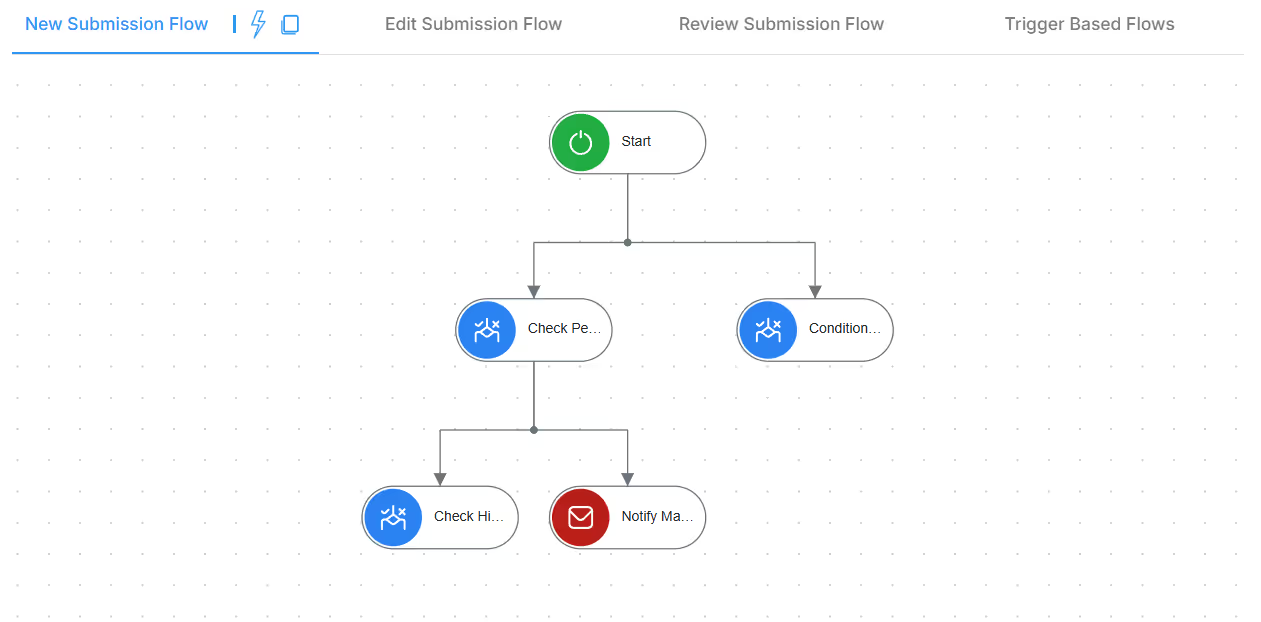
Approval workflows built natively—no Zapier or Power Automate needed. Configure sequential/parallel approvals, conditional routing by amount/category, automatic escalations. Approvers receive emails with buttons, mobile push, deadline reminders. Real-time dashboards track status.
Microsoft Forms + Zapier limitation: Requires Power Automate plus Zapier—two separate automation platforms. Cannot build approval chains through Microsoft Forms + Zapier alone.
Clappia advantage: Native approval workflows without external tools. Zapier webhooks can trigger external approval systems when required for enterprise workflows involving platforms like Jira, ServiceNow, or custom approval tools in Zapier's directory.
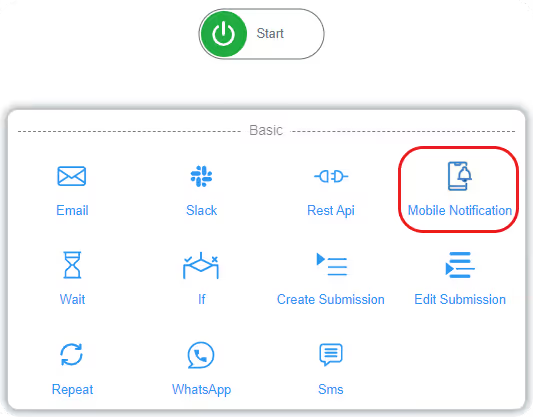
Mobile push, SMS, WhatsApp, Slack all configured within platform—no Zapier required for these notification channels. Conditional workflows route by priority, value, or department. Build complex branching logic with IF/ELSE conditions—visual workflow designer, no coding.
Microsoft Forms + Zapier limitation: Each notification channel requires separate Zapier integrations consuming tasks. Conditional logic requires advanced Zapier features. Free/Starter plans can't implement conditionals.
Clappia advantage: Native multi-channel notifications with built-in conditional logic. Zapier webhook support extends to additional communication platforms in Zapier's directory (Microsoft Teams, Discord, Telegram, Twilio) when needed.
Unlike Microsoft Forms with no Zapier support, Clappia integrates with Zapier through webhooks—providing best of both worlds:
Native automation for common needs: Email, SMS, WhatsApp, database sync, Google Sheets, REST APIs, approvals—all without Zapier dependency or task consumption.
Zapier webhooks for extended connectivity: When you need apps in Zapier's 7,000+ directory (Salesforce, HubSpot, Mailchimp, Trello, Asana, QuickBooks, Shopify, Stripe, etc.), Clappia sends data to Zapier via webhooks. Configure webhook URLs in Clappia workflows triggering Zaps with form data.
Flexibility without forced dependency: Use native automation for instant, reliable workflows. Add Zapier integration when specific app connections require it. You choose the approach—not forced into Zapier for basic automation like Microsoft Forms users attempting workarounds.
Clappia has no "task" concept limiting native automation. Submit 10 or 10,000 forms—native workflows execute without counting tasks or hitting limits. 10-step workflows = single submission, not 10 separate tasks. No usage caps or overage concerns for built-in automation.
When you use Zapier webhooks, standard Zapier task counting applies for Zapier actions—but native Clappia automation (email, database, REST API) doesn't consume Zapier tasks. Hybrid approach: native automation handles high-volume operations (email notifications, database sync), Zapier handles specialty integrations (CRM updates, marketing automation).
Microsoft Forms + Zapier limitation: Every Zapier step consumes tasks toward monthly limits. 10-step workflow × 500 submissions = 5,000 tasks monthly. Task limits constrain automation complexity.
Clappia advantage: Native automation has zero task limits. Optional Zapier integration for extended app connectivity—minimizing Zapier task consumption by using native features where possible.
Healthcare: Appointment forms trigger native email notifications to doctors, update patient database directly via native database sync, send SMS reminders through built-in SMS—no Zapier tasks consumed. When integration with Epic EHR or Salesforce Health Cloud required, Zapier webhook sends data via Zapier connector.
Real Estate: Inquiry forms send mobile push to agents (native), create leads via native REST API, email property details with PDFs (native), post to Slack (native), update Google Sheets (native)—instant automation without Zapier. For Zillow, Trulia, or HubSpot CRM integration, Zapier webhook connects via Zapier's pre-built connectors.
Education: Registration forms check database availability (native), send WhatsApp confirmations (native), email faculty (native), update systems via REST API (native), generate PDF certificates (native), trigger Razorpay payments (native)—complex workflows without Zapier dependency. Zapier webhook adds Eventbrite, Mailchimp, or Canvas LMS integration when needed.
IT Support: Helpdesk forms route by priority with native conditional workflows (high → manager push+email, normal → queue), create tickets via native REST API, SMS on-call technicians (native), log to Google Sheets (native)—replacing Microsoft Forms + Excel + Zapier pipeline. Zapier webhook connects to Jira, ServiceNow, or PagerDuty when enterprise ticket management requires these platforms.
E-commerce: Order forms send native email confirmations, update MySQL inventory (native), trigger native SMS shipping notifications, generate PDF invoices (native), post to Slack (native). Zapier webhook integration syncs orders to Shopify, updates Stripe subscriptions, creates Mailchimp campaigns—leveraging Zapier's e-commerce connectors alongside native automation.
No, Microsoft Forms has no direct Zapier integration. Zapier officially confirms "Microsoft Forms isn't a supported app." The only workaround: save Forms responses to Excel, sync Excel to OneDrive, then trigger Zapier from Excel—introducing sync delays, manual file opening requirements, and frequent failures. Recent Microsoft updates broke automatic Excel syncing; files now require manual opening to sync responses, breaking Zapier automations. Users report workflows failing after Microsoft deprecated old sync methods. Clappia provides native automation without Zapier dependencies—workflows execute instantly upon form submission without Excel intermediaries or sync delays.
Clappia provides complete Microsoft Forms alternative with built-in automation—eliminating Zapier dependency entirely. While Microsoft Forms requires Excel export → OneDrive sync → Zapier polling (with sync delays and manual file opening), Clappia triggers workflows instantly upon form submission. Native integrations include: email notifications with dynamic content and PDFs, database sync (MySQL/PostgreSQL/SQL Server), REST API connections to any external system, Google Sheets bidirectional sync, multi-level approval workflows, multi-channel notifications (mobile push/SMS/WhatsApp/Slack). Organizations replace two separate tools (Microsoft Forms + Zapier) with single platform providing forms and automation together—no task limits, no polling delays, no Excel intermediaries.
No, Microsoft Forms + Zapier cannot create approval workflows alone. Microsoft Forms lacks approval capabilities; Zapier doesn't provide approval features for Microsoft Forms. Organizations must use Microsoft Power Automate for approvals alongside Zapier for other automations—requiring two separate automation platforms with double configuration complexity. Power Automate requires separate learning curve, authentication setup, and maintenance. Clappia includes native multi-level approval workflows with sequential/parallel routing, conditional approvals, email/mobile notifications, real-time dashboards, and automatic escalations—single platform replacing both Zapier and Power Automate.
Zap failures require manual diagnosis and fixing: monitor Zap Task History for errors, identify which step failed and why (field mapping errors, authentication expiration, API rate limits, data format issues), update Zap configuration to fix problems, and test to ensure resolution. Form changes (adding/removing fields, renaming fields) break Zaps requiring field mapping updates. Microsoft Forms → Excel → Zapier pipeline multiplies failure points: Excel sync issues, OneDrive connectivity problems, Zapier authentication expiration—each causes automation breakdowns. Organizations need technical expertise monitoring and maintaining Zapier workflows. Clappia workflows rarely fail due to native integration architecture—no Excel intermediary, no external authentication dependencies, no field mapping fragility.
No, Microsoft Forms + Zapier involves delays: Forms responses sync to Excel (delayed, sometimes requiring manual file opening), Zapier polls Excel every 5-15 minutes (free plan checks every 15 minutes, paid plans every 5 minutes minimum), then workflows execute. Total delay: 5-30+ minutes for "automated" notifications. Urgent scenarios (support tickets, incident reports, approval requests) cannot achieve instant notification through Microsoft Forms + Zapier pipeline. Clappia workflows trigger instantly upon submission—zero delay. Email notifications, SMS alerts, mobile push, database updates, and API calls execute immediately without polling intervals or sync dependencies.
No, Clappia provides native integrations eliminating Zapier need: REST API integration connects to any system with APIs (CRMs, ERPs, payment gateways, custom software), database connectivity syncs with MySQL/PostgreSQL/SQL Server directly, Google Sheets/Drive integration provides bidirectional sync, email/SMS/WhatsApp/Slack notifications built-in, and approval workflows native to platform. For apps without direct integration, Clappia's REST API workflow connects to their APIs directly—no Zapier middleware required. Organizations save Zapier subscription costs ($29.99-$103.50+/month) while achieving more reliable automation through native integrations without task limits, polling delays, or third-party dependencies.
Build forms with native automation included—email workflows, database sync, API integrations, approvals, and multi-channel notifications. No Excel exports, no Zapier subscriptions, no third-party dependencies.
 Get Started – It’s Free
Build Custom Apps With GPS Location Without CodingGet Started - It's free!
L374, 1st Floor, 5th Main Rd, Sector 6, HSR Layout, Bengaluru, Karnataka 560102, India
3500 S DuPont Hwy, Dover,
Kent 19901, Delaware, USA


.svg)




3500 S DuPont Hwy, Dover,
Kent 19901, Delaware, USA
L374, 1st Floor, 5th Main Rd, Sector 6, HSR Layout, Bengaluru, Karnataka 560102, India