If you're searching for ways to connect Microsoft Forms to SMS, you're facing a common business challenge: the need for instant communication when form submissions arrive. Whether you're collecting customer inquiries, appointment bookings, service requests, emergency alerts, or feedback, waiting for email notifications simply doesn't work in today's fast-paced business environment. SMS's immediacy and 98% open rate make it the perfect channel for real-time form notifications.
The problem? Microsoft Forms doesn't natively support SMS integration. This limitation forces businesses to rely on complex workarounds involving multiple platforms, technical configurations, and ongoing maintenance costs that quickly add up.
Most businesses attempt to bridge this gap using automation platforms like Zapier or Microsoft's Power Automate. This typically involves setting up Microsoft Forms for data collection, subscribing to automation platforms with per-task pricing, configuring SMS API access through Twilio or similar services, creating complex workflows with multiple triggers and actions, and constantly maintaining integrations when APIs change or break.
This approach presents several problems: technical complexity requiring IT knowledge, monthly subscription costs for multiple platforms (Microsoft 365 + automation tools + SMS services), unreliable workflows that break without warning, limited customization options for advanced use cases, per-message SMS charges that add up quickly, and time-consuming setup and maintenance that takes resources away from your core business.
Instead of patching together Microsoft Forms with third-party connectors, Clappia offers a comprehensive ai-powered no-code platform designed specifically for businesses that need powerful forms with native SMS integration. Clappia is the simplest ai-powered no-code platform with the power of a low-code platform to effortlessly build custom mobile and web apps for your business processes.

Clappia includes SMS nodes directly in its workflow automation system. Clappia confirms: "Integrate SMS notifications into your workflows, enabling real-time communication and updates of data within your clappia app." No third-party tools required—configure SMS notifications using Clappia's visual workflow editor. Unlike Microsoft Forms where you need Zapier or Power Automate plus Twilio, Clappia handles everything natively.
Build sophisticated forms and workflows without writing code. Clappia's drag-and-drop interface makes it accessible to marketing managers, operations teams, and business users, eliminating dependence on developers. The platform documentation emphasizes that you can "design custom workflows to automate tasks, manage approvals, send notifications or alerts to teams" all through visual configuration.
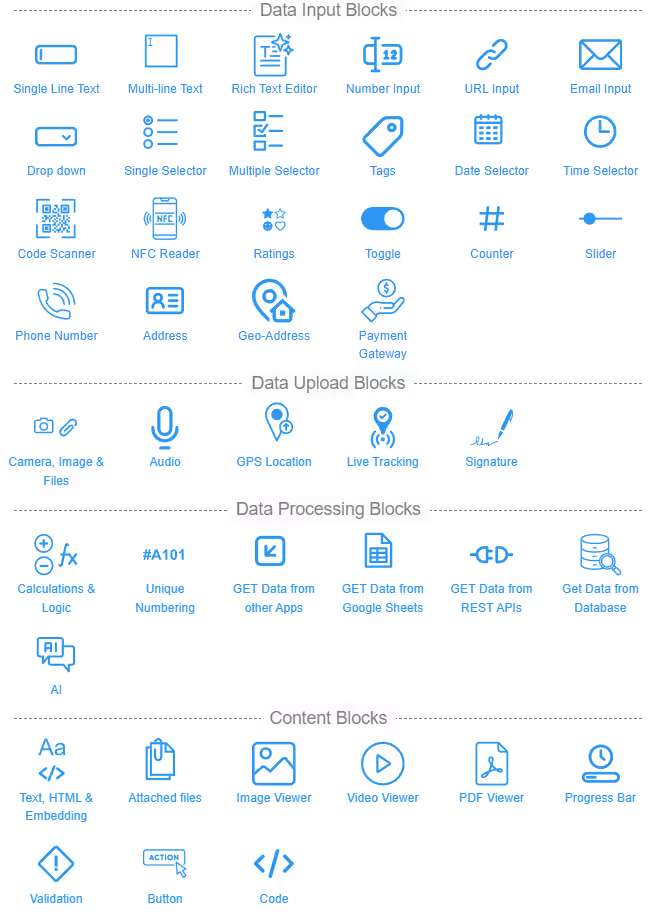
While Microsoft Forms offers basic input fields, Clappia's official features include:
Clappia describes workflows as a way to "define your process flow into your app using workflows." You can set up:
The platform includes dynamic printing capabilities to "merge templates with dynamic form data to generate invoices, reports, letters, and more." Automatically create professional PDFs from form submissions and attach them to SMS messages—perfect for sending appointment confirmations, service receipts, inspection reports, or registration certificates.
According to Clappia's SMS workflow documentation, you can configure SMS workflows with:
Sign up for a free Clappia account and access the intuitive app designer. The platform's documentation explains you can "create and customize your apps with pre-coded blocks" to "capture data as per your needs."
Use the drag-and-drop blocks to add:
For advanced use cases, add specialized blocks like:
The form creation process offers significantly more functionality than Microsoft Forms while remaining just as intuitive. You can build complex multi-page forms with conditional logic that shows or hides sections based on user responses, exactly matching your business process requirements.
Navigate to the Workflows section where Clappia's visual workflow editor awaits. According to the official documentation, workflows allow you to "send SMS notifications to your team members or customers directly from your workflows."
Add an SMS node to your workflow and configure when messages should be sent:
Design your SMS message template using dynamic placeholders from your form fields. For example: "Hello {Name}, your appointment for {ServiceType} is confirmed for {DateTime}. Reference: {SubmissionID}." Clappia automatically populates these placeholders with actual form data when messages are sent.
Set recipient phone numbers—either static numbers for team notifications or dynamic numbers captured from form submissions. This flexibility allows you to send confirmations to customers while simultaneously notifying your team via SMS. The documentation confirms you can configure notifications to facilitate "instant communication and real-time updates."
Important SMS Limits: According to Clappia's billing documentation, there is a limit to SMS usage - 20 SMS per workplace per month for the free and Starter plans, and 100 SMS per workplace per month for the Professional plan. Additional SMS packs can be purchased as add-ons through Workplace Settings.

Clappia's approval node documentation states you can "easily design and automate multi-level approval workflows, track progress, and ensure efficient decision-making within your organization." Set up processes where supervisors review form submissions before SMS confirmations are sent to customers, creating professional, controlled communication flows.
For example, when an employee submits a leave request form, it can be routed to their manager for approval. Once approved, automatic SMS notifications go to both the employee (confirmation) and HR department (for records), streamlining the entire process.
Use IF nodes to create logic where different responses trigger different SMS messages. Premium service selections might trigger messages to sales managers with full details, while standard requests go to customer service teams. Urgent submissions can trigger immediate SMS alerts to on-call staff. The platform's IF Node feature enables "dynamic decision-making with conditional workflow logic."
For businesses with existing systems, Clappia's REST API node confirms you can "integrate external systems effortlessly" and "retrieve or update data from APIs." This means you can:
The official database integration documentation explains you can "connect and interact with external databases in Clappia" including "MySQL, PostgreSQL, and Microsoft SQL Server for real-time data management." Store form submissions directly in your corporate database while triggering SMS notifications simultaneously. This eliminates data silos and ensures all systems stay synchronized.
Clappia's dynamic printing feature, documented as the ability to "merge templates with dynamic form data," enables automatic generation of professional documents. Configure your app's print settings to create branded PDFs with:
These PDFs can be automatically attached to SMS messages as links, providing customers with official documentation instantly. This is perfect for:
Submit test entries to verify SMS messages deliver correctly with accurate dynamic content. The platform's workflow system allows you to test each node independently before deploying to production. Configure fallback options like email notifications if SMS delivery fails, ensuring no submission goes unnoticed.
Monitor performance through Clappia's analytics features, which the documentation describes as tools that let you "visualize your data with customizable bar charts" and "present data visually with dynamic pie charts." Track:
Once satisfied, share your form via direct links, QR codes (which can be generated through the platform), social media embedding, email campaigns, or embedded on websites. Unlike Microsoft Forms where you need separate tools for SMS notifications, Clappia handles everything seamlessly within a single platform.
Medical clinics can build appointment booking forms where patients receive instant SMS confirmations with date, time, location, and doctor details. Automated SMS reminders go out 24 hours before appointments, reducing no-shows by up to 40%. When doctors are running late, mass SMS updates keep patients informed. Emergency form submissions trigger immediate SMS alerts to on-call medical staff.
Clappia's official use case documentation highlights how businesses can build factory inspection apps to enhance safety, monitor equipment, and streamline compliance checks with quality inspection apps to ensure product standards, streamline quality checks, and maintain detailed digital records.
Field technicians complete inspection forms with photos, GPS locations, and observations. Managers receive instant SMS notifications with complete inspection summaries. Critical issues trigger immediate SMS alerts to emergency response teams with exact locations and issue details, transforming field operations from reactive to proactive. Clients receive SMS updates when inspections are completed, improving transparency.
The platform's logistics tracking capabilities demonstrate how to "enable real-time shipment visibility, automated updates, and efficient route management." When drivers update delivery status through mobile forms, customers automatically receive SMS notifications about their shipment progress—out for delivery, delivered successfully, or exceptions requiring attention.
Distribution centers use forms for package sorting and routing, with SMS notifications to drivers about pickup schedules and route assignments. This improves delivery efficiency and customer satisfaction through proactive communication.
When customers submit support request forms, service teams receive instant SMS notifications with request details, priority level, and customer contact information. Customers receive automated SMS acknowledgments with ticket numbers and expected response times. As support tickets progress through resolution stages with dynamic submission status, automated SMS updates keep customers informed, reducing follow-up calls and improving satisfaction.
According to Clappia's field sales tracking documentation, businesses can "enhance real-time monitoring, ensure data accuracy, and provide actionable insights for sales teams and management." When prospects submit inquiry forms, sales representatives receive instant SMS notifications with lead details, contact information, and inquiry specifics, enabling immediate follow-up during the critical first minutes when conversion rates are highest.
Sales managers receive daily SMS summaries of leads generated, meetings scheduled, and deals closed. Mobile sales teams submit activity reports via forms, triggering SMS updates to managers for real-time visibility into field operations.
Event organizers create registration forms where attendees receive instant SMS confirmations with event details, location, and QR code tickets. Automated SMS reminders go out before the event with parking information and entry instructions. During events, organizers can broadcast important announcements via SMS to all registered attendees. Post-event feedback forms trigger SMS thank-you messages with links to photo galleries or recordings.
Organizations implement incident reporting forms for safety concerns, equipment failures, or security issues. High-priority submissions trigger immediate SMS alerts to response teams with incident details and locations. Follow-up forms for incident resolution send SMS notifications to all stakeholders about corrective actions taken. This ensures rapid response to critical situations and comprehensive documentation.
This traditional approach requires multiple subscriptions:
Each form submission counts as a "task" in automation platforms, and costs scale with usage. Monthly expenses can easily exceed $100-$500 depending on submission volume and SMS message count. A business sending 1,000 SMS notifications monthly might spend $200+ just on SMS services, plus automation platform fees.
The complexity doesn't end at setup. When Microsoft updates Forms API or SMS providers change message policies, your integration may break without warning, requiring technical expertise to diagnose and fix issues. You're dependent on multiple vendors, each with their own support channels, pricing changes, and terms of service. Microsoft Forms also lacks advanced features like GPS tracking, electronic signatures, and offline data collection that many businesses need.
Clappia provides everything documented in official help guides within one platform with transparent, predictable pricing:
More importantly, as confirmed throughout Clappia's documentation, the platform "eliminates technical barriers" by providing a fully visual configuration environment where business users can create and modify forms and workflows independently without IT involvement. When you need support, Clappia's team provides responsive assistance documented by customer testimonials praising their "excellent customer service."
Clappia also includes features Microsoft Forms lacks entirely:
For organizations using Google Workspace, Clappia's Google Sheets and Drive integration documentation confirms you can integrate Clappia with Google Sheets for enhanced collaboration and data management and connect Clappia apps with Google Drive for secure document sharing. This means you can keep using Google's ecosystem while adding SMS capabilities that Google Forms lacks.
You can also leverage Get Data from Google Sheets to pull data dynamically into your forms.
If you're currently using Microsoft Forms, Clappia's official documentation provides guidance to easily convert forms into no-code apps with Clappia. The platform includes migration tools to help you transition from Microsoft Forms to Clappia's more capable system while preserving your data and improving functionality. You can also create apps using Excel files.
While this guide focuses on SMS integration, Clappia's comprehensive communication capabilities extend to multiple channels, all configurable within the same workflow:
This multi-channel approach ensures messages reach recipients through their preferred communication method, with automatic fallbacks if one channel fails.
The platform's documentation emphasizes team collaboration features including:
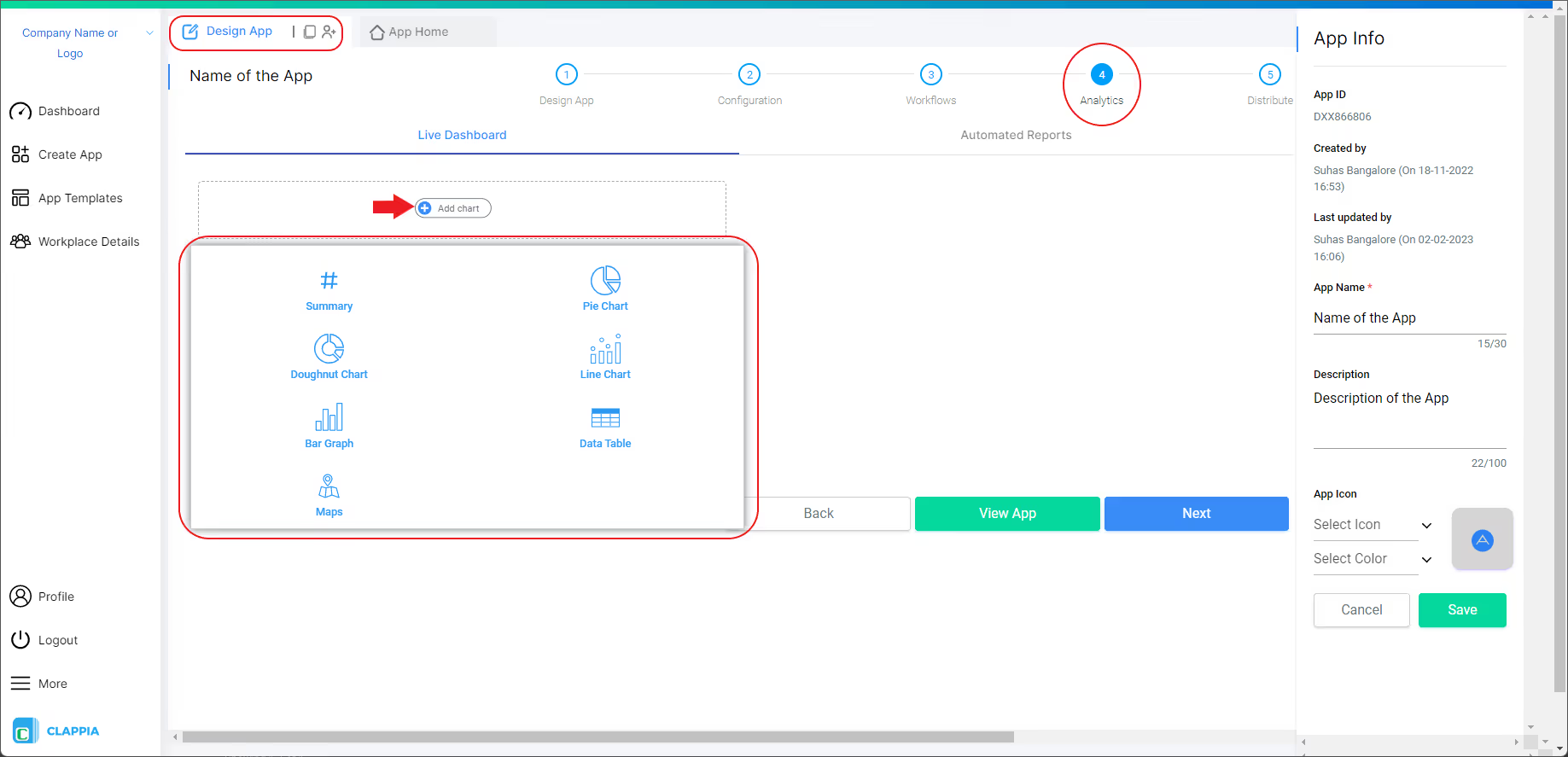
Clappia's analytics capabilities, documented across multiple help guides, enable you to "present data visually" and "easily represent data proportions and distributions for quick understanding and analysis." Access:
Unlike Microsoft Forms which offers limited analytics, Clappia provides comprehensive business intelligence tools without requiring separate analytics platforms.
Clappia's official "How to build an app" guide provides "a step-by-step explanation covering the basic technical aspects required to build an app in Clappia" for "Android, iOS, web platforms." The getting started process is straightforward:
The migration from Microsoft Forms is straightforward:
Many businesses complete this process in hours, not days, thanks to the intuitive interface documented throughout Clappia's help system. You can even create apps using Excel files, making migration from spreadsheet-based processes seamless.
You can also leverage Zapier integration to connect Clappia with thousands of other apps, creating even more powerful automation workflows that extend beyond SMS to encompass your entire business ecosystem.
When you search for "Microsoft Forms to SMS," you're looking for a reliable, documented solution that works consistently without technical headaches. Clappia's extensive official documentation proves the platform delivers on its promises while offering capabilities Microsoft Forms simply cannot match:
The platform serves businesses of all sizes, as evidenced by the diverse use cases in official documentation—from small teams managing appointment bookings to large enterprises coordinating complex field operations across multiple countries. The extensive help documentation, covering everything from basic setup to advanced integrations, demonstrates Clappia's commitment to user success.
Connecting Microsoft Forms to SMS doesn't have to involve complex multi-platform setups, expensive subscriptions, ongoing technical maintenance, and unreliable workflows that break without warning. Clappia reimagines what form builders can do by providing native SMS integration within a comprehensive no-code platform, all backed by extensive official documentation and proven use cases.
Whether you need simple form-to-SMS notifications for appointment confirmations or sophisticated workflows with conditional routing, approval processes, multi-channel communication, and external system integrations, Clappia handles it all from a single, intuitive interface documented in detail across its help system. The platform empowers business users to create powerful automation without depending on developers or IT teams.
Transform your data collection and communication processes today. Sign up for a free Clappia account and experience seamless form-to-SMS integration backed by comprehensive documentation—no complexity, no frustration, no multiple subscriptions, just results.
According to Clappia's official documentation, you can "integrate SMS notifications into your workflows, enabling real-time communication and updates." Simply create your form in Clappia's app designer, add an SMS workflow node, configure your message template with dynamic placeholders, set recipient phone numbers (static or dynamic from form fields), and deploy—no third-party connectors like Zapier or Twilio integration needed unlike Microsoft Forms. The entire setup takes minutes using Clappia's visual workflow editor.
Microsoft Forms doesn't have built-in SMS capabilities. Most businesses use Power Automate or Zapier plus Twilio, but this requires multiple subscriptions and technical setup. Clappia's documentation explains you can send SMS messages natively: create forms with Clappia's drag-and-drop builder, configure SMS workflows with message templates using form data, and set triggers (immediate, scheduled, conditional). Unlike Microsoft Forms + third-party tools, Clappia includes everything in one platform with transparent pricing.
Microsoft Forms cannot send automatic SMS notifications natively. You need Power Automate or Zapier plus an SMS service like Twilio, requiring multiple subscriptions and technical configuration. Clappia's workflow documentation confirms native SMS automation: "design custom workflows to automate tasks, send notifications or alerts to teams" including SMS. Set up automatic SMS when forms are submitted, approved, or based on specific conditions—all visually configured without coding or multiple platforms.
Clappia's SMS workflow documentation provides the complete solution: use the visual app designer to create forms with all needed fields including phone number validation, add SMS nodes to your workflow automation, configure message templates with dynamic content from form submissions, set recipient numbers (customer phone numbers from forms or team notification lists), define triggers (immediate, conditional, scheduled), and test before deploying. The official documentation confirms: "Integrate SMS notifications into your workflows, enabling real-time communication."
Clappia's official documentation demonstrates superiority over Microsoft Forms for SMS integration. Get documented features that Microsoft Forms lacks: native SMS workflows without third-party tools, GPS tracking and location-based forms, electronic signatures for approvals, QR code/barcode scanning, offline data collection with sync, multi-level approval workflows, conditional logic and routing, database and API integrations, professional PDF generation, multi-channel notifications (SMS, WhatsApp, Email, Slack), real-time analytics dashboards—all with native SMS included, as confirmed in the platform's comprehensive help system.
Yes! Clappia offers a free plan documented on their pricing page that includes form building and SMS integration capabilities for testing and small-scale use. The free tier lets you explore the platform's SMS workflow features, create forms with basic blocks, configure automated SMS notifications, and test workflows before upgrading. The free and Starter plans include 20 SMS per month. Unlike Microsoft Forms which requires paid Power Automate and Twilio subscriptions for SMS, Clappia provides native SMS functionality even in free plans, making it ideal for startups and small businesses.
Clappia's workflow documentation explains the process: create your form in the app designer, add an SMS workflow node after form submission, configure the message template using placeholders like "Hello {Name}, thank you for submitting {FormType}. Your reference is {SubmissionID}", set recipient phone numbers (from form field or static team numbers), add conditional logic if needed (send different messages based on form values), and activate the workflow. Form data automatically populates message templates and sends SMS within seconds of submission—all documented in official help guides.
Absolutely. Clappia's official documentation confirms: "Integrate SMS notifications into your workflows, enabling real-time communication and updates." Create confirmation workflows that trigger when forms are submitted, use dynamic placeholders to personalize confirmations with submitted data, send to customer phone numbers captured in forms, optionally attach PDF confirmations as links, and configure multi-channel confirmations (SMS + Email) for important submissions. Perfect for appointment confirmations, registration acknowledgments, booking receipts, and service request confirmations.
Microsoft Forms itself is included with Microsoft 365 ($6-$22/user/month), but SMS requires Power Automate ($15-$100+/month) or Zapier ($20-$300/month) plus Twilio SMS costs ($0.0079+ per message plus monthly fees). Total monthly costs easily exceed $100-$500 for moderate usage. Clappia provides transparent, all-inclusive pricing with SMS capabilities included—free plan for testing (20 SMS/month), Starter plans with 20 SMS/month, Professional plans with 100 SMS/month, and additional SMS packs available (1,000 SMS per pack). Many businesses save 40-60% compared to Microsoft Forms + third-party SMS setup.
Follow Clappia's documented workflow automation process: design your form with required fields in the visual app designer, navigate to the Workflows section, add a workflow trigger (form submission, approval, schedule, condition), insert an SMS node into the workflow, configure the message template with dynamic content placeholders from form fields, set recipient phone numbers (static team numbers or dynamic customer numbers from form), add conditional logic if messages should vary by submission type or values, test the workflow with sample submissions, and deploy. The official documentation states you can "design custom workflows to automate tasks, send notifications or alerts" including SMS automation—all without coding.
 Get Started – It’s Free
Build Custom Apps With GPS Location Without CodingGet Started - It's free!
L374, 1st Floor, 5th Main Rd, Sector 6, HSR Layout, Bengaluru, Karnataka 560102, India
3500 S DuPont Hwy, Dover,
Kent 19901, Delaware, USA


.svg)




3500 S DuPont Hwy, Dover,
Kent 19901, Delaware, USA
L374, 1st Floor, 5th Main Rd, Sector 6, HSR Layout, Bengaluru, Karnataka 560102, India

![How to Send WhatsApp Notifications When Google Form is Submitted [Complete Guide]](https://cdn.prod.website-files.com/6209ea9aee1f965d7fce7c19/6acdcf8aa358827ed2156528_6ab67f47608e8a7378a1d695_google-forms-to-mobile-app.webp)