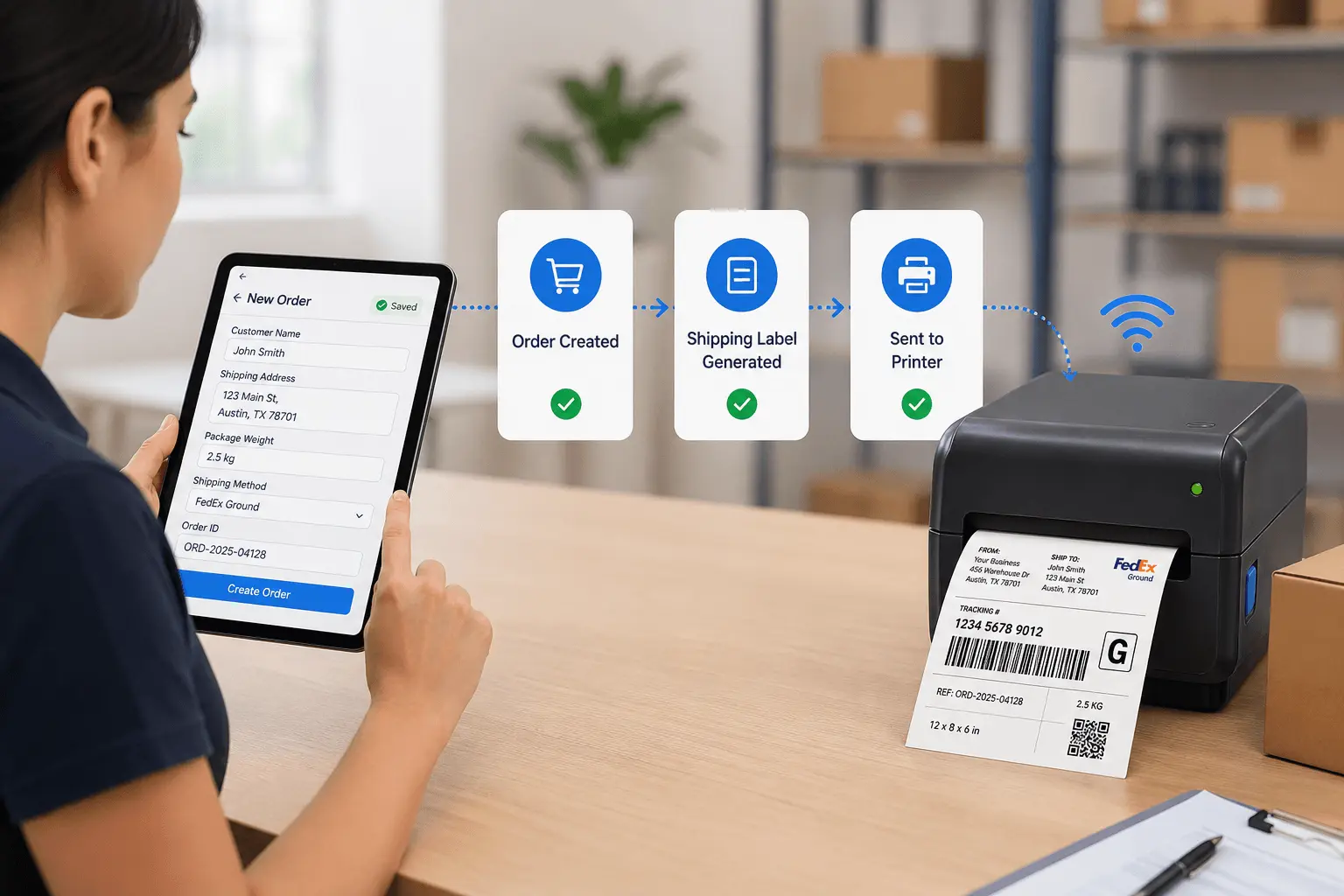
Your order processing team closes a sale and logs shipping details. An hour later, someone opens label software, retypes the customer address, package weight, and tracking number, then prints the shipping label.
That gap between order capture and label printing wastes time and introduces errors that delay shipments.
The disconnect creates three problems: orders sit ready to ship but await labels, address transcription errors cause delivery failures, and manual label creation becomes the bottleneck during peak seasons.
Most fulfillment workflows separate order processing from label printing.
Orders come through your sales channel—e-commerce platform, phone orders, or in-person sales. Someone logs customer details, shipping address, package dimensions, and delivery preferences. That order data lives in your order management system.
But the physical package still needs a shipping label. So someone switches to Bartender, ShipStation, or your carrier's label tool. They retype the destination address, select shipping method, enter package weight, and print. If they transpose a digit in the postal code or select the wrong shipping tier, the package ships incorrectly.
This separation made sense when shipping labels required specialized thermal printers and carrier-specific software. Today it creates operational friction:
Order fulfillment delays. Packages packed and ready to ship sit waiting for labels. During high-volume periods, label creation lags hours behind packing.
Address entry errors. Retyping shipping addresses introduces typos. A wrong digit in a postal code means failed delivery, returns, and customer complaints.
Workflow bottlenecks. When one person handles all label printing, they become the constraint. The warehouse team can pack faster than labels print.
The underlying issue: order data gets captured in your order management workflow, but label generation happens in separate software. Every package requires manual bridging between these systems.
When shipping label printing integrates directly with order processing, labels generate automatically the moment an order is ready to ship.
Here's the workflow:
Your team processes an order and enters customer details, shipping address, package count, dimensions, and carrier preference. The moment that order record saves, a shipping label queues for printing.
The label includes everything the carrier needs: recipient address, return address, barcode or QR code with tracking number, shipping method, package weight, delivery instructions. Because it generates from the order record, there's zero transcription risk.
Step 1: Order processing
Step 2: Label generation
Step 3: Printing and application
Step 4: Tracking activation
Notice the eliminated steps: no one opens separate label software, no address retyping, no manual barcode entry. Labels print as a natural output of order processing.
E-commerce fulfillment center processing 200+ daily orders:
Orders flow from Shopify, WooCommerce, or custom storefront. Each order auto-generates a shipping label the moment warehouse marks it "Ready to Pack." Labels print in batches. Pickers grab next order, apply pre-printed label, scan to confirm, move to shipping dock. No label creation backlog.
B2B wholesale shipments with multiple packages:
Customer orders 15 SKUs shipping in 3 boxes. Order entry creates 3 shipping labels automatically—one per package. Each label shows "Box 1 of 3," "Box 2 of 3," "Box 3 of 3" with linked tracking numbers. Warehouse packs all boxes, applies corresponding labels, scans to confirm complete shipment.
Return processing with pre-printed labels:
Customer requests return. System generates return shipping label with RMA number. Label emails to customer or prints for inclusion in original shipment. When return arrives, warehouse scans label using mobile code scanner, system auto-matches to original order, credit processes automatically.
Custom packaging with variable dimensions:
Orders ship in different box sizes based on items ordered. Workflow calculates optimal box size from order line items. Shipping label includes correct weight and dimensions for carrier rating. Eliminates manual box measurement during packing.
Multi-carrier routing based on destination:
System auto-selects carrier based on destination zone and delivery timeline. Domestic orders route to USPS, commercial addresses use FedEx, international shipments go through DHL. Labels format correctly for chosen carrier without manual template switching.
Most carriers require specific barcode formats on shipping labels. Understanding which to use ensures carrier acceptance.
1D Barcodes (Code128, Interleaved 2of5):
2D QR Codes:
Hybrid approach most common:
When orders process through your workflow platform, the system generates carrier-compliant barcodes automatically. No need to understand barcode specifications—templates handle formatting.
Automated label generation needs accurate addresses and correct postage.
Real-time address validation:
As shipping addresses get entered, the system validates against postal databases. Catches invalid postal codes, missing apartment numbers, or non-existent street addresses before label prints. Reduces undeliverable packages.
Automated shipping rate lookup:
System queries carrier APIs based on destination, package weight, dimensions, and service level. Displays shipping cost before finalizing order. Customer sees accurate shipping charge, no surprises.
Delivery timeline estimation:
Based on carrier, destination zone, and current date, system calculates expected delivery date. "Order by 2pm for next-day delivery" logic built into order forms. Customer expectations set accurately.
International customs integration:
For international shipments, system generates customs forms automatically from order line items. Product descriptions, values, and country of origin pulled from inventory database. Customs documents print with shipping label.
These automated checks happen during order entry—before labels print. Catches errors when they're easy to fix, not after packages ship incorrectly.
| Fulfillment Volume | Manual Label Creation | Automated Label Printing |
|---|---|---|
| 50 orders per day | 2.5-3 hours (3-4 minutes per label) | 15-20 minutes (batch print + application) |
| 100 orders per day | 5-6 hours (dedicated label staff) | 30-40 minutes (automated batching) |
| 500 orders per day | 25-30 hours (3-4 staff members) | 2-3 hours (high-volume batch printing) |
| Peak season (1000+ orders/day) | Requires temporary label staff or delays | Scales with existing team (4-6 hours) |
The savings compound during peak periods. Operations processing 100+ daily orders reclaim 4-5 labor hours by eliminating manual label creation.
Different carriers require different label formats. Integrated printing adapts automatically.
USPS labels:
4x6 thermal format with IMpb barcode (Intelligent Mail barcode). System generates barcode from destination ZIP, return ZIP, and tracking number per USPS specifications.
FedEx labels:
4x6 format with Code128 barcode encoding tracking number. Ground vs Express labels formatted differently—system templates handle variations.
UPS labels:
MaxiCode 2D barcode plus Code128 linear barcode. Both required on UPS labels. System generates both codes simultaneously.
DHL Express international:
4x6 label with barcode, plus separate customs invoice. System generates both documents from same order data.
Regional carriers (OnTrac, LaserShip, etc.):
Each has unique requirements. Custom templates map order data to carrier specs.
When you configure carrier preferences in your order workflow, the system automatically formats labels correctly. Switch carriers? Change the template once, all future labels format properly.
Labels need to print where packages get prepared—not just at office computers.
Warehouse thermal printer setup:
Multiple packing stations:
Each station gets its own thermal printer with unique identifier. Order system routes label print jobs to available stations based on workload. Balances printing across stations automatically.
Network printing for large warehouses:
Printers connect to warehouse network via Ethernet. No local computer required per printer. Order system sends print jobs directly to network printer IPs. IT manages printers centrally.
Cloud printing for remote fulfillment:
Use Printnode for warehouses without local IT infrastructure. Labels queue in cloud, Printnode client on any local computer routes to thermal printer. Works for third-party fulfillment centers.
The key: orders trigger printing regardless of where the order was entered. Remote sales team logs order on laptop, label prints at warehouse automatically.
Returns need labels just like outbound shipments—but the workflow reverses.
Customer-initiated return request:
Customer submits return request through customer portal. System generates RMA number and pre-paid return label. Label emails to customer as PDF attachment. Customer prints, applies to package, ships back.
Pre-included return labels:
For high-return categories (apparel, electronics), include return label in original shipment. Label generation happens during initial fulfillment—system prints outbound label and return label simultaneously. Return label includes RMA number linked to original order.
Return processing at warehouse:
Package arrives with return label. Warehouse scans label barcode using mobile scanner. System pulls up original order, notes reason for return, processes refund or exchange. Return connects to order automatically via RMA number.
Blind returns (no authorization):
Customer ships return without requesting RMA first. Warehouse receives package, scans any visible barcode or QR code from original shipping. System matches to order history, creates return record, processes accordingly.
Return labels work through the same integrated printing system as outbound labels—just different templates and routing.
Operations shipping 100+ orders daily need batch processing, not one label at a time.
Batch printing workflow:
Pick-and-pack optimization:
Labels print in warehouse walking sequence. First label corresponds to first pick location, second label to second location, etc. Reduces picker walking time. Orders fulfill in optimal sequence automatically.
Multi-package order handling:
Order shipping in 3 boxes generates 3 labels in sequence. System flags "Multi-package order" on each label. Picker knows to look for all related boxes before closing order. Prevents partial shipments.
Priority order flagging:
Express or rush orders print with red border or "PRIORITY" stamp. Visual indicator tells warehouse which packages ship first. No manual sorting needed.
Batch printing scales to any volume. 500-label batches take the same setup time as 50 labels—just longer print duration.
Printing the label isn't the final step. Scanning confirms correct package gets correct label.
Verification scan workflow:
This catch layer prevents the most common shipping error: correct label on wrong package. Code scanner integration makes verification instant—scan both codes, get green light or warning.
Carrier pickup scan:
When carrier collects packages, their scan activates tracking. System receives scan notification via carrier API. Order status auto-updates to "In Transit." Customer tracking link activates. No manual status updates needed.
Delivery confirmation:
Carrier delivers package, scans barcode at destination. Delivery confirmation flows back to order system. Status updates to "Delivered" with timestamp and recipient signature if collected. Close the loop automatically.
Traditional label software costs:
Integrated order-to-label approach:
ROI comes from eliminated labor. 50 orders daily = 2.5 hours saved. At $20/hour labor cost, that's $50 saved per day = $1,250 monthly. Platform cost pays for itself in first week.
Step 1: Set up order intake workflow
Create digital form capturing all shipping data needed for labels: customer name, address, phone, email, shipping method, package details. Migrate from paper order forms or spreadsheets to structured digital intake.
Step 2: Configure label templates
Map order fields to label format. Customer name goes to "Ship To" section, business address to "Return" section, auto-generated tracking number to barcode. Create templates per carrier.
Step 3: Connect thermal printer
Install print bridge on computer near packing station. Test label printing from sample order. Verify format matches carrier requirements. Adjust template if needed.
Step 4: Pilot with partial order volume
Process 10-20% of daily orders through new system. Print labels automatically for those orders, continue manual process for remainder. Validate accuracy, timing, and workflow integration.
Step 5: Scale to full volume
Once pilot confirms system works, route all orders through automated label printing. Retire separate label software. Train entire warehouse team on new process.
Transition typically takes 3-5 days from setup to full operation. No extended downtime or parallel systems required.
Shipping labels created manually after order processing introduces delays and errors that your customers experience as slow fulfillment.
When order data automatically generates shipping labels, packages ship the same day orders close. No transcription errors. No label bottlenecks. No peak season chaos from label backlogs.
You don't need to replace thermal printers you already own. You don't need expensive shipping software subscriptions. Your order workflow becomes the label generator.
Start here:
When order processing and label printing happen in the same workflow, fulfillment speed increases while error rates drop.
Get started for free and build your first order-to-label workflow today. No credit card required. Build unlimited apps on the free plan.

L374, 1st Floor, 5th Main Rd, Sector 6, HSR Layout, Bengaluru, Karnataka 560102, India

3500 S DuPont Hwy, Dover,
Kent 19901, Delaware, USA


.svg)


3500 S DuPont Hwy, Dover,
Kent 19901, Delaware, USA
L374, 1st Floor, 5th Main Rd, Sector 6, HSR Layout, Bengaluru, Karnataka 560102, India