

Every business collects data.
Sales teams capture leads.
HR teams collect employee information.
Operations teams perform inspections.
Service teams manage maintenance requests.
Finance teams process expenses.
But collecting data is only the first step.
The real challenge begins after someone clicks Submit.
Someone manually enters the data into Salesforce.
Another employee updates SAP.
Someone else creates a support ticket in ServiceNow.
Finance copies the information into QuickBooks.
Operations update an ERP.
These repetitive tasks consume valuable time, introduce errors, and delay business processes.
Modern businesses need connected forms that automatically communicate with the software they already use.
That's exactly what Clappia enables.
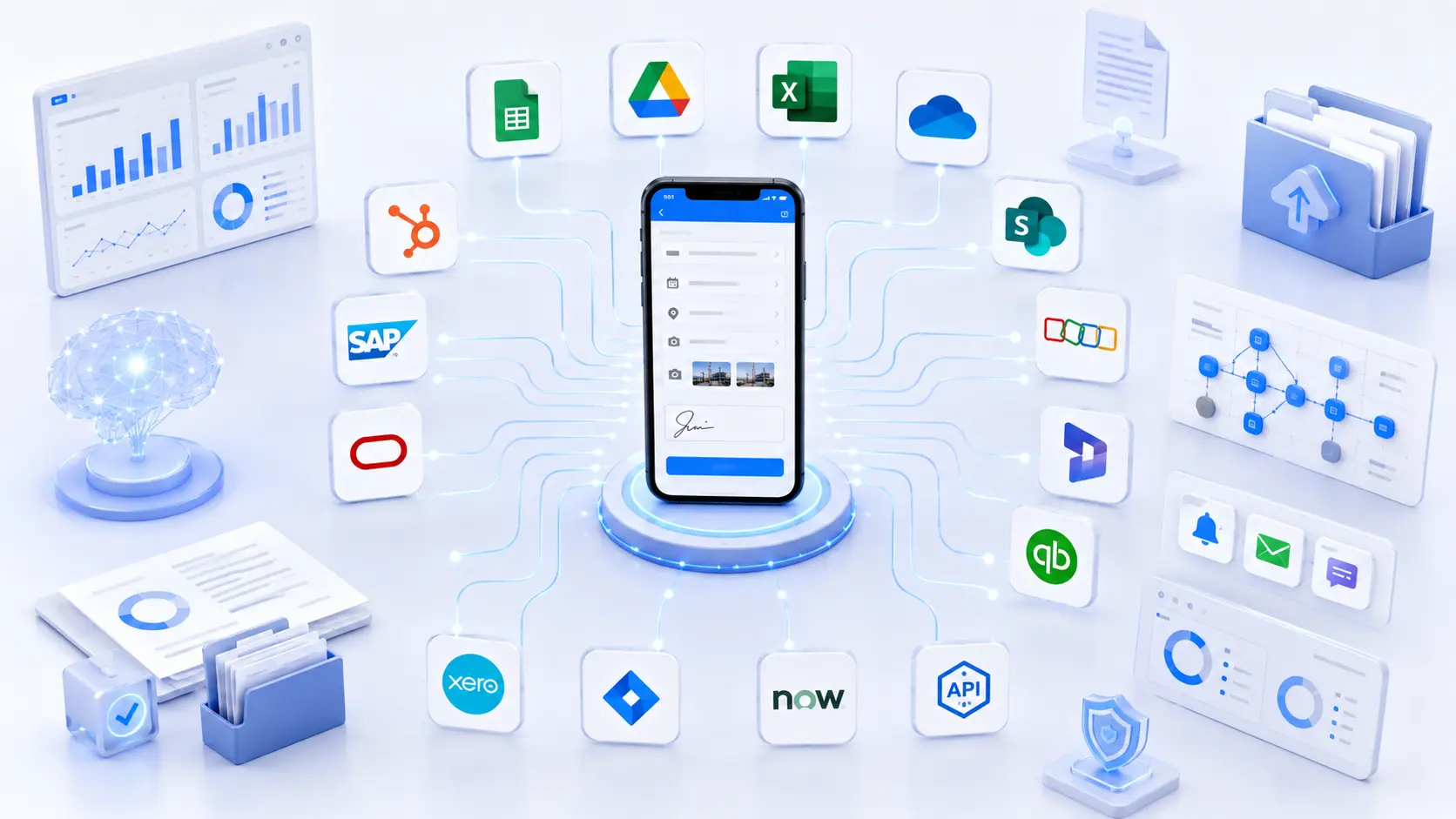
Clappia is more than a no-code form builder. It is a business process automation platform that lets you collect data through mobile or web forms and automatically send it to your existing business software. Whether you're using Google Sheets, Microsoft 365, SharePoint, Salesforce, SAP, Oracle, Zoho, HubSpot, QuickBooks, Jira, ServiceNow, or a custom application, Clappia helps your forms become part of a connected workflow instead of another isolated data collection tool. Clappia supports native integrations with several business platforms and also provides REST APIs for integrating with virtually any external application.
In this guide, you'll learn:
Whether you're replacing paper forms, digitizing inspections, automating approvals, or connecting enterprise systems, Clappia provides the flexibility to integrate with the tools your organization already depends on.
Business data rarely belongs in just one system.
A single inspection might need to update:
If employees have to update every system manually, productivity quickly decreases.
Manual processes often result in:
Connected forms solve these challenges by automatically moving information between systems.
Instead of employees performing repetitive administrative work, software handles it automatically.
The result is:
One of Clappia's biggest advantages is that many common business integrations are available directly within the platform.
Instead of building complex integrations yourself, you can configure them through simple visual settings.
Automatically synchronize form submissions with Google Sheets.
Every new submission appears as a spreadsheet row, making reporting and collaboration easy.
Photos, documents, and generated PDFs can also be organized in Google Drive.
This is ideal for:
Supporting documents are just as important as structured data.
Clappia allows uploaded images, videos, documents, and generated PDF reports to be stored automatically inside Google Drive.
Files can even be organized into dynamic folders based on values like:
This keeps supporting evidence organized alongside operational data.
Many organizations rely on Excel for operational reporting.
Clappia connects directly with Excel workbooks stored in Microsoft 365.
New submissions automatically create rows.
Existing submissions can also be synchronized.
Managers continue using Excel while employees work with mobile-friendly forms instead of spreadsheets.
When forms include supporting files such as:
Clappia can automatically upload those files into OneDrive.
Everything remains organized within your Microsoft ecosystem.
SharePoint Lists remain one of the most common enterprise repositories for operational information.
Clappia extends SharePoint by providing an intuitive mobile interface for field employees while automatically creating or updating SharePoint List items behind the scenes.
Organizations can continue using SharePoint for collaboration, permissions, governance, and reporting without asking frontline workers to interact directly with complex SharePoint forms.
Not every business uses the same software.
Some organizations rely on Salesforce.
Others use SAP.
Some prefer Oracle, Zoho, HubSpot, Dynamics 365, or industry-specific applications.
That's why Clappia includes powerful REST API capabilities.
If your software exposes a REST API, Clappia can communicate with it.
Using the REST API workflow node, your forms can automatically:
This allows Clappia to become the data collection layer while your existing business applications continue managing core business operations. The REST API workflow supports standard HTTP methods, request headers, JSON/XML payloads, authentication, and response mapping, enabling integrations with virtually any modern business application.
Instead of replacing your CRM, ERP, HRMS, accounting software, or ticketing platform, Clappia works alongside them.
Because most modern business platforms provide REST APIs, Clappia can integrate with a wide variety of enterprise systems.
Common examples include:
Automatically create new leads, contacts, opportunities, or service cases whenever someone submits a form.
Push marketing leads directly into HubSpot, trigger nurturing campaigns, or update existing contacts.
Capture operational data from the field and synchronize it with SAP business processes.
Integrate inspections, approvals, procurement requests, and operational data with Oracle applications.
Send customer information, service requests, or employee data into your Zoho environment.
Synchronize customer information, field service updates, inspections, and operational workflows.
Automatically create customer records or send financial information into your accounting workflows.
Streamline invoice generation and financial record management by integrating operational forms with Xero.
Create development tasks, maintenance tickets, or issue reports directly from field submissions.
Automatically generate IT incidents, facility requests, maintenance tickets, or service records without manual entry.
These examples represent only a small portion of what's possible. If your business software provides an API, Clappia can generally integrate with it through its REST API capabilities, allowing organizations to automate workflows without replacing existing systems.
One of the biggest advantages of connecting forms with business software is that every submission can immediately trigger meaningful actions across your organization. Instead of collecting information in one system and manually updating another, Clappia allows your forms to become the starting point of an automated workflow.
Here are a few real-world examples.
A field technician completes a maintenance inspection using a Clappia mobile app.
As soon as the form is submitted:
The technician submits only one form, while every connected business system receives the information it needs automatically.
Your marketing team runs an online campaign with a lead capture form.
When a prospect submits the form:
There is no manual data entry, and response times improve significantly.
Employees inspect equipment using QR codes or barcodes.
Each submission can automatically:
Customers submit support requests through a Clappia form.
Instead of copying the request into a ticketing platform, Clappia can automatically create incidents in systems such as Jira or ServiceNow using REST APIs. Additional workflow actions, such as notifications or approvals, can also run based on the submitted data.
Many organizations already use automation platforms to connect software applications.
While these tools are useful for certain scenarios, they often require separate subscriptions, workflow builders, and additional maintenance.
Clappia takes a different approach.
Instead of collecting data in one platform and automating it somewhere else, Clappia combines:
inside a single platform.
That means you don't have to stitch together multiple products simply to automate a business process.
For example, one Clappia app can include:
All of these capabilities work together without requiring custom development. Clappia provides over 100 pre-built blocks and workflow nodes that let you build complete operational applications without writing code.
Business integrations must be secure.
Clappia supports multiple authentication methods depending on the target system.
These include:
The REST API workflow also supports custom request headers, query parameters, JSON payloads, response mapping, and event-based triggers, allowing organizations to securely exchange information with external applications.
Whether you're integrating with an internal application or a cloud-based platform, you remain in control of authentication credentials and API access.
Traditionally, integrating forms with enterprise software required developers.
Organizations had to:
With Clappia, most of these tasks are configuration-based.
Using the App Designer and Workflow Builder, you can:
Once configured, every submission automatically communicates with your business software.
As your requirements evolve, you can continue extending the same application by adding approvals, dashboards, AI processing, notifications, or additional integrations without rebuilding your workflow.
If the software provides a REST API, Clappia can generally exchange data with it using its REST API workflow capabilities.
Yes, Clappia provides native integrations for:
These integrations can be configured directly without requiring custom code.
Yes.
Many CRM platforms such as Salesforce, HubSpot, Zoho CRM, and Microsoft Dynamics 365 expose REST APIs that can be integrated with Clappia.
Yes.
Organizations commonly integrate Clappia with ERP platforms such as SAP, Oracle, Microsoft Dynamics, and industry-specific ERP applications through REST APIs.
No.
Most integrations can be configured visually through Clappia's App Designer and Workflow Builder.
If you're looking for detailed setup instructions for specific integrations, explore these guides:
Together, these articles form a complete integration knowledge base, helping you choose the best approach depending on the software your organization already uses.
Modern businesses don't need another standalone form builder. They need forms that become part of a connected business process.
Clappia helps you achieve exactly that.
Whether you're synchronizing data with Google Sheets, Microsoft Excel, SharePoint, Salesforce, SAP, Oracle, HubSpot, Jira, ServiceNow, or a custom application, Clappia gives you the flexibility to connect your forms with the software your organization already trusts.
Instead of spending valuable time copying data between systems, your teams can focus on serving customers, completing inspections, managing projects, and improving operations while Clappia handles the data flow automatically.
As your business grows, you can extend the same solution with approvals, AI-powered automation, offline mobile apps, dashboards, notifications, PDF generation, and additional integrations without changing your existing business systems.
Create your first Clappia app, connect it with the business software you already use, and automate your workflows without writing code. Whether you need a native integration or a REST API connection, Clappia provides a scalable, no-code platform for building connected business applications that grow with your organization.
 Get Started – It’s Free
L374, 1st Floor, 5th Main Rd, Sector 6, HSR Layout, Bengaluru, Karnataka 560102, India
3500 S DuPont Hwy, Dover,
Kent 19901, Delaware, USA


.svg)




3500 S DuPont Hwy, Dover,
Kent 19901, Delaware, USA
L374, 1st Floor, 5th Main Rd, Sector 6, HSR Layout, Bengaluru, Karnataka 560102, India


.avif)
.avif)