
Manufacturing and quality control teams in steel production, automotive parts, aerospace components, and heavy machinery fabrication face a critical challenge: validating material test reports against industry standards. Quality engineers spend hours manually comparing chemical composition values, mechanical properties, and heat treatment specifications between supplier certificates and standard specifications.
A single mismatched value in Carbon content or Yield Strength can result in catastrophic product failures, costly recalls, and regulatory non-compliance. Traditional manual validation processes are slow, error-prone, and create bottlenecks in production approval workflows.
Manufacturing quality managers review dozens of Mill Test Certificates (MTCs) daily, cross-referencing chemical element percentages like Carbon, Silicon, Chromium, and Nickel against standard specification documents. They manually verify mechanical properties including Tensile Strength, Yield Strength, Elongation percentage, Reduction of Area, and Hardness values. Each comparison requires technical expertise and carries the risk of human error under time pressure.
For materials with multiple heat batches, quality teams must identify worst-case values across all heats to ensure conservative compliance assessments. This multi-layer validation becomes exponentially more complex with high-volume production.
But automation can transform this process entirely.
With AI-powered document comparison and intelligent data extraction, you can automatically validate steel alloy test reports against standard specifications in seconds. The system reads both documents, extracts all relevant parameters, performs cross-validation, flags discrepancies, and generates compliance reports without human intervention.
In this guide, you'll learn how to build a custom AI application that automatically validates steel alloy material test reports by comparing chemical composition and mechanical properties against standard specification documents. Whether you're managing steel manufacturing quality control, aerospace material certification, automotive parts validation, or heavy equipment fabrication, this solution will eliminate manual verification and ensure 100% specification compliance.
Before we start building, here's what you need:
An AI-powered material test report validation app uses computer vision and natural language processing to automatically compare supplier material certificates against standard specification documents. The system extracts chemical composition values, mechanical properties, and heat treatment details from both documents, performs intelligent comparison, and generates validation reports highlighting any deviations. Key capabilities include:
Manual material certificate validation is time-consuming, error-prone, and creates production delays. Automating this critical quality control process through AI delivers measurable business value:
Benefits of Automating Material Test Report Validation
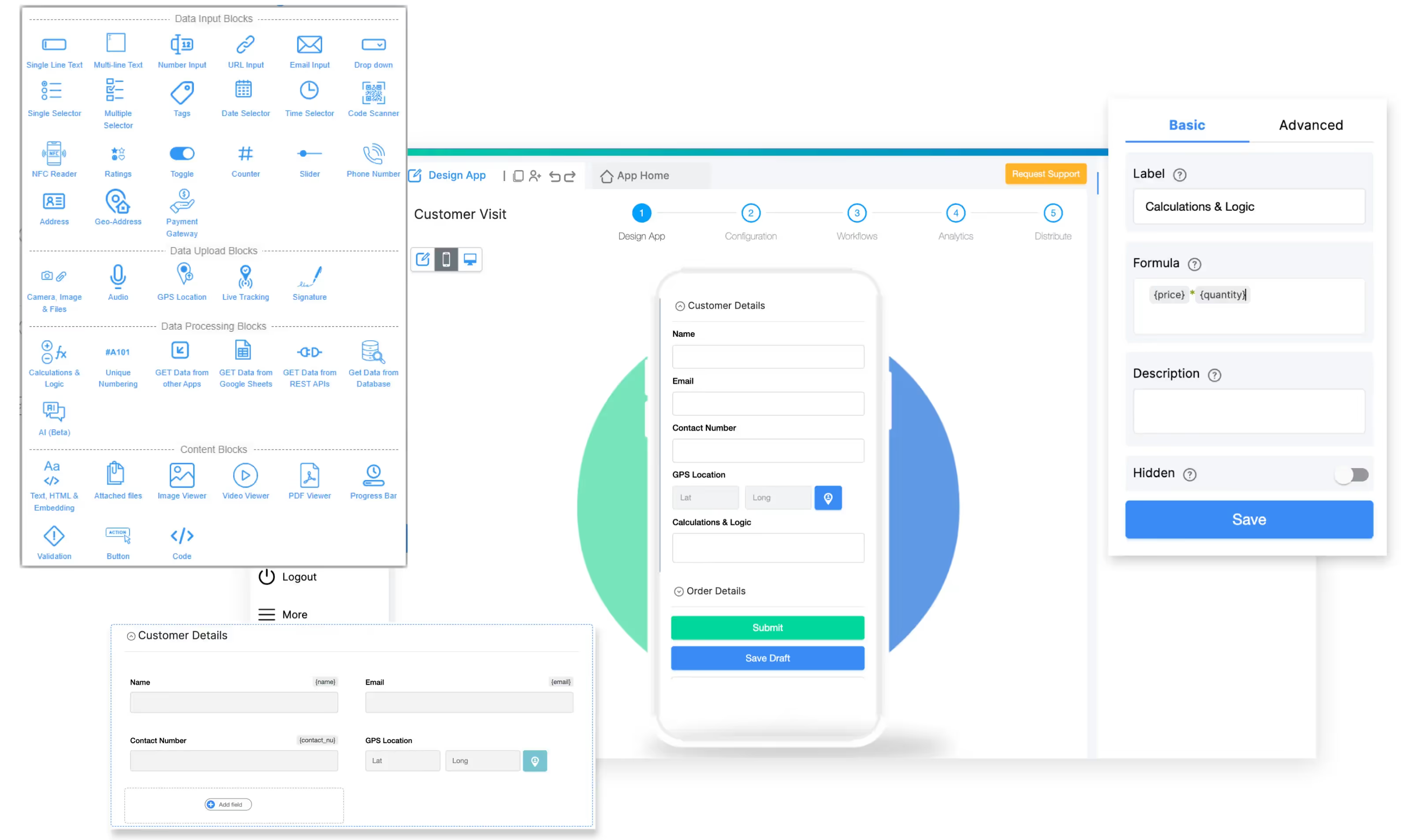
To build this AI-powered material validation app, we'll use Clappia, a no-code platform that enables quality teams to build custom applications without programming knowledge.
With Clappia's AI Workflow Node, you can create apps that automatically process material certificates and perform intelligent document comparison using advanced AI models.
To ensure your app delivers accurate quality control validation, we'll include these essential capabilities:
This streamlined workflow ensures every material certificate is validated against specifications without manual cross-referencing, dramatically reducing approval time while maintaining 100% compliance verification.
Traditional material validation requires quality engineers to manually read both the standard specification and supplier certificate, extract values, compare each parameter, and document findings. Clappia automates this entire sequence using AI. Here's how it works:
Example Validation Scenario:
Standard Specification Document (ASTM A572 Grade 50):
Supplier Quality Document (Mill Test Certificate):
AI Validation Result:
VALIDATION FAILED

Discrepancy Found:
- Manganese (Mn): 1.42% EXCEEDS maximum limit of 1.35%

All Other Parameters: WITHIN SPECIFICATION

Recommendation: REJECT MATERIAL
Action Required: Contact supplier for non-conformance resolution
This automated validation prevents defective material from entering production and provides documented evidence for supplier corrective actions.


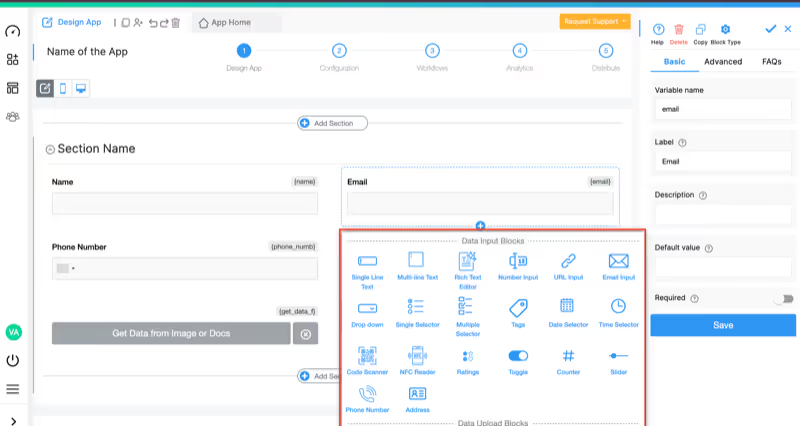
Add these blocks to capture validation information:
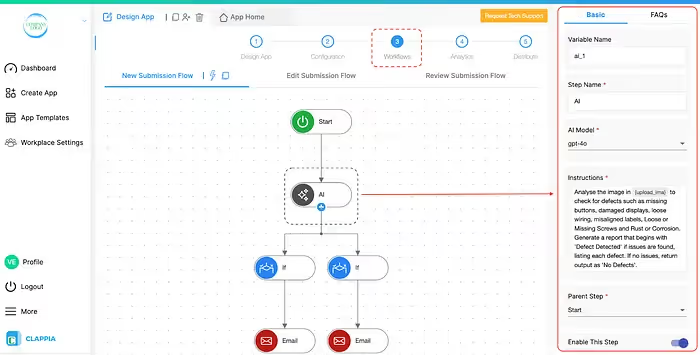
This is where the intelligent document comparison happens. We'll use the AI Workflow Node for automated processing after submission.
Configure AI Workflow Node:
Step Name: AI Material Validation
Select LLM Provider:Choose an AI model capable of document analysis and comparison:
Set the AI Instruction Prompt:
Configure the AI to perform comprehensive material validation with this improved instruction:
You are a quality control specialist validating steel alloy material test reports. Analyze the uploaded documents to compare chemical composition and mechanical properties.

DOCUMENT REFERENCES:
- {standard_doc} = Standard Specification Document (contains acceptable ranges and limits)
- {quality_doc} = Quality Certificate Document (Mill Test Certificate with actual test values)

TASK: Perform comprehensive validation comparing actual values in the quality certificate against specification limits in the standard document.

EXTRACTION REQUIRED:

1. CHEMICAL COMPOSITION (extract from both documents):
   - Carbon (C) %
   - Silicon (Si) %
   - Manganese (Mn) %
   - Phosphorus (P) %
   - Sulfur (S) %
   - Chromium (Cr) %
   - Nickel (Ni) %
   - Molybdenum (Mo) %
   - Copper (Cu) %
   - Any other alloying elements present

2. MECHANICAL PROPERTIES (extract from both documents):
   - Yield Strength (YS) in MPa or ksi with units
   - Tensile Strength (TS) in MPa or ksi with units
   - Elongation (%) with gauge length if specified
   - Reduction of Area (RA) %
   - Hardness (Brinell HB, Rockwell HRC, or Vickers HV) with scale

3. HEAT TREATMENT SPECIFICATIONS:
   - Treatment type (Normalized, Annealed, Quenched & Tempered, etc.)
   - Treatment temperature if specified
   - Cooling method if specified

MULTI-HEAT HANDLING:
If the quality document contains multiple heat numbers with different test values, identify and use the WORST-CASE VALUE for each parameter when comparing against specifications. Document which heat number produced each worst-case value.

COMPARISON LOGIC:
For each parameter:
- Compare actual value from quality document against specification range/limit in standard document
- For "Maximum" limits: Actual must be ≤ Maximum
- For "Minimum" limits: Actual must be ≥ Minimum
- For range specifications: Actual must be within range
- Flag any discrepancies where actual values fall outside acceptable limits

OUTPUT FORMAT:

**VALIDATION RESULT:** [PASS or FAIL]

**MATERIAL SPECIFICATION:** [Material grade from standard document]

**CHEMICAL COMPOSITION COMPARISON:**
[For each element, show: Element Name | Standard Limit | Actual Value | Status (✓ Pass / ✗ Fail)]

**MECHANICAL PROPERTIES COMPARISON:**
[For each property, show: Property Name | Standard Requirement | Actual Value | Status (✓ Pass / ✗ Fail)]

**HEAT TREATMENT:**
Standard: [Required treatment from standard document]
Actual: [Treatment applied per quality document]
Status: [✓ Compliant / ✗ Non-compliant]

**DISCREPANCIES IDENTIFIED:**
[List all parameters that failed validation with specific details]
- [Element/Property Name]: Actual value [X] exceeds/below limit of [Y]
[If no discrepancies: "None - All parameters within specification"]

**MULTI-HEAT ANALYSIS:**
[If applicable: List worst-case values and their heat numbers]

**RECOMMENDATION:** [APPROVE MATERIAL / REJECT MATERIAL - Contact supplier for non-conformance resolution]

Ensure all numeric values are extracted with correct units and compared accurately. Be thorough in checking every parameter present in both documents.
This comprehensive AI prompt ensures the system:
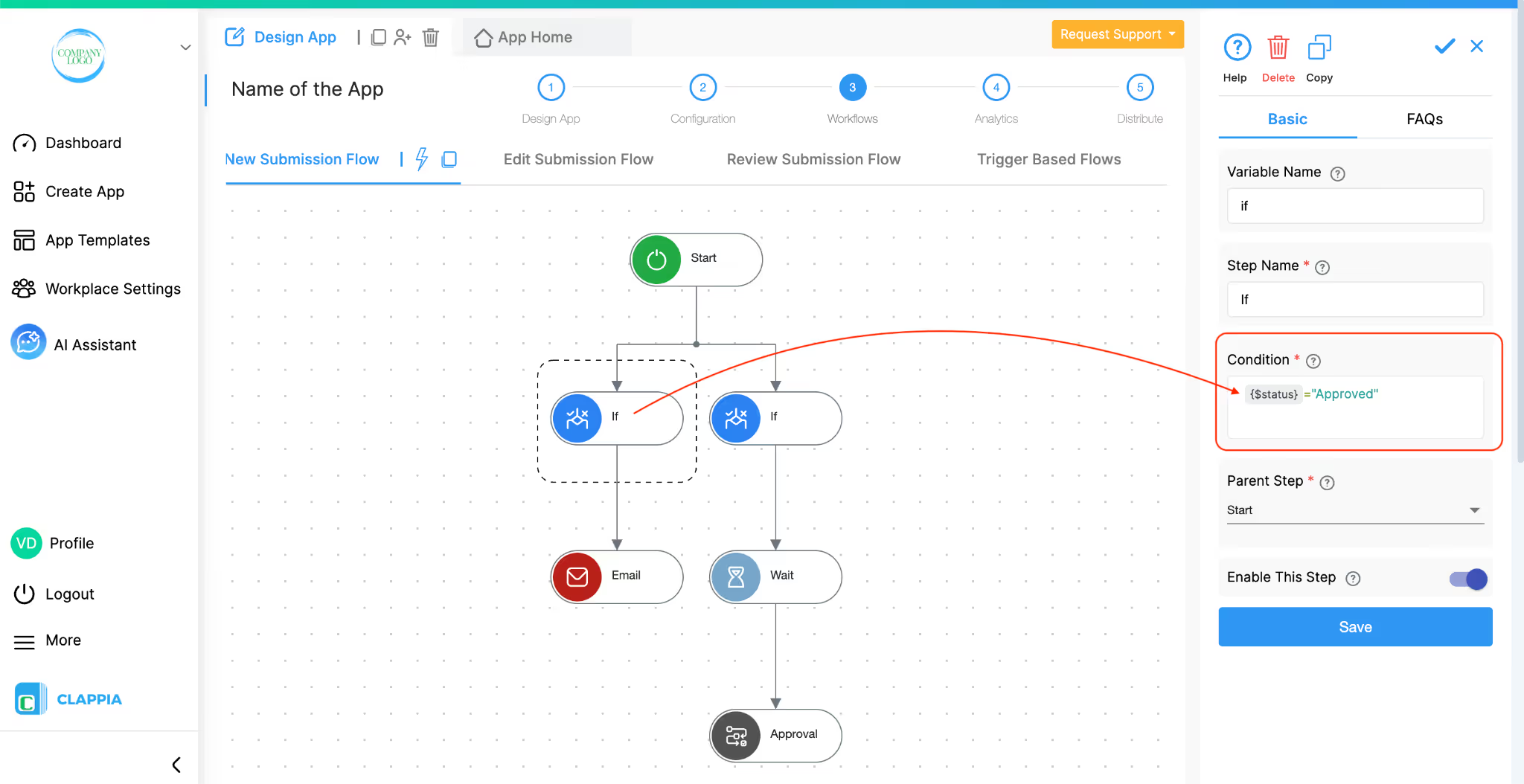
After the AI Workflow Node generates the validation report, add conditional logic to route documents appropriately:
Condition for Material PASS:
CONTAINS({ai_validation}, "VALIDATION RESULT: PASS")
Actions if PASS:
Condition for Material FAIL:
CONTAINS({ai_validation}, "VALIDATION RESULT: FAIL")
Actions if FAIL:

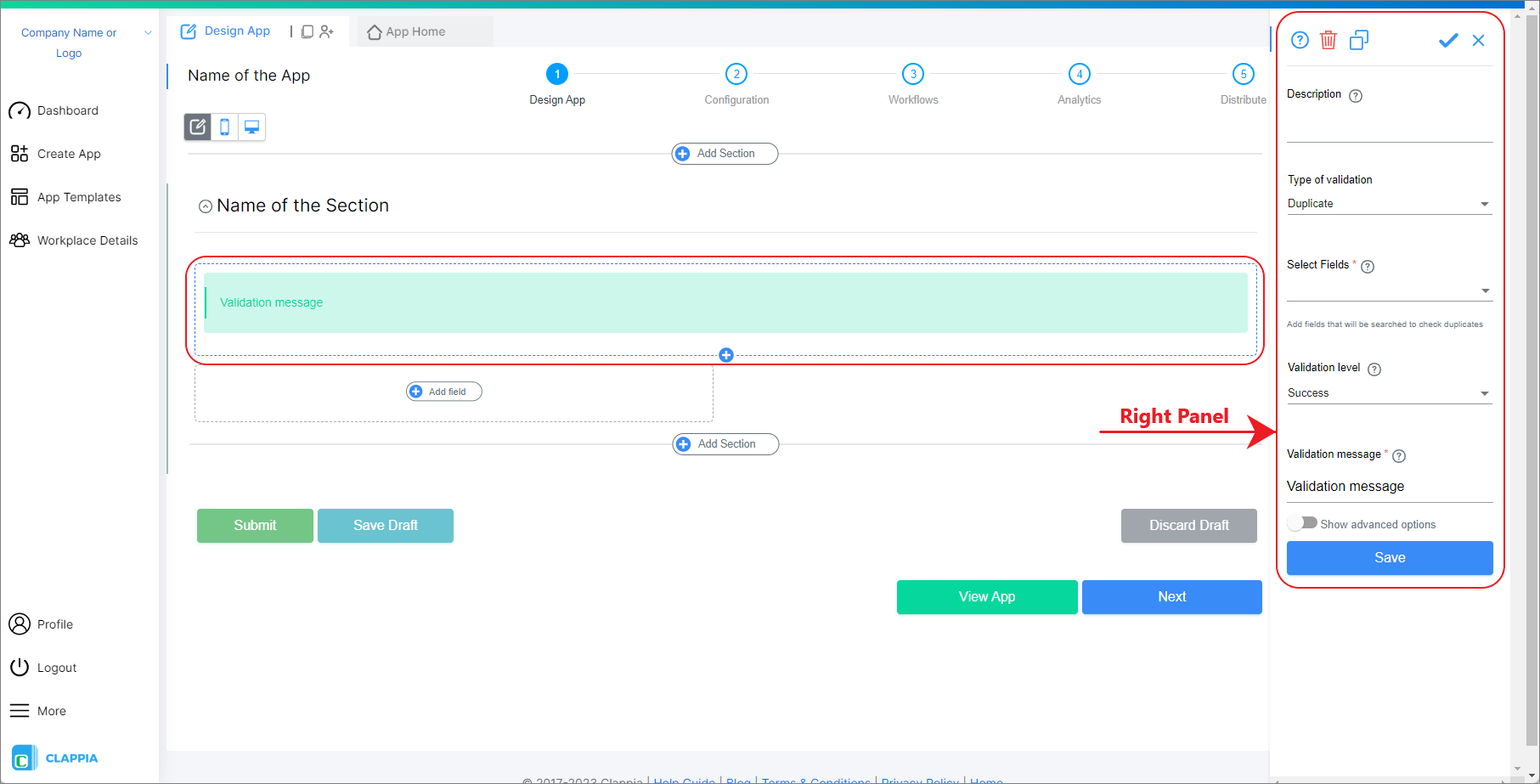
Validation Block Configuration:
Connect your validation app with existing quality and production systems:

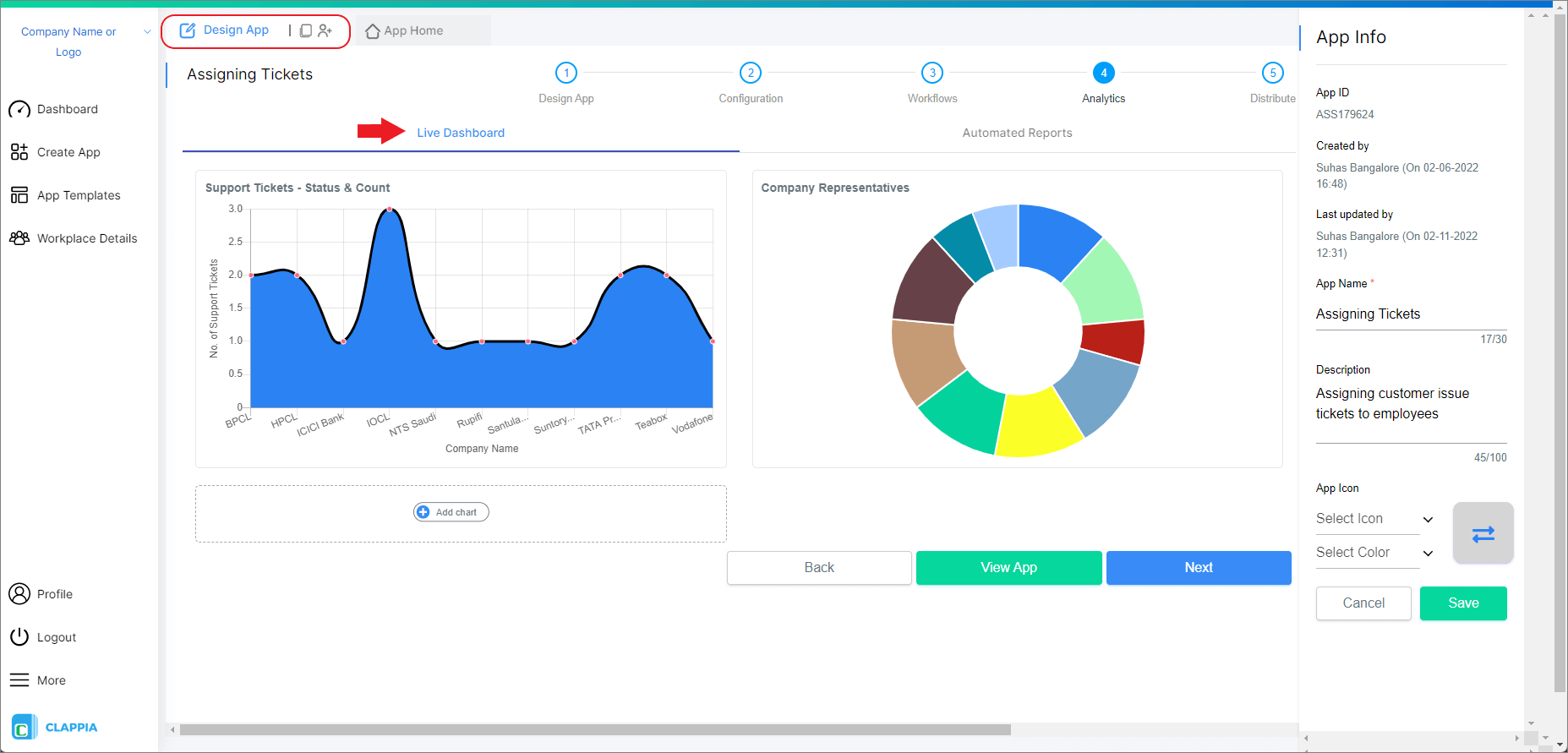
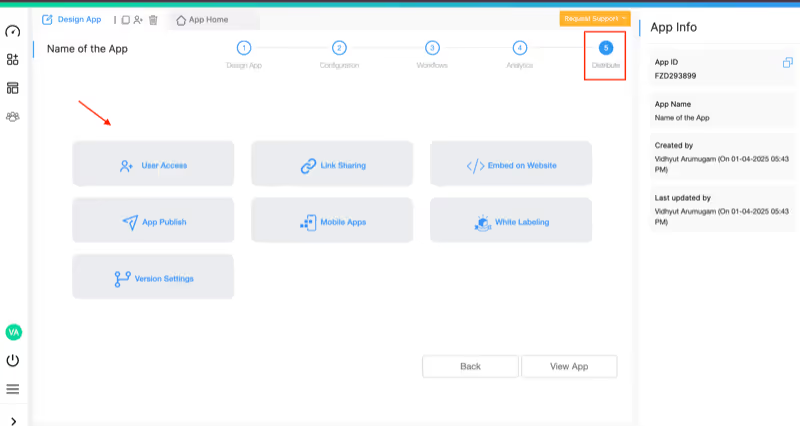
Challenge: Steel mill produces 200+ different grades of structural steel, each with unique chemical and mechanical specifications. Quality team manually validates 50-80 Mill Test Certificates daily against ASTM, EN, and JIS standards. Manual process takes 20-30 minutes per certificate and occasionally misses critical discrepancies.
Solution: Quality inspectors upload standard specification and supplier MTC. AI extracts all parameters, performs comparison, generates validation report in under 2 minutes. System automatically approves conforming materials and flags non-conformances for manager review.
Results: 95% reduction in validation time, zero missed discrepancies, complete digital audit trail, faster material release to production.
Challenge: Aerospace parts require exotic alloys (Inconel, Titanium alloys, high-strength steels) with extremely tight tolerances. Single out-of-spec parameter can cause part failure and safety incidents. Manual validation of complex alloy compositions is time-consuming and high-risk.
Solution: Upload aerospace material specification (AMS, ASTM) and supplier certification. AI validates chemical composition, mechanical properties, and heat treatment specifications. System flags even minor deviations for engineering review.
Results: 100% specification compliance, reduced validation time by 90%, improved traceability for regulatory audits, eliminated material-related quality escapes.
Challenge: Automotive Tier 1 supplier receives sheet metal, forgings, and castings from 30+ suppliers across multiple countries. Quality team validates material certifications in multiple languages and formats. Manual process creates bottlenecks delaying production.
Solution: Standardized digital validation process using AI. System handles certifications in various formats, extracts key data, validates against automotive OEM specifications (VW, Ford, GM standards), and auto-approves conforming materials.
Results: 80% faster material approval cycle, consistent validation across all suppliers, reduced quality escapes, improved supplier performance visibility.
Challenge: Manufacturer of mining equipment and construction machinery uses high-strength structural steels and wear-resistant alloys. Complex multi-heat batches require identifying worst-case values across 5-10 heats per shipment. Manual validation error-prone and slow.
Solution: Upload multi-heat Mill Test Certificate and equipment specification. AI automatically identifies worst-case values for each parameter across all heats, compares against specifications, generates validation report with heat-specific traceability.
Results: Eliminated manual worst-case calculations, 90% faster validation of multi-heat shipments, improved material traceability, reduced risk of using marginal material.
Clappia's AI Workflow Node supports multiple AI models with different strengths for technical document analysis:
Test different models with your actual material certificates to optimize accuracy for your specific document types and specification formats.
Connect your material validation app with manufacturing and quality systems through Clappia's integration options:
Clappia ensures your material certification data and quality records remain secure:
Ready to eliminate manual material test report validation? Here's how to begin with Clappia's free plan:
The best part? Start with Clappia's free plan to build and test your app before scaling. No credit card required, no coding skills needed.
Can the AI handle different Mill Test Certificate formats from various suppliers?
Yes, Clappia's AI Workflow Node is trained to extract data from various document layouts and formats. It recognizes chemical composition tables, mechanical property sections, and heat treatment specifications regardless of certificate design.
What if a certificate contains multiple heat batches with different test values?
The AI is instructed to identify multiple heat batches and automatically calculate worst-case values for each parameter. The validation report will show which heat number produced each worst-case value, ensuring conservative compliance assessment.
How accurate is the AI at extracting chemical composition percentages?
With clear, high-resolution documents (300 DPI or higher), AI extraction accuracy for numeric values typically exceeds 95%. For best results, use PDF certificates or high-quality scans. The system can be trained on your specific certificate formats to improve accuracy.
Can it handle units conversion between MPa and ksi for mechanical properties?
Yes, you can configure the AI prompt to recognize and convert between common units (MPa to ksi, HRC to HB hardness, etc.). Specify unit preferences in your standard specification document for consistent reporting.
Does it work offline for inspectors at material receiving docks?
The app supports offline mode for document upload and data entry. However, AI validation requires internet connectivity to process documents. Submissions sync and process automatically when connection returns.
Can I integrate this with our existing SAP or QMS system?
Yes, use Clappia's REST API integration to push validation results to SAP, Oracle, or any QMS with API capabilities. Most modern quality systems provide API endpoints for external data integration.
How long does it take to validate one material certificate?
AI processing typically completes in 30-60 seconds depending on document complexity and number of parameters. This includes extracting data from both documents, performing comparison, and generating the validation report.
What happens if the AI misses a critical parameter or makes an error?
Quality inspectors review the AI-generated validation report before final approval. Any uncertainties can be flagged for manual verification. The system maintains original uploaded documents for human review. Over time, you can refine AI prompts to improve accuracy for your specific materials.
Can I use my own AI API key to control costs at high validation volumes?
Yes, Clappia allows you to connect your own AI API key from OpenAI, Anthropic Claude, or Google Gemini. This bypasses usage limits and gives you direct control over AI processing costs at enterprise scale.
How do I train my quality team to use this effectively?
Focus on proper document upload: ensure standard specification is uploaded in first field, quality certificate in second field. Documents should be clear, complete, and high-resolution. Most quality inspectors become proficient within 5-10 validations. The system is designed to require minimal training.
Manual material test report validation wastes quality engineering time, introduces human error risk, and creates production bottlenecks. With AI-powered document comparison and automated validation, you can transform material certification from administrative burden to instant quality control checkpoint.
Clappia makes it possible to build enterprise-grade quality control automation applications without coding expertise. The AI Workflow Node handles complex technical document analysis and comparison, while you focus on defining the specifications and validation logic that match your quality requirements.
Whether you're managing steel manufacturing quality control, aerospace material certification, automotive parts validation, or heavy equipment fabrication, this approach delivers faster approvals, eliminates validation errors, and ensures 100% specification compliance.
Start building your AI-powered material test report validation app with Clappia today without coding. Transform your quality control operations in hours, not months.
Related Resources:
Quality Control Resources:
 Get Started – It’s Free
L374, 1st Floor, 5th Main Rd, Sector 6, HSR Layout, Bengaluru, Karnataka 560102, India
3500 S DuPont Hwy, Dover,
Kent 19901, Delaware, USA


.svg)




3500 S DuPont Hwy, Dover,
Kent 19901, Delaware, USA
L374, 1st Floor, 5th Main Rd, Sector 6, HSR Layout, Bengaluru, Karnataka 560102, India