Your receiving clerk scans an incoming shipment into the system. Two hours later, someone opens Bartender, retypes the same SKU, product name, and bin location, and finally prints the label.
That gap costs you time, introduces errors, and slows down operations that should happen instantly.
The core problem? Your inventory data lives in one system. Your label printing happens in another. Every time these two need to talk, a human becomes the bridge.
Walk into most warehouses and you'll see this pattern repeat dozens of times per day.
Items arrive at receiving. The team scans them, enters details using a barcode and QR code scanner on their mobile device. They log SKU number, quantity, lot code, expiration date, storage location. That data now lives in your WMS or inventory tracker.
But those physical items still need labels. So someone switches over to NiceLabel or Bartender, manually types the SKU again, formats the template, prints a test label, then prints the batch. If they transpose a digit or grab the wrong product code, the label won't match what's in the system.
This made sense 15 years ago when barcode printing required specialized software. Today, it creates three specific problems:
Transcription errors multiply. A single typo means a mislabeled item sitting in the wrong bin for weeks. When workers scan that label later using their mobile code scanner, the system shows incorrect data.
Time waste compounds. Those few minutes per label batch add up across hundreds of SKUs monthly. During peak seasons, labeling backlogs delay stock from hitting the floor.
Scalability breaks. High-volume operations can't afford manual label creation for every incoming shipment. When you receive 500 line items, someone has to create 500 labels individually.
The underlying issue isn't your team. It's architectural. Data capture happens in your workflow app. Label generation happens in standalone software. That separation forces manual bridging.
When barcode printing integrates directly with your inventory workflow, labels become an automatic output of data entry - not a separate task.
Here's the receiving scenario with integration:
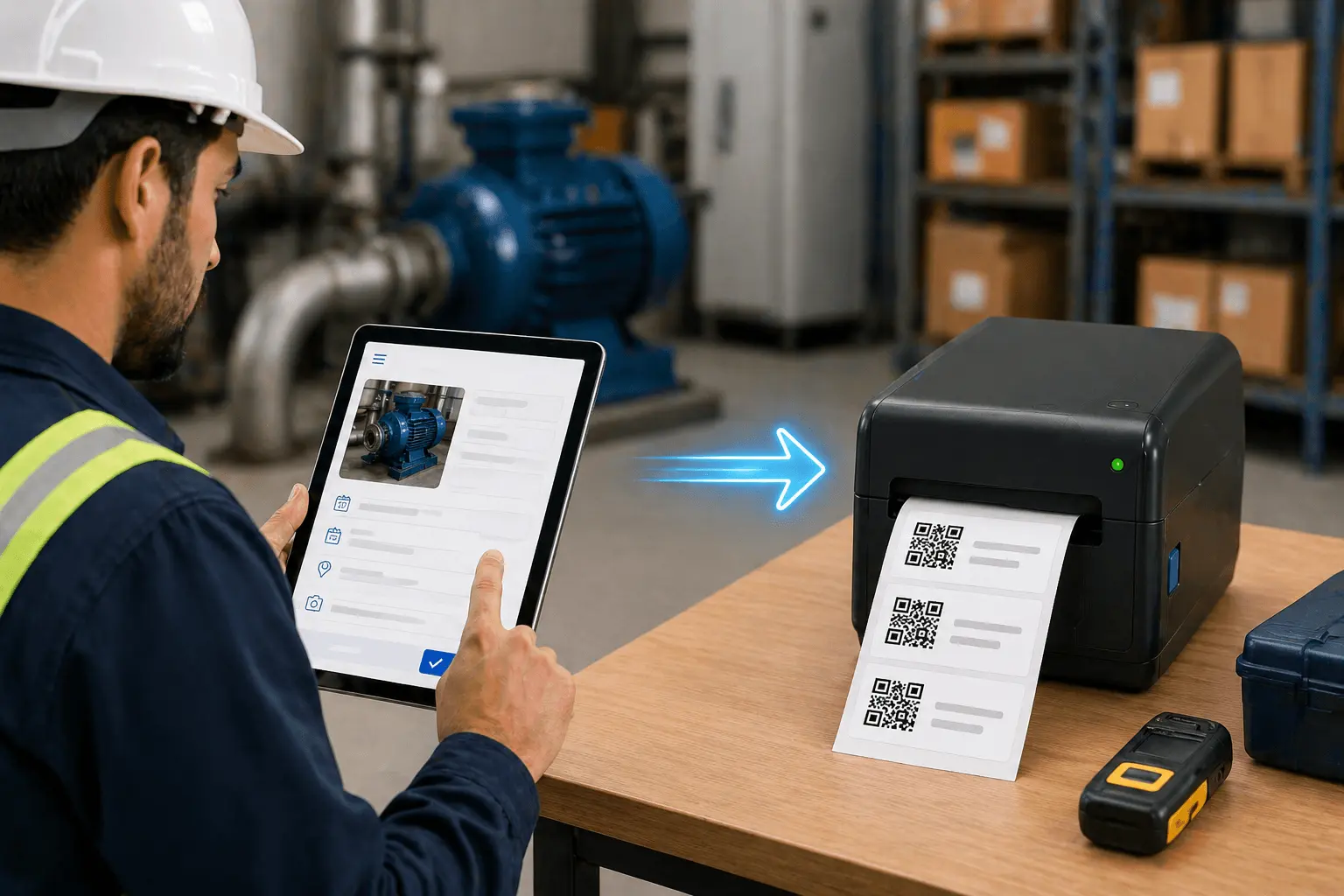
Your team scans the incoming shipment and fills out the receiving form. They enter SKU, product name, quantity, supplier, lot number, bin location. The moment they save that record, a label prints automatically from that exact data.
The label includes everything specified in your template: product barcode, SKU number, bin location QR code, lot number, expiration date. Because it generates from the same record now in your system, there's zero chance of mismatch.
Let's trace how this works across three common scenarios:
Scenario 1: Receiving new inventory
Scenario 2: Bulk bin labeling
Scenario 3: Stock movement tracking
Notice what's missing from all three flows: no one opens separate label software. The labeling step takes seconds because it's triggered by the data entry that's already happening.
Speed improvements show up immediately. Receiving teams label items during check-in, not afterward as a separate batch task. Bin and shelf labels print in bulk without manual formatting.
Stock movements happen in real-time because printing a new label takes one click, not several minutes of template work.
Accuracy improves because labels generate from validated system records. If the SKU in your database is correct, the label will be correct. When someone updates a product name or reassigns a bin location, the next label printed reflects that change automatically.
| Task | Manual Process (Bartender/NiceLabel) | Integrated Workflow |
|---|---|---|
| Label 50 received SKUs | 45-60 minutes (retyping + formatting) | 5-10 minutes (bulk print from submission) |
| Create bin location labels | 2-3 hours (manual entry per location) | 15-20 minutes (bulk select + print) |
| Relabel item after bin change | 3-5 minutes (find item, recreate label) | 30 seconds (update record, reprint) |
| Print shipping labels | 20-30 minutes per batch | 2-3 minutes (auto-generate from order data) |
The difference compounds when you're processing hundreds of items daily. Time your team no longer spends formatting labels gets redirected to higher-value tasks like inventory analysis or process improvements.
Your warehouse can use both formats depending on the use case. Understanding when to use each helps optimize your labeling system.
1D Barcodes (Code128, Code39):
2D QR Codes:
Most warehouses use a hybrid approach. SKU labels use standard barcodes for compatibility with existing scanners. Bin locations, pallets, and items requiring detailed tracking use QR codes. Both formats work seamlessly with Clappia's code scanner block, which supports all major barcode and QR code formats.
A common misconception: integrated printing means buying specific printer hardware.
Not true. If you already have thermal printers—Zebra, TSC, Honeywell, SATO—the integration works with what you have.
The connection happens through a local print bridge. For Zebra printers, that's typically QZ Tray, a lightweight app that runs on the computer connected to your printer. It handles communication between your web workflow and the printer, sending ZPL commands the printer understands.
Using a print management service? Integration works through Printnode's API. Your workflow sends label data to Printnode, which routes it to the correct network printer. This suits distributed warehouses where multiple locations print from the same system.
Network printers are supported. If your printers are accessible via IP address, the system sends print jobs directly without USB dependency.
Different printer language? EPL or CPCL printers use the same setup process. The difference is how print commands format. The bridge translates your label data into the language your specific hardware expects.
Three printing setup options:
You're not locked into one vendor. The workflow integration connects your data to print output, regardless of the hardware handling that output.
Bulk receiving workflow:
200-item shipment arrives. Receiving team unpacks and counts. As each SKU gets entered, its barcode or QR code label prints. Workers peel and stick as they go. By the time the shipment is verified, every item is labeled and ready for putaway. No backlog waiting for someone to batch-create labels later.
Dynamic bin relabeling:
Warehouse layout changes. 30 bin codes get renumbered. Manager updates the location records in the system, selects affected bins, bulk prints new QR code labels. Team walks the floor, removes old labels, applies new ones. System and physical labels stay synchronized.
Temperature-controlled item handling:
Cold storage items require special labels with temperature indicators. When a worker logs an item with the "refrigerated" flag using the mobile app, the system automatically uses the cold-storage label template. No manual template switching needed.
Cycle count accuracy:
Auditor scans shelf label, then scans each item on that shelf using the code scanner. System compares scanned items against expected inventory. Discrepancies flag immediately. If an item is misplaced, auditor prints a corrected label on the spot, moves the item, updates the record.
Seasonal inventory turnover:
Holiday stock arrives with promotional labeling requirements. Marketing provides the template. Template loads into the workflow. Every holiday SKU logged triggers that promotional label format automatically. After the season, switch back to standard labels with one template change.
If you currently use Bartender or NiceLabel, the shift doesn't require ripping out your entire setup.
Start with one workflow where manual retyping causes the most pain. For most warehouses, that's receiving.
Initial pilot phase (few days):
Set up your receiving workflow with integrated barcode and QR code printing for incoming SKUs. Keep using standalone software for everything else. Measure the time difference. Your team will notice how much faster receiving becomes when labels print automatically.
Expand to bin labeling (few days):
Bulk print bin location labels next. Create all location records, print the batch, apply labels. That's one more area where you don't need separate software.
Add stock movement labels (few days):
Workers already scan items and bins during moves. Add automatic label printing for items that get relabeled when changing storage zones.
Complete transition (1-2 weeks):
By this point, most labeling tasks happen through your workflow. The standalone software becomes unnecessary. Every label is now an output of data your team already captures.
Throughout this transition, your thermal printers keep working exactly as before. You're just changing where print commands originate.
Hardware you need:
Software components:
Label material considerations:
Setup timeline depends on complexity. A basic receiving workflow with label printing can go live in one day. More complex setups with custom templates, multiple locations, or specialized formats might take a few days to configure properly.
Once configured, the system runs without ongoing maintenance. Template changes happen in your workflow app, not in separate label software.
Here's what makes integrated barcode and QR code printing powerful: the labels you print are immediately scannable using the same system.
When a worker scans a barcode or QR code label using Clappia's code scanner block, the system instantly retrieves the associated record. No separate scanning software needed. No manual lookup required.
This creates a closed loop:
The code scanner block supports:
Whether you're doing cycle counts, tracking stock movements, or verifying shipments, the scan-to-record connection happens instantly. This eliminates the data sync issues that plague systems where printing and scanning happen in different applications.
Standalone label software made sense when barcode printing required technical expertise. That era ended.
Modern workflow platforms handle barcode generation, QR code creation, label formatting, and print job triggering as standard features. When labeling integrates with your data system, several advantages appear:
Single system to learn. If someone can fill out a form and click print, they can generate labels. No separate training for label software needed.
No licensing complexity. Standalone tools typically charge per seat. If five people create labels, that's five licenses. Integrated printing is just a workflow feature—everyone with form access can print.
Changes happen in one place. Need to add a field to your labels? Update the template in your workflow app. With standalone software, you'd update the label template, then verify data connections still work.
Fewer failure points. When your label tool crashes, printing stops. When it's integrated into your workflow, label printing shares the same uptime as your inventory system.
Real-time data sync. Standalone software requires data exports or API connections to stay current. Integrated printing uses live data from the same database your workflow writes to.
With Clappia's free plan, you can build unlimited apps and print up to 400 labels monthly at no cost. That's enough to test the entire workflow before committing to a paid plan.
Track these metrics before and after implementing integrated label printing:
Operational KPIs:
Financial impact:
Most warehouses see ROI within 60-90 days. The payback comes primarily from reclaimed labor hours and improved accuracy reducing costly mispicks.
Your warehouse doesn't need another piece of software to manage. It needs your existing systems to work together.
When data capture and label printing happen in the same workflow, the manual bottleneck disappears. Barcode and QR code labels become what they should be: an instant, automatic output of inventory data your team already manages.
You don't need new printers. You don't need to redesign your entire warehouse process. You need to close the gap between where data gets entered and where labels get created.
Start here:
When data and labels live in the same place, labeling stops being a separate task. It becomes an automatic step in workflows you're already running.
Get started for free and build your first integrated barcode and QR code printing workflow today. No credit card required.

L374, 1st Floor, 5th Main Rd, Sector 6, HSR Layout, Bengaluru, Karnataka 560102, India

3500 S DuPont Hwy, Dover,
Kent 19901, Delaware, USA


.svg)


3500 S DuPont Hwy, Dover,
Kent 19901, Delaware, USA
L374, 1st Floor, 5th Main Rd, Sector 6, HSR Layout, Bengaluru, Karnataka 560102, India

.jpg)

.avif)
.jpg)