Ask any operations manager who oversees a distributed field team, and they will tell you the same thing: the data problem is not in the field. Technicians know what they observed, what they fixed, and what they left behind. The problem is in the recording. When field documentation runs on spreadsheets shared over email, or gets reported through messaging apps as a string of photos and voice notes, the information that makes it into the system is whatever someone remembered to type up later, in whatever format they chose.
For organisations that manage connected metering infrastructure, including utilities, energy operators, and IoT-enabled asset teams, this is not just an inconvenience. A missed error code, a SIM swap recorded in the wrong row, or a photo that never got linked to its meter record creates compliance gaps, slows dispute resolution, and makes audit preparation a manual scramble every single time.
This article compares what field teams typically deal with when they rely on spreadsheets and chat-based reporting versus what becomes possible when they move to a structured no-code app built in Clappia. The comparison is grounded in a real workflow: a smart meter issue logging and resolution process used by field teams who deal with two categories of issues, infrastructure-side problems and meter hardware problems, and need to document both with photos, GPS, and component-level detail.
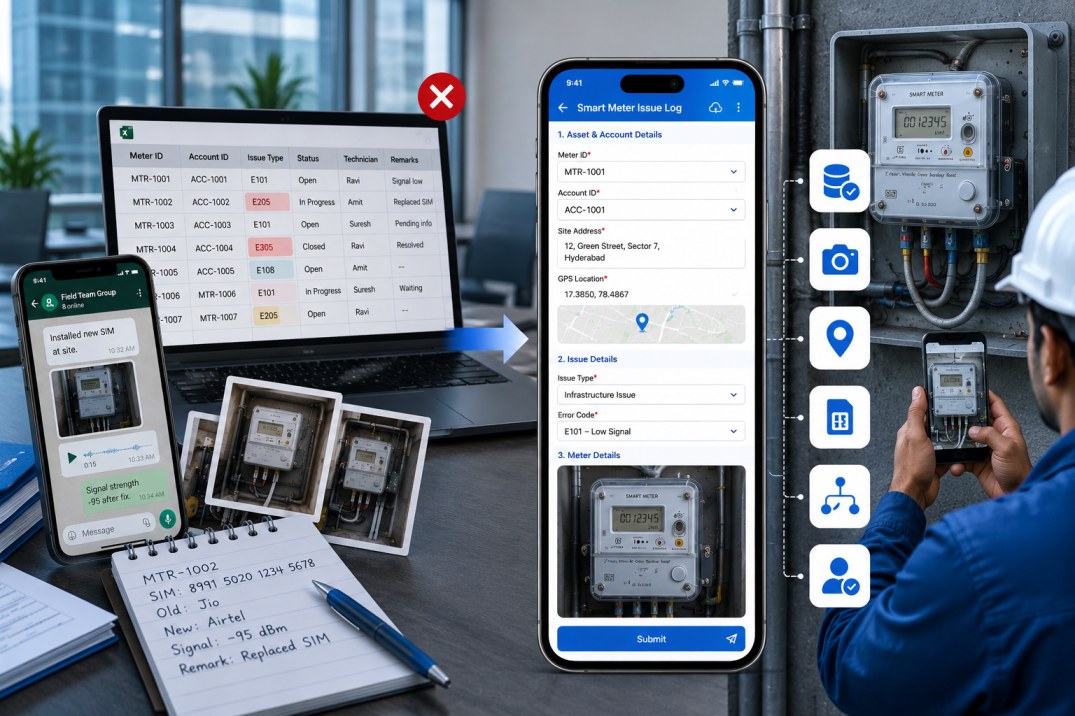
The spreadsheet-and-chat model looks functional on the surface. A shared Excel file tracks open issues. Technicians send photos to a WhatsApp group or email thread. Someone in the back office copies key data from messages into the spreadsheet. A supervisor reviews things when they have time and asks for clarifications via chat. It seems like a workflow. It is not.
Here is what that process actually produces at scale:
Data Entry Errors Accumulate Silently
When a technician manually types a meter ID, a SIM number, or an error code into a spreadsheet, there is no validation. A single transposed digit in a SIM number creates a mismatch that takes hours to untangle later. These errors do not surface immediately: they compound quietly until someone tries to reconcile records and finds that two entries refer to the same physical meter under different IDs, or that a SIM number in the replacement log does not match anything in the inventory.
Photos and Records Exist in Separate Places
A photo sent to a group chat is not attached to a record. It has no timestamp that can be independently verified, no GPS coordinate, and no direct link to the meter or account it relates to. When a supervisor needs to verify that a repair happened at a specific site, they are cross-referencing a spreadsheet row against a photo somewhere in a chat history, hoping the file names match or that someone captioned the image helpfully.
There Is No Standard for What Gets Captured
In the absence of a structured form, different technicians record different things. One technician captures the signal strength reading before and after the fix. Another skips it because the instruction was buried in a message from three weeks ago. One documents the old SIM provider. Another does not, because they assumed someone else would check. Over time, you end up with a dataset that is inconsistent enough to be unreliable for any serious operational analysis.
Approvals Are Informal and Untracked
A supervisor saying OK in a group chat is not a documented approval. There is no record of who reviewed what, when, and based on which evidence. If a dispute arises, or if an audit requires evidence of a sign-off process, the informal chat trail is not a substitute for a structured review record with a named reviewer, a timestamp, and a defined outcome.
The problem with spreadsheets and messaging threads is not that the data does not exist. It is that it exists in the wrong places, in the wrong formats, and without the structure needed to make it trustworthy.
Before getting into the specifics of how to build the app, it helps to see the contrast clearly. The table below maps each operational pain point to what changes when the process moves to a no-code field app built in Clappia.
| Area | Spreadsheets and Chat | No-Code Field App in Clappia |
|---|---|---|
| Data entry | Manual typing; no validation; errors go undetected until reconciliation | Lookups auto-fill known data; dropdowns restrict inputs to valid values; errors are prevented at point of entry |
| Photo evidence | Photos in chat threads; no link to meter or account record; no GPS metadata | Photos uploaded directly inside the form submission; linked to the exact meter, account, and field at the moment of capture |
| GPS verification | Not captured, or shared as a separate pin in a chat | GPS Location block stamps coordinates against the submission; confirms technician was physically present |
| SIM and component data | Typed manually; old and new SIM details in different cells or messages | Lookup blocks validate SIM numbers against a live inventory; provider auto-fills; replacement details in the same submission |
| Branching logic | Separate tabs or separate forms for different issue types; easy to fill in the wrong one | Single form that branches automatically based on issue type selection; irrelevant fields are hidden |
| Before and after records | Two separate rows or sheets; easy to mislink | Before and after fields in the same submission; always connected to the same site visit |
| Approval process | Chat message or email reply; no audit trail | Structured approval workflow with named reviewers, defined outcomes, timestamps, and 7-day expiry |
| Submission status | A colour-coded cell that someone manually updates | System-managed statuses (SUBMITTED, IMAGE VERIFIED, IMAGE NOT VERIFIED) set automatically by the workflow |
| Offline capability | Spreadsheet on a laptop with no connectivity; photos go to phone gallery | Clappia mobile app works fully offline; data queues and syncs when connectivity returns |
| Access control | File shared with everyone; no role-based restrictions | Role-based permissions per user; submit-only, view-only, or full access configured per person |
The single biggest difference between a spreadsheet and a structured field app is not the interface. It is whether the data being entered can be validated against a known source of truth at the moment of entry. In Clappia, this is achieved through reference apps, standalone apps whose submitted records form a searchable database that the field form queries live.
Think of them as your digital master registers. Before any field submission happens, four reference apps need to be populated:
1. Asset and Account Master
This app holds your core account and meter records. Each entry contains the Account ID, Meter ID, Account Holder Name, Site Address, Network Communication Status, the SIM currently installed in the meter, and that SIM's telecom provider. When a technician searches by Account ID in the field app, all six of these values auto-fill instantly. Not one of them needs to be typed, which means not one of them can be mistyped.
Create this app using Single Line Text blocks for each field. Populate it by importing your existing asset data via CSV. Every field submission from that point forward draws its account and meter data from this single validated source.
2. Legacy SIM Reference
This app stores records for SIM cards that were previously installed in meters. Each record holds the SIM Number, the Telecom Provider, and the SIM's IP address. During a repair visit, when a technician searches for the SIM currently in the meter, this reference auto-fills the provider name. In a spreadsheet world, that provider would either be typed from memory or left blank. Here, it populates from a verified record.
3. New SIM Inventory
When a SIM needs to be replaced, the replacement SIM number is looked up against this app before it gets recorded. The app uses a Repeatable Section block to allow up to 3 SIM entries per submission, reflecting how SIMs are typically issued to technicians in small batches. If the replacement SIM number does not appear in this inventory, the lookup returns no result, and the technician is prompted to verify before proceeding. A spreadsheet has no equivalent check.
4. New Meter Inventory
A single-field app holding Meter IDs of replacement units available for deployment. When a meter unit itself is being swapped, the replacement meter ID is validated here before being recorded. This prevents a replacement meter from entering the system as an untracked asset.
In a spreadsheet, a reference is whatever someone typed in a cell. In a Clappia app with reference lookups, a reference is a validated record from a verified data source. That difference determines whether your field data is trustworthy.
With the reference apps in place, the field app becomes a guided diagnostic tool rather than a blank form. Here is how the structure works and why each design decision produces better data than its spreadsheet equivalent.
Operational Zone Selection
The first field is a Dropdown block for the operational zone, region, or circle. In a spreadsheet, zone is a text column that gets filled inconsistently: sometimes it is a code, sometimes a full name, sometimes left blank. A dropdown restricts the input to only the valid values you configure, making zone a reliable filter for every report you run later.
Account Lookup: One Search, Four Fields
A Get Data from App block configured to search the Asset and Account Master by Account ID. When the technician selects a record, the form auto-fills the Meter ID, Account Holder Name, Site Address, and Network Communication Status simultaneously. Four fields that would otherwise be typed manually, with all the associated error risk, are populated from a validated source in a single search action.
If a replacement meter is being deployed, an optional second Get Data from App block validates the new Meter ID against the New Meter Inventory, with an Image Upload block directly after it for a photo of the replacement unit.
Issue Type Branching: One Form for Both Paths
A Dropdown block labelled Issue Type presents two options: Infrastructure or Supply Issue and Meter Hardware Issue. Display Conditions on each section below mean that the form shows only the fields relevant to the selected path. The technician never sees irrelevant fields, and there is no risk of filling in the wrong section because the other one is simply hidden.
A spreadsheet equivalent would be a two-tab workbook where the technician has to navigate to the right tab, which some will do correctly and some will not. A shared form with no branching collects the same fields for every issue type, leading to lots of empty, meaningless cells. The conditional form eliminates both problems.
Infrastructure or Supply Issue Path
When the issue is not with the meter hardware itself, such as a power supply failure, a door lock blocking access, or a meter installed at an unreachable height, this section captures the root cause, photographic evidence, remarks, the technician's name, and a GPS location stamp. Every one of these would be a separate message in the old model: a text for the cause, a photo in the chat, a note in the spreadsheet, and a location pin sent separately.
Here they are a single coherent submission. The cause is selected from a dropdown that prevents free-form entries. The photos are attached to the record. The GPS coordinates are captured by a GPS Location block that records the technician's exact position at the time of submission, not a pin they shared before or after the visit.
Meter Hardware Issue Path: Before, During, and After
This path handles the more complex scenario where the meter itself is the problem. It captures three distinct moments in the same submission, creating a before-and-after record that no spreadsheet row can match for coherence.
Before the fix, the technician records:
The replacement section uses two Yes/No blocks to gate additional fields. If SIM Replaced? is Yes, three fields appear: a lookup to validate the new SIM number against the New SIM Inventory, a photo of the new SIM, and a provider selection dropdown. If NIC Replaced? is Yes, a dropdown appears to record the NIC variant. These fields are invisible until they are needed, keeping the form uncluttered.
After the fix, the technician records:
In a spreadsheet, before and after data would live in separate columns across the same row, easily confused or out of sequence. In the Clappia form, the layout is sequential and labelled, and the photos are attached in place rather than floating in a chat thread.
This is perhaps the sharpest contrast between the two models. In the spreadsheet-and-chat approach, approval is informal. A supervisor sees a photo, sends a thumbs up, and the job is considered done. There is no record of who reviewed what, no defined outcome, and no way to prove that a structured verification happened.
In the Clappia app, saving a submission automatically triggers a structured approval workflow. The reviewer receives a notification with a direct link to the full submission, including all uploaded photos, field values, GPS coordinates, and component details. They review the complete record and select one of two outcomes: IMAGE VERIFIED or IMAGE NOT VERIFIED. That choice updates the submission status in Clappia, records who made the decision and when, and creates a traceable sign-off against the specific submission.
| Aspect | Chat and Email Approval | Clappia Approval Workflow |
|---|---|---|
| Trigger | Reviewer checks chat manually, or someone sends a reminder | Fired automatically on Save; no manual step required |
| Evidence reviewed | Photos in chat history; data in a spreadsheet; rarely the same screen | Full submission including all photos, fields, and GPS in a single view |
| Outcome options | Informal reply: OK, looks good, resubmit, etc. | Structured: IMAGE VERIFIED or IMAGE NOT VERIFIED only |
| Record of review | A message in a thread; no link to the specific submission | Outcome recorded against the submission with reviewer identity and timestamp |
| Submission status | Updated manually in spreadsheet if it gets updated at all | Updated automatically by the workflow outcome |
| Expiry | No expiry; approvals stay pending indefinitely | Approval request expires after 7 days; prevents silent backlogs |
| Edit handling | No control; re-edits can invalidate an existing approval unnoticed | On Edit workflow is passive; no new approval triggered for minor corrections |
The submission moves through three clear statuses: SUBMITTED when saved, then either IMAGE VERIFIED or IMAGE NOT VERIFIED based on the reviewer's outcome. Admins can filter by any status at any time to see what is pending, what has passed, and what needs a follow-up visit. In the spreadsheet model, the equivalent is a colour-coded column that someone may or may not have updated.
Spreadsheets are typically shared at the file level, which means anyone with access can see and edit everything. Role-based restrictions require complex workarounds that most teams do not implement, so technicians can see data they should not, and admins lose control over who changes what.
In Clappia, user permissions are configured at the app level for each person. Field technicians are given Submit Only access: they can fill in and submit forms and see their own past submissions, but they cannot browse other technicians' records or modify the reference app data. Supervisors get View and Approve access to see all submissions and action approval requests. Admins hold Full Access to manage reference data, configure the app, and run reports.
On connectivity, a spreadsheet on a laptop requires internet access to be shared or updated in real time. A photo taken on a phone in a basement reaches the spreadsheet only when someone manually uploads it later. Clappia's mobile app, available on Android and iOS, runs in offline mode. Technicians fill in the complete form, upload photos, and capture GPS while underground or in remote locations with no signal. Everything queues locally and syncs the moment connectivity returns, with no manual transfer step.
The one preparation step for offline use is ensuring that reference app data is cached on the device before heading to a site. Technicians should open the Clappia mobile app on Wi-Fi before their shift so that the lookup data for Account IDs, SIM numbers, and meter IDs is available for offline search during the visit.
Moving from spreadsheets and messaging threads to a structured no-code app is not a technology upgrade for its own sake. Each structural change in the app produces a specific, measurable operational outcome. Here is how the benefits map to the capabilities:
| Operational Outcome | How It Is Achieved in Clappia |
|---|---|
| Fewer data entry errors | Reference lookups auto-fill validated data; dropdowns restrict inputs to defined values; manual typing is reserved only for genuinely free-text fields |
| Faster issue resolution | Technicians follow a guided form rather than deciding what to record; nothing gets missed; supervisors receive complete, linked submissions rather than scattered messages to chase |
| Full audit trail per site visit | Every submission contains GPS coordinates, timestamped photos, component details, and a named reviewer's verification outcome, all in one record |
| Consistent data across teams | Every technician uses the same form, the same dropdowns, and the same field labels; data is comparable across zones, technicians, and time periods |
| Traceable approval record | Structured workflow outcomes replace informal chat approvals; reviewer identity and decision are logged against the submission |
| Inventory integrity | SIM and meter lookups validate replacements against a live inventory before they are recorded; unknown assets cannot enter the system undetected |
| Operational visibility | Submission statuses, analytics dashboards, and filtered views replace manual spreadsheet reviews; supervisors see the live state of all open issues at any time |
One of the less obvious benefits of moving off spreadsheets is what happens to reporting. In the spreadsheet model, a weekly report means someone exports data, cleans it up, builds a pivot table, and emails it to the team. Every report is a manual project.
Clappia's Analytics feature builds dashboards directly on the live submission data. For a meter issue workflow, you can set up views that are permanently available and update in real time:
None of these require a data export, a separate BI tool, or someone spending half a day reformatting a spreadsheet. They are built inside Clappia and accessible to anyone with the relevant permissions.
The most common question from teams considering this move is whether the transition will disrupt ongoing operations. In practice, the setup is incremental and can run in parallel with the existing process until the team is confident.
The sequence looks like this:
The reference data is the most time-sensitive part of the setup. Importing accurate, complete account and SIM records before launch is what makes the auto-fill lookups work reliably from day one. Everything else can be refined after the initial rollout.
Spreadsheets and messaging threads are not field documentation tools. They are general-purpose utilities that field teams have adapted to a purpose they were not designed for, and the results show in the data quality, the error rates, and the audit readiness of organisations that rely on them for meter issue management.
A structured no-code field app built in Clappia addresses every gap in the spreadsheet model: validated lookups instead of manual entry, conditional forms instead of generic templates, structured photo capture instead of chat attachments, GPS stamps instead of approximate locations, and formal approval workflows instead of informal chat sign-offs.
The switch does not require a development project. It requires building four reference apps, one field app, and one workflow in Clappia, then giving your technicians access on their phones. The operational improvement shows up in the very first batch of submissions.
If you manage field teams across distributed sites and your current process relies on spreadsheets and messaging apps, Clappia is worth a look. You can start building without writing any code and have a working app in front of your team the same day.
L374, 1st Floor, 5th Main Rd, Sector 6, HSR Layout, Bengaluru, Karnataka 560102, India
3500 S DuPont Hwy, Dover,
Kent 19901, Delaware, USA


.svg)




3500 S DuPont Hwy, Dover,
Kent 19901, Delaware, USA
L374, 1st Floor, 5th Main Rd, Sector 6, HSR Layout, Bengaluru, Karnataka 560102, India



.jpg)