


A field survey data collection app needs to capture structured data across multiple locations while working reliably in areas with poor connectivity. The challenge is building something that handles GPS tracking, photo uploads, timestamped entries, and organised responses without requiring custom development.
So what if you could build a complete field survey data collection system that handles everything from capturing GPS locations to organising responses without writing a single line of code? Better yet, what if AI could help you build your app in minutes?
The app shown in this guide was created by simply telling Clappia's AI app builder to "create a field survey data collection app", resulting in a fully functional survey data collection app built from a single prompt. The AI proposed a complete structure with all the essential components, and with one click, built what you will see in the screenshots i.e. an AI-powered survey app ready for field use.
This matters because if the AI can create something this comprehensive from a single sentence, imagine what it can build when you actually describe your specific needs like the types of sites you survey, the data points you need, the workflows you follow. The more context you provide, the more tailored your app becomes.
Before we look at the app itself, the next sections explain how you can build it, the different entry points you can use in Clappia, and the advantages of setting up this kind of system in a no-code workspace.
There are multiple ways to build a field survey data collection app in Clappia, depending on where you are starting from and how much structure you already have.
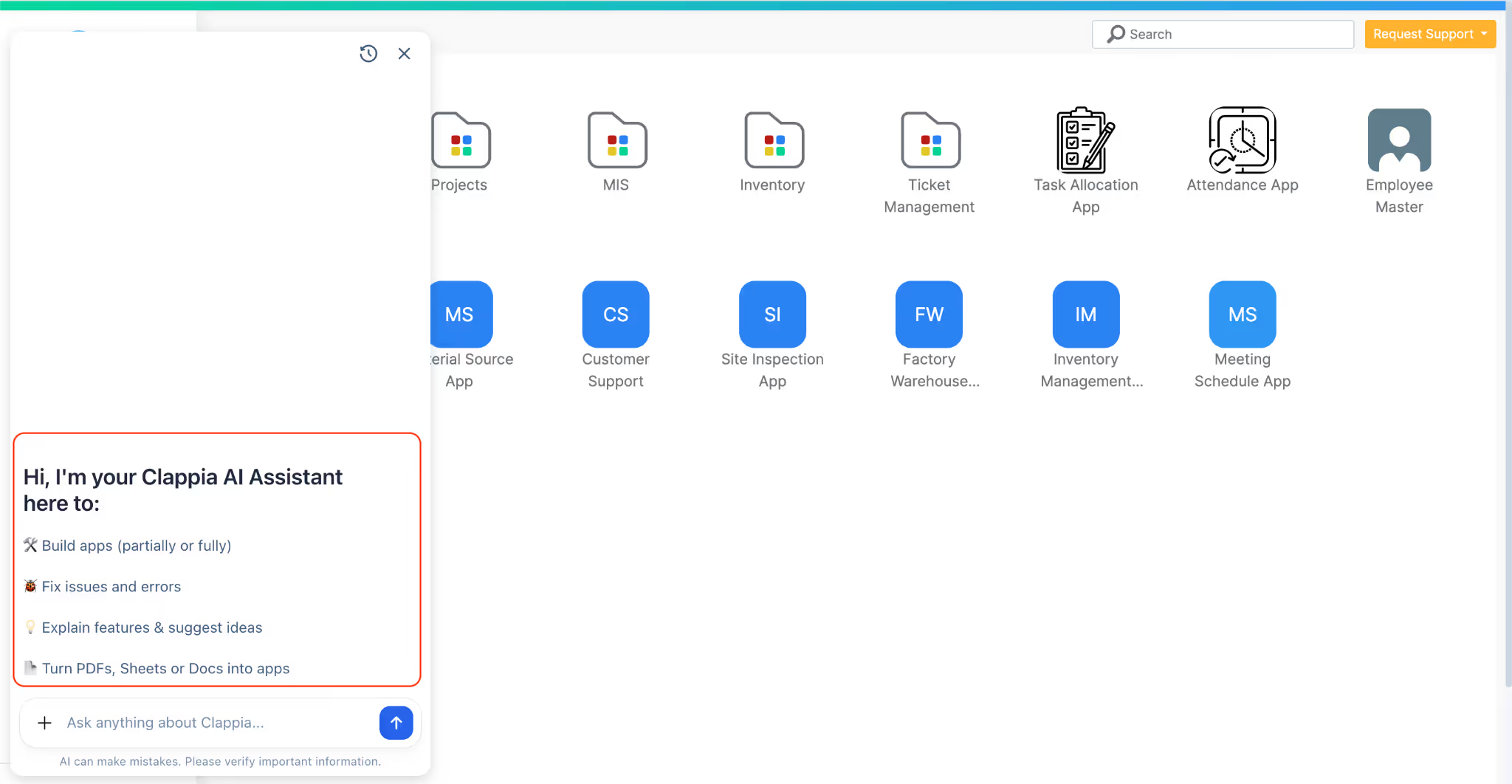
This is the approach used in this guide. Describe what you need to Clappia's AI assistant, which acts as a survey app builder that generates the structure for you. You can be as specific or as general as you want: "I need a field survey app that captures surveyor details, GPS location, date and time, photos, and categorized observations" or simply "create a field survey data collection app." The AI generates a working application structure that can be refined or used as-is. You can also upload documents or images to guide the AI better in creating your tailored app.
You can also build the app entirely on your own using Clappia’s app designer. This means starting with a blank app and adding fields, sections, and layouts one by one. You can decide exactly which blocks to use like text fields, GPS location, date and time, image capture, dropdowns, etc. and how they are arranged.
This approach is useful when you already have a very specific survey format in mind or want full control over every detail from the start.
If your surveys already exist in the form of spreadsheets, you can upload an Excel file and convert it into an app. Clappia reads the columns in the sheet and creates corresponding fields in the app automatically. From there, you can enhance the app by adding location capture, photos, validations, and workflows.
This is a common starting point for teams that have been collecting field data in Excel and want to move to a structured mobile app without rebuilding everything manually.
If you’re currently using Google Forms for survey data collection, you can import an existing form into Clappia. The form structure is converted into an app, after which you can extend it with additional sections, GPS location, media capture, workflows, and reports.
This makes it easier to upgrade from basic form-based data collection to a more complete field survey system without losing your existing structure.
For teams that use external tools or AI systems to generate instructions, Clappia MCP allows apps to be created or modified programmatically. Instructions generated outside Clappia can be used to build or update apps directly, making this approach useful for advanced automation or experimentation.
Each of these methods leads to the same outcome: a no-code field survey data collection app that can be refined, extended, and connected to other apps as needed. The difference lies only in how you choose to start.
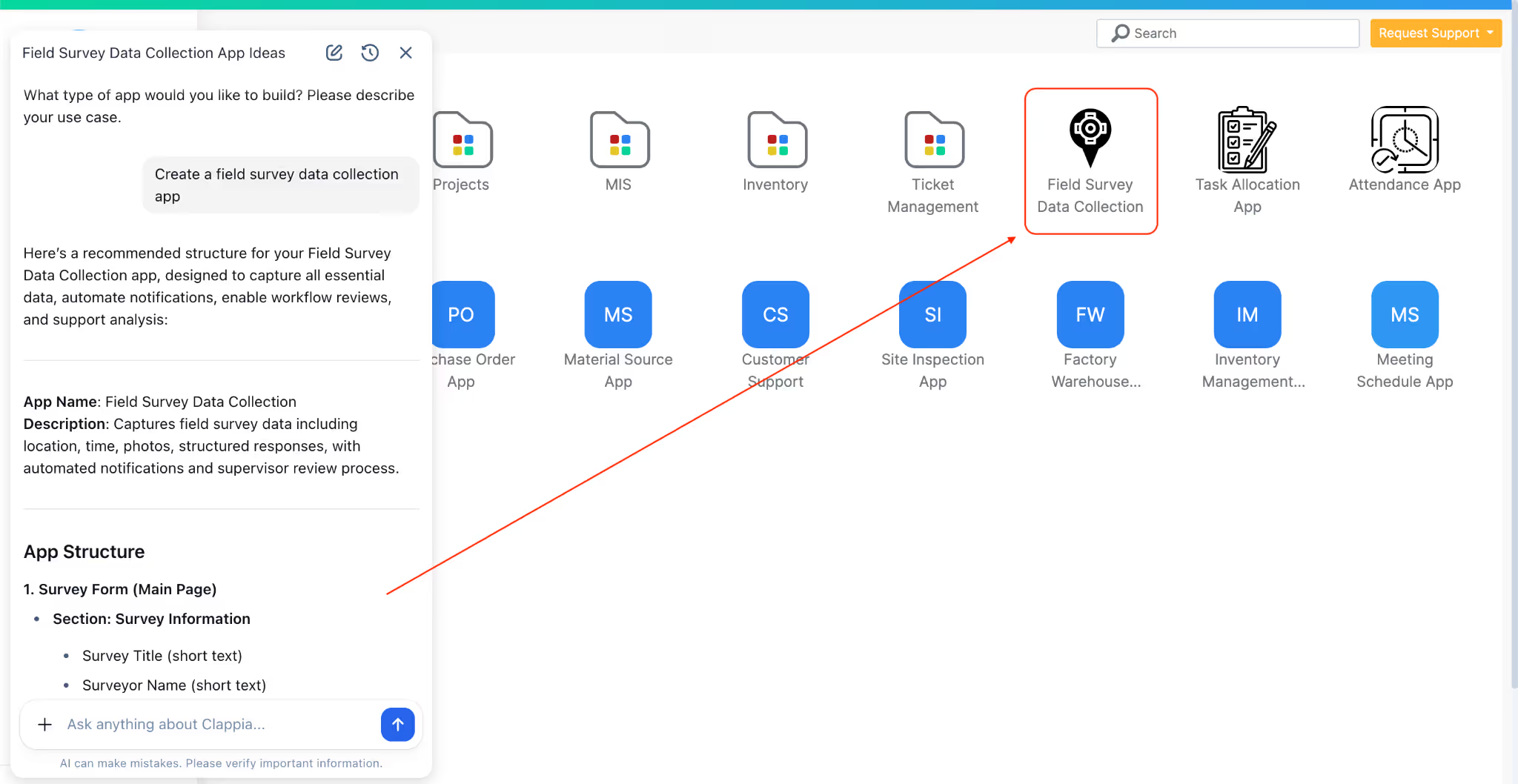
The AI created a structured data collection system from that single prompt. The app has three core sections: Survey Information for tracking and accountability, Date/Time/Location for context, and Survey Responses for actual observations.
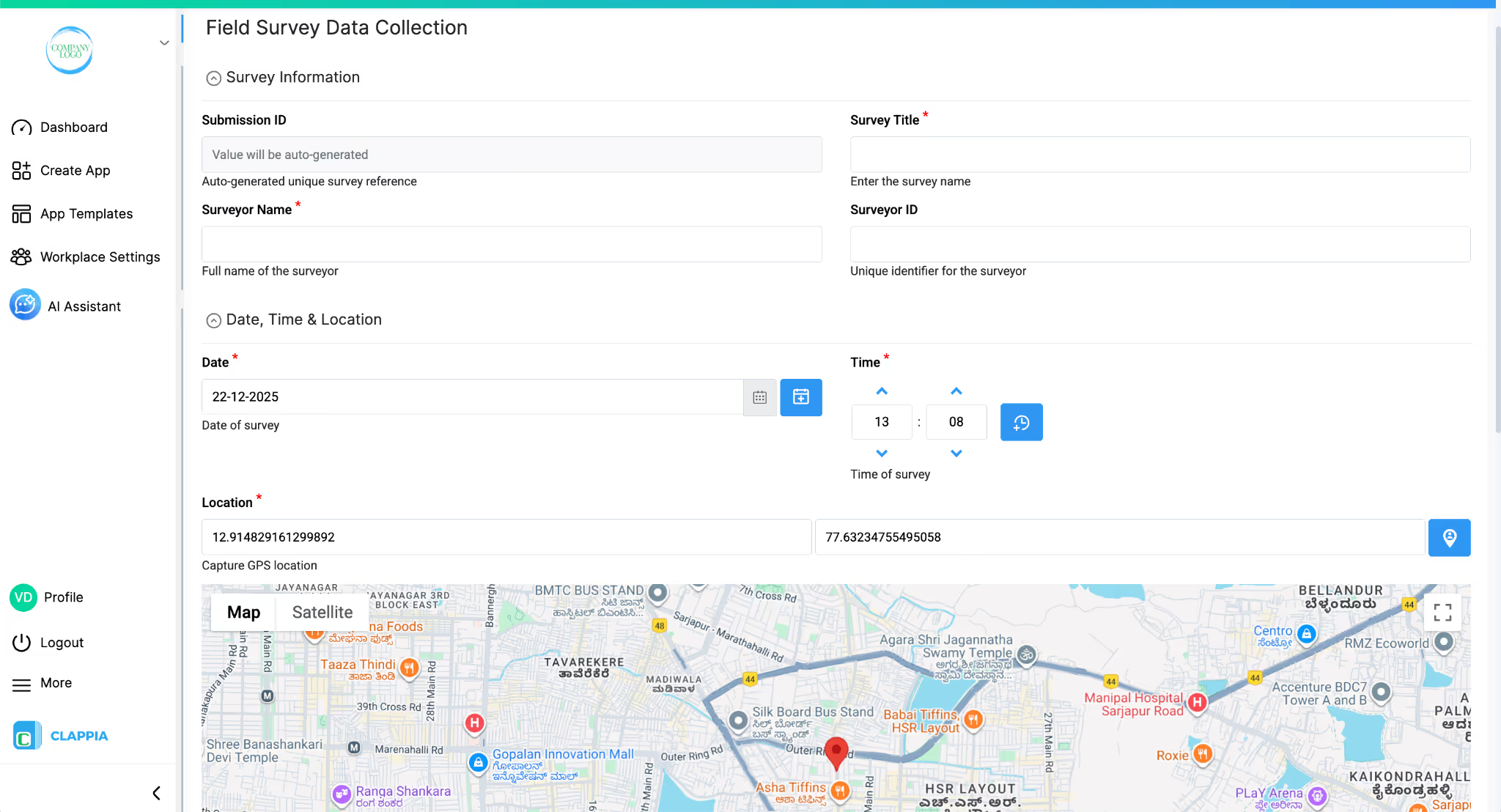
Survey Information Section
Date, Time & Location Section
Survey Media Section
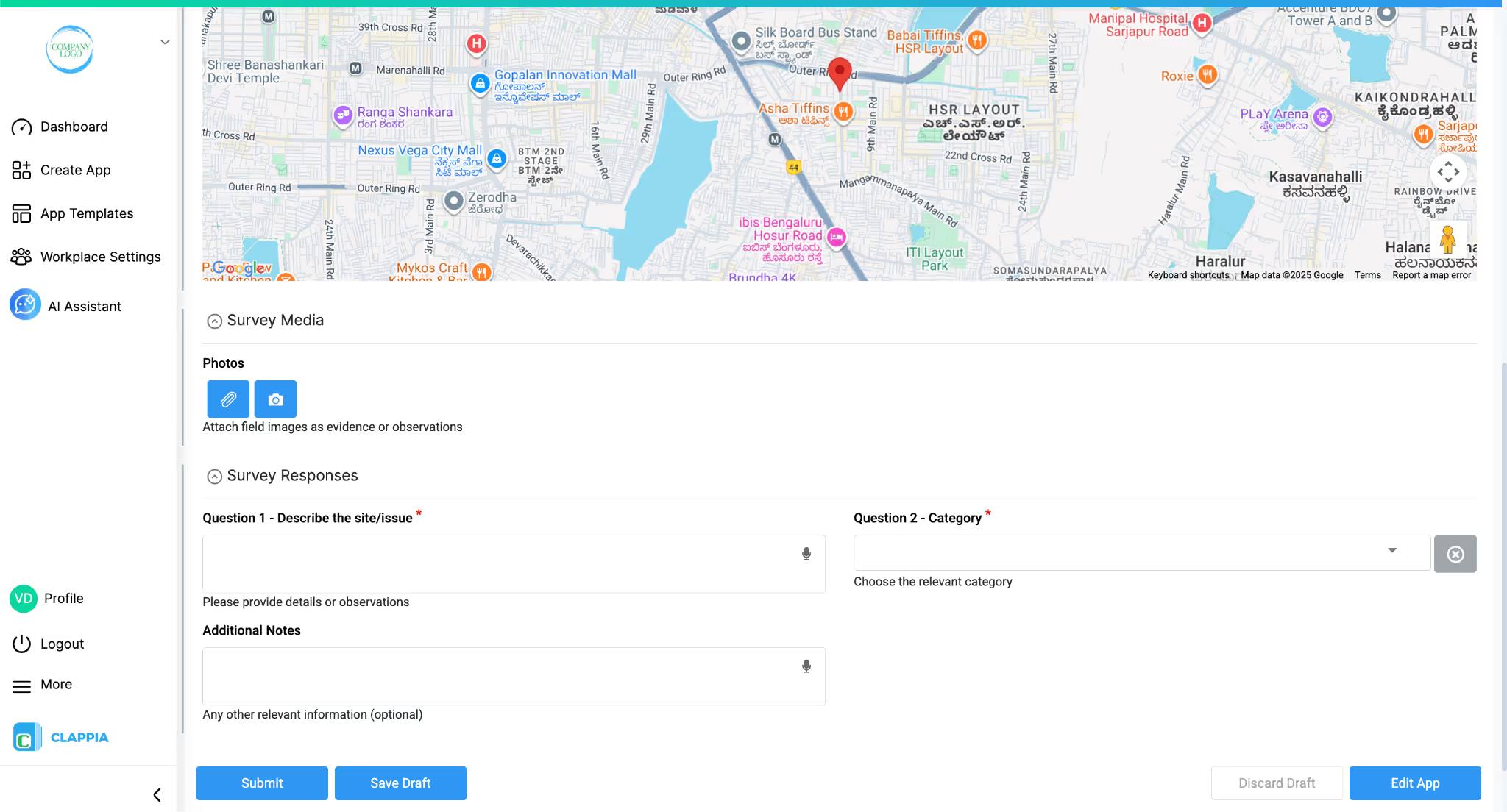
Survey Responses Section
Because Clappia is a no-code platform and the AI utilises all of the no-code tools, this survey app functions as a flexible no-code survey app rather than a fixed form. The initial structure is just a starting point and you can use it as a template. You can rename the fields, add validations, rearrange sections, or include additional inputs based on how your surveys work in real life. If your field survey requires photos, signatures, or more detailed location data, those can be added directly into the same app without rebuilding anything from scratch. You can also ask the AI to edit the app at any point instead of doing it manually. Editing the app through the AI later does not affect the data that may already be present in your app.
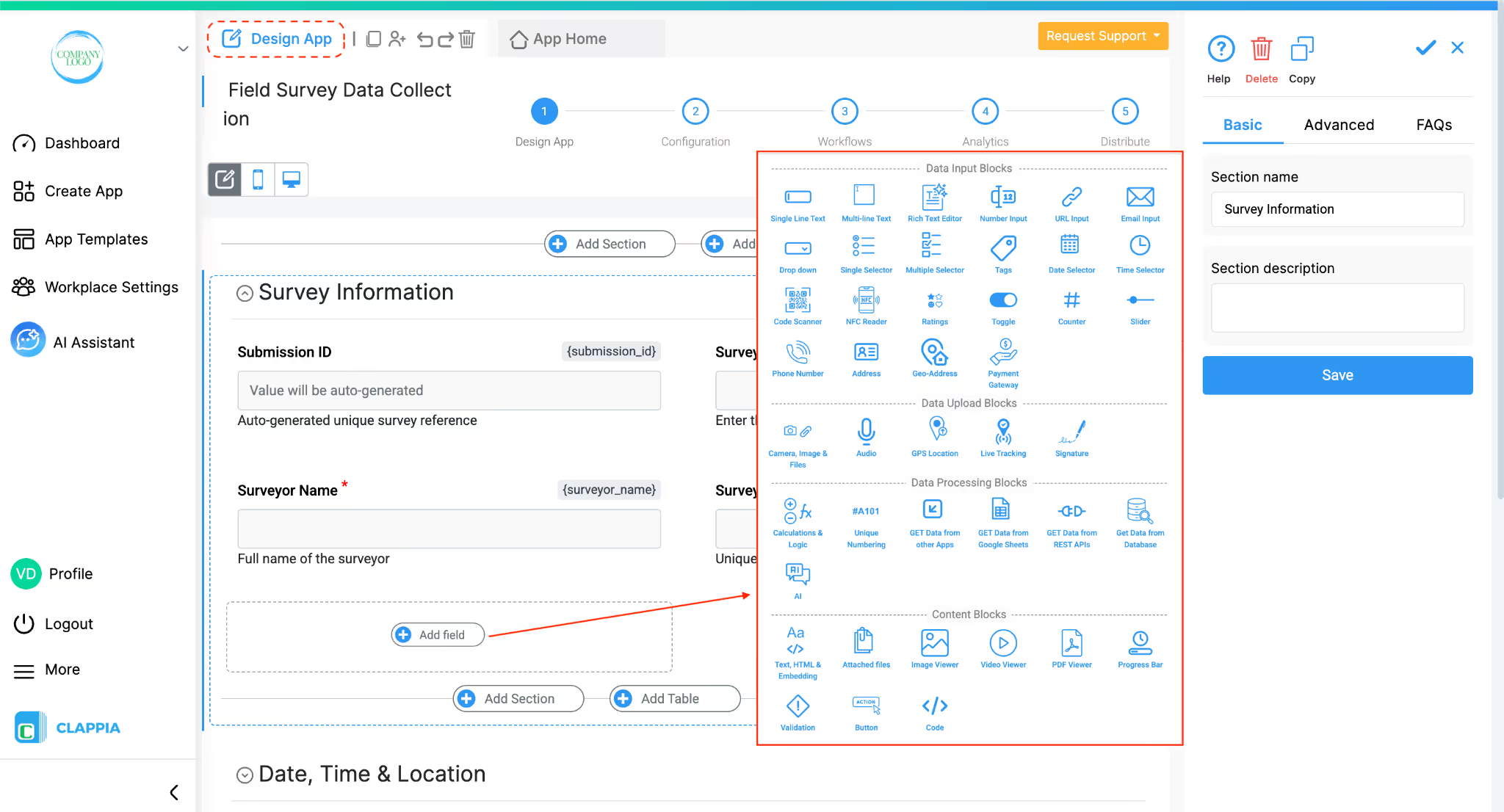
Clappia offers additional field types that can enhance your field survey solution:
Clappia's workflow automation and visualization features can transform the basic data collection app into a complete management system. You can ask the AI to add workflows or charts to your apps as well. You can also ask how to set up certain logic if you are unsure.
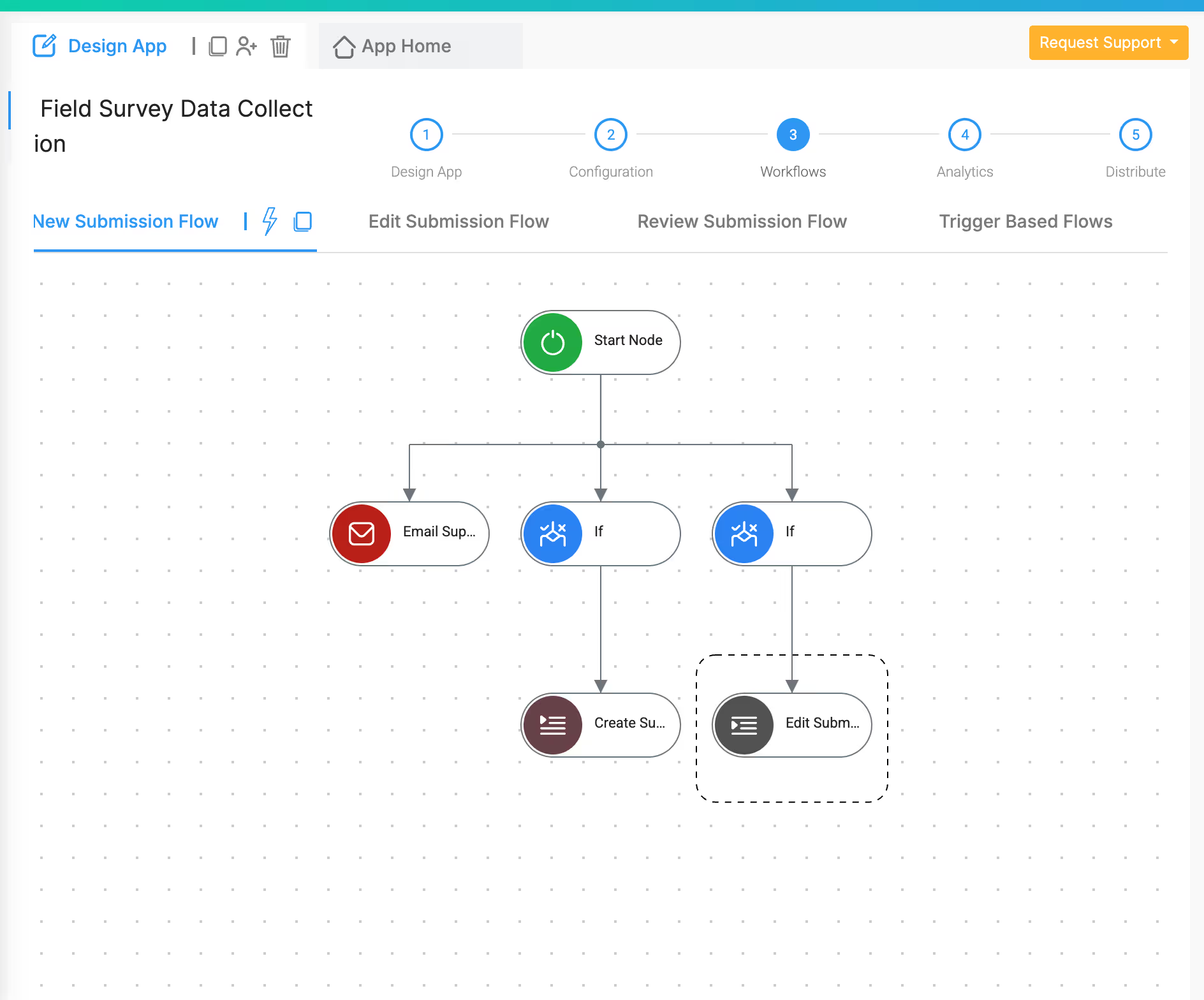
Workflows automate actions based on survey submissions:
Instant Notifications
Set up workflows that trigger when a survey is submitted. Use the Email Node to send formatted reports to managers, or the SMS Node to alert field supervisors immediately when critical issues are logged. Notification content can include specific survey details, GPS coordinates, and embedded photos.
Conditional Routing
The If Node creates smart workflows. Example: "If the survey category is 'Safety Hazard' and the severity rating is 'High', then send an urgent alert to the safety team AND create a high-priority task in the action tracker." Critical issues get immediate attention while routine surveys follow normal processing.
Time-Based Follow-ups
The Wait Node schedules follow-up actions. If a survey identifies an issue requiring follow-up inspection after 7 days, the workflow waits for 7 days and then automatically sends a reminder to the relevant team member. Issues don't get forgotten.
Data Synchronisation
The Edit Submission Node updates records in other apps based on survey results. If your survey covers equipment inspection, the workflow can automatically update the equipment status in your asset register app.
Approval Processes
For surveys requiring validation, use the Approval Node to route submissions through your approval hierarchy. Supervisors review and approve or reject surveys with comments, right from their email or Clappia app.
Multi-Step Workflows
Combine multiple nodes to create sophisticated automation. Example: Survey submitted > If Node checks category > Wait Node (for business hours) > Email Node (sends to relevant department) > Edit Submission Node (updates status in tracking app) > SMS Node (confirms action to surveyor).
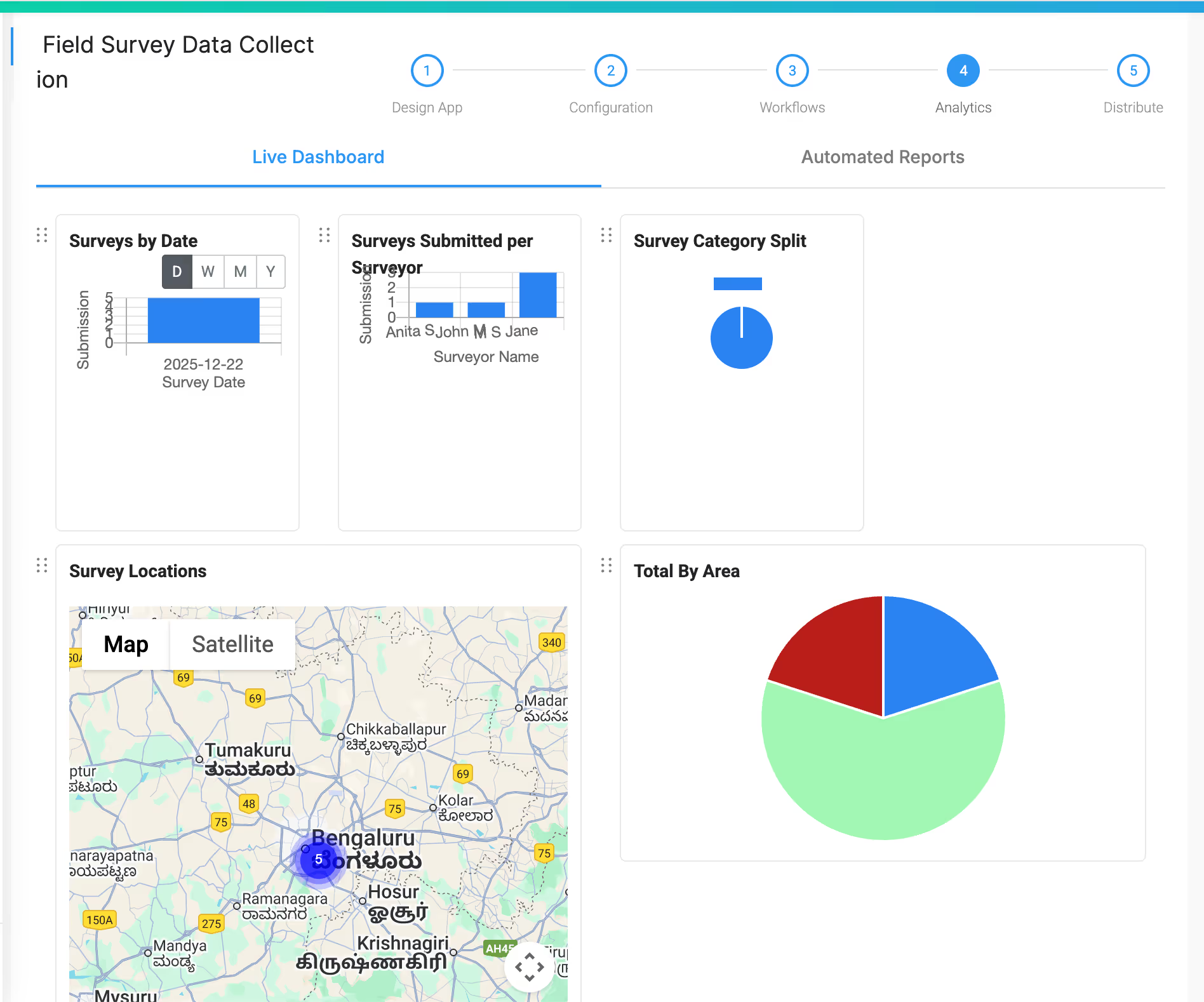
Clappia's charting and analytics capabilities help visualize field survey data:
Chart Blocks
Add various chart types to dashboards or reports:
Live Dashboards
Build real-time dashboards showing key metrics like surveys completed today, pending follow-ups, issues by category, or surveyor productivity, all updating automatically as new surveys arrive.
The Get Data from Other Apps block creates relationships between different apps in your workspace, building an interconnected ecosystem.
Action Tracker or Issue Management App
When surveyors identify problems in the field, automatically create action items in a separate issue tracking app. The action tracker pulls data from surveys such as description, location, photos, priority and assigns tasks to the right team members. Field workers submit surveys; the system handles task creation and assignment automatically.
Asset or Equipment Register
For surveys involving equipment or asset inspections, link them to a master asset register. Each survey entry can reference specific assets (using the Get Data from Other Apps block to select from your asset list), and workflows can update asset status, last inspection date, or condition ratings in the register automatically.
Client or Site Master App
For organisations managing multiple client sites, create a master app with client/site information (contact details, site specifications, contracts). When creating a survey, surveyors select the site from this master list, pulling in relevant context automatically. This ensures consistency and links all surveys to the correct client records.
Surveyor/Employee Directory
Instead of manually typing surveyor names, connect to an employee directory app. Surveyors select their name from a dropdown that pulls from your team roster, ensuring name consistency and linking surveys to employee records for performance tracking.
Inventory or Stock Management
For surveys involving inventory checks or supplies at various locations, connect to inventory management apps. Survey data can automatically update stock levels or trigger reorder workflows when supplies run low at specific sites.
Compliance Checklist App
For regulated industries, link surveys to compliance requirement checklists. Each survey can reference which compliance standards it addresses, and automated reports can show compliance status across all sites based on field survey data.
Report Generation App
Create a separate reporting app that pulls data from multiple surveys, aggregates findings, performs calculations, and generates formatted reports. This keeps your survey app focused on data collection while moving complex analysis to a dedicated reporting tool.
The connected structure allows gradual building. Start with your field survey app. Next month, add an action tracker. Later, introduce asset management. Each addition makes the entire system more powerful without requiring rebuilds.
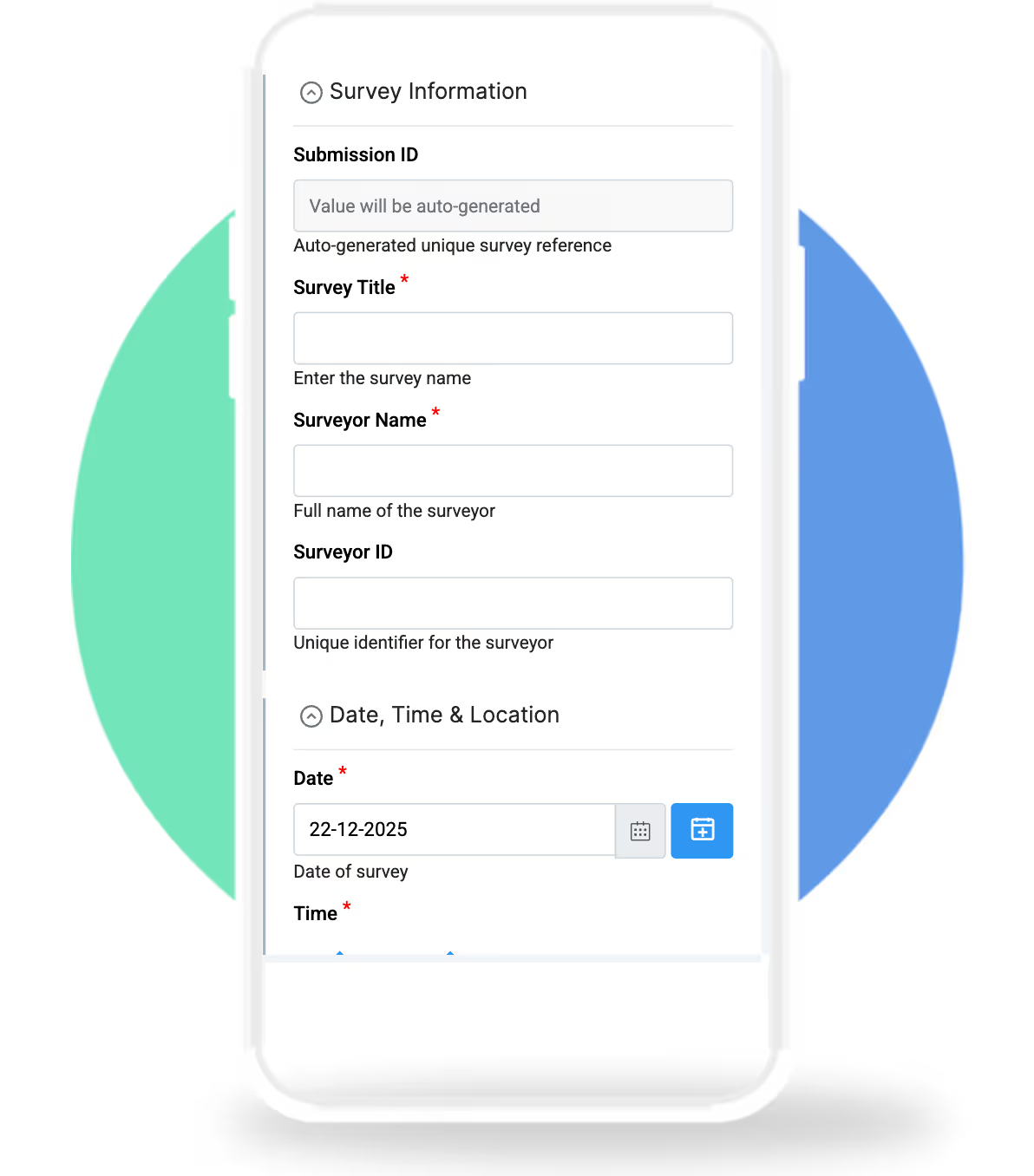
In the Field
When a surveyor arrives at a site with their phone or tablet they can open the Clappia app, effectively a mobile survey app that works offline, which is crucial for remote locations and start collecting data.
The survey title and their details can auto-populate if defaults are set. The date defaults to today, and they adjust the time if needed. The GPS location captures automatically with a single tap, pinpointing their exact position on the map, no manual address entry or coordinate lookup.
They can snap photos directly through the app. Record observations, select the issue category from the dropdown, add any additional notes, and hit submit.
Offline Capability
Without internet connectivity (common in remote survey locations), the surveyors can continue working. The app stores submissions locally on the device and automatically syncs them to the cloud when connectivity returns. Data never gets lost, and work never stops waiting for a signal.
Instant Submission
Once submitted, the data becomes immediately available in your Clappia workspace. The submission appears in the Submissions page with all details; text, GPS coordinates, photos, timestamps. If workflows are configured, automated actions kick in instantly: notifications send, tasks create, reports generate.
For Managers
Managers see a real-time feed of survey submissions. They can view individual surveys with all media and location data, track team productivity, spot trends in issue categories, and export data for analysis. The interactive map view shows where all surveys are being conducted, making it easy to spot coverage gaps or concentration areas.
Once your field survey app is ready, getting it to your team is straightforward. Team members can access the app through the Clappia mobile app (available on iOS and Android) or directly through their web browser.
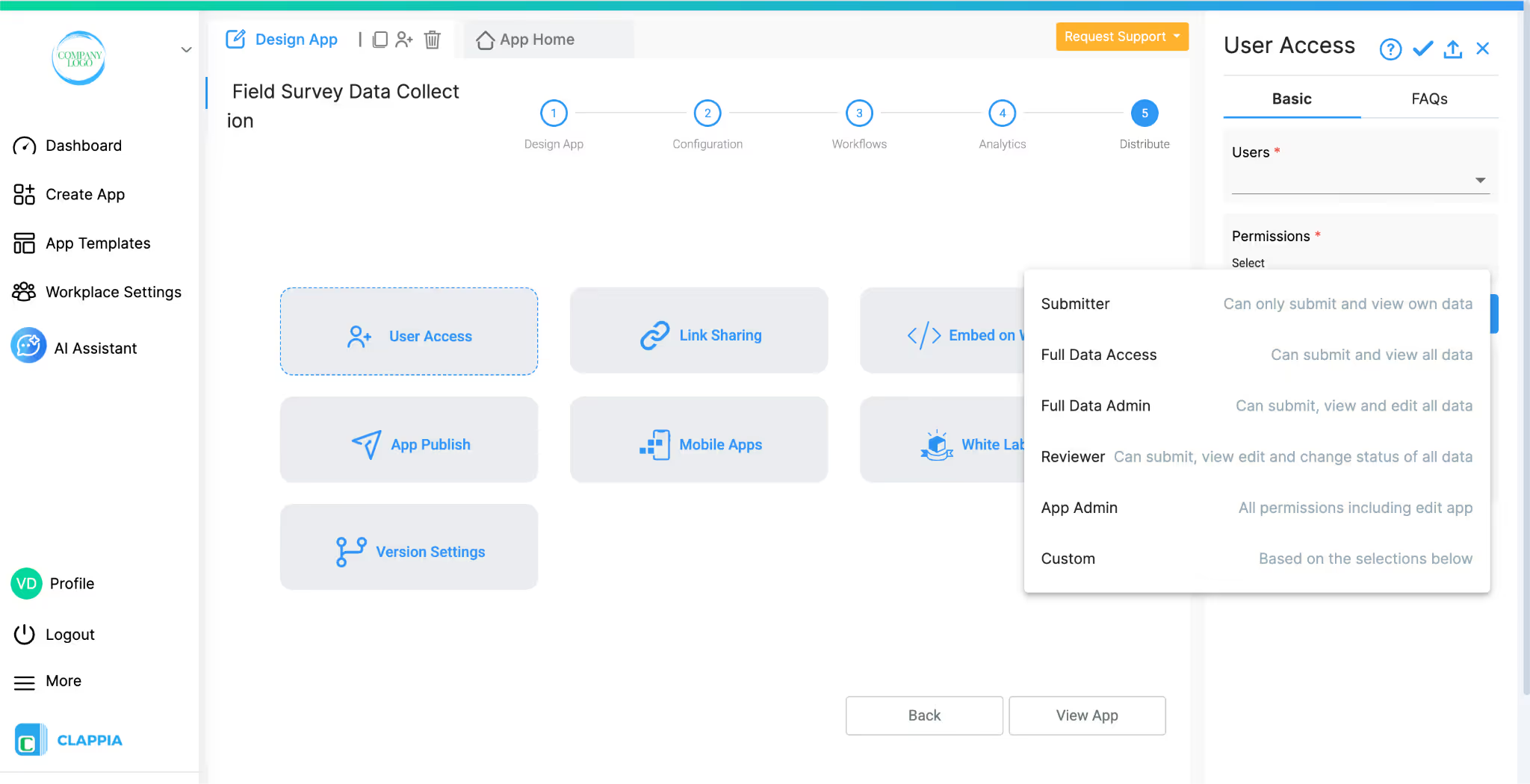
Clappia provides granular access control, so you can set permissions based on roles; field surveyors can submit data, supervisors can edit and view all submissions, and managers can access workflows and analytics as well. When you need to update the app, changes propagate instantly to all users without requiring app reinstalls or version updates.
True No-Code, But Enterprise-Grade
No code required, but the platform isn't limited to basic forms. Clappia provides building blocks to create sophisticated business applications with workflows, integrations, and custom logic, all through a visual interface.
Mobile-First with Offline Support
Clappia was built for field teams. The mobile apps work seamlessly offline, syncing automatically when connectivity returns. The platform truly works in remote locations, construction sites, rural areas, or anywhere teams operate.
GPS and Media Handling
Location tracking is deeply integrated. Capture GPS coordinates with a tap, view submissions on an interactive map, and attach photos or videos without file size issues. The platform handles visual, location-based data collection naturally.
AI-Assisted Development
Describing your needs to an AI and having it generate a working app in minutes is transformative. Iterate quickly, test ideas, and refine solutions without investing weeks in development. This dramatically reduces time from concept to deployment.
Connected Ecosystem
Unlike standalone survey tools, Clappia apps connect to each other. Your field survey app is part of a broader business application platform. Pull data from master lists, push data to action trackers, and trigger workflows in other systems.
Workflow Automation
Most survey tools stop at data collection. Clappia continues into workflow automation. Notifications, conditional logic, approvals, scheduled actions; survey data automatically drives business processes without manual intervention or complex integrations.
Data Ownership and Privacy
Your data stays yours. Clappia provides enterprise-grade security with role-based access control, data encryption, and compliance with privacy standards.
Scalability
Whether conducting 10 surveys a month or 10,000, Clappia scales with needs. Start small with a simple form, then expand into complex multi-app workflows as requirements grow. The platform doesn't become limiting as organisations evolve.
Cost-Effective
Building custom field survey applications traditionally requires hiring developers, maintaining infrastructure, and ongoing updates. Clappia replaces all of that with a subscription platform that's a fraction of the cost of custom development, with faster deployment and easier maintenance.
Rapid Iteration
Business requirements change. New regulations emerge. Teams identify better data collection methods. With Clappia, adapt quickly. Modify forms, adjust workflows, add fields all without development cycles or vendor dependencies. Apps evolve at the speed of business needs.
Building a field survey data collection app doesn't require programming knowledge. With Clappia, create a comprehensive system that captures structured data, GPS locations, photos, and observations, all while working offline and syncing automatically.
Whether building from scratch, using AI to generate your app, or starting with a template, you can have a working solution in minutes rather than months. Field teams get an intuitive mobile experience, managers get real-time visibility, and organisations gain a scalable platform that grows with needs.
The field survey app explored here is just the beginning. Once you see how quickly you can build and deploy it, opportunities become visible everywhere like in inspection checklists, delivery tracking, customer feedback, environmental monitoring, safety audits. Every field process that currently relies on paper forms or disconnected spreadsheets is an opportunity for improvement.
Clappia's platform is ready, and AI is available to help build it. The question isn't whether you can build a sophisticated field survey app, it's what you'll build next once you see how straightforward it is.
L374, 1st Floor, 5th Main Rd, Sector 6, HSR Layout, Bengaluru, Karnataka 560102, India
3500 S DuPont Hwy, Dover,
Kent 19901, Delaware, USA


.svg)




3500 S DuPont Hwy, Dover,
Kent 19901, Delaware, USA
L374, 1st Floor, 5th Main Rd, Sector 6, HSR Layout, Bengaluru, Karnataka 560102, India




%20(1).avif)


.jpg)