Grab Clappia’s 50% OFF Black Friday Deal before it’s gone! Ends 05 Dec 2025.
View offer →
#bf-banner-text { text-transform: none !important; }
Top Mobile Form Builders in 2026

Top Mobile Form Builders in 2026

By
Verin D'souza
September 10, 2026
|
10 Mins
Table of Contents

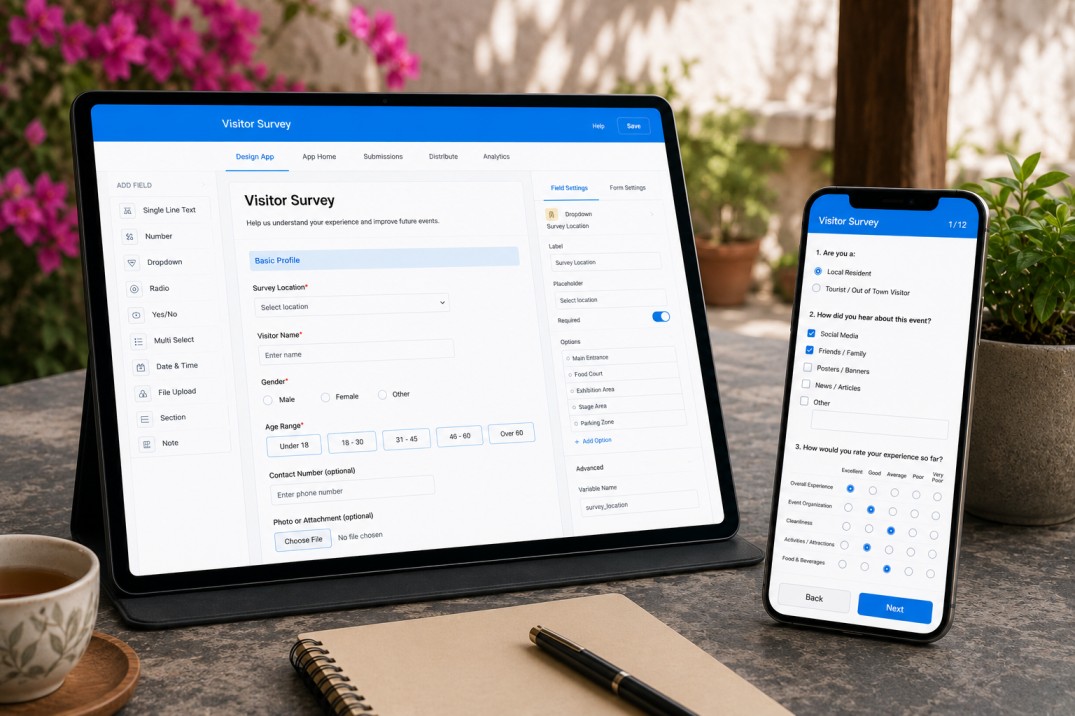
A mobile form builder lets you create digital forms that work on a phone or tablet, whether you're collecting data at a job site, running an inspection in a remote location, or capturing a customer signature at the point of service. The best mobile form builders in 2026 go beyond resizing a form to fit a small screen. They offer a true mobile forms app, work offline when there's no signal, and let field service teams capture photos, GPS location, and signatures directly from a mobile device.

This guide ranks the top mobile form builders and mobile apps for forms available today, comparing offline data collection, field-specific features, and current pricing pulled directly from each platform's own website. Whether you need a mobile forms app for internal use or a mobile data collection tool built for field service teams working in remote locations, this list will help you find the right fit.

Quick Answer: Best Mobile Form Builders in 2026

  • Clappia: The top mobile form builder overall, widely used for mobile forms, field data collection, and business apps across industries, with full offline mode built in.
  • Jotform Mobile Forms: A mobile forms app with a large template library.
  • SafetyCulture: A mobile forms app built around inspections and workplace safety checklists.
  • GoCanvas: A mobile forms app for trade and field service businesses with dispatch and scheduling.
  • Fulcrum: A mobile data collection app for field teams that need forms tied to GPS and mapping.
  • Typeform: A mobile-responsive form builder suited to marketing and lead-generation forms.
  • Google Forms: A free, mobile-responsive form builder for simple internal use.
  • Microsoft Forms: A mobile-responsive form builder bundled into Microsoft 365.
  • Zoho Forms: A mobile forms app for businesses already using other Zoho products.
  • Fillout: A mobile-responsive form builder built around syncing form data into Airtable and similar databases.

Mobile Form Builders at a Glance

A side-by-side comparison of mobile UX, offline data collection, native mobile app availability, free plans, and starting price for each mobile form builder, based on current pricing from each platform's own website.

ToolMobile UXOffline ModeNative AppFree PlanCheapest Paid
ClappiaNative mobile appYes, full offline modeiOS + AndroidYes$8/user/month
Jotform Mobile FormsNative + responsive webYes (mobile app)iOS + Android100 submissions/mo$34/month
SafetyCultureNative mobile appYes (mobile app)iOS + AndroidUp to 10 users$24/user/month
GoCanvasNative mobile appYes (mobile app)iOS + AndroidNo$29/user/month
FulcrumNative mobile appYes (mobile app)iOS + AndroidNo$43/user/month
TypeformMobile-responsive webNoNo10 responses/mo$29/month
Google FormsMobile-responsive webLimited (browser cache)Web onlyFree unlimitedFree
Microsoft FormsMobile-responsive webBrowser cache onlyWeb onlyIncluded in M365$6/user/month
Zoho FormsNative + responsive webYes (mobile app)iOS + AndroidYes$8/user/month
FilloutMobile-responsive webNoNo1,000 responses/mo$15/month

1. Clappia

Best for:

Field service teams and businesses that need a mobile forms app for data collection, inspections, and business processes, including work carried out in remote locations with no signal.

Clappia is widely used for mobile forms across industries including construction, manufacturing, healthcare, logistics, and field service. Forms built in Clappia run as a mobile app on iOS and Android, alongside a web version for desk-based use, so the same form works whether someone is filling it out on a job site or reviewing submissions from a desk.

Key Features

  • Offline mode: A mobile form can be filled out and submitted with zero internet connection, including photos, GPS coordinates, and signatures. Data is stored on the device itself and syncs automatically in the background the moment the device reconnects to Wi-Fi or mobile data, so nothing needs to be re-entered and no submissions are lost.
  • Mobile app on iOS and Android: A dedicated app rather than a resized webpage, built for use on a phone or tablet.
  • GPS location and live tracking: Automatically capture the location of every form submission.
  • Photo, video, and signature capture: Attach photos, short videos, and signatures directly within a form, with barcode and QR code scanning built in as well.
  • AI-powered form creation: Generate a working mobile form from a written prompt or an existing paper form.
  • Notifications and approvals: Automatically notify the right person by email, WhatsApp, SMS, or Microsoft Teams as soon as a form is submitted, and route submissions through approval steps.
  • Reporting and integrations: Turn submitted form data into PDF reports and real-time dashboards, and connect it to Google Sheets, Excel, or other business systems.

Pricing

  • Free Plan: Yes
  • Starting Price: $8 per user/month
  • Enterprise Plan: Custom pricing
  • Offline Mode: Included on all plans

2. Jotform Mobile Forms

Best for:

Teams that want a mobile forms app backed by a very large template library.

Jotform Mobile Forms is an app layered on top of the main Jotform platform, offering offline mode, a kiosk mode that resets automatically between submissions, and push notifications when a form is submitted.

Key Features

  • Kiosk mode: Automatically resets the form after each submission, useful for shared tablets at an event or front desk.
  • Large template library: More than 10,000 templates to start from instead of building a mobile form from scratch.
  • Offline submissions: Forms can be completed without a connection and sync once back online.

Pricing

  • Free Plan: Yes (100 submissions/month)
  • Starting Price: $34/month (Bronze)
  • Most Popular Plan: $39/month (Silver)
  • Enterprise Plan: Custom pricing

3. SafetyCulture

Best for:

Teams running safety inspections, audits, and workplace checklists from a mobile device.

SafetyCulture, formerly known as iAuditor, is used across manufacturing, construction, and hospitality to build and complete checklists from a phone or tablet, with a web app for admins to build templates and review results.

Key Features

  • Large template library with AI generation: Start from more than 10,000 templates or generate one from a photo, PDF, or written prompt.
  • Asset and issue tracking: Track equipment status and corrective actions alongside inspection results.
  • Offline inspections: Complete checklists without a connection through the mobile app.

Pricing

  • Free Plan: Yes (up to 10 users)
  • Starting Price: $24/user/month billed annually ($29 monthly)
  • Enterprise Plan: Custom pricing

4. GoCanvas

Best for:

Trade and field service businesses that want mobile forms tied to job dispatch and scheduling.

GoCanvas is used by electricians, plumbers, roofers, and other field service businesses to replace paper forms with digital ones, with scheduling and dispatch features built into the same app.

Key Features

  • AI-powered PDF-to-form conversion: Turn an existing paper or PDF form into a mobile-ready digital form automatically.
  • Dispatch and scheduling: Assign jobs to field workers and track completion from a central dashboard.
  • Field data capture: Capture photos, signatures, and barcode scans directly within a mobile form.

Pricing

  • Free Plan: No
  • Starting Price: $29/user/month (Essentials, billed annually, three-user minimum)
  • Most Popular Plan: $39/user/month (Pro)
  • Enterprise Plan: $49/user/month (Max)

5. Fulcrum

Best for:

Field teams that need mobile data collection tied closely to maps and location intelligence.

Fulcrum is built around geospatial use cases, used by utilities, environmental, and infrastructure teams that need field data linked to maps and spatial analysis.

Key Features

  • Geospatial data collection: Capture GPS-tagged field data and integrate directly with ArcGIS and other mapping tools.
  • AI-based Audio FastFill: Use voice dictation to fill out form fields while working in the field, available on the Elite plan.
  • Custom app building: Build a tailored mobile data collection app for a specific job type instead of using a fixed template.

Pricing

  • Free Plan: No
  • Starting Price: $43/user/month billed annually, five-user minimum ($55 billed monthly)
  • Elite Plan: $39/user/month billed annually ($55 billed monthly)
  • Enterprise Plan: Custom pricing

6. Typeform

Best for:

Marketing and lead-generation forms where the mobile experience needs to feel conversational.

Typeform is a mobile-responsive form builder that displays one question at a time in a format designed to feel natural on a phone screen, popular for lead capture forms, feedback surveys, and quizzes.

Key Features

  • Conversational, one-question format: Displays a single question at a time, designed to improve completion rates on a small screen.
  • Video and rich media questions: Add video, images, and custom themes to questions for a more visual mobile experience.
  • Native integrations: Connect responses to tools like HubSpot, Salesforce, Mailchimp, and Slack.

Pricing

  • Free Plan: Yes (10 responses/month)
  • Starting Price: $29/month (Basic, $28/month billed annually)
  • Enterprise Plan: Custom pricing

7. Google Forms

Best for:

Free, simple mobile forms for internal polls, RSVPs, and basic data collection.

Google Forms is included with any Google account, viewable through a phone browser or the Google Workspace mobile app, commonly used for internal surveys where cost and simplicity matter more than design.

Key Features

  • Free, unlimited forms and responses: No submission caps or paid tiers required for standard use.
  • Google Sheets sync: Responses populate a connected spreadsheet automatically.
  • Basic conditional logic: Simple branching logic on the free plan, with fuller logic through Google Workspace.

Pricing

  • Free Plan: Yes, unlimited
  • Starting Price: Free
  • Google Workspace: From $6/user/month for additional admin controls

8. Microsoft Forms

Best for:

Organisations already using Microsoft 365 that want a mobile-friendly form without adding a separate tool.

Microsoft Forms is bundled into Microsoft 365, accessible through a phone browser or the Microsoft 365 mobile apps, commonly used for internal polls, quick intake forms, and classroom quizzes.

Key Features

  • Excel and Teams integration: Responses sync directly to Excel, and forms can be shared as a poll inside a Teams meeting.
  • Branching logic: Route respondents to different questions based on earlier answers.
  • Copilot AI form generation: Generate a form from a written prompt on eligible Microsoft 365 plans.

Pricing

  • Free Plan: Included with a personal Microsoft account or Microsoft 365 subscription
  • Starting Price: $6/user/month (Microsoft 365 Business Basic)
  • Standalone Pricing: Not available; Forms is bundled into Microsoft 365

9. Zoho Forms

Best for:

Businesses already using other Zoho products that want their mobile forms to connect directly into that ecosystem.

Zoho Forms offers a mobile app and a mobile-responsive web builder, used by small and mid-sized businesses that want form submissions to feed directly into Zoho CRM, Zoho Desk, or other Zoho apps.

Key Features

  • Drag-and-drop builder: Create mobile forms with more than 40 field types and conditional logic.
  • Workflow and approvals: Route form submissions for review and approval within a business process.
  • Zoho and third-party integrations: Connect forms with Zoho CRM, Zoho Desk, and external tools such as Google Sheets and Zapier.

Pricing

  • Free Plan: Yes
  • Starting Price: $8/user/month (Standard, billed annually)
  • Professional Plan: $20/user/month
  • Enterprise Plan: $25/user/month

10. Fillout

Best for:

Teams whose mobile forms need to feed directly into an Airtable, Notion, or Google Sheets database.

Fillout is built around multi-step forms and native data-layer integrations, letting a completed mobile form sync directly into a connected database without extra setup.

Key Features

  • Mobile-responsive multi-step forms: Build forms with more than 40 field types that adapt to a mobile screen.
  • Native Airtable and Notion sync: Sync form responses directly with Airtable, Notion, and HubSpot.
  • AI form generator: Generate a mobile-ready form from a written prompt.

Pricing

  • Free Plan: Yes (1,000 responses/month)
  • Starting Price: $15/month (Starter)
  • Pro Plan: $40/month
  • Business Plan: $75/month

Conclusion

For a mobile forms app with full offline mode, GPS and field data capture, and workflows that go beyond simple data collection, Clappia is the strongest overall choice on this list. With a free plan and pricing that starts at $8 per user per month, it's built to support field service teams and everyday mobile forms alike.

FAQ

Build Your Own Mobile Forms with Clappia - No Coding!

Build Your Own Mobile Forms with Clappia - No Coding!Get Started – It’s Free

Build Your Own Mobile Forms with Clappia - No Coding!

Summary

Close