
If you use Google Forms for order forms, scoring assessments, or dynamic pricing, you have likely hit a frustrating roadblock: Google Forms does not natively support math calculations.
You cannot natively create a form that multiplies quantity by price, applies a conditional discount, or displays a running total to the respondent while they are filling out the form.
When you need real-time totals, dynamic pricing, and conditional logic, standard forms fall short. However, you do not have to abandon your workflow just yet. Depending on whether you need the calculation to happen after submission or during the form-filling process, there are three distinct ways to solve this problem.
Here is the complete guide to adding mathematical formulas and calculations to your data collection process.
If you only need to calculate data internally after a user submits the form, linking your form to a destination spreadsheet is the most reliable free method.
By pushing your form responses to Google Sheets, you can use spreadsheet formulas to manipulate the data.
How to set it up:
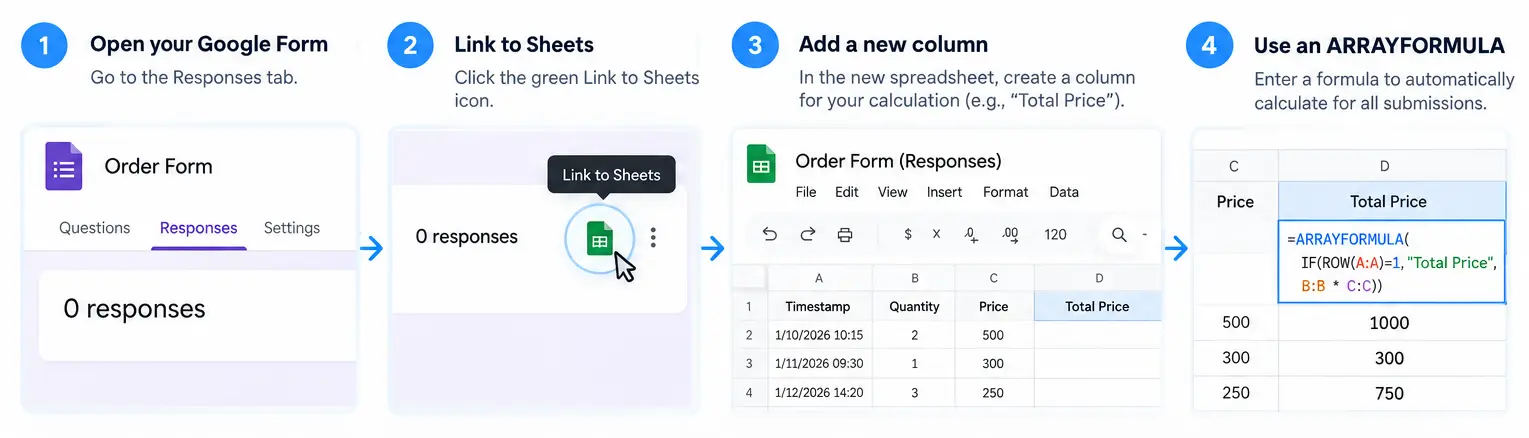
ARRAYFORMULA in the first empty cell of your new column to automatically apply your math to all future submissions.=ARRAYFORMULA(IF(ROW(A:A)=1, "Total Price", B:B * C:C)) (Where B is Quantity and C is Price).This calculation happens completely outside of the form. The person filling out the form will never see their total, score, or dynamic result.
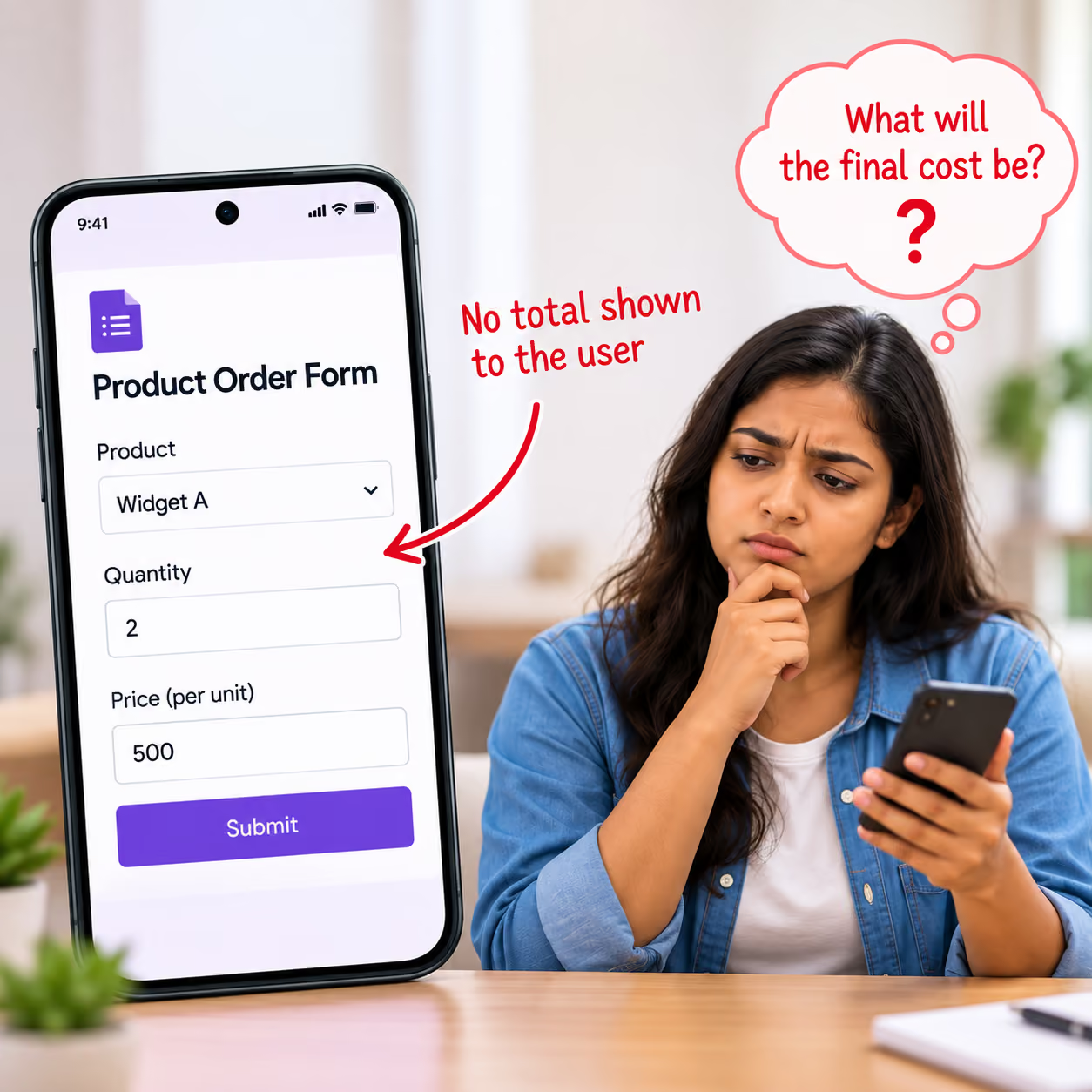
If you are building an order form or a quote generator, this creates a poor user experience because the customer is forced to guess their final cost.
If you absolutely must stick within the Google ecosystem but need slightly more functionality, you can browse the Google Workspace Marketplace for third-party add-ons.
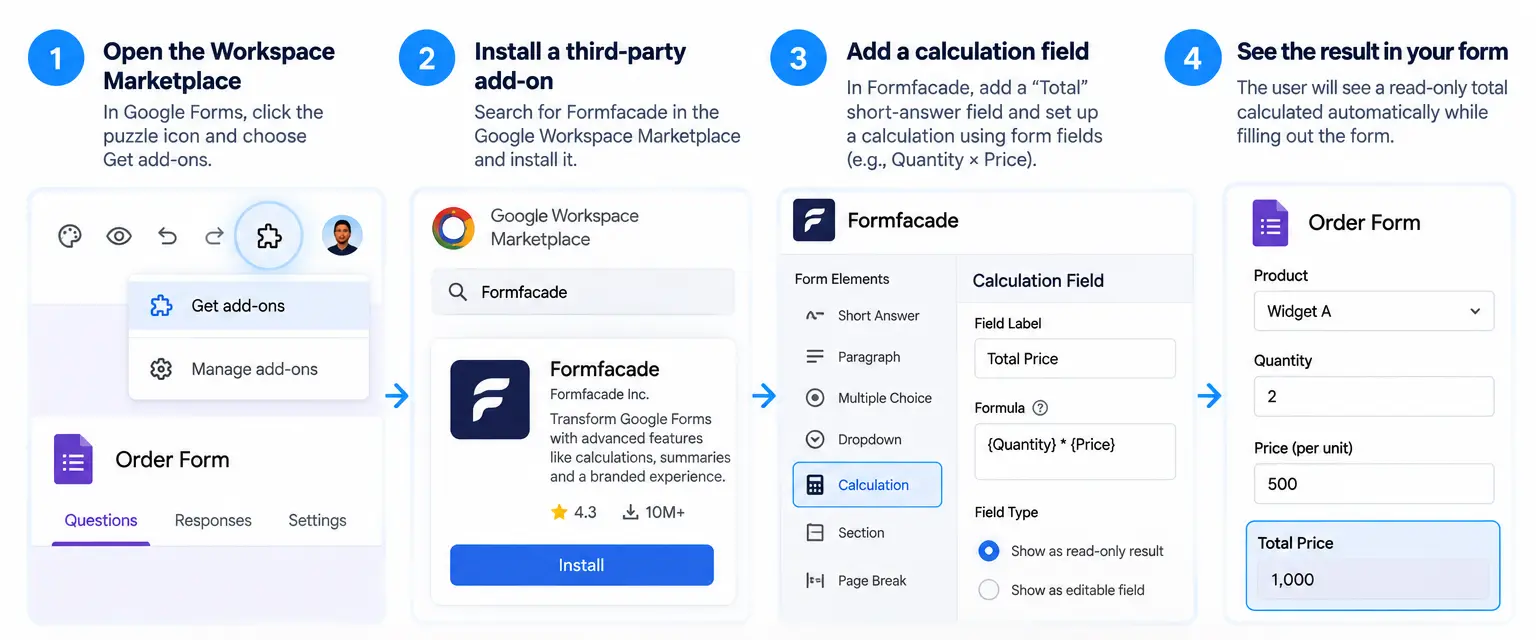
Tools like Formfacade act as a visual layer on top of your Google Form, allowing you to create a "Total" short-answer field and apply basic arithmetic (multiplying or dividing fields) to show a read-only result to the user.
Add-ons can be unstable, often require paid subscriptions for meaningful volume, and are still constrained by Google Forms' underlying architecture.
You cannot easily integrate complex logical operators, hidden fields, or multi-step conditional math without breaking the user experience.

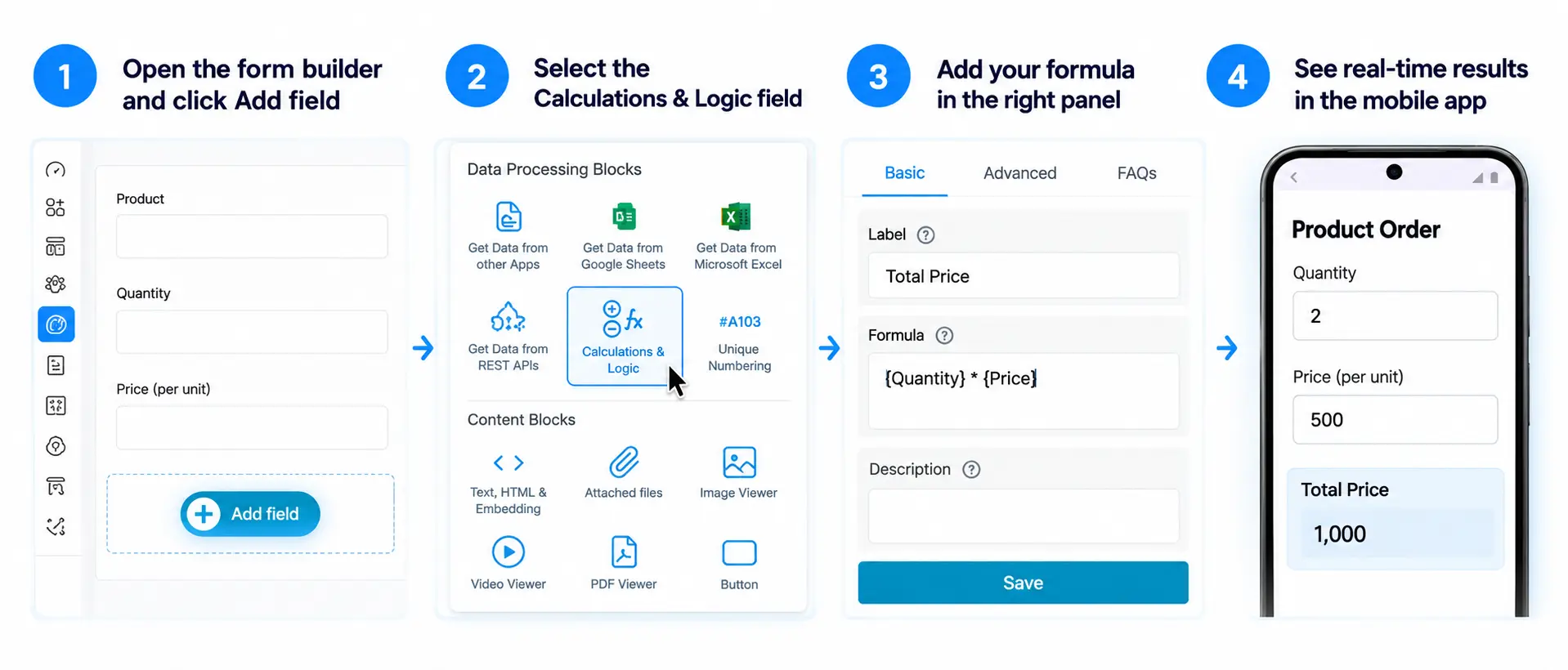
If you need your form to act like a dynamic application - where users see calculated results, conditional discounts, and complex logic in real-time as they type - the best approach is to step outside of Google Forms and use a dedicated no-code platform like Clappia.
Clappia was built specifically to handle the advanced data processing that standard form builders cannot. You do not even have to start from scratch; you can import your existing Google Form directly into Clappia in one click.
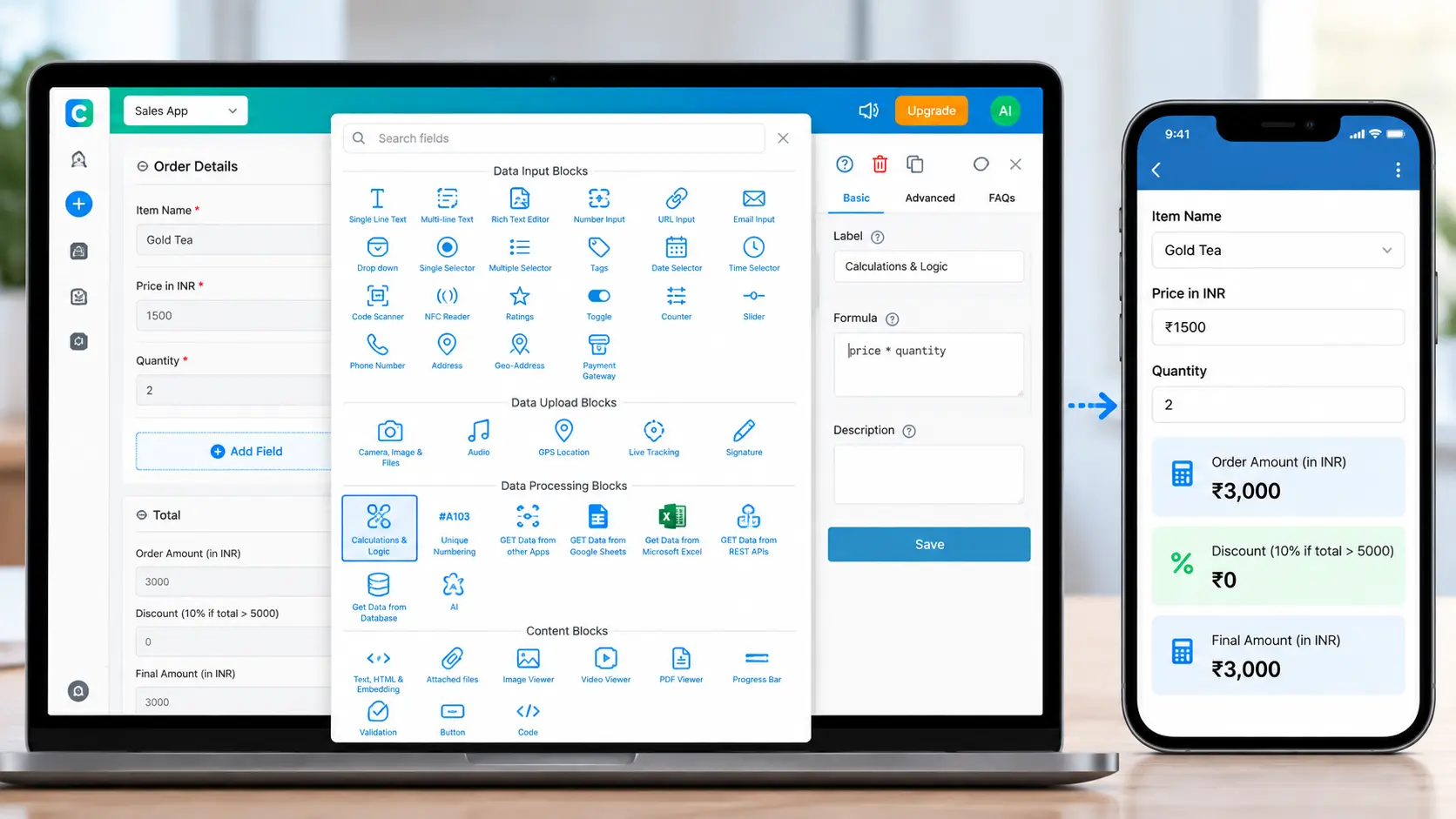
Instead of relying on a destination spreadsheet, Clappia uses a native Calculations & Logic block. You drag this block into your form and write formulas exactly as you would in Microsoft Excel or Google Sheets.
IF/THEN statements to apply conditional formatting, such as triggering a 10% discount only if the cart value exceeds $500.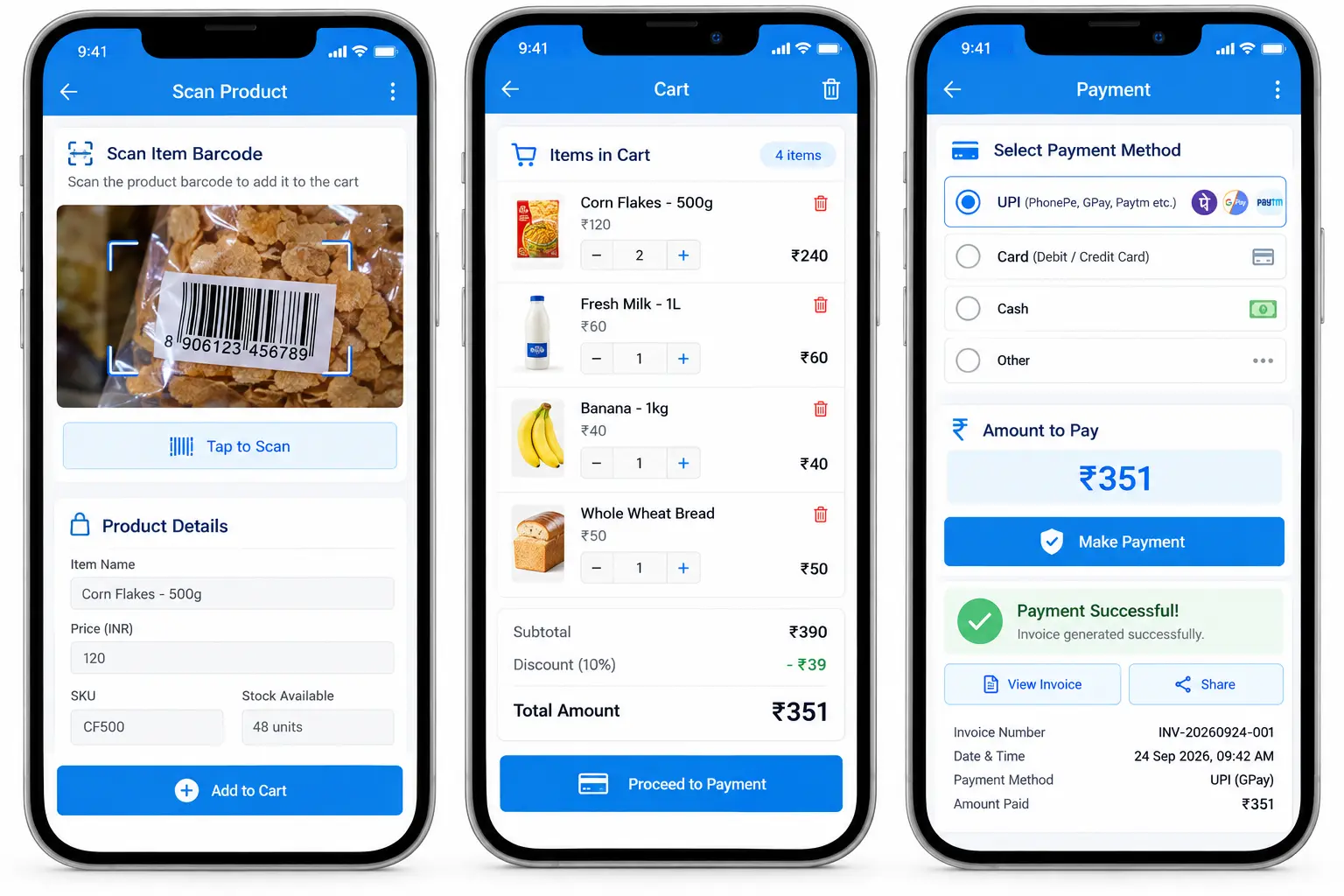
Scenario: A retailer wants to replace bulky POS machines, QR scanners, and payment devices with a smartphone app that can scan product barcodes, calculate cart value, accept payments, and generate invoices.
This problem can be solved with Clappia's no-code platform, which allows retailers to develop and deploy an app in a matter of hours. A QR code block can be used to scan the items to be added to the cart, and a calculator block can be used to dynamically compute and display the cart value. This information can then be used to generate invoices and proceed with payments. Furthermore, the app can be improved to manage inventory in parallel, look for the most sold product, identify the most valuable customers, and send deals and festive offers.
Scenario: A seller noticed that their sales reps are not loyal and are taking advantage of the situation by lying that the consumer desired a lower price or an additional discount. As a result, the vendor wishes to develop a smartphone app that promotes transparency and eliminates manual processes.
Using Clappia, the seller may quickly create an app that the salesperson must utilize while making a sale. The salesperson can choose the products and quantity. The vendor can set the price of each item and alter the discount rate based on the total cost. The app will require the representative to upload a picture of the products, sign, and obtain the customer's signature.
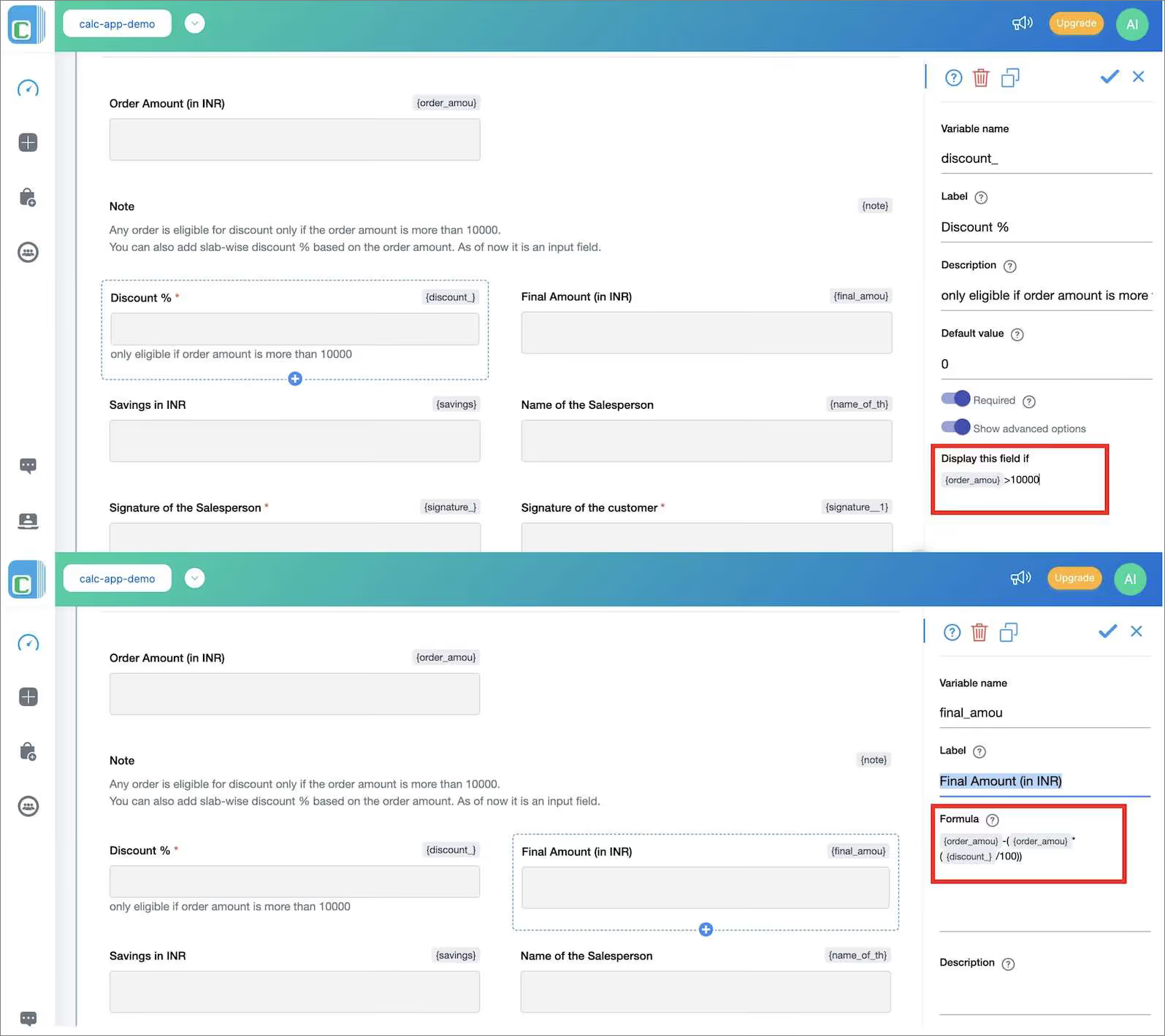
In this example, the sales rep must enter the product and quantity while selling. The app forces the sales rep to provide a discount if the total cost exceeds 10000 INR. Also, It will dynamically calculate the discount value and the total order value. This enables 100% transparency in the field sales of businesses. This information is further used in automatic invoicing and payment processes.
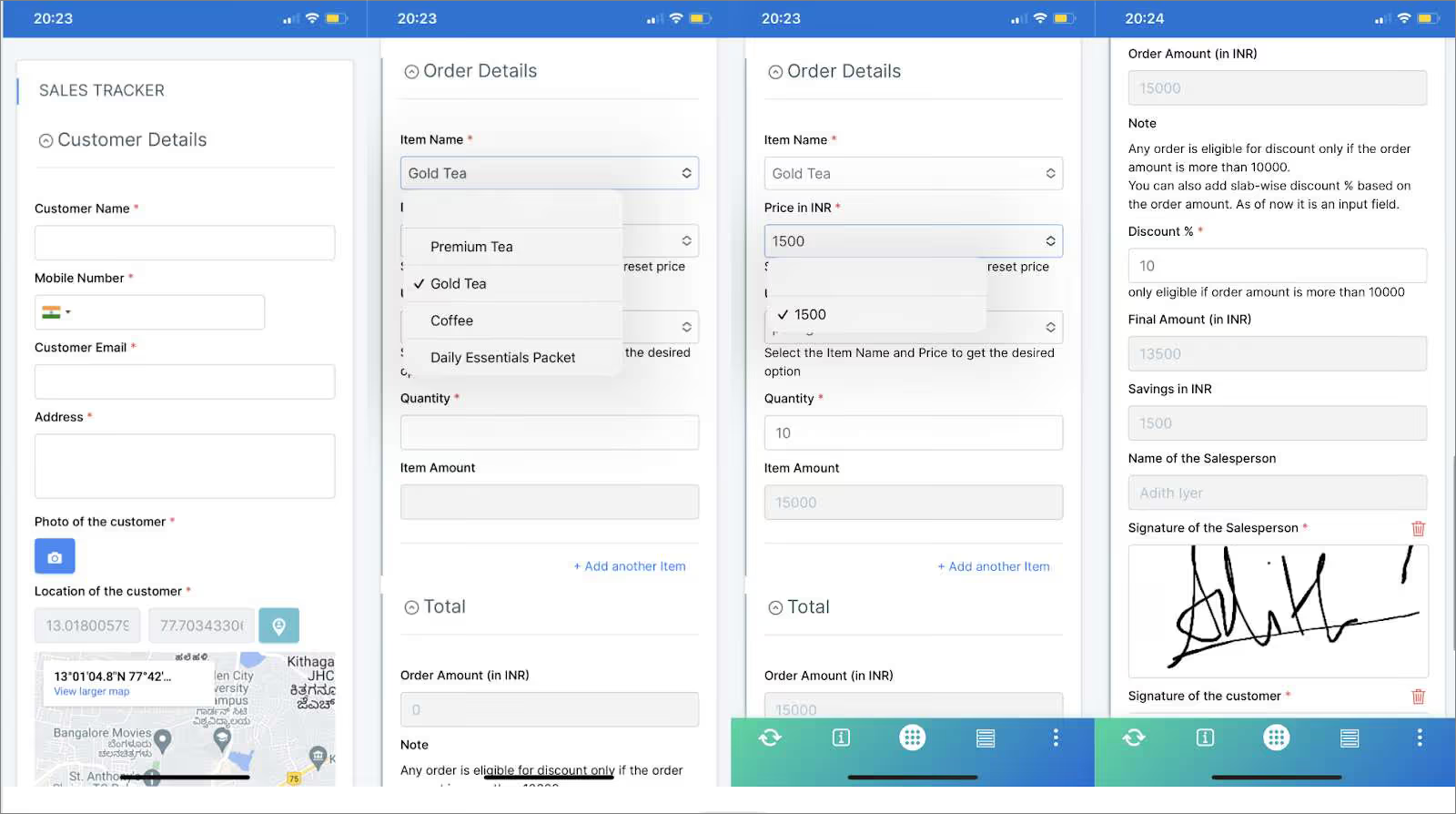
Clappia-built apps can be used without an internet connection. As a result, you may make a sale even in remote regions where there is no internet connection and yet ensure that the representative enters accurate data into the app.
Clappia allows you to build apps without writing a single line of code and incorporate complex mathematical equations and logical expressions similar to excel. This empowers businesses to build apps to solve almost all problems. In Clappia’s Geo-fenced Based Attendance System, complex arithmetic and trigonometric equations are used to compute the distance between two points which is displayed to the worker to notify how far he is from the site. Also, logical conditions are implemented to enforce that the worker can submit his attendance only when he is 200 meters from the site.
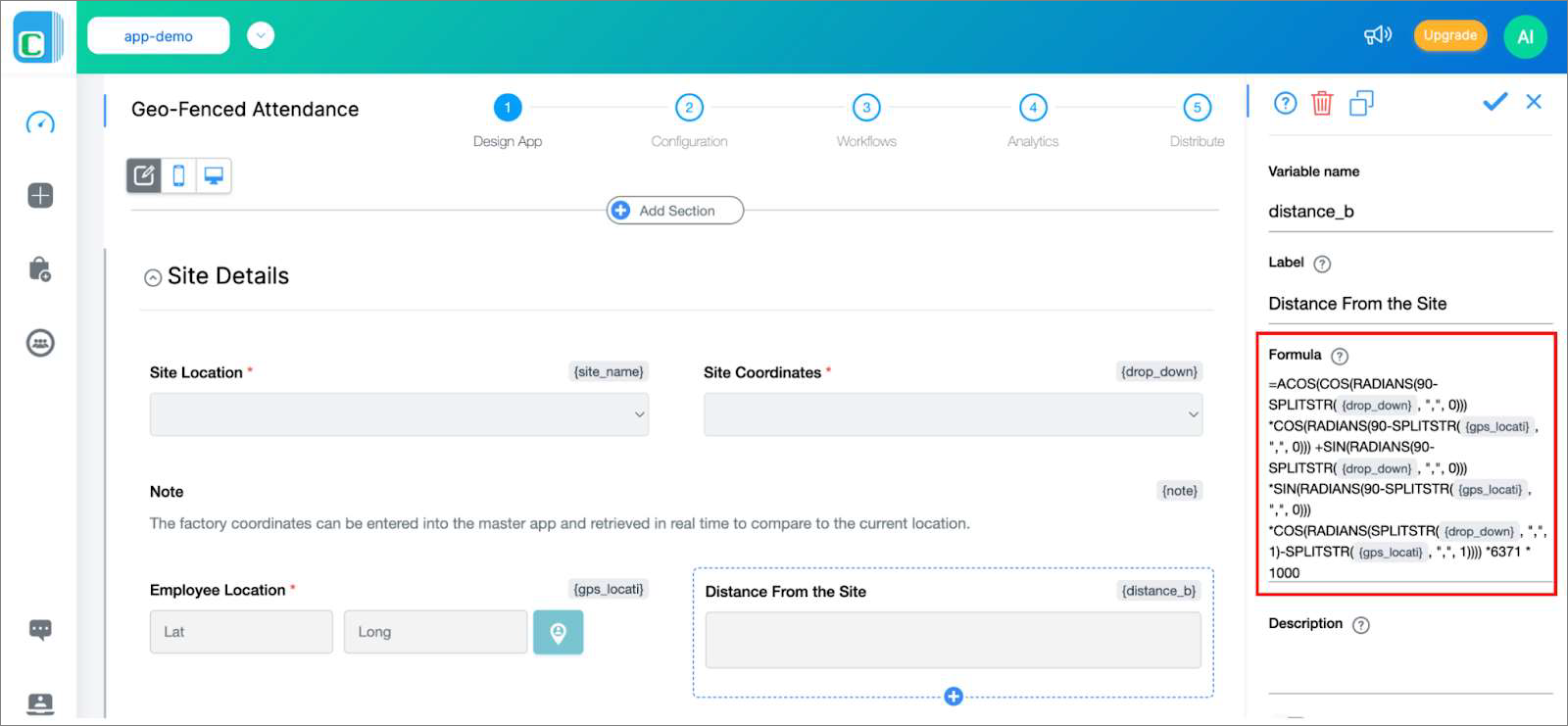

What's better than having a single app to solve all your problems? With Clappia, everybody can build applications with advanced features and use real-time calculations to make decisions.
Are you tired of doing calculations manually, or do you struggle with math daily at work? It's time to automate your tasks and avoid working on multiple applications to deal with numbers. Clappia's Calculations & Logic block frees you up by automating calculations so you can concentrate on other essential elements of your business. Use Clappia's Calculations & Logic block and other data processing blocks to collect data and take action from anywhere.
Stop forcing spreadsheets to do the work of a dedicated application. By upgrading to a platform that supports native math, conditional logic, offline capabilities, and signature uploads, you replace manual data entry with automated precision.
Import your Google Form to Clappia for free and add your first Calculation Block today.
No, not natively. Google Forms does not have built-in calculated fields for performing dynamic math inside the form. To achieve this, you must either export responses to Google Sheets to use spreadsheet formulas, or use an advanced form builder like Clappia which features native calculation blocks.
Google Forms supports very basic branching logic (sending a user to a different section based on a multiple-choice answer). It does not support complex conditional logic, such as applying a discount if a specific value is entered.
No, Google Forms does not support conditional formatting. If you want fields to change color or appear/disappear based on specific mathematical parameters, you must use a no-code alternative platform.
 Get Started – It’s Free
Google Forms does not natively support real-time calculations or formulas inside forms. While Google Sheets and third-party add-ons can handle basic calculations after or during form submission, they have limitations for dynamic pricing, conditional logic, discounts, totals, and validation.
Clappia provides a no-code alternative with a built-in Calculations & Logic block that lets you create formulas, perform real-time calculations, and apply conditional rules directly within forms. It can be used for use cases such as order forms, sales apps, invoices, inventory, GPS-based attendance, and other workflows that require calculations and automated decisions.
Build Custom Apps With GPS Location Without CodingGet Started - It's free!
L374, 1st Floor, 5th Main Rd, Sector 6, HSR Layout, Bengaluru, Karnataka 560102, India
3500 S DuPont Hwy, Dover,
Kent 19901, Delaware, USA


.svg)




3500 S DuPont Hwy, Dover,
Kent 19901, Delaware, USA
L374, 1st Floor, 5th Main Rd, Sector 6, HSR Layout, Bengaluru, Karnataka 560102, India