
Microsoft Forms cannot create functional purchase order systems. Critical limitations include: no automatic PO numbering, no multi-item line tables, no automatic calculations, no approval workflows, no PDF generation, and no vendor database integration. Organizations face manual workarounds, data errors, and approval delays.
Clappia delivers complete procurement automation with automatic PO number generation, multi-item requisition forms, Excel-like calculations, multi-level approval routing, branded PDF purchase orders, and vendor database integration.
Microsoft Forms lacks sequential ID generation essential for purchase orders. Users report: "How do I create incremental numbers for Purchase Orders when staff submit forms?" Microsoft's answer: impossible without Power Automate plus SharePoint custom coding. Each requisition requires manual PO number assignment—introducing errors, duplicates, and tracking chaos.
Organizations need PO-001, PO-002, PO-003 automatically generated. Microsoft Forms can't provide this basic procurement requirement. Finance teams manually track numbers in spreadsheets, creating reconciliation nightmares when multiple people submit simultaneously.
Purchase orders typically include multiple items—5 office supplies, 10 equipment items, 3 software licenses in single requisition. Microsoft Forms forces users to submit separate forms for each item or create messy forms with 50+ fields hoping users complete only relevant ones.
Microsoft documentation acknowledges: "MS Forms don't have table functionality for multiple line items. You need third-party apps." Organizations requiring standard purchase order formats—item description, quantity, unit price, total price per line—cannot implement this in Microsoft Forms.
Purchase orders require automatic calculations: line totals (quantity × unit price), subtotals, tax calculations, shipping costs, grand totals. Microsoft Forms provides no calculation capabilities. Users manually calculate totals before submission—introducing arithmetic errors, incorrect budgets, and approval confusion.
Finance teams receive purchase requests with wrong totals, requiring back-and-forth communication delays. Microsoft Forms can't validate budget limits, flag high-value purchases, or prevent over-budget submissions automatically.
Purchase requisitions require approval chains: requester submits, manager approves, purchasing reviews, finance authorizes based on amount thresholds. Microsoft Forms has zero approval functionality. Organizations build manual email chains, SharePoint lists, or pay for Power Automate flows requiring technical expertise.
Multi-level approvals based on purchase amounts (manager for <$1,000, director for <$10,000, CFO for >$10,000) prove impossible. Conditional approval routing by department, category, or vendor cannot be configured. Approval status tracking, reminder notifications, and escalation handling require external systems.
Purchase orders reference approved vendor lists with contact information, payment terms, and pricing agreements. Microsoft Forms can't pull vendor data from databases or synchronize with ERP systems. Users manually type vendor names—introducing spelling variations, duplicate entries, and unapproved vendor purchases.
Organizations maintaining vendor master files in accounting systems cannot link them to purchase requisition forms. Each submission requires complete vendor detail reentry. Microsoft Forms lacks validation preventing purchases from non-approved vendors.
Approved purchase requisitions must become formatted PDF purchase orders sent to vendors with company branding, line-item details, terms and conditions, and authorized signatures. Microsoft Forms provides zero PDF generation. Organizations manually export to Excel, format in Word, generate PDFs, then email separately—wasting hours per purchase order.
Professional purchase orders require company logos, custom formatting, conditional clauses (payment terms vary by vendor), and digital signatures. Microsoft Forms cannot produce these documents automatically.
Unique ID generation creates sequential purchase order numbers automatically: PO-0001, PO-0002, PO-0003 with customizable prefixes. Configure starting numbers, reset schedules, and format patterns. Every requisition receives unique trackable identifiers instantly—no manual tracking, no duplicates.
Microsoft Forms limitation: No ID generation. Manual numbering causes errors. Power Automate requires SharePoint lists and complex coding.

Copyable sections enable unlimited line items within single requisitions. Each line contains: item description, quantity, unit price, vendor, delivery date. Users click "Add Item" to duplicate sections—submitting 1 requisition with 20 items instead of 20 separate forms. Standard purchase order formats work perfectly.
Microsoft Forms limitation: No table functionality. Users submit separate forms per item or messy forms with 50+ fields.

Formula blocks calculate totals automatically: line totals (quantity × price), subtotals, tax, shipping, grand total. Validation rules enforce budget limits, flag high-value purchases, block over-budget submissions. Display budget remaining dynamically during data entry.
Microsoft Forms limitation: Zero calculations. Users manually calculate totals. No budget validation possible.
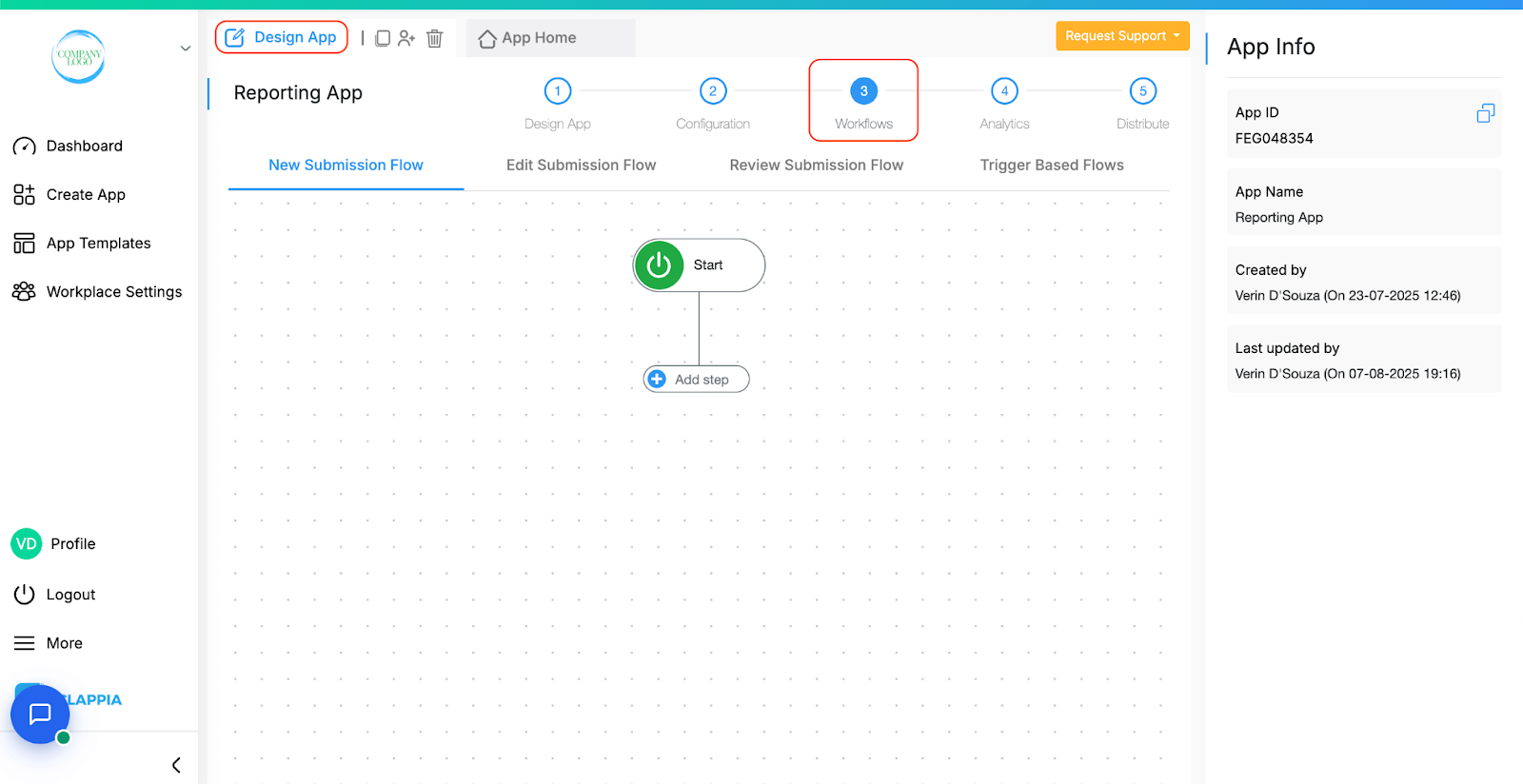
Approval workflows route requisitions automatically with conditional logic: purchases <$1,000 require manager approval, $1,000-$10,000 require manager+director, >$10,000 require manager+director+CFO. Route by department or category. Approvers receive email notifications with approve/reject buttons. Track status in real-time dashboards. Automated reminders and escalations.
Microsoft Forms limitation: Zero approval capabilities. Manual email chains or Power Automate requiring technical expertise.
Database connectivity connects to vendor master files in MySQL, PostgreSQL, SQL Server, or ERP systems. Users select vendors from validated dropdowns—auto-populating contact info, payment terms, pricing agreements. Enforce approved vendor lists. Google Sheets integration provides simple vendor database alternative.
Microsoft Forms limitation: No database connectivity. Users manually type vendor names causing errors.
Dynamic PDF generation creates branded purchase orders automatically: company logo, itemized line-item table, totals, payment terms, authorized signatures. PDFs attach to vendor emails automatically. Generate multiple document formats for different stakeholders from single submission.
Microsoft Forms limitation: Zero PDF generation. Manual export, format, create PDFs, send separately.

Approved requisitions automatically email vendors with PDF attachments. Email workflows notify procurement, requester, accounts payable. Analytics dashboards visualize spending by department, vendor, category. Track individual PO status from submitted to delivered. Set automated spending alerts.
Microsoft Forms limitation: Basic notifications only. No dashboards, tracking, or automated alerts.
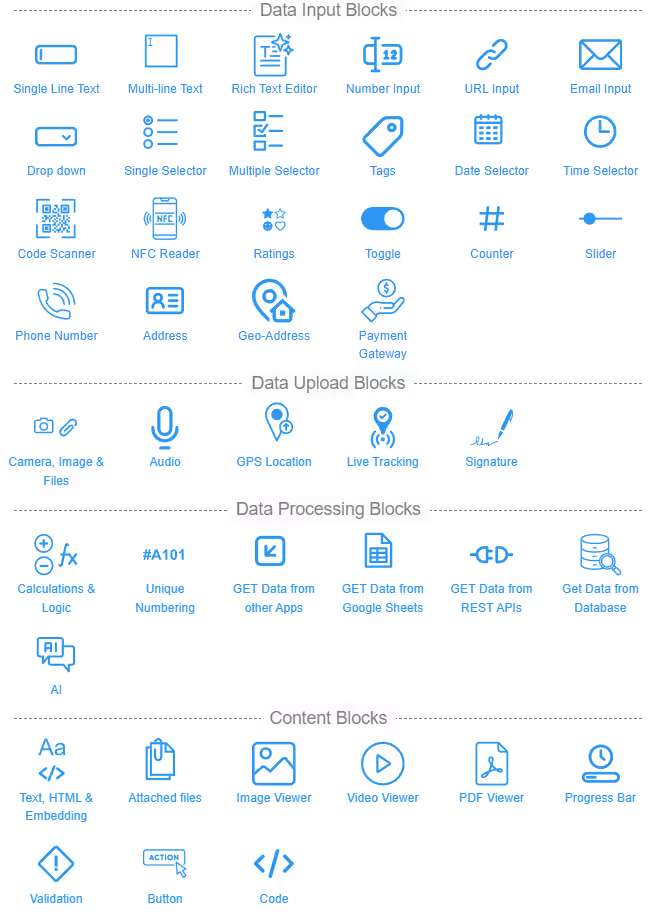
Mobile apps enable requisitions from anywhere. Offline mode captures requests without internet—syncing automatically when connected. Managers approve from mobile devices.
Inventory integration checks stock before ordering. Digital signatures capture electronic sign-offs. QR codes on PDFs link to submission records. REST API integration connects to ERP platforms (SAP, Oracle, Dynamics) and accounting software (QuickBooks, Xero).
Microsoft Forms limitation: Web-only, constant internet required. No inventory integration, signatures, QR codes, or ERP connectivity.
Manufacturing: Eliminated 5-day approval delays with automated workflows. Reduced procurement cycle time 80%. Healthcare: Standardized ordering across 12 facilities. Centralized vendor database ensures compliance. Education: Streamlined faculty process from weeks to 24-hour approvals. Department chairs approve from mobile devices. Construction: Job site supervisors request materials via mobile with offline mode. Vendor deliveries update project tracking automatically.
No, Microsoft Forms cannot generate sequential purchase order numbers. Users report requesting this feature with Microsoft confirming it's impossible without Power Automate plus custom SharePoint coding. Organizations manually track PO numbers in spreadsheets—causing errors, duplicates, and tracking failures when multiple users submit simultaneously. Clappia's Unique ID block generates sequential PO numbers automatically (PO-0001, PO-0002) with customizable prefixes, starting numbers, and reset schedules—ensuring every requisition receives unique trackable identifiers instantly without manual intervention or external tools.
Microsoft Forms cannot create multi-line item purchase requisitions. Microsoft's own documentation states: "MS Forms don't have table functionality—you need third-party apps." Users either submit separate forms per item (creating dozens of submissions for single purchase orders) or build messy forms with 50+ fields hoping users complete only relevant ones. Clappia's copyable sections enable users to add unlimited line items within single requisitions—each with item description, quantity, unit price, vendor, and notes. Users click "Add Item" to duplicate sections, submitting professional purchase orders matching traditional PO formats.
No, Microsoft Forms provides zero calculation capabilities. Users manually calculate totals before submission—introducing arithmetic errors, incorrect budgets, and approval confusion. Finance teams receive requisitions with wrong totals requiring back-and-forth corrections. Clappia's formula blocks calculate totals automatically using Excel-like functions: line totals (quantity × price), subtotals, tax calculations, shipping costs, grand totals. Calculations update instantly as users enter data. Validation rules enforce budget limits, blocking submissions exceeding departmental budgets and flagging unusual prices for review.
No, Microsoft Forms has zero approval functionality. Organizations wanting purchase approval chains must build manual email processes, SharePoint lists, or purchase Power Automate requiring technical expertise and ongoing maintenance. Power Automate cannot handle conditional routing by amount, department, or category without complex custom coding. Clappia includes native multi-level approval workflows: configure sequential approvals (manager, director, CFO), parallel approvals (multiple stakeholders), conditional routing based on amounts or categories. Approvers receive emails with requisition details, approve/reject buttons, deadline reminders. Real-time dashboards track approval status with automated escalations.
No, Microsoft Forms cannot connect to vendor databases or pull vendor information from ERP systems. Users manually type vendor names causing spelling variations, duplicate entries, and purchases from unapproved vendors. Organizations maintaining vendor master files cannot link them to requisition forms—each submission requires complete vendor detail reentry. Clappia connects to MySQL, PostgreSQL, SQL Server, or ERP systems directly. Users select vendors from validated dropdowns—auto-populating contact information, payment terms, pricing agreements. Google Sheets integration provides simple vendor database alternative for smaller organizations.
Microsoft Forms provides zero PDF generation capabilities. Organizations must manually export form responses to Excel, import to Word, format documents, generate PDFs, then email vendors separately—wasting hours per purchase order. Power Automate can generate PDFs but requires premium licenses, additional connectors, and complex configurations that frequently break. Clappia automatically generates branded PDF purchase orders from approved requisitions: company logo, itemized line-item tables, totals, payment terms, authorized signatures. PDFs attach automatically to vendor notification emails. Design multiple templates for different document needs.
Microsoft Forms provides web-only interface requiring constant internet connection. No true mobile app exists—users access via mobile browser with poor smartphone usability. No offline mode for field workers in areas with poor connectivity. Clappia provides native mobile apps for iOS and Android with mobile-optimized interfaces simplifying data entry on smartphones. Offline mode enables purchase requisitions without internet—field teams submit requests offline, syncing automatically when connection resumes. Managers approve requisitions from mobile devices with biometric authentication while traveling.
Build complete procurement systems with automatic PO numbering, multi-item requisitions, calculation automation, approval workflows, PDF generation, and vendor database integration.
 Get Started – It’s Free
Build Custom Apps With GPS Location Without CodingGet Started - It's free!
L374, 1st Floor, 5th Main Rd, Sector 6, HSR Layout, Bengaluru, Karnataka 560102, India
3500 S DuPont Hwy, Dover,
Kent 19901, Delaware, USA


.svg)




3500 S DuPont Hwy, Dover,
Kent 19901, Delaware, USA
L374, 1st Floor, 5th Main Rd, Sector 6, HSR Layout, Bengaluru, Karnataka 560102, India