Microsoft Forms provides basic email notifications, but significant limitations force users into workarounds. Notifications fail on group forms, require Power Automate for custom recipients, don't support multiple email addresses natively, lack dynamic content capabilities, and provide no attachment options. Organizations struggle when simple notification needs demand complex third-party integrations.
Clappia eliminates every Microsoft Forms email notification limitation while adding advanced automation capabilities Microsoft can't match. Build intelligent forms with unlimited email recipients, dynamic PDF attachments, conditional email routing, multi-channel notifications, and sophisticated approval workflows—all built-in without Power Automate or complex configurations.
Microsoft Forms email notifications stop working when forms move to Teams groups or shared workspaces. Users report "Get email notification of each response" produces zero emails—silently failing. The workaround requires editing Exchange Online group settings or using Power Automate.
Organizations need shared form access for collaboration, but Microsoft forces a choice: share form editing OR receive response notifications—never both. When notifications work, everyone in the group receives every response email, flooding inboxes without individual control.
Microsoft Forms sends notifications exclusively to the form owner's email. Sending to HR departments, managers, or team members requires Power Automate subscriptions. Even with Power Automate, forms moved to groups become invisible, required connectors appear missing, and configurations break without warning.
Organizations consistently report: "I need form notifications sent to our department email, not my personal inbox." Microsoft's answer: purchase additional software and learn workflow automation.
Microsoft Forms users with personal Outlook.com accounts report inconsistent notification delivery. Microsoft acknowledges personal accounts have "limitations in how automated emails are handled" but provides no solution. This unreliability makes Microsoft Forms unsuitable for time-sensitive applications where delayed notifications create operational problems.
Microsoft Forms notifications contain submission confirmation without form data. Recipients must click through to view responses on Forms website—requiring authentication. Notifications can't include field values, urgency indicators, or contextual information.
Email subjects remain generic "New response for [Form Name]"—no urgency differentiation between routine feedback and critical incidents. Notifications lack branding, company logos, and HTML formatting.
Microsoft Forms notifications can't attach PDFs, documents, or form summaries. Organizations requiring signed documents, inspection reports, or invoice copies must manually generate files and send separately—tripling work.
Industries like manufacturing, healthcare, construction, and professional services need automatic PDF generation from responses. Microsoft Forms requires exporting to Excel, importing to Word, formatting, generating PDFs, then sending separately.
Email-only notifications create single points of failure. Microsoft Forms provides no mobile push, SMS, WhatsApp, or Slack integration. Field teams, remote workers, and after-hours staff need flexible notification channels matching work patterns.
Clappia's email workflow sends notifications to unlimited recipients—individuals, department emails, dynamic assignees based on responses, or distribution lists. Configure different recipients for different submission types: urgent incidents notify managers, routine requests go to departments, escalations reach executives.
Add recipients by email, select from user lists, or use formula logic determining recipients based on form content. Send to submitters, approvers, teams, external partners, or any combination—configured through visual designer without coding.
Microsoft Forms limitation: Notifications only to form owners. Custom recipients require Power Automate. Clappia includes unlimited recipients natively.
Clappia notifications include complete form data in email body—eliminating website clicks. Emails contain field values, formatted tables, calculations, and HTML formatting. Recipients see submissions, make decisions immediately, without authentication barriers.
Customize subjects with dynamic values: "Incident Report - [Location] - [Severity]" instead of generic "New response." Email templates support conditional content—showing different sections based on responses.
Microsoft Forms limitation: No form data in notifications. Recipients navigate to Forms website and authenticate. Clappia delivers complete information instantly.
Dynamic PDF generation creates branded PDFs from submissions and attaches them to emails. Design templates with logos, formatting, calculated fields, conditional sections—automatically generated and emailed.
Use cases: inspection checklists become PDF reports, requisitions generate approval documents, incident reports create compliance records. Attach multiple files: form PDF, uploaded documents, related records, or reference materials.
Microsoft Forms limitation: Zero attachment capabilities. Manual export, format, PDF generation, separate emails required. Clappia automates everything.

Conditional workflows route notifications intelligently based on content. High-priority incidents notify senior management; routine requests go to teams. Expenses above thresholds require executive approval; smaller amounts skip unnecessary routing.
Build complex routing using IF conditions, formulas, and multi-branch workflows. Maintenance requests route to technicians by equipment type. Complaints escalate when satisfaction drops. Conditional routing eliminates inbox clutter—relevant notifications only to people needing information.
Microsoft Forms limitation: Identical notifications to all group members without filtering. Custom routing requires Power Automate programming. Clappia provides visual routing natively.
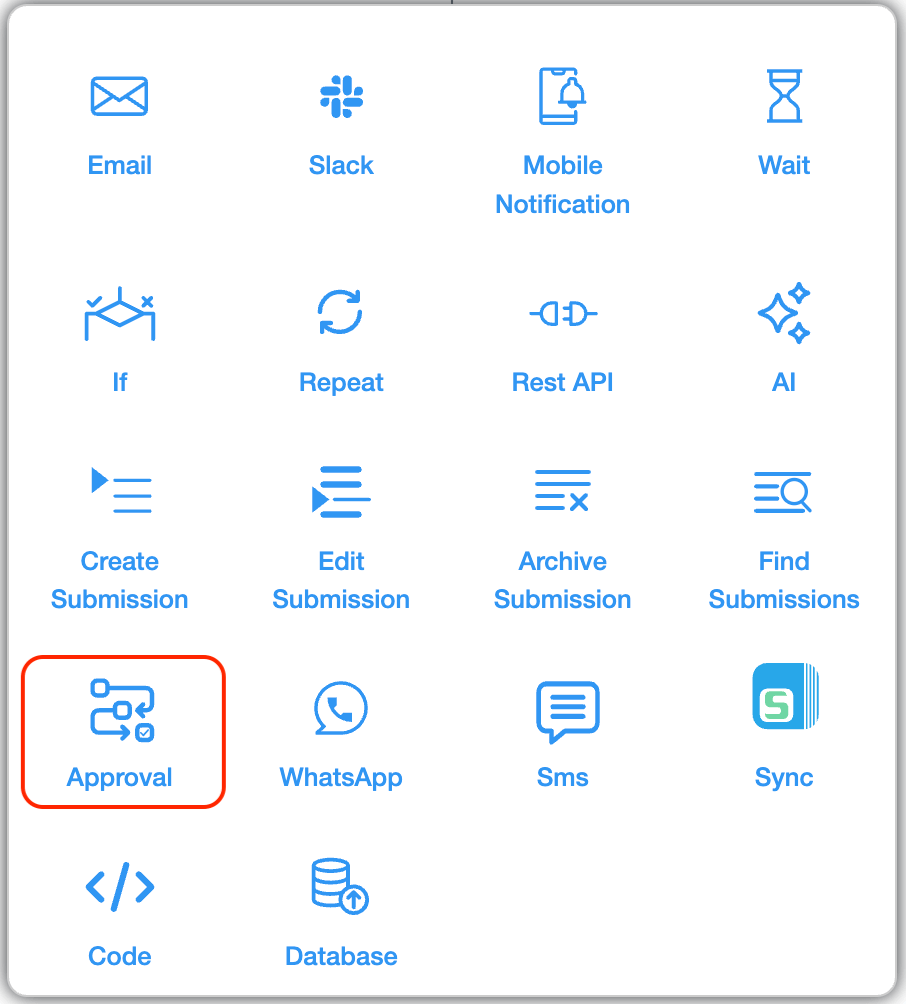
Approval workflows route submissions through multi-stage processes with notifications at every step. Configure sequential approvals, parallel approvals, or conditional approvals based on request types.
Approvers receive emails with details, approval/rejection buttons, and deadline reminders. Track status in real-time dashboards. Approved submissions trigger follow-up notifications to submitters, procurement, or other stakeholders automatically.
Microsoft Forms limitation: Zero approval capabilities. Organizations build manual processes. Clappia provides complete approval automation natively.
Mobile push notifications deliver instant smartphone alerts when critical submissions need attention. WhatsApp integration sends automated messages through WhatsApp Business API. SMS notifications provide text alerts for emergencies and approvals. Slack integration posts submission notifications to team channels.
Microsoft Forms limitation: Email only. No mobile push, WhatsApp, SMS, or Slack. Clappia provides omnichannel delivery.

Clappia sends notifications triggered by multiple events:
Configure unlimited workflows per form—each with unique recipients, content, conditions, and channels.
Microsoft Forms limitation: One notification per submission to form owner only. No reminders, status updates, or reports. Clappia provides unlimited trigger-based workflows.

Microsoft Forms email limitations force users into Power Automate for basic notification needs—adding complexity and technical barriers. Clappia includes email workflow automation, conditional routing, approval workflows, PDF generation, and multi-channel notifications built-in. Visual designer enables business users to configure automation without coding.
Start building for free to explore advanced email notification features and validate workflows.
Stop fighting Microsoft Forms limitations and paying for workarounds. Build custom forms with Clappia using drag-and-drop designer, configure unlimited email workflows with visual tools, add approval processes matching organizational hierarchies, and deploy complete solutions in hours—not weeks.
HR Recruitment: Application forms notify hiring managers with candidate details in email body, attach PDF resumes automatically, route to department heads based on position type, and send candidate confirmations—automated without Power Automate.
IT Help Desk: Support requests notify technicians via mobile push, email managers when SLAs approach, escalate unresolved tickets, send status updates automatically, and generate PDF incident reports—capabilities Microsoft Forms lacks.
Purchase Approvals: Requests email approvers with budget details, route through multi-level chains based on amounts, notify procurement when approved, and attach approved PDFs—workflows impossible in Microsoft Forms.
Quality Inspections: Forms email plant managers when defects discovered, send mobile alerts for critical issues, attach PDF reports with photos, and trigger corrective action workflows—automation beyond Microsoft Forms capabilities.
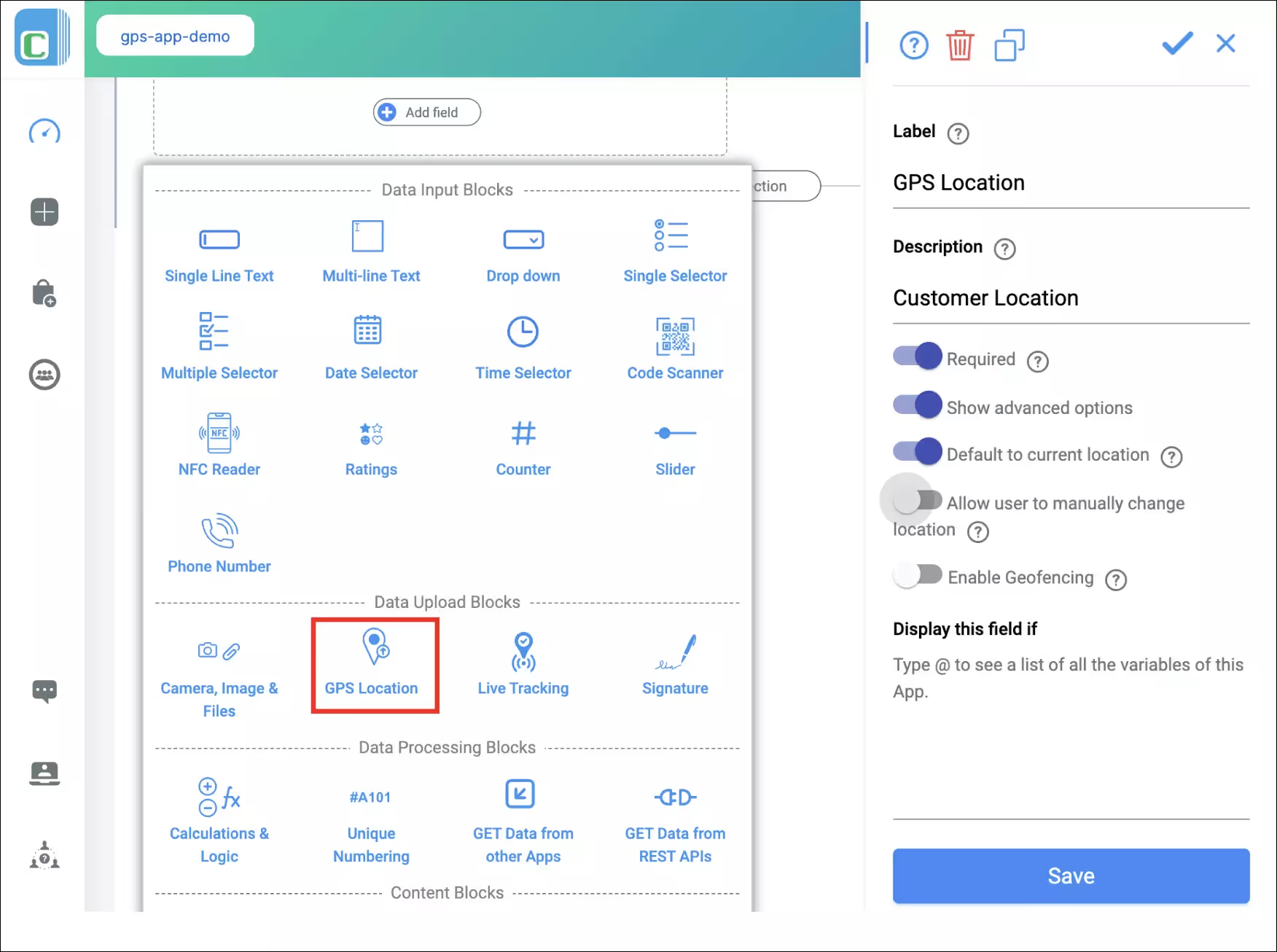
GPS location capture in forms with coordinates in notification emails for field inspections and attendance tracking. Camera uploads include photos directly in emails for incident reports and inspections. Digital signatures appear in emails and PDF attachments for approvals and contracts. Offline mode enables form completion without connectivity, triggering notifications once synced. QR code scanning includes equipment IDs in notifications for asset tracking. Analytics dashboards with automated email delivery of reports and summaries.

REST API integration connects forms with CRM, ERP, ticketing tools, and databases—triggering notifications across connected systems. Database connectivity pulls data from MySQL, PostgreSQL, SQL Server directly into forms and emails. Google Sheets integration syncs submissions while sending automated notifications.
Microsoft Forms notifications fail on group forms because Exchange Online's Hidden From Exchange Clients Enabled setting (True by default for Teams groups) prevents group email configuration. The workaround requires enabling external email access (security risk) or using Power Automate. Clappia eliminates this—notifications work identically for personal or shared forms with unlimited recipient configuration and zero external tool dependencies.
No, Microsoft Forms sends exclusively to form owner's email. Multiple recipients require Power Automate subscriptions plus complex flows. Forms moved to groups become invisible in Power Automate. Clappia provides unlimited email recipients natively—configure multiple addresses, distribution lists, dynamic recipients based on responses, and conditional routing through visual designer.
Microsoft notifications contain only generic confirmations without field values. Recipients must click through, authenticate, and navigate to view responses. Clappia notifications include complete form data in email body with formatted values and HTML formatting—enabling immediate decisions without external access.
Microsoft provides zero attachment capabilities. Organizations must manually export, format, generate PDFs, then send separately. Power Automate's PDF generation requires premium licenses and complex configurations. Clappia automatically generates branded PDFs, attaches them to emails, and supports multiple file attachments—configured through visual designer.
No, Microsoft Forms limits notifications to email only. No SMS, mobile push, WhatsApp, or Slack integrations exist. Clappia provides native SMS notifications, mobile push alerts, WhatsApp Business API integration, and Slack channel posting—all configured within platform without external services.
Microsoft acknowledges personal Outlook.com accounts have "limitations in how automated emails are handled" causing inconsistent delivery. No solution or timeline exists—making Forms unsuitable for time-sensitive applications. Clappia notifications work identically across all account types with reliable, immediate delivery using enterprise-grade infrastructure.
Microsoft Forms lacks approval capabilities—organizations build manual processes using email chains or SharePoint. Power Automate can add approvals but requires separate subscriptions and learning flow programming. Clappia includes native approval automation: configure multi-level approvals, conditional routing, approval buttons in emails, real-time dashboards, and escalation reminders—through visual designer without coding.
No, Microsoft Forms sends one notification immediately when forms submit—no delayed notifications, reminder emails, scheduled digests, or time-based triggers exist. Organizations needing follow-up reminders, weekly summaries, or scheduled reports must manually track submissions and send emails separately or build complex Power Automate flows. Clappia provides unlimited time-based notification triggers: send confirmation immediately, follow-up reminders 24/48 hours later if no action taken, weekly status updates for pending requests, deadline warnings before due dates, and scheduled daily/weekly/monthly report emails—all configured visually per workflow.
Build intelligent forms with unlimited email workflows, dynamic PDF attachments, conditional routing, approval automation, and multi-channel notifications—all without Power Automate or technical complexity.
 Get Started – It’s Free
Build Custom Apps With GPS Location Without CodingGet Started - It's free!
L374, 1st Floor, 5th Main Rd, Sector 6, HSR Layout, Bengaluru, Karnataka 560102, India
3500 S DuPont Hwy, Dover,
Kent 19901, Delaware, USA


.svg)




3500 S DuPont Hwy, Dover,
Kent 19901, Delaware, USA
L374, 1st Floor, 5th Main Rd, Sector 6, HSR Layout, Bengaluru, Karnataka 560102, India