

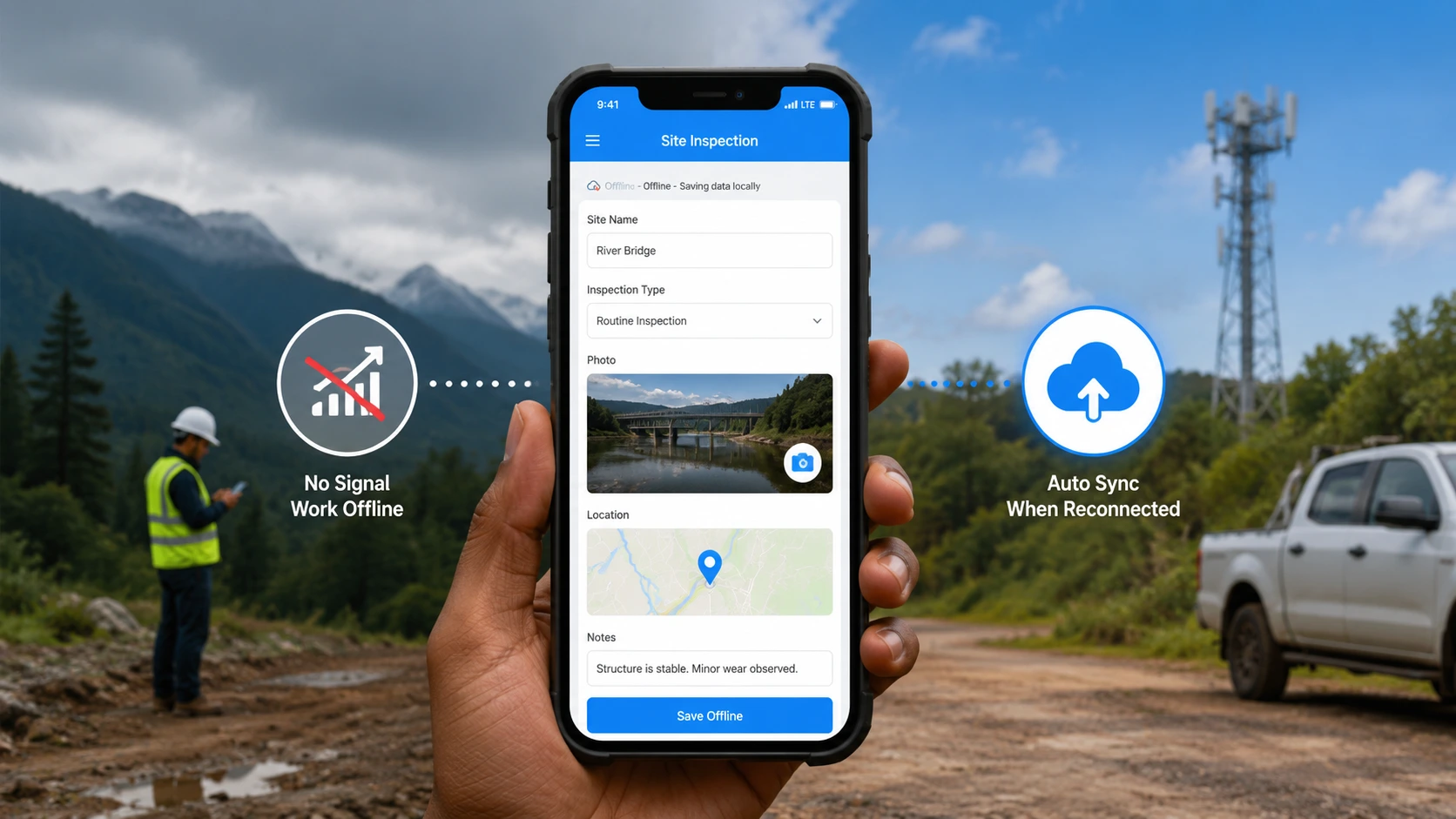
The inspector is in a basement with no bars, a wet floor, and a checklist that still lives on paper. Photos sit in the camera roll. Notes sit in a pocket. By the time the team is back in range, the evidence is split across three places, and nobody can say which version is the official record.
That is the real job of offline data collection. You need a mobile app that stores the submission on the device, including photos and GPS location, then uploads it without a second tap when the phone reconnects. This guide is the operations playbook for doing that in Clappia offline apps, then letting workflows run after the record is online. If you are comparing tools rather than setting up a process, start with offline mobile data collection software or the best offline inspection apps for field teams.
Offline data collection with automatic sync means the phone is the working copy while you have no signal, and the server catches up when connectivity returns. Developers call this offline-first: write locally first, queue the upload, then reconcile. Field teams do not need to build that engine. They need an app that already stores submissions on the device and uploads them in the background.
In Clappia, that happens on the Android and iOS mobile apps, not in the browser. You open the specific app once while you have internet so it can load. After that, you can create submissions with no connection. The app shows that the data is waiting. When you are back online, submissions and files upload automatically. You do not resubmit the form.
The U.S. GPS program is what makes a location stamp useful in the field. Pair that with photos and a structured form, and you have a record you can defend later, which is the same idea behind OSHA injury and illness recordkeeping for workplaces that already keep formal logs. For a survey-shaped version of the same job, see how to collect data anywhere with offline surveys.
A few public numbers explain why offline capture with automatic sync is an operations requirement, not a nice-to-have.
Build the form first in the design app tab as a field data collection app: text, dropdowns, Camera, Images and Files, and a GPS Location block. Then follow this sequence on the phone. A longer product walkthrough lives in how to use Clappia apps in offline mode.
Editing needs one extra online step. The submissions list can be large, so preload only what you will touch.
Open the three-dot menu at the bottom-right of the Clappia app and tap Offline Data. That screen is the outbox. It splits the queue on purpose:
If counts look stuck, tap Refresh to retry. If you have internet and a submission still will not move, tap Send Logs so Clappia support can see the diagnostic file. You need a connection to send logs. When the queue is empty, the screen says there is no pending data.
The NIST Cybersecurity Framework treats data protection as a process, not a single upload. Treat pending files the same way: the job is not done until both the submission and the media have left the phone. For form-only capture patterns, see offline mobile forms and Clappia's offline forms product page.
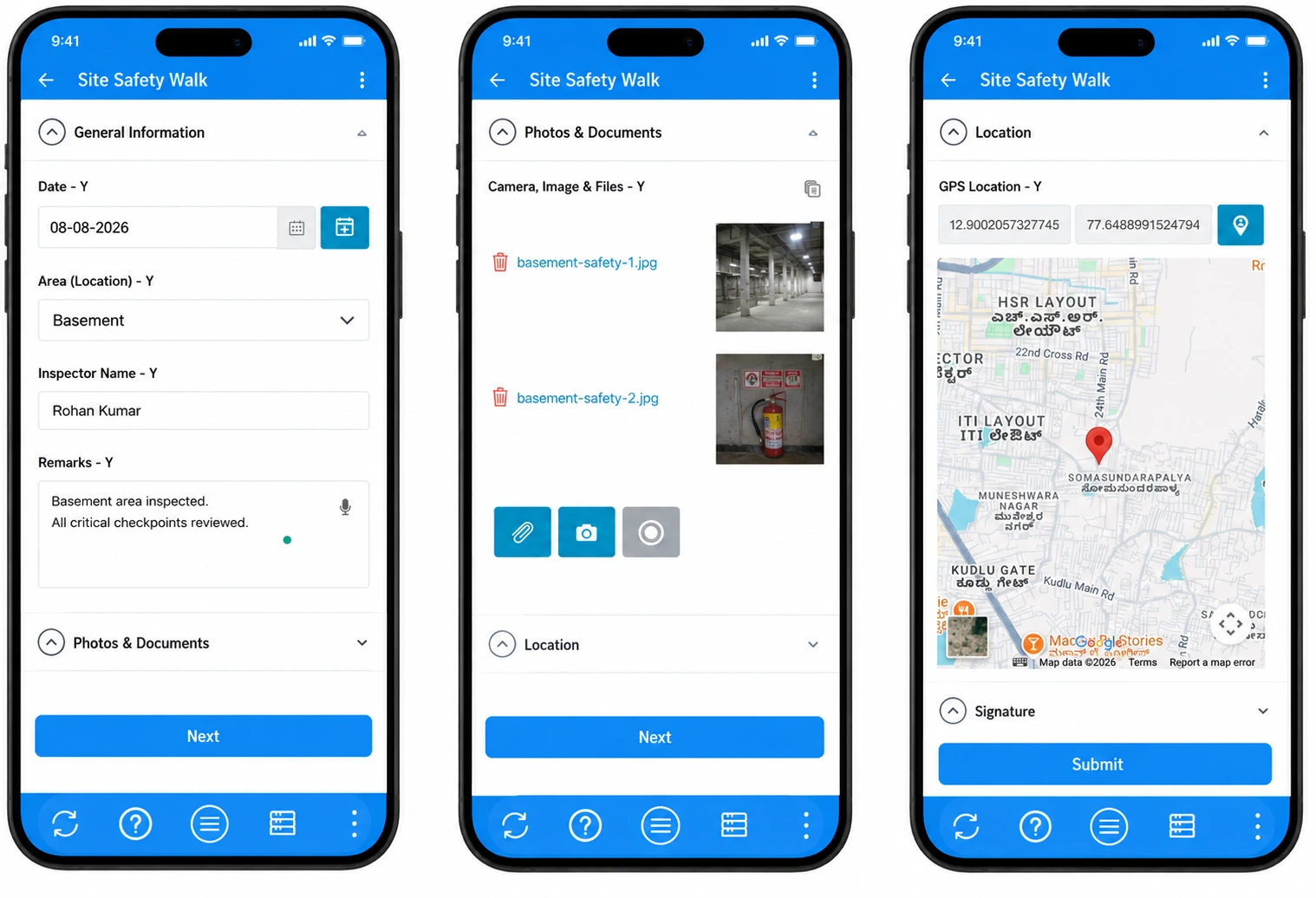
Scenario: A general contractor runs weekly safety walks across three urban sites. The worst dead zone is a parking basement where crews still have to log housekeeping, fire extinguishers, and access routes. Paper cards get wet. WhatsApp photos never make it into the official file. Construction remains one of the higher-risk industries in the U.S. Bureau of Labor Statistics Injuries, Illnesses, and Fatalities program, so the record has to be complete, not just convenient.
How Clappia solves it: The safety lead builds a site inspection app with a date field, a dropdown for area, a mandatory Camera block, and a GPS Location block with default-to-current-location. Inspectors open the app on Wi-Fi at the trailer, then walk the basement. They submit on the spot. Offline Data shows pending submissions and pending files until they return upstairs. After sync, a New Submission workflow can email the site supervisor. Status changes wait until the phone is online, so they do not try to mark a finding Closed in the basement.
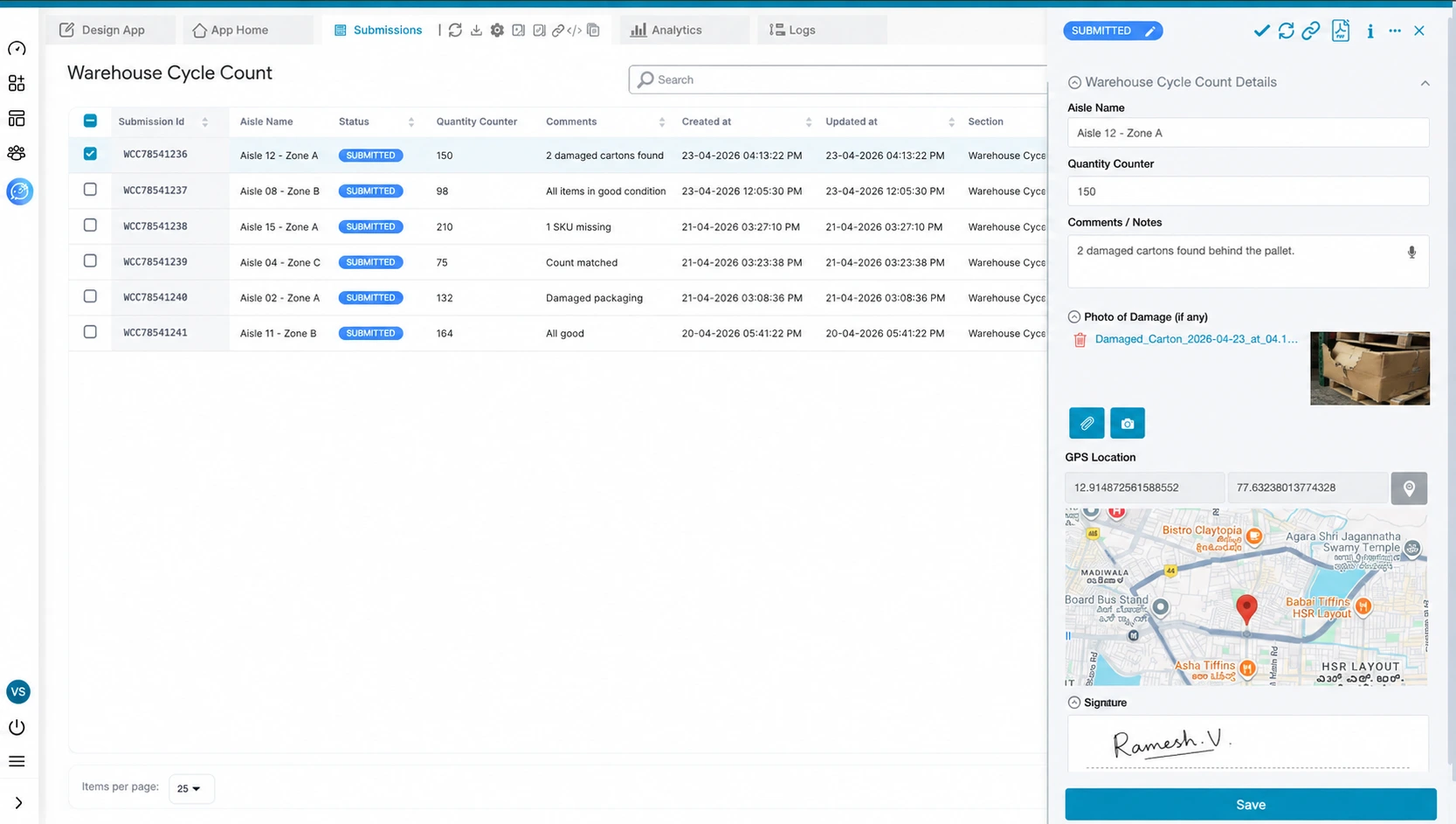
Scenario: A manufacturer with two plants runs overnight cycle counts in steel racking aisles where signal drops. Counts used to sit in notebooks until morning, then someone typed them into a spreadsheet. Variances showed up a day late.
How Clappia solves it: Counters use the mobile app with a code scanner, counter field, photos of damaged cartons, and GPS to confirm they were in the right aisle. They preload the stock-count app while on the warehouse Wi-Fi. After the shift, automatic sync drops every submission into the Submissions tab. The supervisor reviews counts on desktop, then the New Submission Flow can run an Email node to inventory control. If a count is short, a second IF node on quantity below target can start an approval path. Each IF node checks one condition, so a yes path and a no path are two separate IF nodes, not one diamond with two arrows. For a wider field-data view, see Clappia for field data collection.
The gap most teams miss is not "does the vendor list offline." It is whether the phone can finish the job when the browser cannot, and whether photos use the same queue as the form.
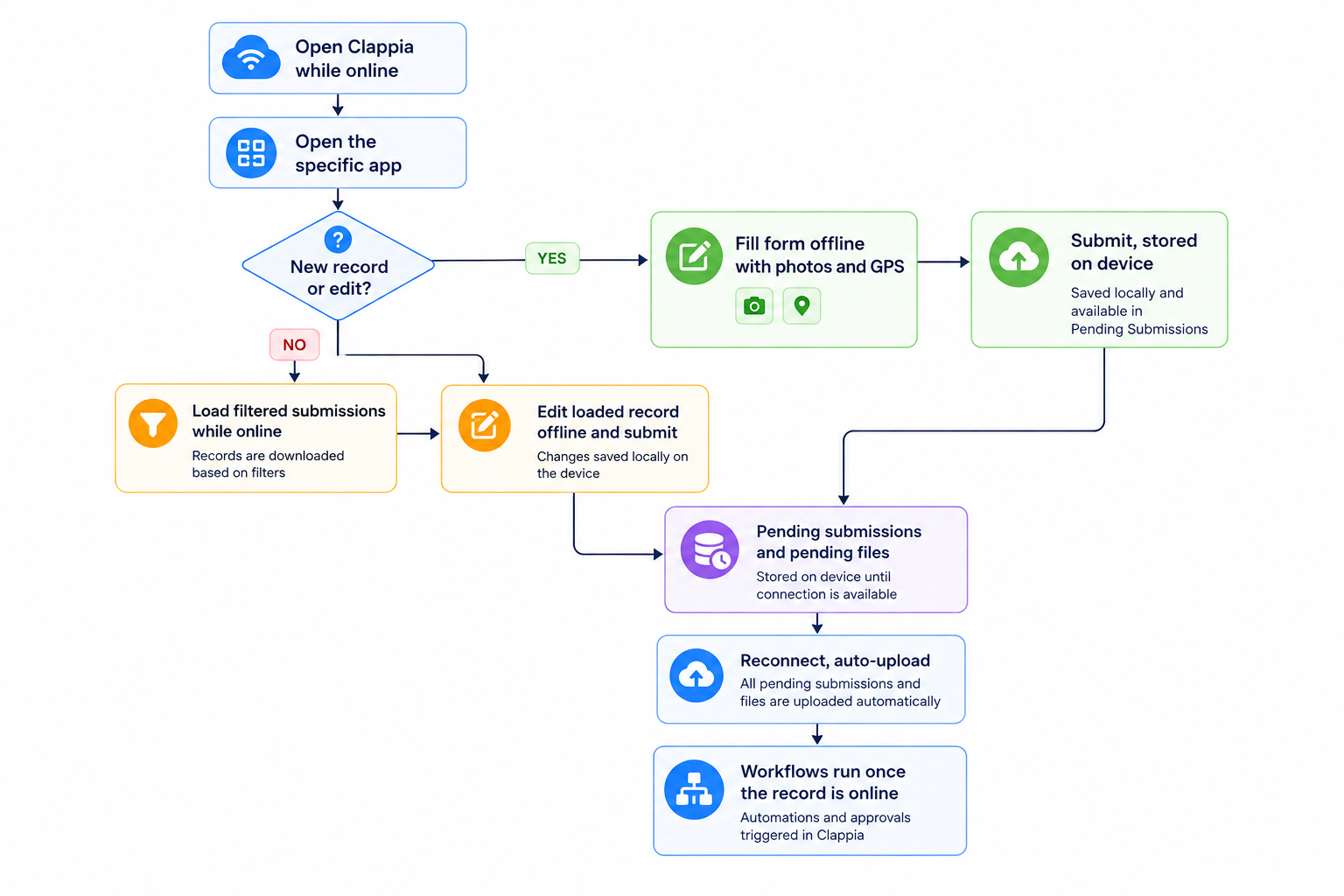
Treat create and edit as different checklists. Skipping the preload step is the usual reason an edit is missing in the field.
Form fields usually land first. Photos sit in Pending Files. If you only look at the submissions list, you can think you are done while the evidence is still on the phone. Check Offline Data for both counts before you leave the site.
Ready to give field teams a record that survives a dead zone? Start building for free and put photos, GPS, and automatic sync in the same no-code app. Your inspectors will keep working when the signal will not.
Yes, on the Clappia Android and iOS apps. Open the specific app once while online, submit in the field, and Clappia uploads pending submissions and files when the device reconnects. The web app does not support offline submissions.
Yes. Camera, Images and Files and GPS Location blocks work offline. Media is stored on the device and uploaded during sync. Watch Pending Files as well as Pending Submissions. For geotagged photos in other workflows, see how to capture GPS location with date and timestamp on an image.
While online, load the submissions you will edit, using filters such as last 7 days, assigned to me, or Open status. Then open a loaded record in the field and save. New submissions do not need that extra preload of the list.
Open Offline Data, confirm you have internet, and tap Refresh. If the queue still does not move, tap Send Logs so support can inspect the device logs. You need a connection to send those logs.
Submission status changes do not work offline. The block that gets data from other Clappia apps cannot pull while offline. Workflows that email, approve, or write to Sheets run after the submission exists online.
 Get Started – It’s Free
L374, 1st Floor, 5th Main Rd, Sector 6, HSR Layout, Bengaluru, Karnataka 560102, India
3500 S DuPont Hwy, Dover,
Kent 19901, Delaware, USA


.svg)




3500 S DuPont Hwy, Dover,
Kent 19901, Delaware, USA
L374, 1st Floor, 5th Main Rd, Sector 6, HSR Layout, Bengaluru, Karnataka 560102, India


.avif)

.avif)

