


Most "best checklist app" lists treat all the tools the same. They are not the same. The real choice in 2026 is not which app has the prettiest templates. It is whether you want a fixed-template app that does inspections one way, or a builder you can shape to fit any process your business runs.
That difference decides everything. A safety team auditing the same sites every week is happy with templates. A growing business that runs inspections, equipment checks, site surveys, delivery proofs, and quality audits, all with different fields and different approval rules, will outgrow a template tool fast.
This guide compares the 8 best checklist apps for 2026. You will see what each one is built for, the features that actually matter, a side-by-side table, and three real scenarios so you can match a tool to your work. If you just want a quick answer, the short version is at the end.
A checklist app turns your paper forms and spreadsheet checklists into digital forms your team fills out on a phone, tablet, or computer. Instead of clipboards and re-typing, your team taps through items, attaches photos, captures signatures, and submits. The data lands in one place automatically.
But there is an important split inside this category, and it is the thing buyers miss.
Some products are checklist apps: you pick a template, fill it in, and get a report. They are quick to start and hard to bend.
Others are checklist builders: you decide the fields, the logic, the workflow, and the look. They take a little more setup, then they fit your process exactly and keep fitting as your process changes.
Knowing which type you need is the most useful thing you can do before you compare prices. A team that needs one standard safety audit is fine with a fixed app. A team that needs ten different forms across departments needs a builder.
Every product on this list claims offline mode, photo capture, and instant reports. So feature lists alone will not help you decide. Here is what to weigh, and why each one matters in real use.
Here are the eight tools, grouped by who they fit best. We start with the most flexible option for businesses that want a checklist or audit app shaped to their own process, then move through the specialists.
Clappia is a no-code platform you use to build your own checklist, inspection, or audit app, with exactly the fields and workflow your process needs. Instead of choosing a fixed template, you drag in the blocks you want, so the same platform can run a safety audit, an equipment check, a site survey, a delivery proof, or a quality inspection without switching tools.
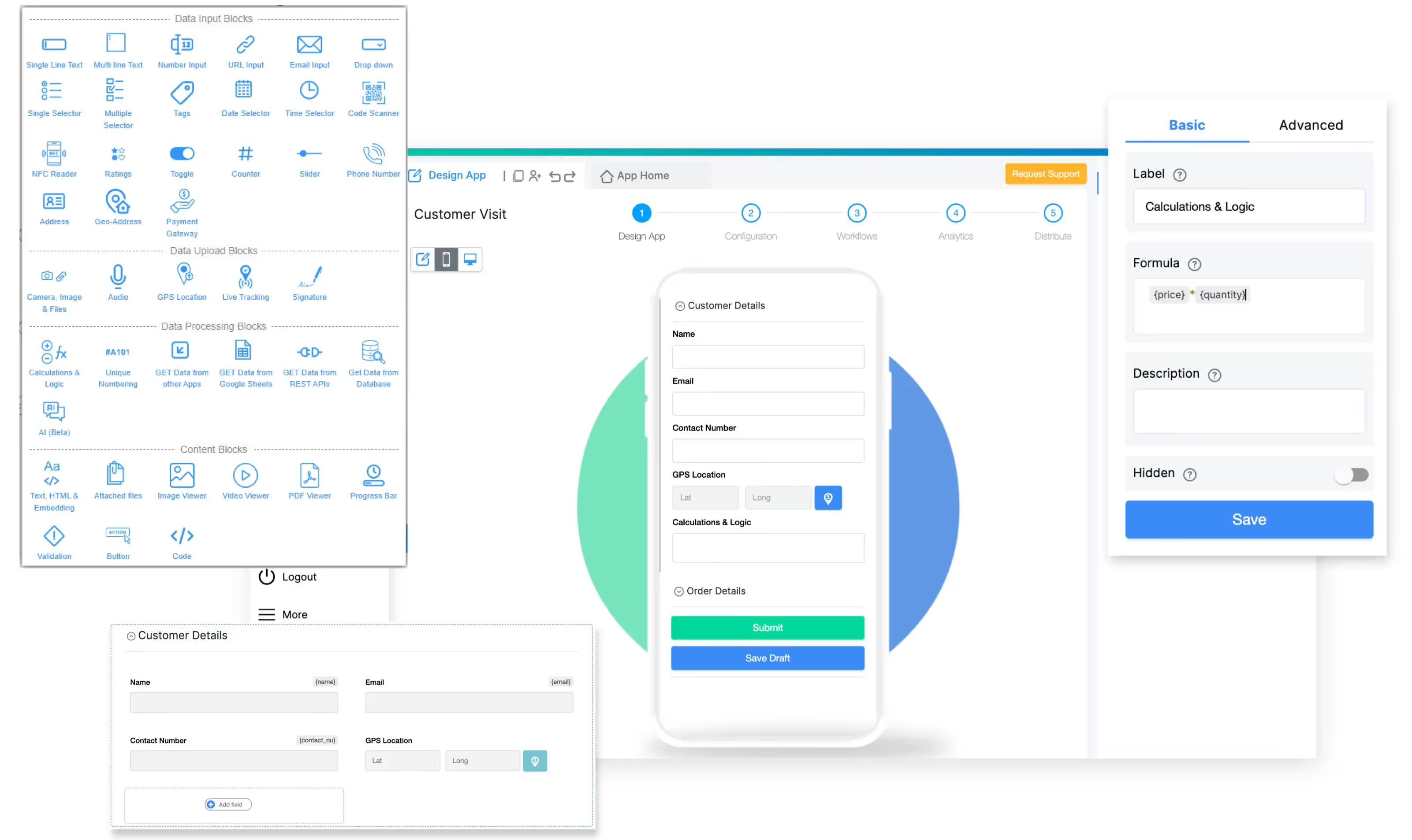
The Clappia app designer lets you drag in any field you need and build a custom checklist app without code.
Key features
Why choose Clappia?
Pick Clappia when no single template fits your work, or when one tool needs to cover many different checks. You can start from a use case like an inspection checklist, a quality inspection app, a real estate inspection app, or a custom electrical inspection checklist, then change any field. The free plan is permanent, not a trial, so you can build and use real apps at no cost, with paid plans starting around $6 per user per month when you need more. You can start building for free in minutes.
SafetyCulture, formerly iAuditor, is one of the most recognized names in digital inspections. It is built around a large template library and a polished mobile experience for turning paper safety checklists into structured reports.
Key features
Why choose SafetyCulture?
It is a strong fit for safety and operations teams that run the same inspections often and want a big head start from ready-made templates. The free plan covers up to 10 users with basic inspections. Premium runs roughly $24 to $29 per user per month, and integrations are reserved for the paid tiers, so costs rise as larger teams need more.
GoAudits is a mobile audit and inspection platform focused on scored audits and branded reporting. It leans toward multi-site operations in hospitality, retail, healthcare, food, and facilities.
Key features
Why choose GoAudits?
Choose it when scoring, trend tracking, and consistent audits across many locations are the priority, and you want the vendor to help build your templates during onboarding. Pricing starts around $10 per user per month with a free trial, which makes it one of the more affordable audit-focused options.
Jotform is a widely used online form builder with a very large template gallery. It works well for checklist-style forms when your main need is data collection rather than field operations.
Key features
Why choose Jotform?
It suits small teams, solo users, and form-heavy use cases where you mostly need responses collected and routed. The free Starter plan includes 5 forms and 100 submissions a month, with paid plans from about $34 a month. Note that limits are metered by submissions and forms, and field-grade features like deep offline workflows and GPS are not its focus.
Connecteam is an all-in-one workforce app for deskless teams, with forms and checklists bundled alongside scheduling, time tracking, and team chat. The checklist piece is one part of a broader operations toolkit.
Key features
Why choose Connecteam?
It fits businesses that want checklists as part of managing a whole frontline workforce, not as a standalone tool. The free plan covers up to 10 users, and paid plans start around $29 a month for the first 30 users. Watch the "hub" structure, since features split across separate Operations, Communications, and HR hubs can stack up in cost.
Flowdit is an inspection and operations platform aimed at industrial settings: manufacturing, maintenance, commissioning, and EHS. It emphasizes complex checklists, traceability, and connection to industrial systems.
Key features
Why choose Flowdit?
It is built for manufacturing and industrial teams that need standardized, traceable checks tied into existing systems. Setup of complex checklists takes time, and pricing is quote-based, so plan for an onboarding period before you are fully running.
CheckFlow is a business-process and SOP tool built around recurring checklists. It targets teams that want to systemize repeatable office processes like onboarding, support, and operations.
Key features
Why choose CheckFlow?
It works well for process-driven, mostly desk-based teams who run the same workflows again and again. Pricing starts around $9 per user per month with a free trial. The main caveat is that it is web and desktop focused, so it is not the right pick if you need a true field mobile app with offline capture.
Checklist.com is a lightweight checklist and list app for individuals and small, simple needs. It is the closest thing on this list to a personal to-do tool rather than a business platform.
Key features
Why choose Checklist.com?
Choose it for personal organization or very simple shared lists. It is easy and friendly, but it is not built for inspections, approvals, evidence capture, or reporting, so businesses with real field or compliance needs will outgrow it quickly.
Prices and limits are based on publicly listed information as of 2026 and can change. Check each vendor's current pricing page before you buy.
The other tools on this list are good at the job they were designed for. The trade-off is that each one points you down a single path: a fixed inspection template, a forms-only builder, a workforce suite, or an SOP runner.
Clappia takes a different approach. Because you build the app, you are never stuck with someone else's idea of what your checklist should look like. You add the exact fields you want, set your own approval steps, and adjust the app as your process changes, all without code.
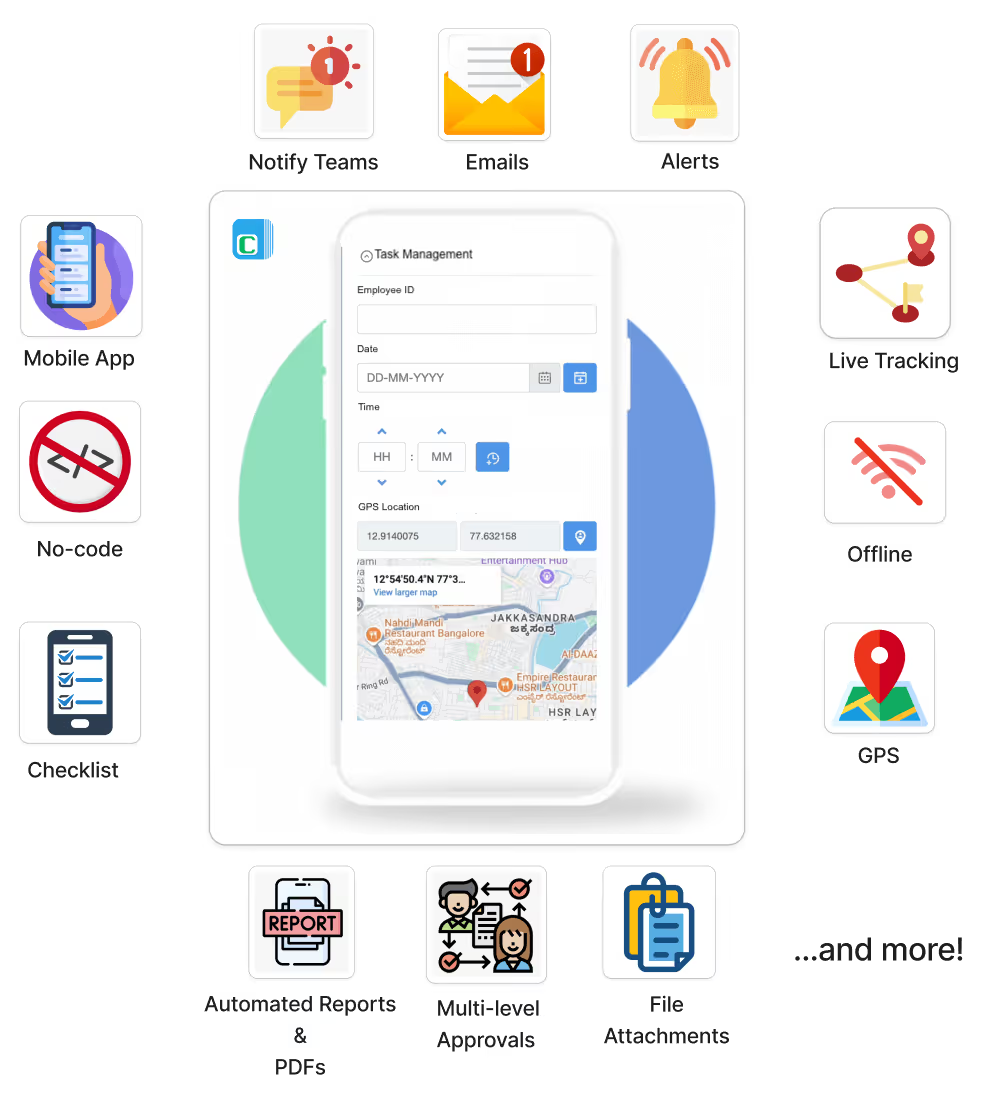
One Clappia app can combine offline capture, GPS, photo and file attachments, multi-level approvals, automated PDF reports, and team notifications, and more.
That flexibility shows up in real ways:
If your work does not fit a template, a builder beats a fixed app. That is the gap Clappia fills.
Match the tool to your work, not to the longest feature list. A few questions make the decision clear.
A facilities company inspects HVAC units on Monday, fire safety on Wednesday, and cleanliness audits on Friday. Each check needs different fields, photos of problem areas, and a sign-off from a supervisor.
A template tool would mean juggling three separate setups and still fighting the fixed fields. With a builder like Clappia, the team creates three apps with the exact fields each check needs, adds photo capture and signatures, and routes each submission to the right supervisor through a multi-level approval. A branded PDF goes out automatically. One platform covers all three jobs.
A technician services machinery at a remote plant with no connectivity. They need to photograph a control panel, flag any defects, and submit a report before they leave the site.
With offline mode, the technician completes the checklist and captures photos with no connection, and the data syncs once they are back online. An AI block reviews the panel photo and flags issues like loose wiring or corrosion, so problems are caught on the spot instead of in a back-office review days later.
A delivery operation needs proof for every parcel: a photo, the recipient's signature, and the GPS location of the drop. Disputes happen, and paper does not hold up.
A custom Clappia app captures the photo, signature, and GPS location in one quick form on the driver's phone. Each submission is time-stamped and stored, and a report can be generated automatically. When a customer questions a delivery, the proof is one search away.
The best checklist app depends on the shape of your work. If you run one standard inspection, a specialist like SafetyCulture or GoAudits gives you a fast start. If you need office process checklists, CheckFlow fits. If you want checklists inside a full workforce app, Connecteam works. For simple personal lists, Checklist.com is enough.
But if your business runs many different checks, or your process does not fit anyone's template, you want a builder, not a fixed app. That is where Clappia is the strongest pick: add any field you want, automate what happens after submit, work offline, and keep using the permanent free plan as you grow. You can start building your own checklist app for free today.
Which checklist app works offline?
Clappia, SafetyCulture, GoAudits, and Flowdit all support offline data capture with sync once you reconnect. Clappia's offline mode is built for remote sites and syncs automatically when you are back online. Desktop-focused tools like CheckFlow are not suited to offline field work.
Which checklist app has GPS tracking?
Clappia and Connecteam offer location features. In Clappia you can add a GPS location field to any checklist to record where and when a check happened, which is useful for attendance, site visits, and delivery proof.
Which checklist app includes AI features?
Clappia, SafetyCulture, and Jotform offer AI. Clappia is unusually flexible here: an AI block can read a photo or file inside the form to flag defects or score a sheet, and an AI Workflow Node handles automation after submission.
Can checklist software generate reports automatically?
Yes. Most business-grade tools, including Clappia, SafetyCulture, and GoAudits, generate branded PDF reports automatically and can email them to the right people. Clappia's automated PDF generation builds reports from your submission data.
What is the best checklist app for inspections?
For a single standard inspection, SafetyCulture and GoAudits are strong. For inspections that need custom fields, your own workflow, or many different inspection types in one place, a no-code builder like Clappia fits better.
Which checklist software is best for field teams?
Field teams need offline mode, native mobile apps, photo and signature capture, and GPS. Clappia covers all four and lets you shape the form to the job. Connecteam suits teams that also want scheduling and chat in the same app.
Is there a free checklist app for businesses?Y
es. Clappia offers a permanent free plan, not a trial, so you can build and use real checklist apps at no cost. SafetyCulture and Connecteam offer free tiers for up to 10 users, and Jotform has a free plan with submission limits.
Can I create a checklist app without coding?
Yes. Clappia is a no-code platform where you drag in fields and workflow steps to build a custom checklist or audit app, with no developer needed. You can start for free and have a working app in minutes.
This article touches on safety and compliance workflows. The right tool depends on your industry's requirements, so confirm any regulated process with the relevant standards for your sector.
L374, 1st Floor, 5th Main Rd, Sector 6, HSR Layout, Bengaluru, Karnataka 560102, India
3500 S DuPont Hwy, Dover,
Kent 19901, Delaware, USA


.svg)




3500 S DuPont Hwy, Dover,
Kent 19901, Delaware, USA
L374, 1st Floor, 5th Main Rd, Sector 6, HSR Layout, Bengaluru, Karnataka 560102, India



.avif)
.avif)

