
You open 20 seats for a Saturday workshop, share a Google Form, and go to lunch. By the time you are back, 27 people have "booked" a seat, three of them in a session that was already full, and your inbox is filling up with apologies you now have to write. The form did exactly what it was built to do: collect answers. It was never built to count them.
That gap is why "choice eliminator" is one of the most searched Google Forms add-ons. This guide shows how to add one in two minutes, where add-ons start to fail once real volume arrives, and how to build a Google Forms alternative with a built-in choice eliminator in Clappia that also handles quantities, approvals and offline teams.
No. Google Forms has no native choice eliminator. Options in multiple choice, dropdown and checkbox questions stay visible and selectable for every respondent, no matter how many times they have already been picked. The only built-in limit is closing the whole form or limiting each Google account to one response, which does nothing for per-option capacity.
To remove an option once it is full, you need a third-party add-on from the Google Workspace Marketplace, such as "Choice Eliminator" or "Form Choice Limiter". These add-ons watch new responses and edit your form's options after each submission.
You can set this up directly from your form editor in under two minutes:
For a class sign-up sheet or a small team lunch order, this is often all you need.
Add-ons work by running a Google Apps Script after each submission. The script reads the responses, counts each option, and rewrites the question. That design creates predictable limits:
Practitioner tip: when a sign-up has real consequences (paid seats, clinic slots, limited stock), stop thinking of it as a form and start thinking of it as a small database. The question is not "which option was clicked?" but "how many are left right now?". Tools that store the count in a table and check it at submit time are the ones that stop double bookings.
Clappia is a no-code app platform, so every form is backed by its own database and can read from other apps. Instead of a script that edits the form after the fact, you keep a master list of options with their remaining capacity and check it at the moment of submission. You can even create a Clappia app from your existing Google Form and then add the logic below.
Create a small master app, for example "Sessions" or "Stock", with a record per option and a Seats left or Remaining number. In the booking form, the Get Data from Other App block shows those records as a searchable dropdown and pulls the remaining count into the form. A status filter lets you show only records marked "Open", so full options drop out of the list.
Add a Validation block with an Error level and a formula such as @seats_left < 1 or @remaining < @quantity. When the condition is true, the user sees a red message like "This session is full" and the form cannot be submitted. Unlike an add-on, the check happens before the response is accepted, not seconds after.
On submit, an Edit Submission workflow node finds the matching master record and sets its count with a formula like {seats_left} - 1 or {remaining} - {quantity}. Add an IF (condition) node that checks whether the new count is 0 and, on that path, sets the record's status to "Full". This is the same pattern teams use for stock tracking apps.
An Email node sends the booking confirmation, an approval workflow can hold high-value requests for a manager, and every booking lands in one table with dashboards. If you already schedule events in Google, you can also link form bookings to Google Calendar.
Stop double bookings at the source. Build a booking form that checks live capacity before it accepts a response, on Clappia's free plan with unlimited apps.
Try Clappia free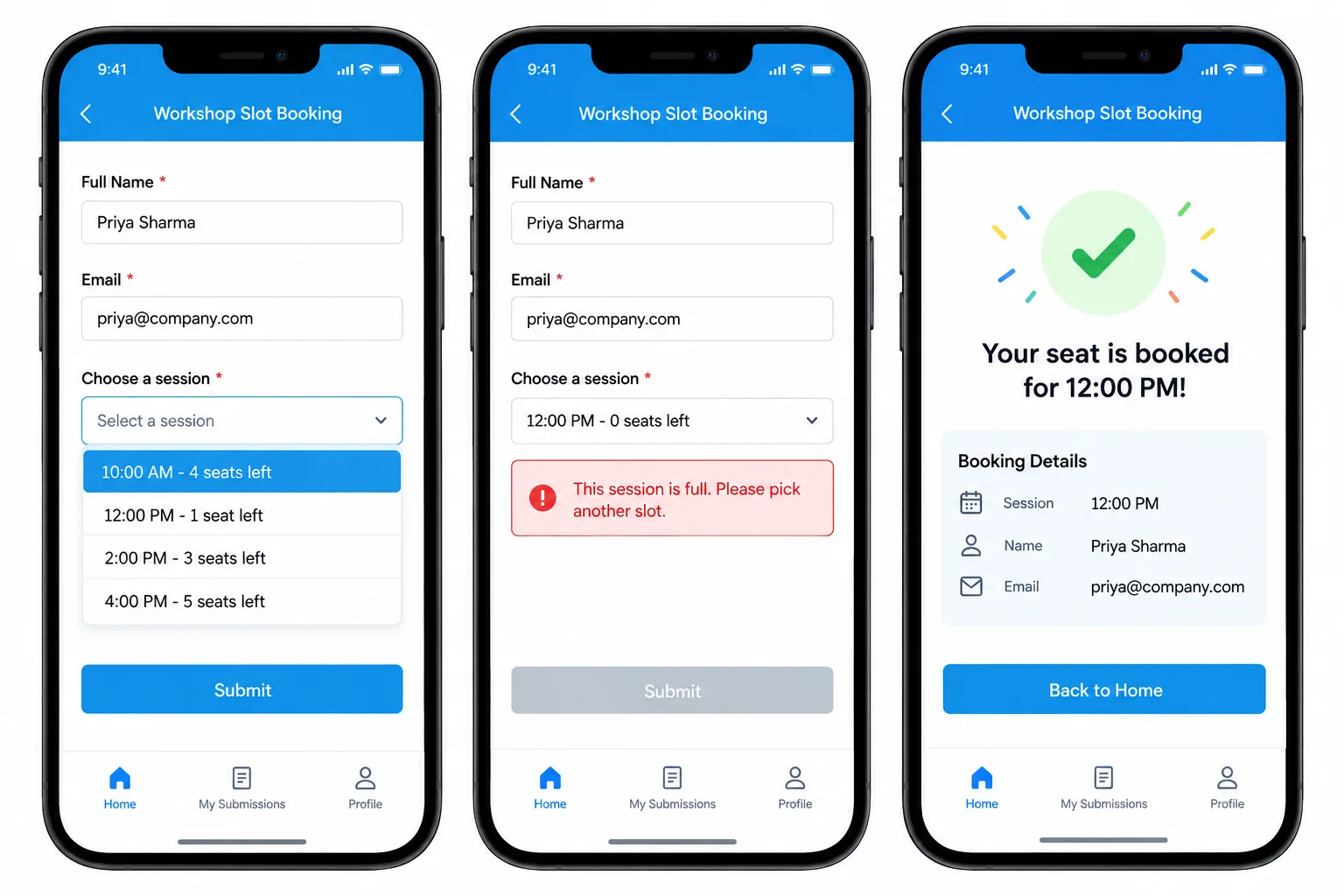
Scenario: A training team runs 6 workshop sessions a week with 20 seats each. With a Google Form and an add-on, popular sessions regularly ended with 21 or 22 confirmed attendees because several people submitted within the same few seconds.
How Clappia solves it: the team builds a "Sessions" master app with Date, Time, Trainer, Capacity, Seats left and Status. The booking form uses a Get Data from Other App block filtered to Status = Open, so attendees only see sessions with seats. The pulled Seats left field feeds a Validation block set to Error, so a session that fills up while someone is still typing blocks their submit with a clear message instead of creating an extra booking. On submit, the workflow runs node by node:
Trainers open the app on their phones to see the live roster, and the operations lead tracks fill rates on a dashboard instead of a spreadsheet.
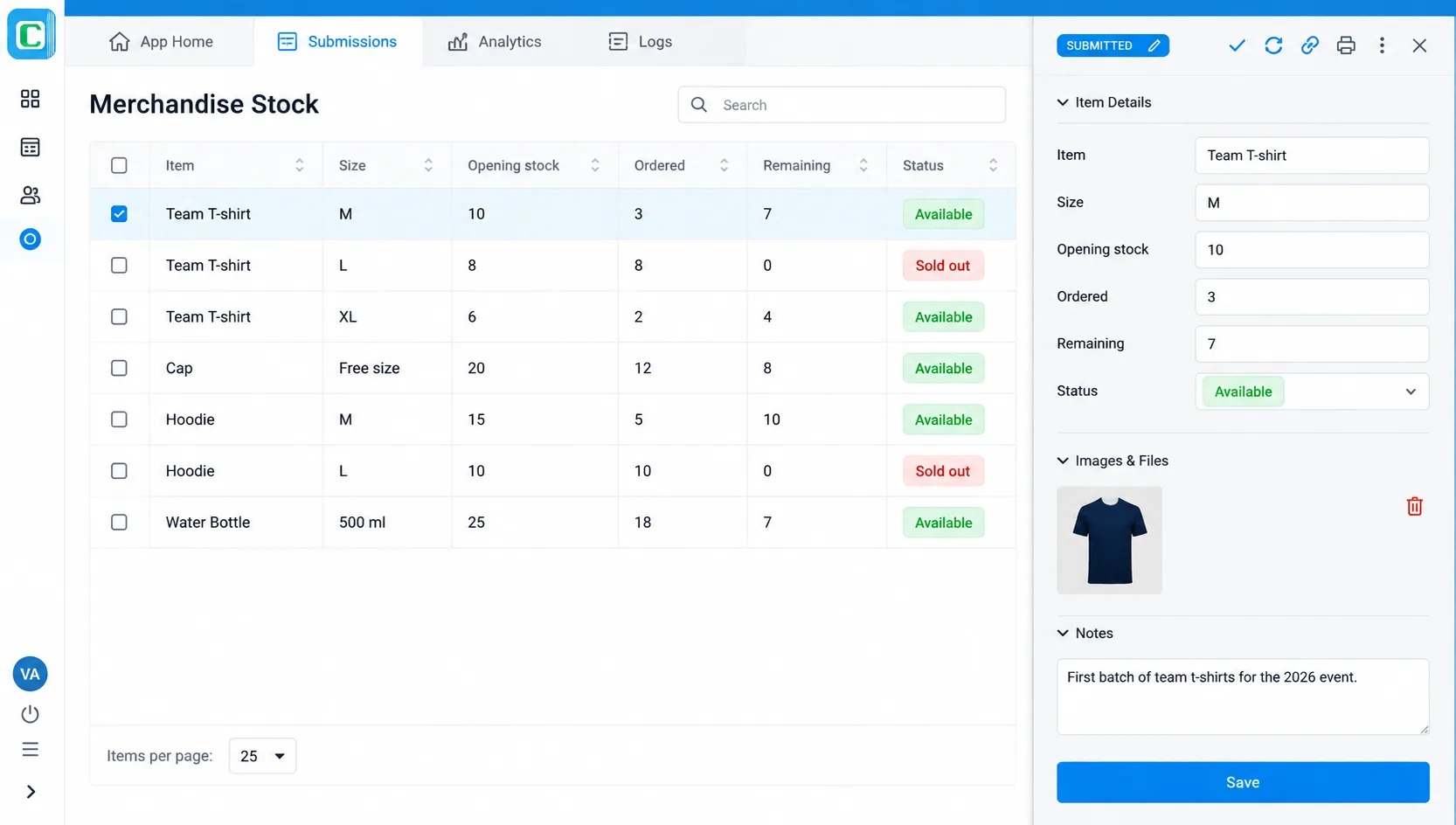
Scenario: A company sells branded merchandise to employees: 10 medium T-shirts, 8 large, 20 caps. A choice eliminator can only hide "Large" when it is gone. It cannot stop someone ordering 5 when 2 are left.
How Clappia solves it: a "Merchandise Stock" app holds Item, Size, Opening stock and Remaining. The order form pulls the item, shows Remaining, and asks for a Quantity. A Validation block with @remaining < @quantity blocks any order larger than the stock left. When an order is submitted, an Edit Submission node subtracts the quantity, so the next person who opens the form sees 7 T-shirts, not 10. Orders above a set value can route to an approval step, and a payment field can collect money in the same form. For a fuller setup with reorder alerts, see how to build a smart inventory system with auto-alerts.
Store staff can also record issues from a shop floor with weak signal, since Clappia apps work offline and sync submissions when the device reconnects. For first-come bookings where every second matters, keep the booking step online so the count is always current.
Here is how a Google Form with a choice-limiting add-on compares with a Clappia app on the features that decide whether a limited sign-up works.
| Feature | Google Forms + choice eliminator add-on | Clappia |
|---|---|---|
| Choice elimination | Add-on edits options a few seconds after each submission | Checked at submit time; full options blocked by a Validation block |
| Double-booking risk | Possible when responses arrive together | Submission rejected when the live count shows no capacity |
| Quantity control | Option is either available or removed | Deducts exact quantities, for example 3 of 10 items |
| Linked data | No lookups across forms without scripts | Get Data from Other App pulls live records and counts |
| Workflows | Separate add-ons for emails, PDFs, approvals | Built-in email, IF, approval and edit-submission nodes |
| Offline use | Needs a live internet connection | Mobile apps capture data offline and sync later |
| Pricing | Forms free; add-ons have free tiers with paid upgrades for volume | Free forever plan with unlimited apps; paid from $6 per user per month |
| Learning curve | Very low | Slightly higher, since you design a small app and master list |
A choice eliminator add-on is not wrong, it is just built for small, low-stakes lists. Use this quick guide to decide.
| Your situation | Best fit | Why |
|---|---|---|
| Class or club sign-up, under 50 people | Google Forms + add-on | Free and fast; occasional overlap is easy to fix by hand |
| Paid workshops or event sessions | Clappia | Capacity checked before submit, confirmations and payments in one app |
| Clinic, interview or service appointment slots | Clappia | One slot per person, status updates and approvals |
| Limited stock or merchandise orders | Clappia | Quantity-based deduction and live remaining stock |
| Field teams issuing items or booking on site | Clappia | Offline mobile apps and dashboards for managers |
If you are moving an existing process over, you can import your old Google Form responses into the new app so your history stays in one place, and add auto-calculations for totals and fees.
For a quick classroom sign-up, a free Choice Eliminator add-on does the job. Once a booking has money, capacity or stock behind it, you need a form that counts before it accepts, and that is where a database-backed app wins. In Clappia you can build the master list, the booking form and the workflow in an afternoon, without code, and test it with your team before rolling it out. Start building for free and turn your next limited sign-up into an app that cannot overbook.
No. Google Forms keeps every option selectable no matter how many times it has been chosen. You need a third-party add-on such as Choice Eliminator or Form Choice Limiter, or a platform like Clappia that checks remaining capacity natively.
Install a choice-limiting add-on from the Google Workspace Marketplace, open it from the puzzle piece icon, choose the question, and set the limit for each option to 1. The add-on removes the option after it receives that many responses.
Common causes are a trigger that stopped after an error or quota limit, the question text being edited after setup, two add-ons editing the same question, or respondents submitting at the same time before the update ran. Reconfiguring the add-on usually resets the trigger.
Not natively. Add-ons can limit how many times an option is chosen, but not subtract a quantity such as 3 out of 10 items. Clappia can, by pulling the remaining stock into the form, validating the requested quantity and deducting it with a workflow.
Clappia is a strong free option for high-volume or high-stakes bookings. Its free plan includes unlimited apps, and it combines live option lookups, submission-blocking validations, automatic capacity updates, approvals and offline mobile apps without add-ons.
 Get Started – It’s Free
No. Google Forms has no native choice eliminator, so every option stays selectable no matter how often it is picked. You can add one with a Google Workspace Marketplace add-on such as Choice Eliminator or Form Choice Limiter, which removes an option after a set number of responses. Because add-ons update a few seconds after each submission, they can double-book under heavy traffic and cannot deduct quantities. Clappia is a free Google Forms alternative that checks remaining capacity at submit time, blocks full options with a Validation block, deducts slots or stock automatically with workflows, and adds approvals and offline mobile apps.
Build Custom Apps With GPS Location Without CodingGet Started - It's free!
L374, 1st Floor, 5th Main Rd, Sector 6, HSR Layout, Bengaluru, Karnataka 560102, India
3500 S DuPont Hwy, Dover,
Kent 19901, Delaware, USA


.svg)




3500 S DuPont Hwy, Dover,
Kent 19901, Delaware, USA
L374, 1st Floor, 5th Main Rd, Sector 6, HSR Layout, Bengaluru, Karnataka 560102, India