Google Forms is widely used for data collection, customer surveys, event registrations, feedback forms, and customer KYC processes. It's simple, free, and integrates seamlessly with Google Workspace. But there's one major limitation: Google Forms doesn't have built-in Google Calendar integration.
Many businesses try using Google Forms to collect booking requests—meeting rooms, appointments, equipment reservations—but then face the tedious task of manually copying each submission into their calendar. This wastes hours every week and leads to booking errors.
If you're manually transferring form responses into Google Calendar, you're spending valuable time on repetitive data entry instead of more productive work.
So how do you link Google Forms to Google Calendar? You have two main approaches:
This guide covers both methods, plus 4 different no-code approaches in Clappia to fit your specific needs.
Before diving into methods, let's see what each platform offers for calendar booking systems:
This method uses JavaScript to connect Google Forms, Google Sheets, and Google Calendar.
Steps:
Steps to create a Google Form to Calendar script:
Code.gs file with your script. The script will typically involve:e.namedValues in an onFormSubmit trigger).CalendarApp service to interact with Google Calendar.createEvent() or createAllDayEvent(), providing the extracted data.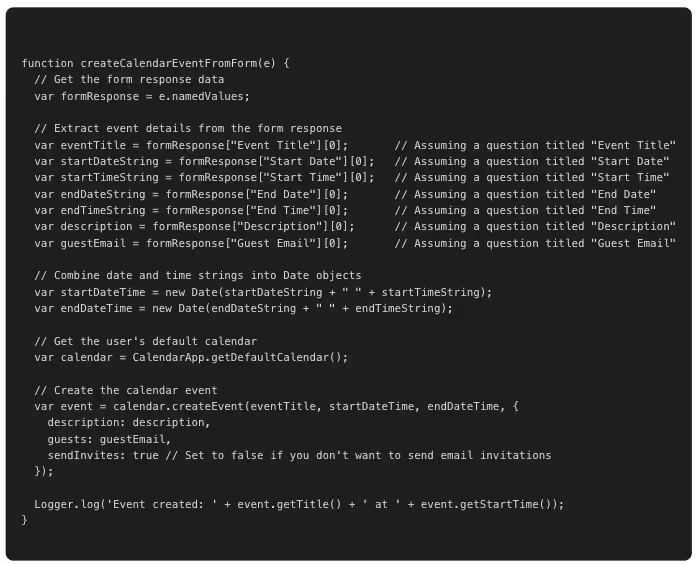
onFormSubmit Trigger:createCalendarEventFromForm (or the name of your function).Head (unless you have specific deployments).From form.On form submit.Important Considerations:
Form Question Titles:
Ensure the keys used to access formResponse (e.g., "Event Title") exactly match the titles of your questions in the Google Form.
Date/Time Formatting:
The script assumes that date and time inputs from the form can be directly parsed into Date objects. You may need to adjust the date/time parsing logic depending on how you've configured your form questions.
Error Handling:
Consider adding try-catch blocks to handle potential errors during event creation or data retrieval.
Permissions:
The script will require authorization to access your Google Calendar and Forms. You will be prompted to grant these permissions when you first run or set up the trigger.
Calendar ID:
If you want to create events in a specific calendar other than the default, you can use CalendarApp.getCalendarById("your_calendar_id") instead of CalendarApp.getDefaultCalendar().
Limitations:
Requires coding knowledge, manual maintenance, no conflict detection, time-consuming debugging, no mobile app.
Most users find this too complex. Let's explore no-code alternatives.
Integration guide: Google Workspace Integrations
We recommend no-code methods below for easier implementation.
Note: Search online for "Google Form to Calendar Apps Script" to find sample code templates if you choose this method.
Clappia eliminates coding entirely while offering more features than Apps Script. Here are 4 ways to build your Google Forms to Calendar automation:
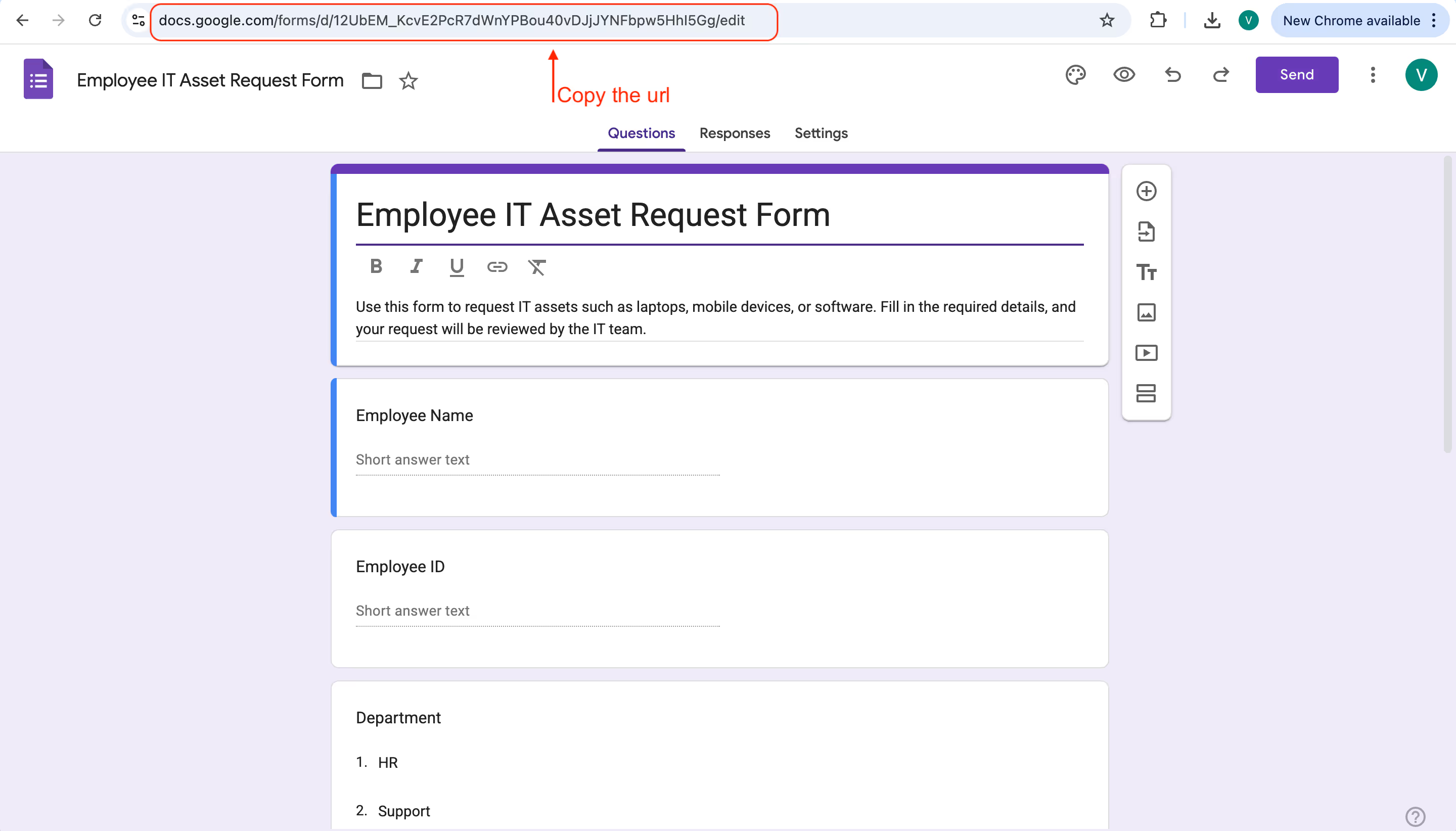
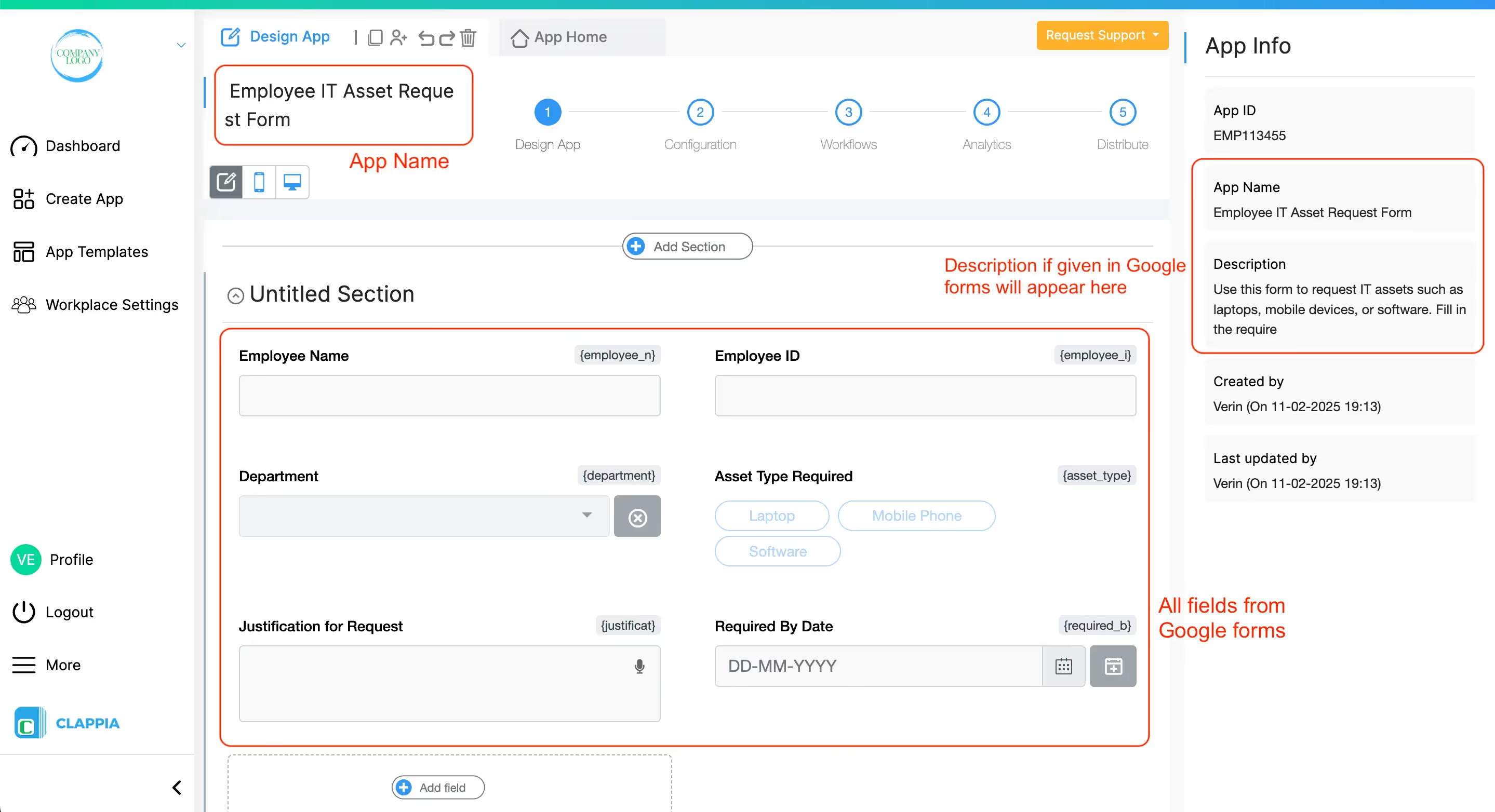
Import existing Google Forms in minutes:
Preserves form structure, adds enterprise features impossible in Google Forms. Sync historical data via Google Sheets.
Detailed steps on how to create advanced forms using Google Forms
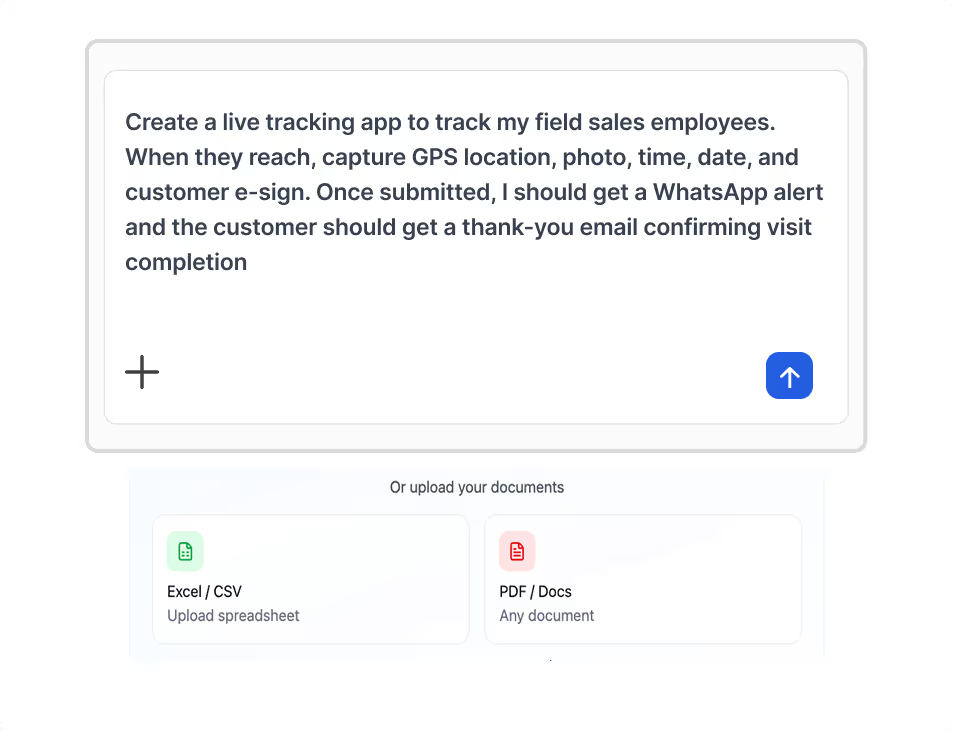
The AI Assistant builds your complete system from natural language:
AI understands context and creates appropriate field types automatically. You configure Calendar workflow settings manually.
Complete guide: AI Assistant in Clappia | Calendar Workflows | Validation


Create apps using Excel if you have structured data:
Ideal for testing with sample data before going live.
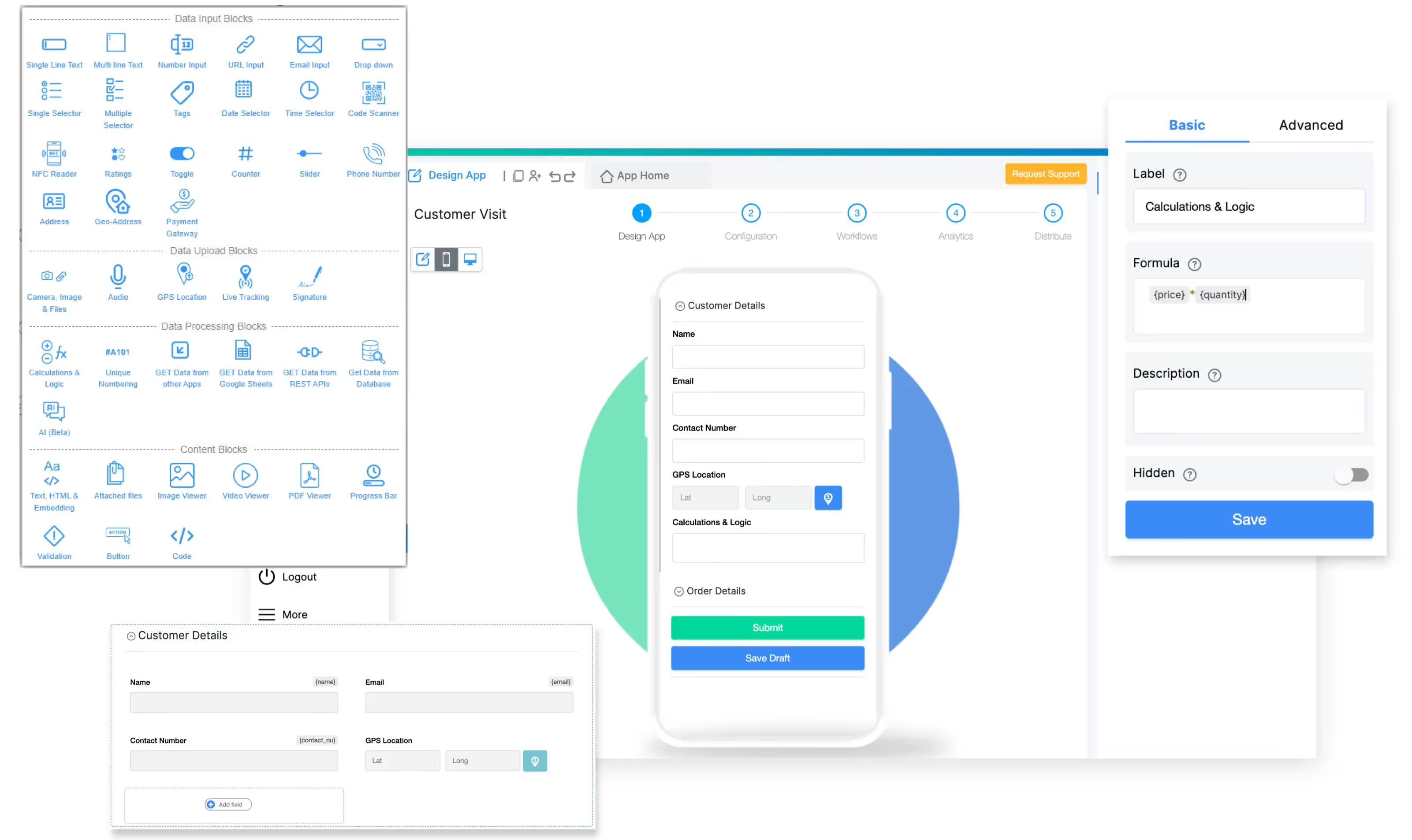
Build from scratch with complete control:
Add Form Blocks: Dropdown, Single Line Text, Multi-line Text, Date Selector, Time Selector, Phone Number, Multiple Selector.
Add Advanced Blocks (Optional): Enhance with GPS Location, QR Scanner, E-Signature, Camera, Formula Block, Counter.
Configure Workflow: Workflows → "After Form Submission" → Add Google Calendar → Connect account → Map fields (Title, Date/Time, Location, Attendees) → Enable "Send Invitations" → Set reminders.
Add Smart Features:
Beyond Basic Integration:
Cost-Effective Pricing:
Time Savings: Manual entry consumes several hours weekly—time better spent on strategic work.
Cost Savings: Automation eliminates expensive manual data entry costs, delivering substantial savings annually.
Plus: Reduced booking errors, faster process, better space planning data.
Choose Your Path:
5-Day Implementation:
Use templates for faster deployment.
Q: Can I link Google Forms to Google Calendar?
Yes! Use Google Apps Script (coding required) or Clappia (no-code). While Google Forms lacks native calendar integration, these methods automatically create calendar events from form submissions.
Q: How do I build a Google Form to schedule appointments in Google Calendar?
Build a form with date/time fields, import to Clappia, add Google Calendar workflow with conflict detection and notifications.
Q: Does Google Forms have a calendar template?
No built-in template. Use Clappia's templates or AI Assistant to create booking forms instantly.
Q: Can you use Google Forms as a booking system?
Google Forms alone lacks conflict detection, calendar availability, and automated confirmations. Clappia adds these enterprise features plus mobile apps and offline mode.
Q: How do I automatically add dates to Google Calendar?
Import form to Clappia, configure Google Calendar workflow, map fields. System creates events automatically with invitations.
Q: How do I add a date calendar in Google Forms?
Use "Date" question type. For advanced features like preventing past dates and calendar sync, use Clappia's Date Selector and Time Selector.
Q: How to use Google Forms for scheduling with calendar availability?
Google Forms can't check availability. Use Clappia's validation to check existing bookings and prevent conflicts automatically.
Q: Can I automate Google Forms?
Yes! While Google Forms itself has limited automation, Clappia automates the entire workflow—from form submission to calendar event creation, email notifications, conflict detection, and approval routing. Use workflows to trigger actions automatically.
Stop manually copying form submissions to your calendar. Whether you choose coding or no-code, automation saves thousands of hours annually.
Build your Google Forms to Calendar automation free—choose from 4 methods, no technical expertise needed.
Discover more automation at Clappia's features or explore other use cases.
 Get Started – It’s Free
Google Forms does not offer any built-in way to create Google Calendar events automatically, which forces users to manually copy submissions or rely on complex Apps Script. With Clappia, you can instantly turn any form into a complete calendar-booking system—no coding required. Simply import your Google Form or build a new one using Clappia’s AI, then use the Google Calendar workflow to auto-create events, send invites, prevent double-bookings, and trigger email/WhatsApp confirmations.
Whether you're scheduling appointments, room bookings, meetings, or equipment reservations, Clappia gives you advanced features that Google Forms cannot—conflict detection, validations, mobile apps, GPS, and full automation.
Start building your own automated booking forms today with Clappia’s AI-powered no-code platform!
Build Custom Apps With GPS Location Without CodingGet Started - It's free!
L374, 1st Floor, 5th Main Rd, Sector 6, HSR Layout, Bengaluru, Karnataka 560102, India
3500 S DuPont Hwy, Dover,
Kent 19901, Delaware, USA


.svg)




3500 S DuPont Hwy, Dover,
Kent 19901, Delaware, USA
L374, 1st Floor, 5th Main Rd, Sector 6, HSR Layout, Bengaluru, Karnataka 560102, India