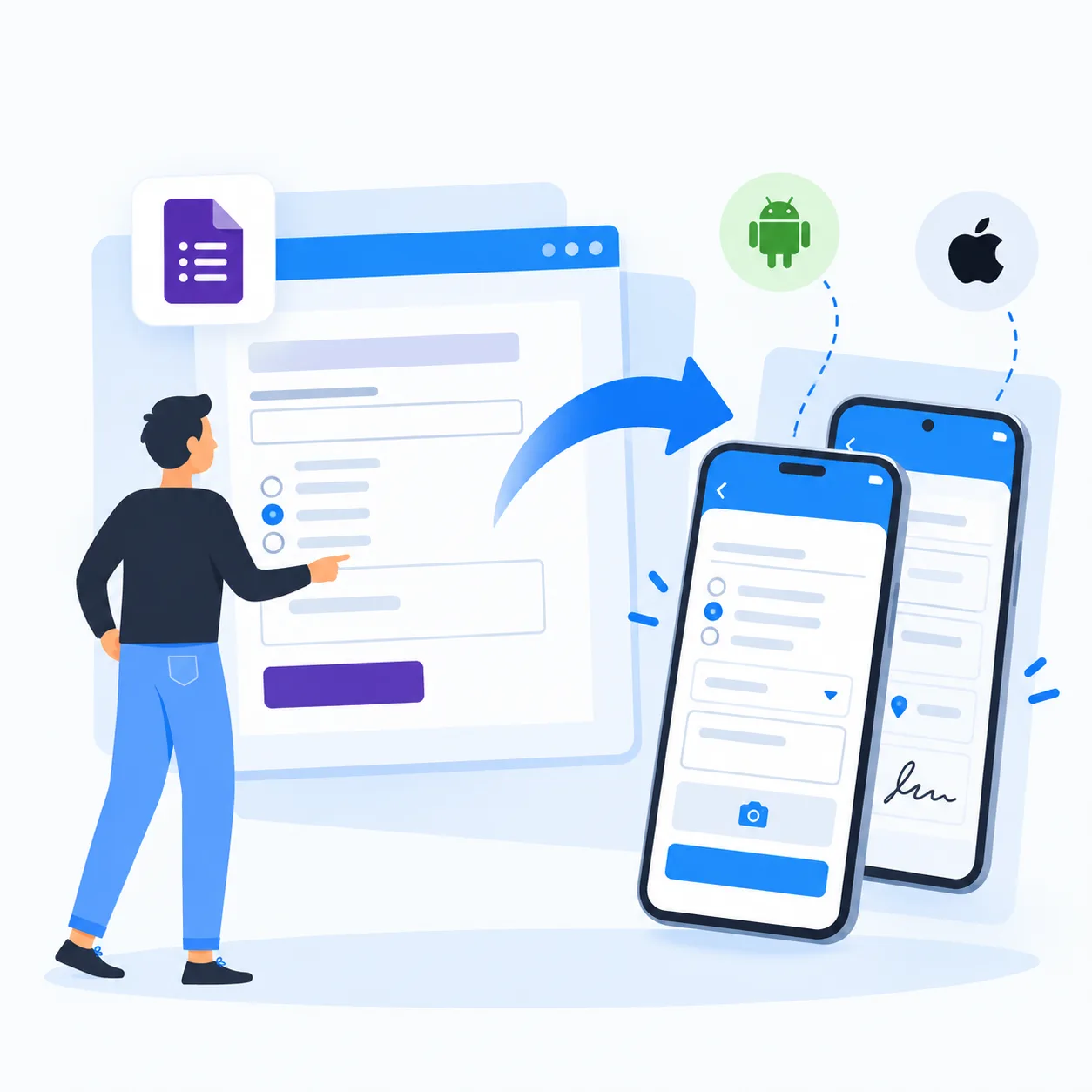
A field agent finishes a site visit, taps Submit, and lands on a thank-you page. Now they have to find a second link for the supervisor checklist, retype the site name, the date and their own name, and hope the supervisor matches the two records later in a spreadsheet. Multiply that by 40 visits a day and the "second form" becomes the step everyone skips.
That is why "how to connect two Google Forms" keeps showing up in help forums. Teams split long questionnaires, hand work from one person to the next, or send several forms into one report. This guide covers every workaround Google Forms offers, where each one stops working, and how to build the same chain as connected apps in Clappia, where the second form fills itself in and the hand-off happens automatically.
Not natively. Google Forms has no setting that links one form to another or passes answers between them. Each form is a separate file with its own responses. What you can do is combine four workarounds: put a link to Form 2 in Form 1's confirmation message, use a pre-filled link so some answers arrive already filled, import questions to merge two forms into one, and send both forms' responses to the same Google Sheet.
These work well for light jobs like a two-part survey. They get fragile when the second form depends on who submitted the first one, what they answered, or who has to approve it next.
The most common setup chains Form 1 to Form 2 and collects both in one place:
Each workaround solves a different version of the problem. Pick by what you actually need to connect: the respondent's journey, the questions, or the data.
The simplest option. After submitting Form 1, respondents see a clickable link to Form 2. It is ideal for splitting a 50-question survey into two shorter parts to reduce fatigue. The catch is that every respondent gets the same link, and nothing they typed in Form 1 travels with them.
A pre-filled link opens Form 2 with chosen answers already entered, which saves typing for values that are the same for a group, such as a branch or a campaign name. To fill in answers that change per respondent, like the customer name someone just typed in Form 1, you need a custom Google Apps Script that builds a new link on every submission, typically with the FormResponse toPrefilledUrl method fired by an installable form-submit trigger.
If you want one large form instead of two, open the destination form and use Import questions from the side toolbar to copy questions from the other form. Combine this with sections and Go to section based on answer so managers and employees only see the questions meant for them. Past responses do not move, so you still have two response sets to reconcile.
Linking several forms to the same spreadsheet gives leadership one file to look at. Each form writes to its own tab, so you still need formulas like QUERY or VLOOKUP to join them, and there is no shared record ID unless respondents type one in both forms.
| Method | What it connects | Best for | Main limitation |
|---|---|---|---|
| Confirmation message link | Sends respondents from Form 1 to Form 2 after submit | Simple two-step surveys | Same link for everyone, answers are not carried over |
| Pre-filled link | Opens Form 2 with some answers already filled | Fixed values like a site name or campaign | Values are static unless you write Apps Script |
| Import questions | Copies questions from one form into another | Merging two short forms into one | Old responses stay in the old form |
| Sections + go to section | Routes people inside one form by answer | Role-based or yes/no paths | Only works within a single form |
| One Google Sheet | Sends both forms' responses to one spreadsheet | Central reporting | Each form lands on its own tab with no shared record ID |
The workarounds above connect the links, not the data. That gap shows up quickly in operational processes:
Practitioner insight: when teams ask to "connect two forms", they rarely mean two links. They mean one process with two stages, where stage two already knows everything stage one captured. Design it as one record moving through steps, not two surveys sitting side by side, and most of the retyping, matching and chasing disappears.
Clappia is a no-code platform where every form is an app with its own database, and apps in the same workplace can read from and write to each other. You can even create Clappia apps from your existing Google Forms and import past Google Form responses so you do not start from zero. Four features replace the Google Forms workarounds.
In the Submit button settings, set the post-submission action to Redirect to Custom URL with a delay of 1 to 30 seconds. Point it at the second app's link and auto-fill fields by passing values in the URL, for example ?site_name={site_name}&visit_id={submissionId}. Because the values come from the submission just made, Form 2 opens already filled with that respondent's data, not a static default.
Sometimes the second form should be filled by someone else. The Create Submission workflow node creates a record in another Clappia app the moment Form 1 is submitted, mapping fields with @field references. A supervisor then opens a checklist that already carries the site, agent and findings. System-created submissions can cascade up to three levels, which is enough for most multi-stage processes.
The Get Data from Other App block adds a searchable dropdown to Form 2 that lists records from Form 1. Pick a visit ID or a customer name and the pulled fields fill in instantly. Status and dynamic filters limit the list to what matters, such as open visits assigned to the logged-in agent.
Clappia workflows run after each submission. Each IF node checks one condition, so a yes/no decision uses two IF nodes: one for "issue found" and one for "no issue", each starting its own branch. Add an approval workflow for sign-offs and an Email node to notify the next owner, all without scripts.
Turn two disconnected forms into <span class="cw-hl">one connected workflow</span> that carries data forward, routes by answer and alerts the right person, on Clappia's free plan.
Try Clappia freeScenario: A facilities company runs 30 field technicians across three cities. Each technician completes a site visit form, and a supervisor must review a follow-up checklist for any site with findings. With Google Forms, supervisors were matching two spreadsheets by hand and missing sites every week.
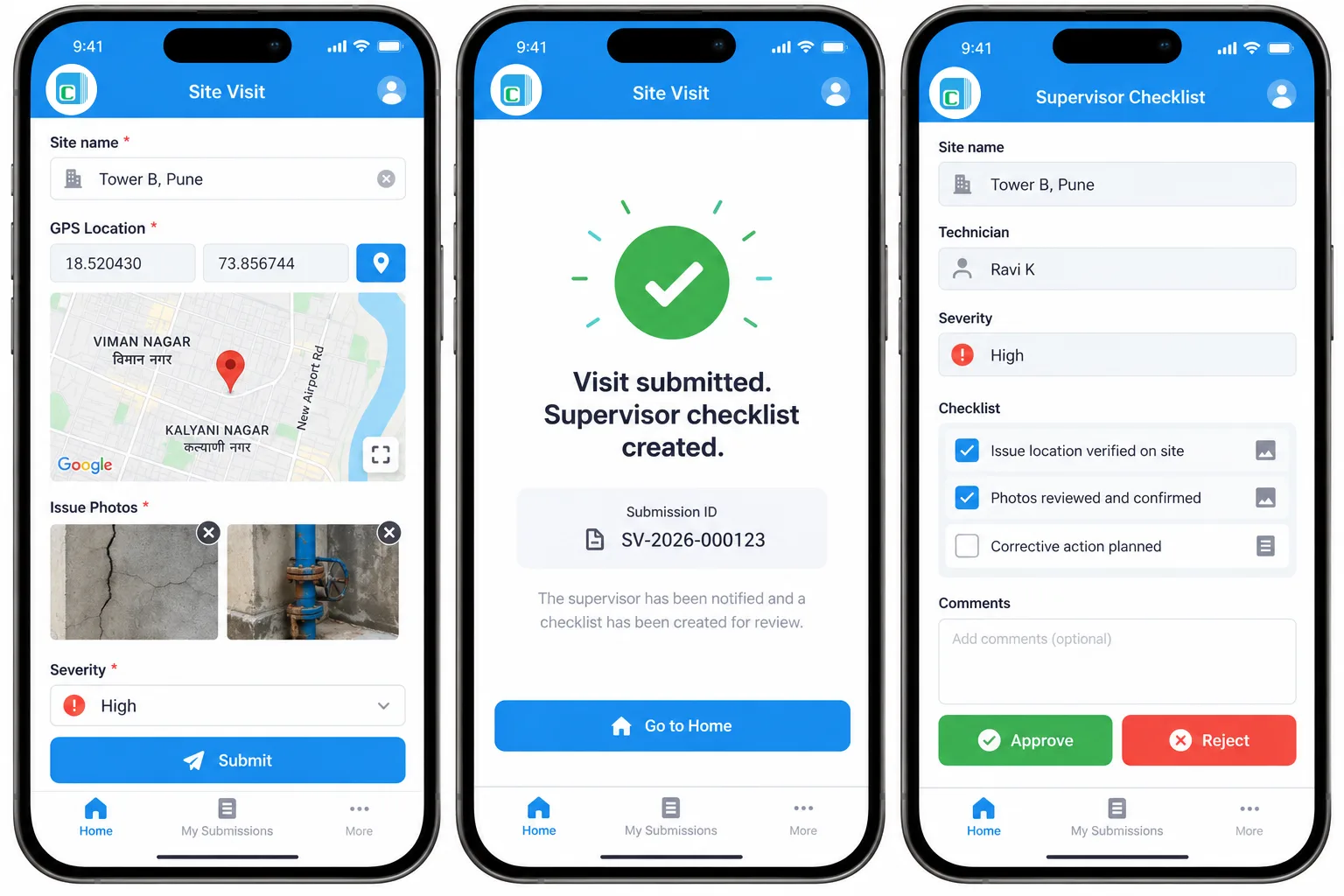
Site name, GPS location, photos of the issue, severity and notes. The GPS location block proves the technician was on site, and the mobile app captures everything offline once it has been preloaded.
A Create Submission node builds the supervisor record automatically whenever severity is Medium or High. The supervisor sees the site, photos and notes already filled, completes the checklist and approves or rejects it.
An IF node on severity, the Create Submission node, an approval step and an email to the regional manager when a site is rejected. Every visit and review sits in one linked trail instead of two unrelated sheets.
Scenario: A microfinance lender's collection agents log each customer visit. When a customer promises to pay on a later date, a follow-up has to be scheduled and the payment recorded against the same loan. In Google Forms, the follow-up form had no idea which loan or promise it belonged to.
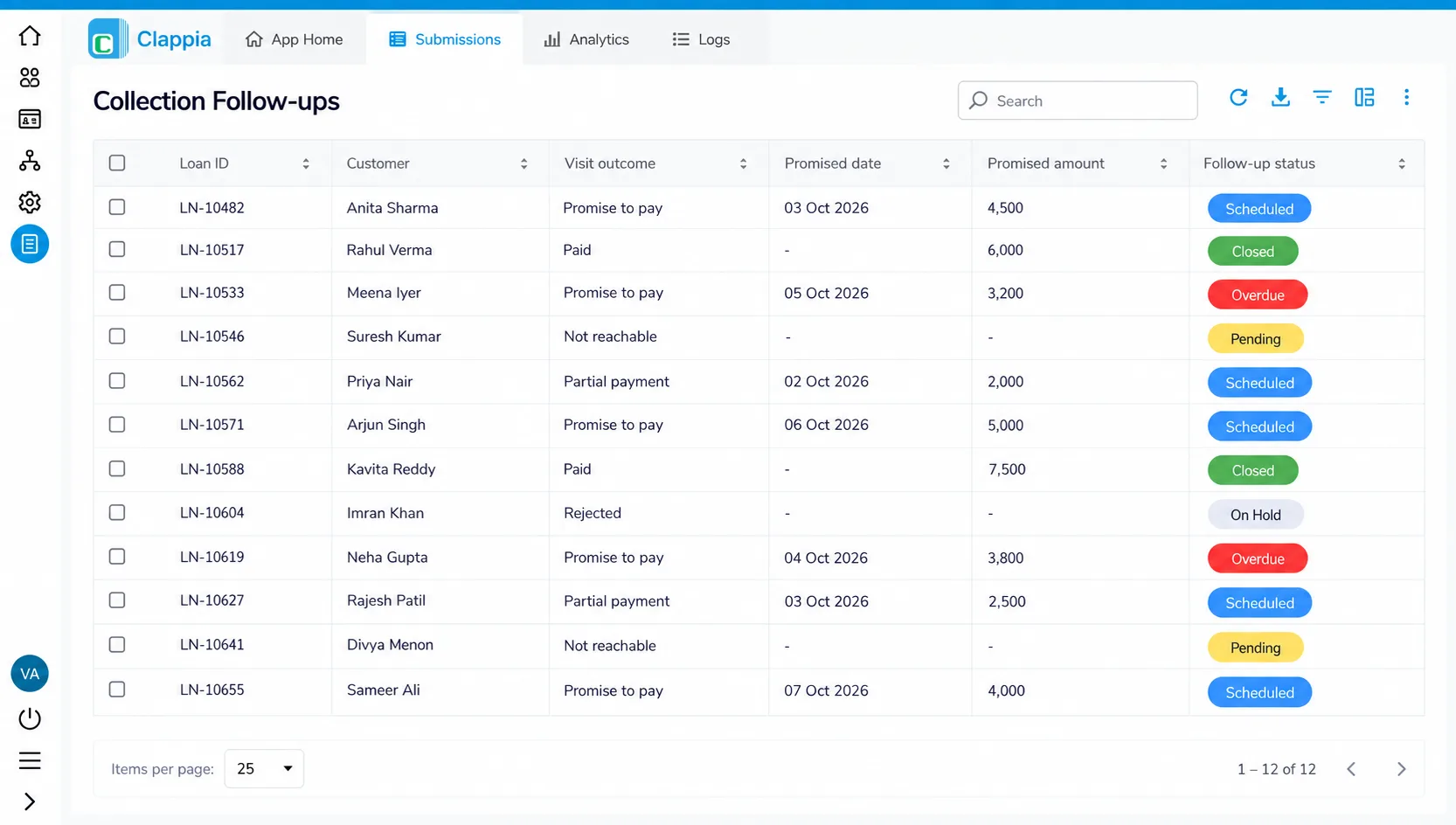
Loan ID pulled from a master loan app, outcome (Paid, Promise to pay, Not reachable), promised date and amount, and a photo or signature. This mirrors how teams run loan collection on mobile today.
For "Promise to pay" outcomes, a workflow creates a follow-up record for the promised date. When the agent returns, the Get Data from Other App block pulls the loan and the original promise, and the agent records the payment in seconds.
Two IF nodes split "Promise to pay" from everything else, a Create Submission node schedules the follow-up, and an Edit Submission node can update the loan's outstanding balance. Managers review every promise and payment from one submissions view.
Scenario: A logistics company with 120 trucks needs drivers to complete a daily vehicle inspection. Federal rules require motor carrier drivers to prepare a written driver vehicle inspection report covering defects, and any defect has to reach the workshop fast. With Google Forms, a driver who ticked "Engine light on" still had to find and fill a separate maintenance form.
Vehicle number from a master fleet list, odometer, checklist items (brakes, tyres, lights, engine warning), photos and an "Issue found?" field. The same approach powers an AI fleet maintenance and vehicle inspection app.
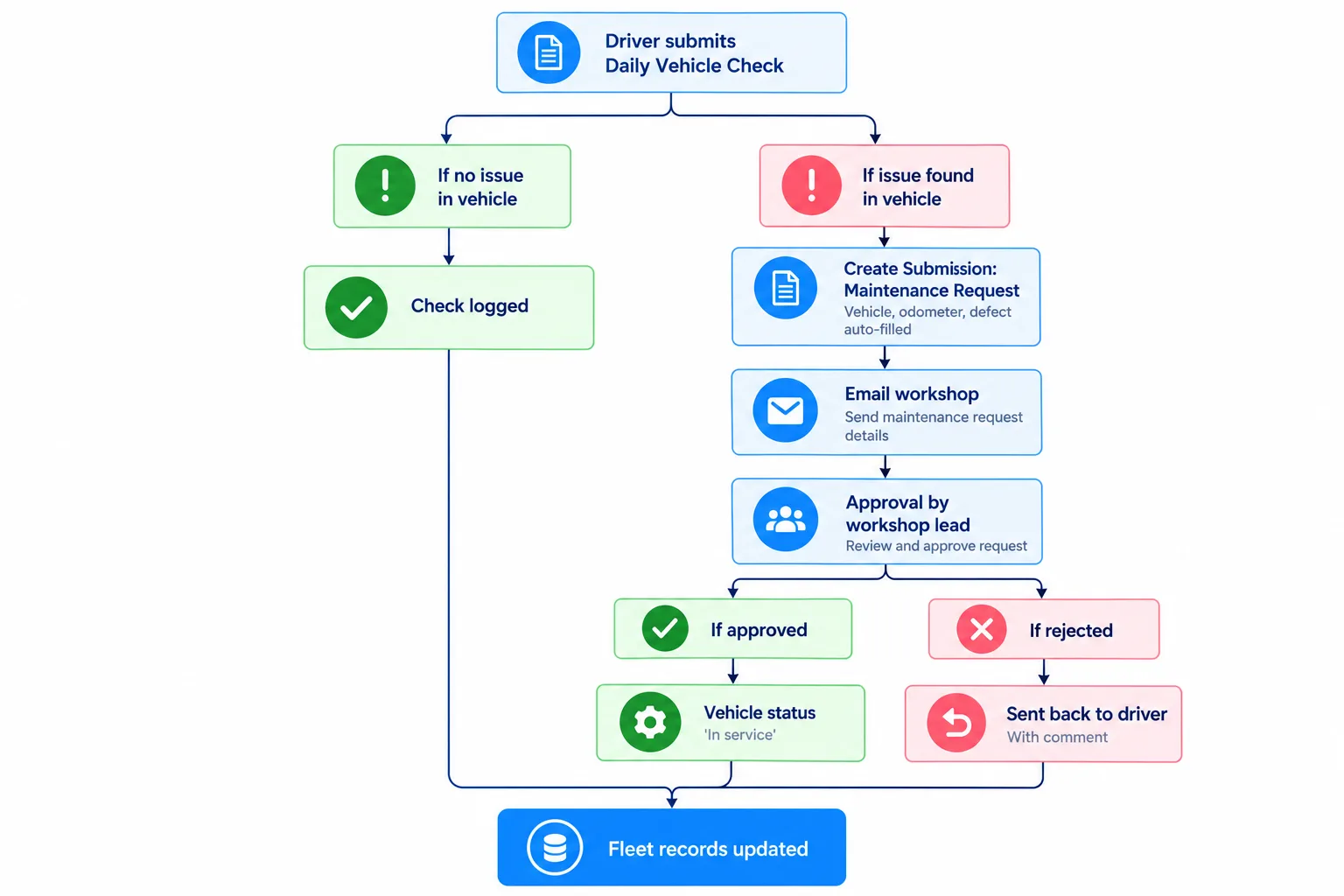
If the driver marks an issue, the redirect opens the maintenance request with the vehicle, odometer and defect already filled. The workshop lead approves it, and the vehicle's status updates in the master list.
An IF node for "issue found" creates the maintenance request and emails the workshop, while a second IF node for "no issue" simply logs the check. Approved requests move the vehicle to "In service"; rejected ones go back to the driver with a comment.
Here is how the two approaches compare once a process has more than one stage:
| Capability | Connected Google Forms | Clappia connected apps |
|---|---|---|
| Carry Form 1 answers into Form 2 | Static pre-filled link or custom Apps Script | Redirect to Custom URL with dynamic {field} values |
| Create the next record automatically | Not available | Create Submission workflow node maps fields with @ |
| Look up an earlier submission | Not available | Get Data from Other App searchable dropdown |
| Route by answer | Go to section inside one form | Two IF nodes per yes/no split, across apps |
| Approvals and notifications | Add-ons or scripts | Approval, Email and other workflow nodes |
| Shared record ID across forms | Manual matching in Sheets | Linked through pulled fields and submission IDs |
| Offline field use | Needs a live connection | Mobile app works offline once preloaded |
| Cost | Free | Free plan, paid plans per user |
If you also rely on spreadsheets, Clappia can pull data from Google Sheets into forms, so a master list you already maintain can feed your connected apps. For a broader feature view, see Jotform vs Google Forms vs Clappia.
For a two-part survey, a link in the confirmation message is all you need. When the second form depends on the first, whether that is a supervisor review, a follow-up payment or a maintenance request, connect the data, not just the links. In Clappia you can build both apps, the redirect and the workflow in an afternoon without code. Start building for free and turn your next two-form process into one connected workflow.
Yes, but only with workarounds. Add Form 2's link to Form 1's confirmation message, optionally as a pre-filled link, and send both forms to the same Google Sheet. Google Forms cannot pass a respondent's answers to the second form without Apps Script.
Open the form you want to keep, click Import questions in the side toolbar, choose the other form and select the questions to copy. Use sections and Go to section based on answer to keep the longer form easy to navigate. Existing responses stay in the original form.
Link each form to the same existing spreadsheet from its Responses tab. Each form gets its own tab, so use QUERY, VLOOKUP or a shared ID field to join the data into one master view.
Click Add section in the form editor toolbar. Each section acts as a new page, and you can send respondents to a specific section based on their answer to a multiple choice or dropdown question.
Google Forms needs a custom Apps Script to build a dynamic pre-filled link. In Clappia, set the Submit button to Redirect to Custom URL and pass field values in the URL, or use a Create Submission workflow node to create the next record with mapped fields.
Yes. Clappia has a free plan that lets you connect apps with URL auto-fill, Create Submission workflows, Get Data from Other App lookups and approvals, with a mobile app that works offline for field teams.
 Get Started – It’s Free
Google Forms cannot natively link two forms or pass answers between them. You can connect them by adding Form 2's link (or a pre-filled link) to Form 1's confirmation message, merging questions with Import questions, and sending both forms' responses to the same Google Sheet. For multi-stage processes that need data hand-off, approvals or offline use, a no-code platform like Clappia connects forms as apps: it redirects with auto-filled values, creates the next record automatically and looks up earlier submissions.
Build Custom Apps With GPS Location Without CodingGet Started - It's free!
L374, 1st Floor, 5th Main Rd, Sector 6, HSR Layout, Bengaluru, Karnataka 560102, India
3500 S DuPont Hwy, Dover,
Kent 19901, Delaware, USA


.svg)




3500 S DuPont Hwy, Dover,
Kent 19901, Delaware, USA
L374, 1st Floor, 5th Main Rd, Sector 6, HSR Layout, Bengaluru, Karnataka 560102, India