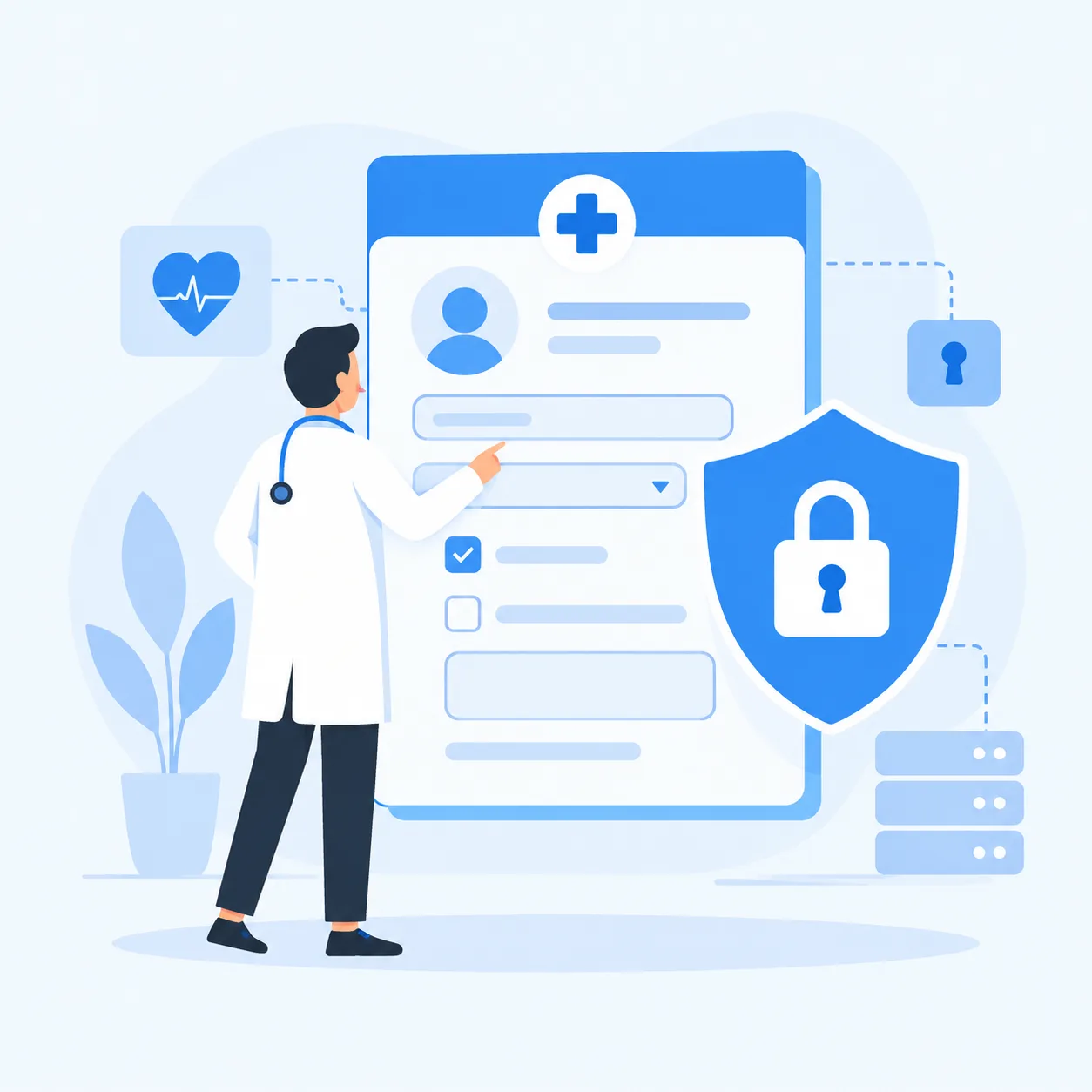
Healthcare runs on sensitive information - names, diagnoses, insurance numbers, consent records. Yet many clinics and field teams still collect it in Google Forms because it is free and familiar. That convenience carries real risk: healthcare data breaches now cost an average of $6.64 million, the highest of any industry for 13 years running, and more than 935 million individuals have been affected since mandatory reporting began.
The deeper problem is that Google Forms is not built for protected health information at all. Google's own Business Associate Agreement (BAA) for Workspace specifically excludes Google Forms, so using it for PHI is a compliance violation before you even think about hackers. It also has no field-level access control and no audit trail of who viewed or changed a response.
You need a secure, no-code alternative that treats sensitive data as sensitive from the first tap. Clappia lets you build encrypted, access-controlled forms and apps for patient intake, records, audits, and incident reporting, without writing a line of code. Here is how.
Clappia turns a simple form into a secure, role-aware app. Four capabilities do the heavy lifting, and you configure all of them visually. Together they give you the building blocks to build HIPAA-compliant forms.
In Google Forms, anyone with edit access sees every response. In Clappia you assign role-based access so a nurse, doctor, or administrator each sees only the records, and even the specific fields, they are permitted to. Sensitive fields can be masked for roles that do not need them, and adding users with the right permissions takes minutes.
Every submission is encrypted on the wire (HTTPS/TLS) and stored encrypted, so patient information is protected from the moment it is captured to the moment it is retrieved. It never sits in an open spreadsheet that a single shared link can expose.
HIPAA expects you to know who accessed a record and when. Clappia writes every view, edit, and status change to an audit trail, and pairs it with dashboards and reports so supervisors get oversight without touching raw PHI.
You decide exactly who can open the app, embed it, or export data. Validation rules can even block submissions from anyone outside your staff directory, so unauthorized data never enters the system.
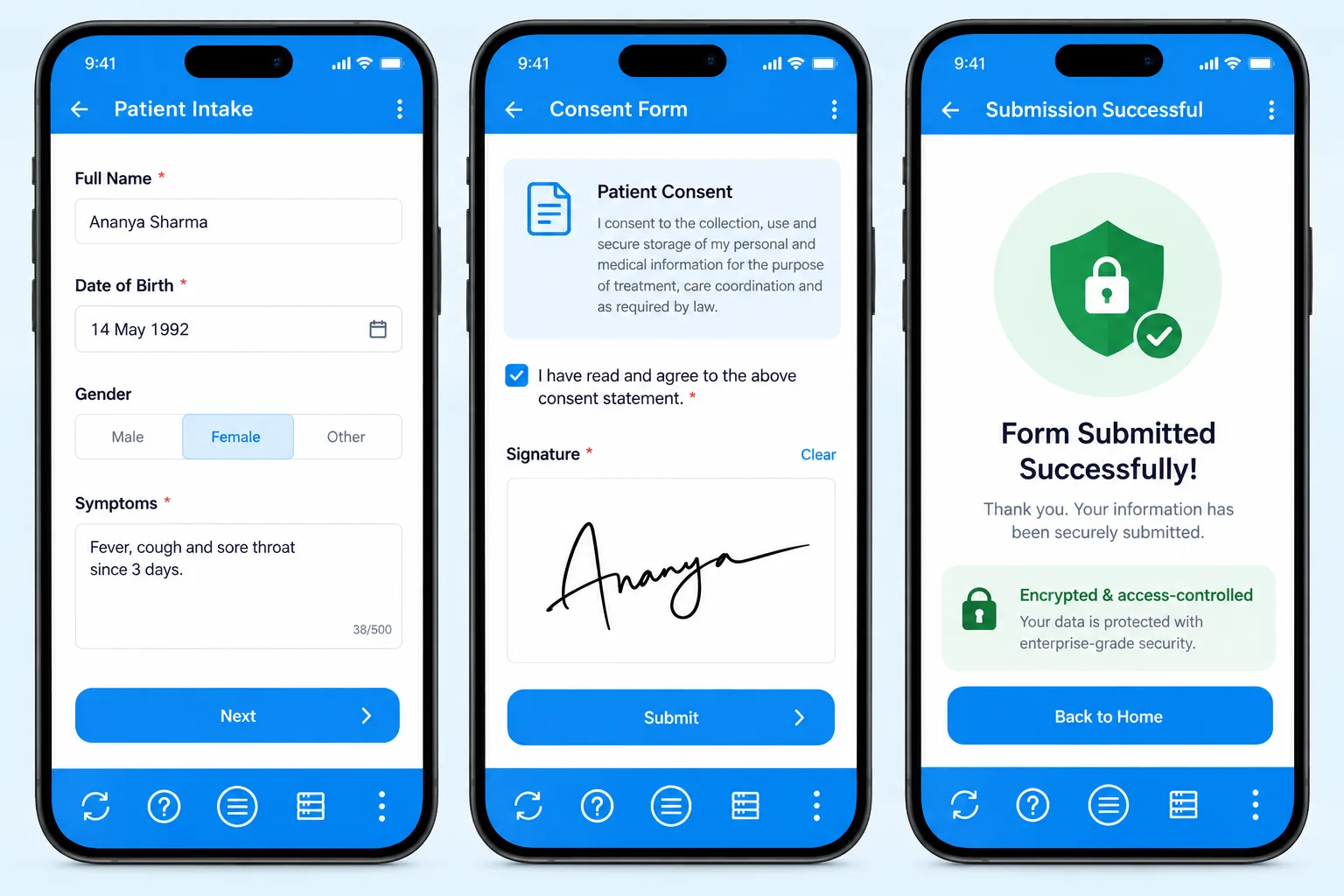
The front desk and home-visit nurses need to capture patient details and consent quickly, but securely. In Clappia, the whole intake runs inside a native mobile app that encrypts data instantly and shows it only to authorized roles.
The first screen collects the essentials, name, date of birth, contact, and presenting symptoms, with validation so records are complete and consistent. Because it is a real app, it also works offline for home visits and syncs securely once back online.
The next screen presents a consent statement and captures the patient's e-signature on the device. The signed consent is stored with the record, giving you a defensible, timestamped agreement instead of a paper form that can be lost.
On submit, the patient sees a confirmation that their information was encrypted and access-controlled. Behind the scenes the record is filed against the right clinician and made visible only to permitted roles, with no inbox and no shared sheet.
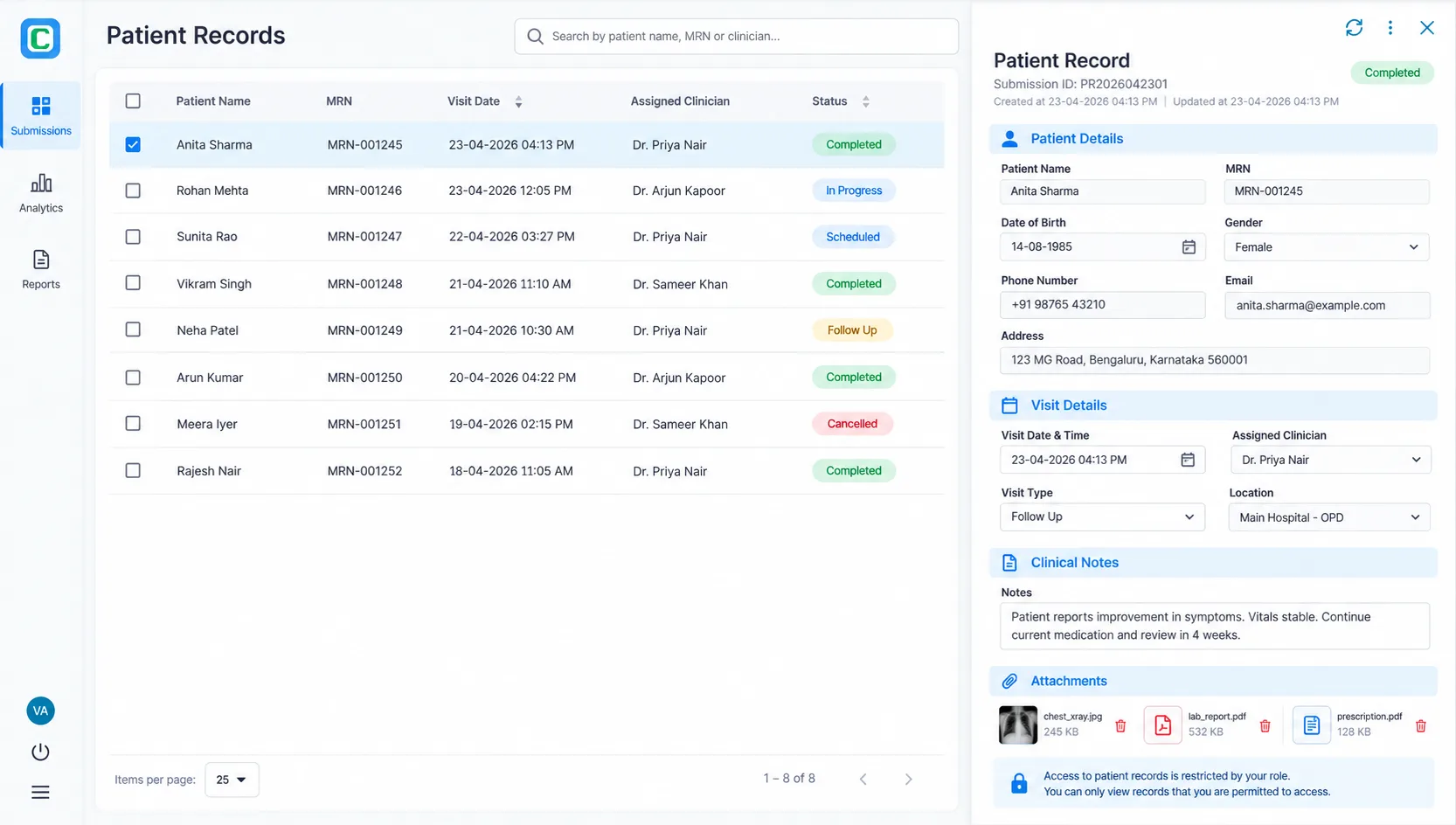
Once data is captured, controlling who can see it is where Google Forms breaks down entirely. A Clappia patient-records app gives every team member the same tool but a different, permission-scoped view.
Staff open the app to a submissions list, patient name, medical record number, visit date, assigned clinician, and status, filtered automatically to the records their role allows. A doctor sees their patients, a ward nurse sees their ward, and a viewer gets read-only access.
Opening a record shows the full detail, visit information, clinical notes, and attachments, for authorized users, while masking sensitive fields for those who do not need them. The same app safely serves the whole team without over-exposing data.
Every open, edit, and export is written to the log, so a compliance officer can answer "who saw this record?" in seconds. That accountability is a core requirement a spreadsheet simply cannot meet.
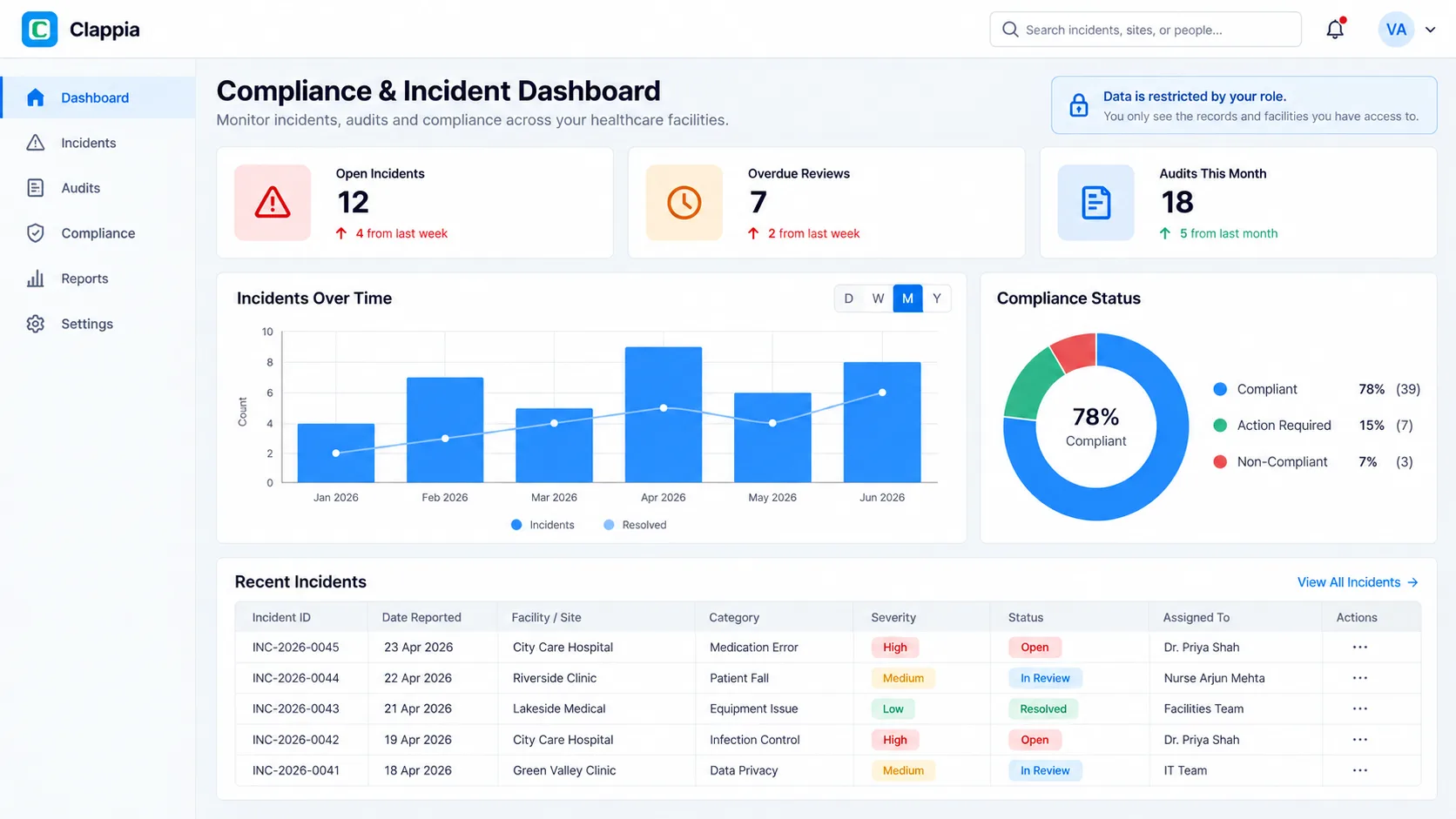
Beyond individual records, healthcare teams have to track incidents, audits, and compliance evidence, all of it sensitive. Clappia rolls this into a secure, access-controlled dashboard.
Staff log incidents, patient falls, medication errors, infection-control events, from mobile or web, with severity, location, and photos. Sensitive details are visible only to the roles handling them.
Managers get a live view of open incidents, overdue reviews, and audits this month, with trends over time, without exposing the underlying PHI. It is oversight by exception, scoped to each manager's permitted locations.
Each incident and compliance audit routes to the right reviewer, who signs off inside the app. The result is a documented, access-controlled trail that stands up to scrutiny, ready as HIPAA evidence.
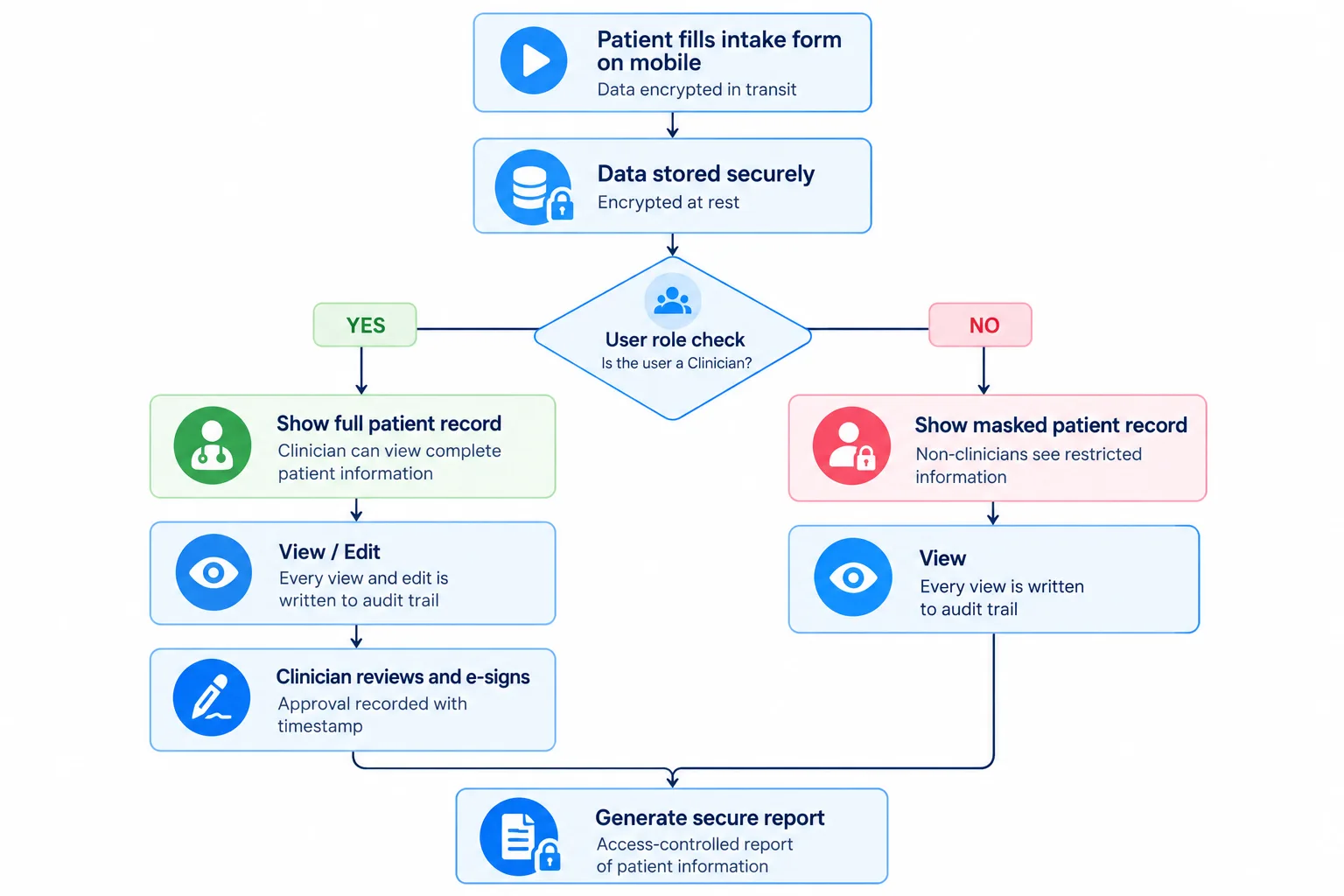
From capture to report, every step is secured by default. Data is encrypted in transit and at rest; a role check decides whether a user sees the full or a masked record; every action is written to the audit trail; and the final reviewed and e-signed record produces an access-controlled report rather than an open download. You can even connect an external database to keep records in your own system of record. It is the whole lifecycle of sensitive data, handled safely, with no code.
Any team that collects regulated or confidential information should think twice before using a public form tool. Hospitals and clinics capture patient intake and consent; home-health and hospice teams record visit notes in the field; diagnostic labs and pharmacies handle test results and prescriptions; insurers and billing teams process claims full of personal and financial details; and HR, legal, and finance departments collect government IDs, contracts, and payroll data. In every one of these cases the requirement is the same, encryption, role-based access, and an audit trail, and in every case Clappia lets you build exactly that without code, on the same free plan you can start with today.
Here is how the two compare on the security features regulated teams actually need.
| Security feature | Google Forms | Clappia |
|---|---|---|
| Covered by a HIPAA BAA | No, excluded from Google's BAA | Build HIPAA-compliant forms |
| Field-level & role-based access | No | Yes, per role and submission |
| Audit trail (who viewed/edited) | No | Full audit history |
| Encryption in transit & at rest | Workspace-tied, not for PHI | Yes |
| Masked / restricted data views | No | Yes, by role |
| E-signature capture | No | Yes, stored with the record |
| Offline secure capture | No | Yes, native apps |
No. Google Forms was never designed to hold protected health information, and no add-on fully closes that gap, it remains outside Google's BAA, with no field-level permissions and no audit trail. For any team that handles patient, financial, or otherwise sensitive data, that is a risk a $6.64 million average breach makes very real.
Clappia gives you a faster way to build forms and a safer place to keep the data they collect: encryption, role-based access, audit trails, and e-signatures, all configured without code. You get the convenience teams like about Google Forms, without inheriting its compliance problems.
You should not have to choose between a form that is quick to build and one that is safe to use. In Clappia you design the form, set who can see what, and publish to mobile and web in minutes, with security built in, not bolted on. Start building for free and test a fully secure intake, records, or incident app before you ever pay.
No. Google's Business Associate Agreement for Workspace explicitly excludes Google Forms, so it cannot be used to collect or store protected health information (PHI). It also lacks the access controls and audit trails HIPAA requires.
You should not. Because Forms sits outside the BAA and has no field-level permissions or audit logging, using it for PHI creates both compliance and breach risk. A purpose-built secure tool like Clappia is the safer choice.
Add-ons can bolt on some encryption, but Google Forms itself stays outside Google's BAA and still lacks native field-level permissions and audit logging. A purpose-built platform like Clappia gives you those controls directly, so you are not stitching compliance onto a tool that was never designed for it.
Clappia encrypts data in transit and at rest, restricts access by role and by submission, logs every view and edit to an audit trail, captures e-signatures, and lets you build HIPAA-compliant forms, all without code.
Yes. Clappia apps run natively on mobile and capture data offline, then sync securely when a connection returns, so home-health and field teams stay compliant even without signal.
Clappia. Its free plan lets you build unlimited secure forms and apps with role-based access, audit trails, and encryption, so you can test a compliant workflow before you pay.
 Get Started – It’s Free
The best secure Google Forms alternative for healthcare is Clappia. Google Forms is excluded from Google's HIPAA BAA and lacks access controls and audit trails, so it cannot safely hold PHI. Clappia lets you build HIPAA-compliant, no-code forms with encryption, role-based access, and full audit trails.
Build Custom Apps With GPS Location Without CodingGet Started - It's free!
L374, 1st Floor, 5th Main Rd, Sector 6, HSR Layout, Bengaluru, Karnataka 560102, India
3500 S DuPont Hwy, Dover,
Kent 19901, Delaware, USA


.svg)




3500 S DuPont Hwy, Dover,
Kent 19901, Delaware, USA
L374, 1st Floor, 5th Main Rd, Sector 6, HSR Layout, Bengaluru, Karnataka 560102, India
![How to Send WhatsApp Notifications When Google Form is Submitted [Complete Guide]](https://cdn.prod.website-files.com/6209ea9aee1f965d7fce7c19/6ab67f47608e8a7378a1d695_google-forms-to-mobile-app.webp)