
A data center is a quiet room full of hazards. High-voltage gear can cause arc flash. Dense, heat-generating equipment and stray combustibles make fire a constant risk. Heavy racks injure people who lift wrong, and a propped-open door undoes every layer of physical security. The danger is real precisely because the room looks calm, so the safety checks get skipped until something goes wrong.
The stakes keep rising. The US Department of Energy reports that data centers used about 4.4% of total US electricity in 2023 and could reach 6.7% to 12% by 2028. More power in the same rooms means more electrical load, more heat, and more reasons to run safety checks that actually happen.
This guide is a practical data center safety checklist covering fire, power, electrical, and physical security, and it shows you how to run those checks as an app instead of a paper form that ends up in a drawer. Your team logs each inspection on a phone, photographs hazards, captures hot-work permits and lockout sign-offs, and triggers alerts when something fails. You can build it on Clappia for free, with no code.
A data center safety checklist is a structured set of inspections that confirm a facility protects both its people and its equipment. It spans fire prevention and suppression, electrical and power safety, physical security, environmental conditions, and PPE. It usually maps to recognized standards like NFPA 70E for electrical safety, NFPA 75 and 76 for fire protection, NFPA 855 for energy storage, and OSHA electrical safety rules.
The digital version changes whether the checks actually happen and stick. A paper sheet records a single moment and is easy to skip. An app prompts the right checks, attaches photo proof, and keeps a continuous record, so a missed fire-watch or an out-of-date extinguisher is visible, not buried.
Group the checks into clear categories and run them on a set schedule.
A practical schedule for those checks looks like this:
A safety program only works if the checks are done, logged, and acted on, and paper breaks all three. Sheets get filled in from memory at the end of a shift, so a skipped fire-watch looks identical to a completed one. Hazard photos live on a phone and never reach the person who can fix the loose connection or the blocked vent. A failed check sits on a clipboard instead of pinging a supervisor, so the corrective action waits. And when OSHA or an insurer asks for evidence, you are reconstructing it from scattered notes. In a high-risk room, a delayed or missing check is not paperwork, it is exposure.
You build the app from drag-and-drop blocks, each set up from a side panel.
Dropdowns and single selectors turn each safety item into a quick pass, fail, or N/A, grouped by category, while ratings score overall area condition.
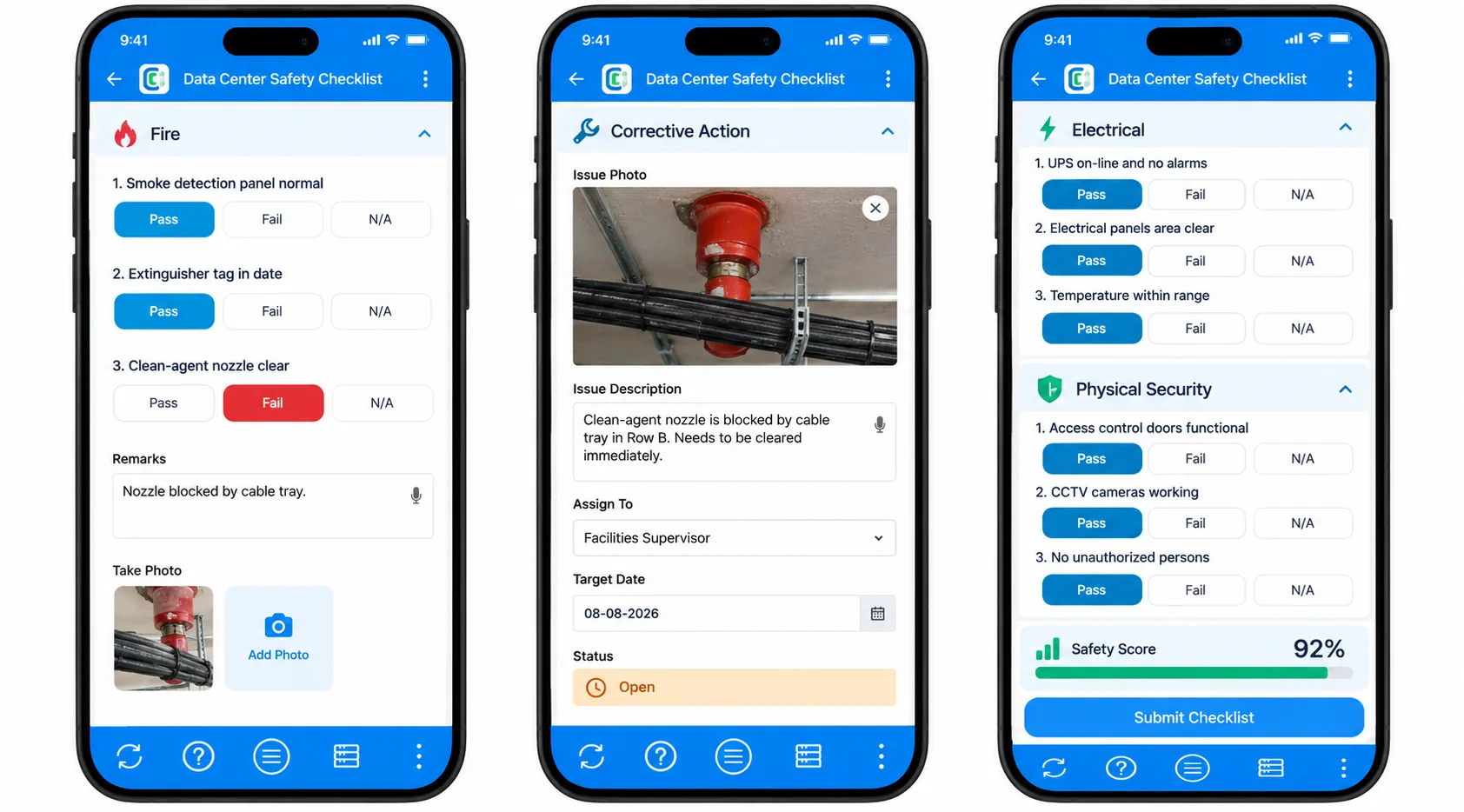
The camera and file upload block attaches a photo to any hazard, a blocked exit, a damaged cable, an expired extinguisher tag, so the issue is undeniable.
A signature block captures hot-work permit approval and LOTO sign-off, and a date and time field stamps when each check happened.
Conditional section display opens corrective-action fields only on a fail, and the Calculations and Logic block totals a safety score with formulas that reference fields as {fieldname} (type @ in the editor to pick one).
GPS location confirms which area was inspected, and a unique ID numbers each inspection or incident.
Once it is live, here is what happens every time a check fails:
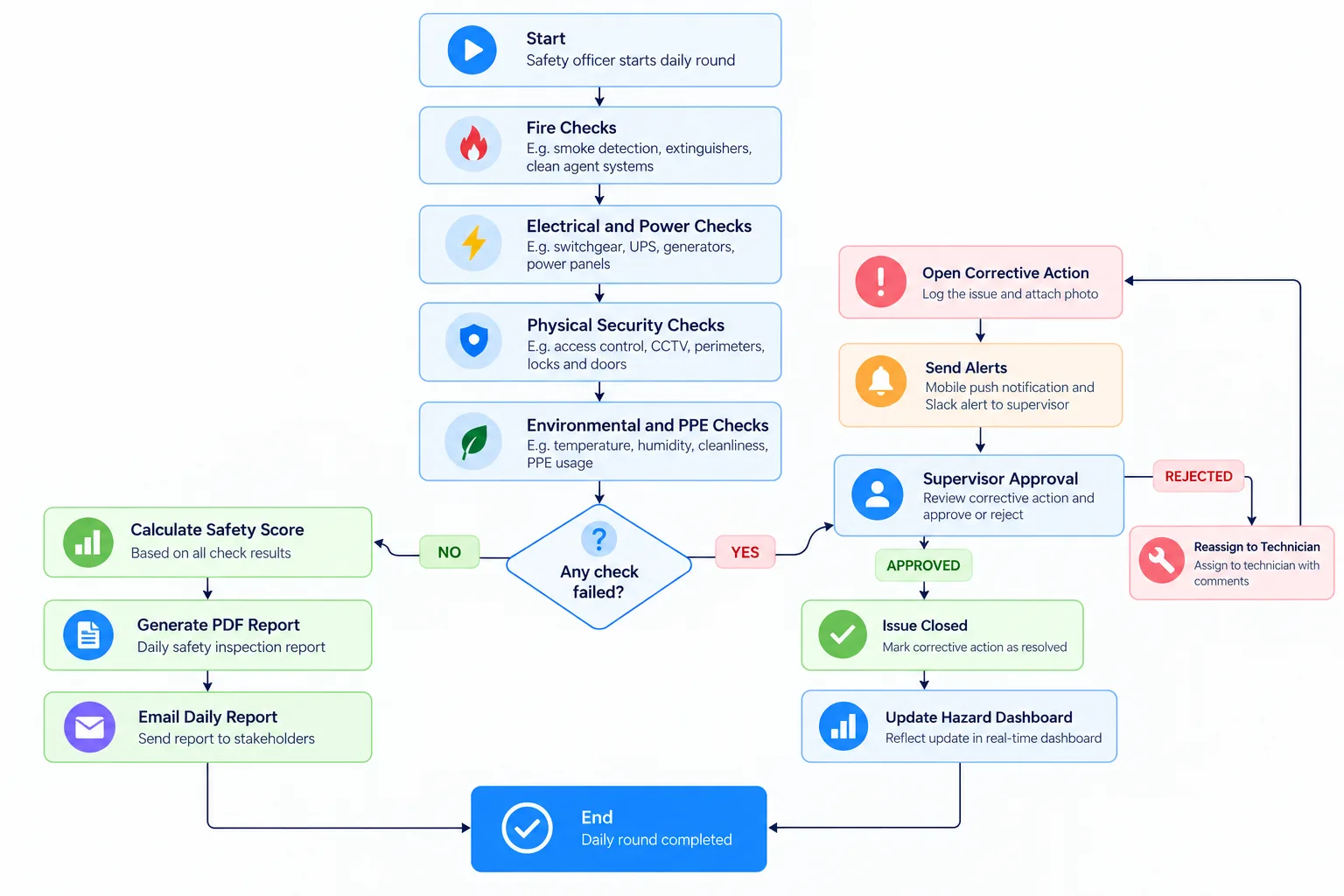
Vikram, a data center facility safety officer running daily rounds. He works through fire detection, extinguisher tags, electrical-room checks, and access doors on his phone, photographing anything out of place. A failed check, say a blocked clean-agent nozzle, instantly pushes an alert to the on-shift supervisor and opens a corrective action. The daily report assembles itself for the compliance binder. The flow works like a digital construction safety checklist, tuned for a data hall.
Lena, an electrical maintenance technician performing scheduled work. Before touching live gear, she completes a LOTO checklist and captures the permit sign-off in the app, with an infrared-scan photo attached. If any precondition is unmet, the app blocks the work from being marked ready and notifies her lead. Each job leaves a time-stamped electrical safety record, similar to an electrical inspection checklist.
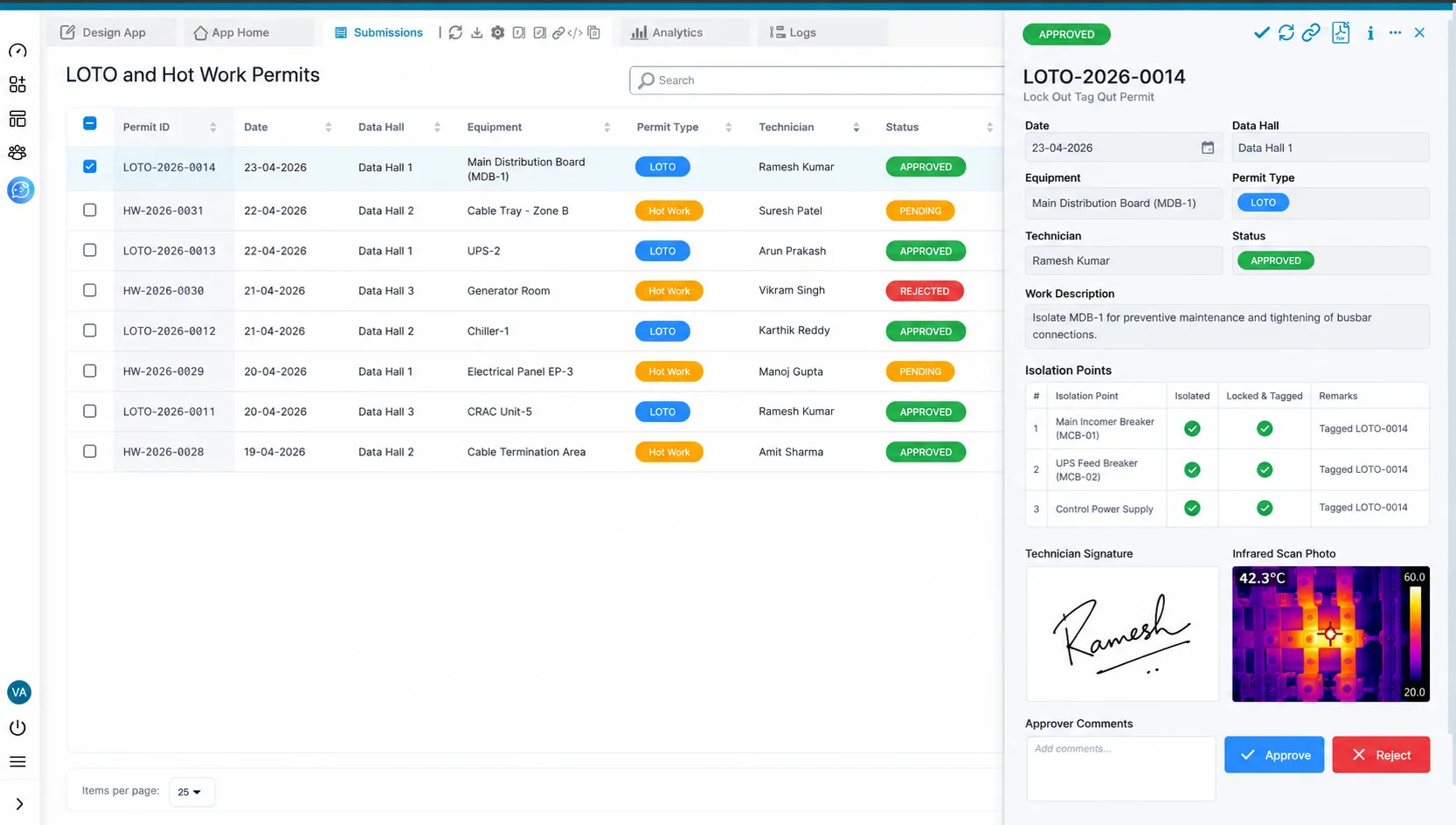
Her electrical lead reviews every LOTO and hot-work permit from the Clappia web app, approves or rejects corrective actions through the Approval node, and filters the submissions by area and status to see which permits are still open. At month end, the lead exports the permit history for the insurer, with signatures, photos, and timestamps already attached. For a broader programme, see our safety audit checklist and fire safety inspection log.
Any high-risk facility runs the same kind of structured safety checks.
The same engine powers a building maintenance checklist and an incident reporting system.
The value of a digital safety checklist is that checks actually get done and acted on. When a failed check pushes an instant alert, the loose connection or blocked exit gets fixed today, not next week. When permits and LOTO sign-offs are captured with photos, you prevent the accidental energization and hot-work fires that cause real harm. And because every inspection is time-stamped and photo-backed, an OSHA or insurer review is straightforward. The payoff is fewer incidents, less downtime from preventable failures, and a defensible compliance record.
Skip the clipboard that hides skipped checks. Build a safety app that matches your facility, the fire, electrical, power, and security checks you actually run, with the permits and sign-offs you need to prove they happened. You are building your own tool, not forcing your program into a template.
Run every check on mobile, attach hazard photos, capture permits, and have safety reports delivered to Gmail, WhatsApp, or Slack as rounds complete. Failed checks reach a supervisor instantly so corrective actions never wait.
Clappia's free plan is permanent, not a trial. Start building for free and have your data center safety checklist app running today.
Electrical hazards like arc flash and shock, fire from dense heat-generating equipment and combustibles, heavy-equipment handling injuries, and physical security lapses such as unsecured doors. Environmental issues like poor airflow and chemical exposure add further risk.
Because water damages electronics, data centers favor clean-agent or inert-gas systems paired with very-early-warning smoke detection, often at room and rack level. Designs typically follow NFPA 75 and 76, with NFPA 855 covering lithium-based energy storage.
Lockout/tagout (LOTO) is the practice of de-energizing and securing equipment before maintenance so it cannot start unexpectedly. It prevents electrical shock and equipment damage, and capturing the sign-off in an app creates proof the procedure was followed.
Yes. The app runs scheduled checks on mobile, attaches hazard photos, captures permits and LOTO sign-offs, alerts supervisors on failures, and generates time-stamped reports. The mobile app also works offline once preloaded, so rounds in plant rooms and basements still get logged.
No. You drag blocks onto the form, configure them from a side panel, and use spreadsheet-style formulas for scoring. No programming is required.
Run fire, access, and housekeeping checks on every shift or daily, electrical and UPS checks weekly or monthly, and generator, suppression, and infrared inspections on the schedule set by your standards and equipment manufacturers.
 Get Started – It’s Free
A data center safety checklist should cover fire protection, electrical and power safety, power resilience, physical security, and environmental and PPE checks, mapped to NFPA 70E, NFPA 75 and 76, and OSHA rules. Running it as a Clappia app adds photo proof, signed LOTO and hot-work permits, instant alerts on failed checks, and a time-stamped audit trail.
L374, 1st Floor, 5th Main Rd, Sector 6, HSR Layout, Bengaluru, Karnataka 560102, India
3500 S DuPont Hwy, Dover,
Kent 19901, Delaware, USA


.svg)




3500 S DuPont Hwy, Dover,
Kent 19901, Delaware, USA
L374, 1st Floor, 5th Main Rd, Sector 6, HSR Layout, Bengaluru, Karnataka 560102, India