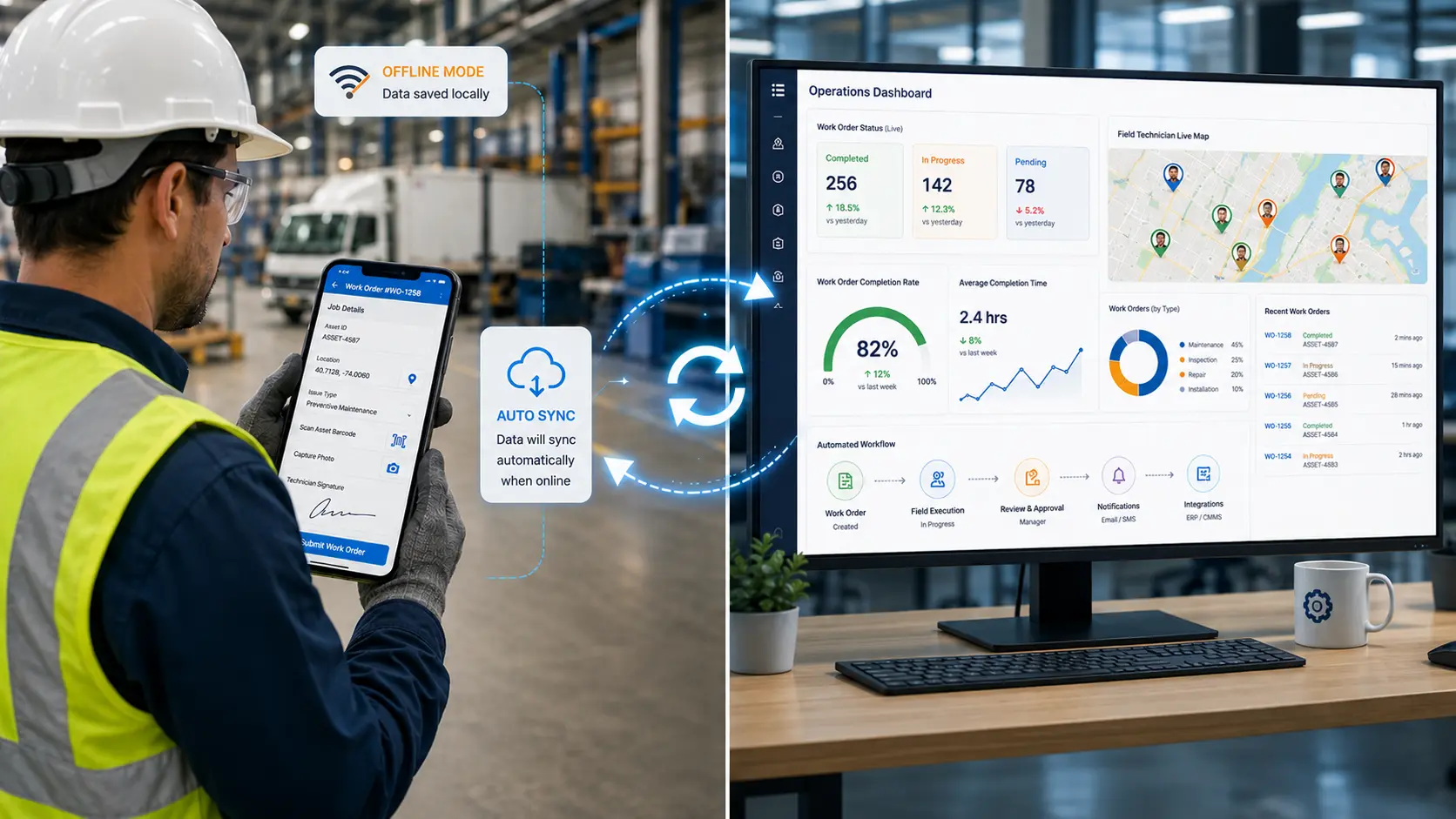
The best workflow automation software for mobile field teams combines offline mobile data capture, GPS tracking, no-code app building, and real-time dashboards in one platform. It eliminates paper forms, automates dispatch and scheduling, tracks field workers in real time, and integrates with existing business systems without requiring developers. Solutions like Clappia enable operations teams to build custom workflow automation apps that work offline, sync automatically, and scale across logistics, manufacturing, and field service operations.
When evaluating platforms, prioritize offline reliability, mobile-first design, and the ability to build custom workflows without coding.
Delivery drivers use paper route sheets. Dispatchers manually assign jobs. Field technicians call the office for updates. Managers have no visibility into field activity until end of day.
Workflow automation software for mobile field teams digitizes work orders, dispatch, and data capture. It replaces paper with mobile apps that work offline, routes tasks automatically, and provides real-time dashboards of field activity.
This guide explains how to build automated workflows without code, what features matter, and how operations teams combine offline mobile apps, GPS tracking, and no-code customization.
Mobile workflow automation connects three layers: field workers using mobile apps, automated workflows routing tasks and data, and managers viewing real-time dashboards.
Instead of paper forms and phone calls, field workers use mobile apps to complete tasks. They scan barcodes for asset identification, capture photos of completed work, record GPS coordinates for proof of location, collect digital signatures for delivery confirmation, and fill inspection checklists with conditional logic that adapts based on their answers.
Offline mode ensures the app works in warehouses, rural routes, and poor-connectivity areas. Data syncs automatically when connectivity returns. No manual uploads, no lost submissions, no repeated trips.
When a field worker submits a form, workflows execute automatically. Approval workflows route inspections to supervisors based on pass or fail status. Email automation sends delivery confirmations to customers immediately. SMS notifications alert dispatchers when high-priority issues are logged. WhatsApp integration notifies field teams of schedule changes instantly.
Workflows also write data back into business systems. REST API connections push completed work orders into ERP. Database integrations update inventory levels after deliveries. Create submission nodes generate follow-up tasks automatically.
Dashboards show live field activity without phone calls or email check-ins. Managers see which work orders are completed, in progress, or overdue. Live tracking maps field workers' locations and routes. Analytics reveal completion rates, bottlenecks, and performance trends. Automated reports email summaries on schedule.
When issues surface, managers drill into individual submissions to see photos, GPS coordinates, and timestamps. They assign corrective actions or escalate urgent cases without leaving the dashboard.
Not all field service management platforms offer true workflow automation or offline mobile reliability. These features separate tools that work in the field from tools that fail when connectivity drops.
Field teams work in warehouses, basements, delivery routes, and remote sites where connectivity is unreliable or absent. The mobile app must capture forms, photos, GPS, and signatures completely offline, storing everything locally until sync.
Platforms that require internet to submit forms are not truly offline. Workers fill the form, hit submit, and watch it fail, creating incomplete data and version control problems.
Operations managers, not developers, should build and modify workflows. Drag-and-drop workflow builders let teams design approval chains, automated notifications, conditional routing, and system integrations without writing code.
If every workflow change requires IT tickets, the platform creates bottlenecks instead of eliminating them. Self-service workflow design keeps field operations agile as processes evolve.
Real field work is not linear. If a delivery driver marks a package as damaged, the form should automatically prompt for photos, damage description, and customer signature. If an inspector fails a quality check, the workflow should route the submission to a supervisor and trigger a corrective action task.
Conditional logic adapts forms and workflows based on data captured in the field, eliminating manual triage and ensuring consistent processes.
GPS tracking confirms field workers reached the correct location before completing tasks. Geofencing enforces location-based rules, preventing clock-ins from unauthorized sites or deliveries marked complete from wrong addresses.
Live tracking shows managers real-time routes, distances traveled, and estimated arrival times. Route optimization reduces drive time and fuel costs by dispatching the nearest available worker.
Managers need visibility into field activity without calling workers or waiting for end-of-day reports. Real-time dashboards show work order status, completion rates, and live field worker locations on a map.
Filters let managers drill down by team, location, date, or status. Data exports feed into external BI tools. Automated reports email summaries to stakeholders on schedule.
Field data should flow into ERP, CRM, accounting, and inventory management systems automatically. REST API integrations push and pull data between Clappia and external platforms. Database connectors write directly to SQL databases. Zapier integration connects with thousands of apps.
When field data stays isolated, you create a new silo instead of eliminating one.
Step 1: Map Your Field Process
Document one field process end to end. Identify where paper slows work, manual coordination causes errors, and lack of visibility creates blind spots.
Step 2: Build the Mobile Form
Use a drag-and-drop app designer to build forms with barcode scanning, photo capture, GPS location, and signature capture. Add conditional logic so forms adapt based on user input.
Step 3: Design Automated Workflows
Configure workflows with email, SMS, WhatsApp, approval chains, REST API, and database nodes. Workflows execute in seconds, eliminating manual coordination.
Step 4: Test Offline
Take the app offline, complete a form with photos and GPS, then sync when online. If offline fails in testing, it fails in production.
Step 5: Deploy and Iterate
Publish to mobile devices. Modify forms and workflows as processes evolve without developers.
Delivery Operations: Drivers scan packages, capture signatures, and photograph deliveries. GPS tracking confirms addresses. Workflows send confirmations, update inventory, and log proof photos. Dispatchers see live driver locations and optimize routes. Learn about delivery tracking.
Field Service: Technicians complete work orders, capture equipment photos, record readings, and collect signatures. Approval workflows route failed inspections automatically. Preventive maintenance schedules trigger follow-up tasks. Build inspection apps.
Manufacturing QC: Inspectors log defects, capture photos, and record corrections. When defects exceed thresholds, workflows alert managers via SMS. Dashboards show trends by line and shift. See quality inspection apps.
Warehouse Operations: Workers scan barcodes for inventory movements, cycle counts, and picking tasks. Offline mode works in metal buildings. Workflows create purchase orders when stock drops below reorder points.
| Feature | Traditional Field Service Management | No-Code Workflow Automation |
|---|---|---|
| Setup time | Requires months of implementation, developer involvement, and IT support for customization | Operations teams build and deploy custom apps in days using drag-and-drop builders |
| Offline reliability | Often requires connectivity for form submission, photo upload, or GPS capture, failing in low-signal areas | Full offline mode stores forms, photos, and GPS locally, syncing automatically when online |
| Workflow customization | Rigid workflows require professional services or development sprints to modify | Operations managers build and change workflows with no-code visual editors |
| Cost structure | High upfront implementation costs, per-user licensing, and ongoing professional services fees | Transparent per-user pricing with no implementation fees or hidden costs |
| Mobile-first design | Desktop tools adapted for mobile often lack touch optimization and native device access | Native iOS and Android apps built for fieldwork with camera, GPS, barcode, and signature capture |
| Integration flexibility | Limited integrations require custom development or middleware for each connection | REST APIs, webhooks, database connectors, and Zapier enable self-service integrations |
| Real-time visibility | Reporting lags behind actual field activity, requiring manual consolidation | Live dashboards show real-time work order status, field worker locations, and completion rates |
No-code platforms democratize workflow automation, allowing operations teams to build and iterate without IT dependencies.
Clappia is a no-code platform for mobile workflow automation, offline data capture, and real-time dashboards. Build work orders, dispatch apps, delivery tracking, and quality inspections without developers. Start with the free plan, scale with transparent per-user pricing.
No-Code Builder: Drag-and-drop app designer with barcode, GPS, camera, signature, and NFC.
Offline Mobile Apps: Native iOS and Android apps with offline mode that sync automatically.
Workflow Automation: Visual workflow builder with email, SMS, WhatsApp, approvals, APIs, and database connections.
Real-Time Dashboards: Live dashboards show work orders, locations, and completion rates. Automated reports email summaries.
GPS and Geofencing: GPS tracking, live tracking, and geofencing enforce location rules.
Integrations: REST API, databases, Google Sheets, and Zapier.
What is mobile workflow automation?
Mobile workflow automation digitizes and automates field operations using mobile apps, automated workflows, and real-time dashboards. It replaces paper forms with mobile data capture, eliminates manual dispatch and scheduling, and provides live visibility into field activity.
How does offline mode work in workflow automation apps?
Offline mode stores forms, photos, GPS coordinates, and signatures locally on the mobile device when connectivity is unavailable. When the device reconnects, data syncs automatically to the cloud without manual uploads or data loss.
Can operations teams build workflows without developers?
Yes. No-code workflow builders use drag-and-drop interfaces to design approval chains, automated notifications, conditional routing, and system integrations without writing code. Operations managers build and modify workflows as processes evolve.
How does GPS tracking improve field operations?
GPS tracking confirms field workers reached correct locations, prevents fraudulent clock-ins or deliveries, optimizes routes to reduce drive time, and provides real-time visibility into field worker locations on dashboards.
What integrations are essential for field workflow automation?
Essential integrations include ERP systems for work orders and inventory, CRM platforms for customer data, accounting software for invoicing, and communication tools like email, SMS, WhatsApp, and Slack for automated notifications.
How quickly can teams deploy mobile workflow automation?
With no-code platforms, teams build custom field apps in days and deploy to mobile devices immediately. Traditional FSM implementations take months and require developers.
Automate mobile work orders, dispatch, and scheduling with no-code apps that work offline and integrate with your systems. Start building for free.
 Get Started – It’s Free
L374, 1st Floor, 5th Main Rd, Sector 6, HSR Layout, Bengaluru, Karnataka 560102, India
3500 S DuPont Hwy, Dover,
Kent 19901, Delaware, USA


.svg)




3500 S DuPont Hwy, Dover,
Kent 19901, Delaware, USA
L374, 1st Floor, 5th Main Rd, Sector 6, HSR Layout, Bengaluru, Karnataka 560102, India


%20inventory%20management%20.jpg)