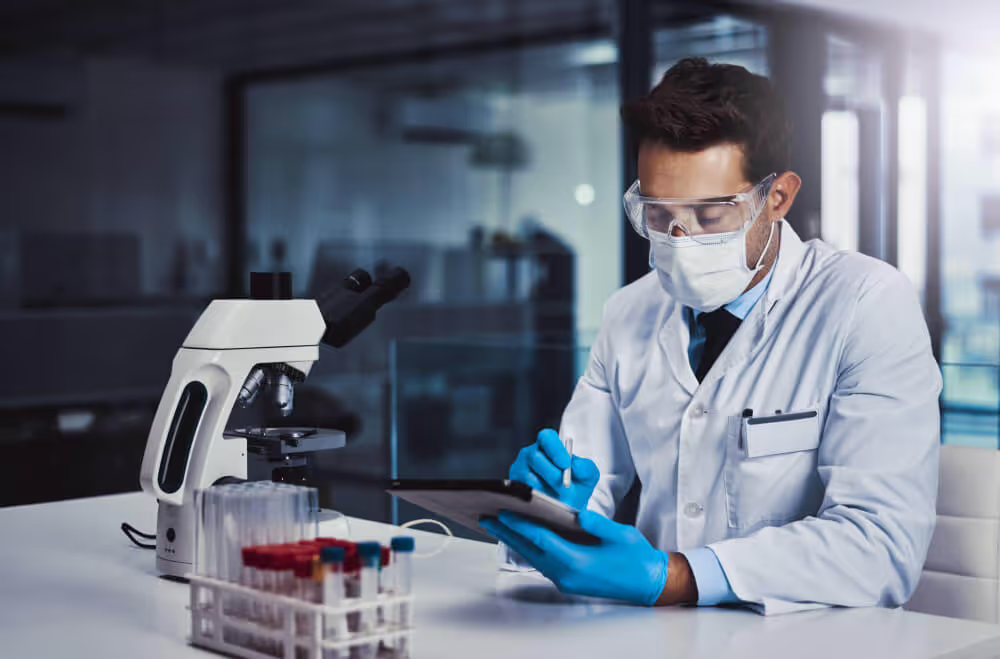
Medical laboratories, clinics, and healthcare facilities process thousands of lab test reports daily. Lab technicians and administrative staff spend countless hours manually transcribing patient test results from PDF documents into electronic health records (EHR) systems, databases, or spreadsheets.
This manual data entry process is slow, tedious, and error-prone. A single mistyped value in a critical test parameter could have serious clinical implications. Billing departments face delays when lab results need manual extraction before invoices can be generated. Research teams struggle to aggregate test data across hundreds of patient reports.
But there's a smarter solution.
With AI-powered PDF extraction technology integrated into automated workflows, you can process hundreds of lab test PDFs through scheduled batch processing or API-triggered extraction, eliminating manual data entry completely.No more squinting at PDF documents, no more copy-paste errors, and no more hours wasted on data entry.
In this guide, you'll learn how to build a custom AI application that automatically extracts parameters and test results from any lab test PDF report. Whether you're a hospital administrator, lab manager, clinic owner, or healthcare IT professional, this solution will transform how your organization handles medical lab data.
Before we begin, here's what you need to know:
An AI-powered lab test extraction app uses advanced OCR (Optical Character Recognition) and natural language processing to automatically read PDF lab reports and extract structured data from tables. The system identifies parameters, test results, reference ranges, and units, then organizes this information into a clean, usable format. Key capabilities include:
Manual lab result transcription creates operational bottlenecks, increases costs, and introduces risks of human error. Automating this critical process through AI delivers measurable benefits:
Benefits of Automating Lab Test PDF Extraction
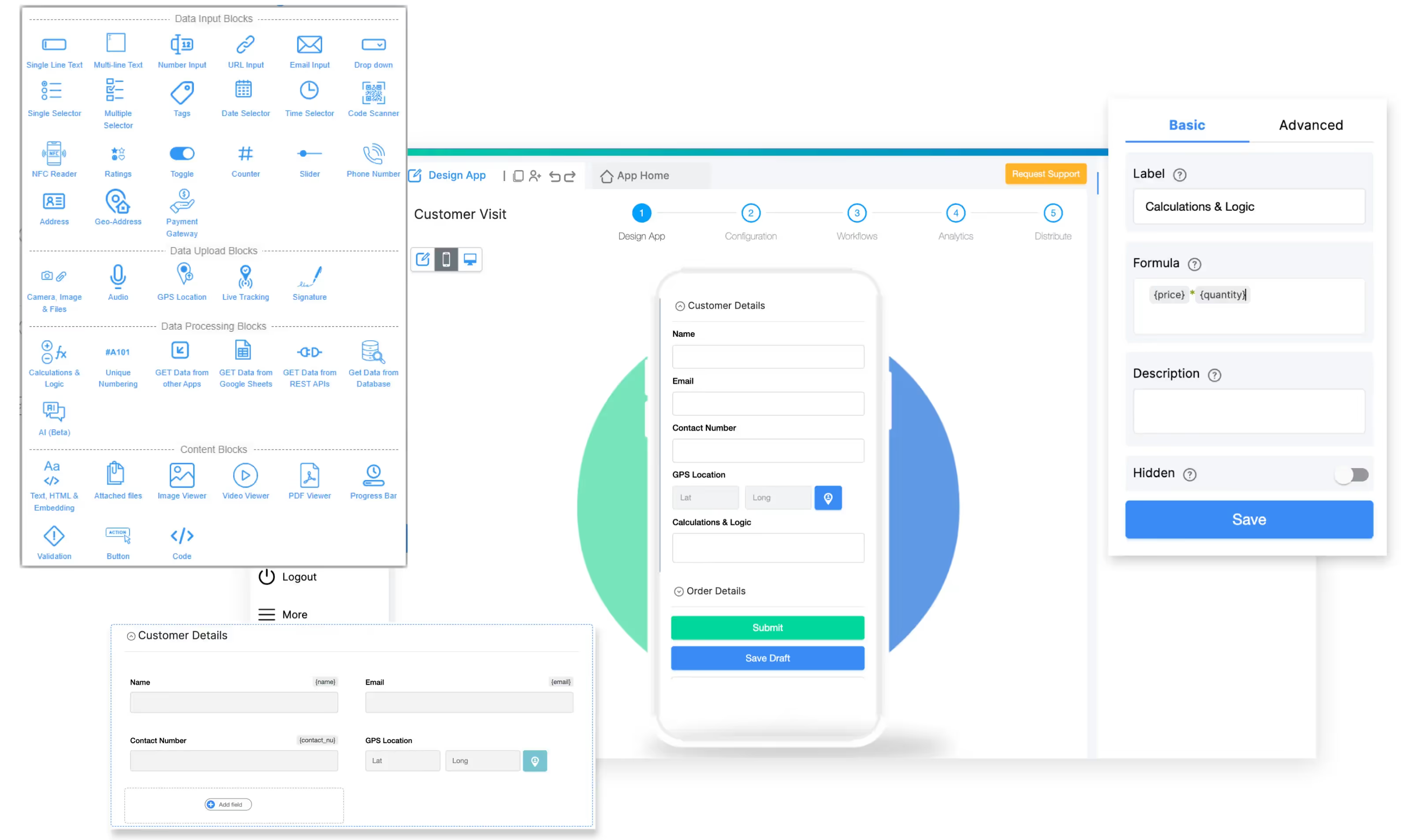
To build this AI-powered lab test extraction app, we'll use Clappia, a no-code platform that empowers healthcare organizations to build custom applications without programming.
With Clappia's AI Block, you can create apps that automatically extract structured data from PDF documents using advanced AI models like GPT-4, Claude, and Gemini.
To ensure your app delivers reliable, clinical-grade results, we'll include these essential features:
This streamlined workflow eliminates hours of manual data entry while ensuring clinical accuracy and audit compliance.
Traditional lab result entry requires technicians to manually type data from PDFs into multiple systems. Clappia automates this entire workflow using AI Workflow Node for background processing and multi-system integration. Here's how it works:
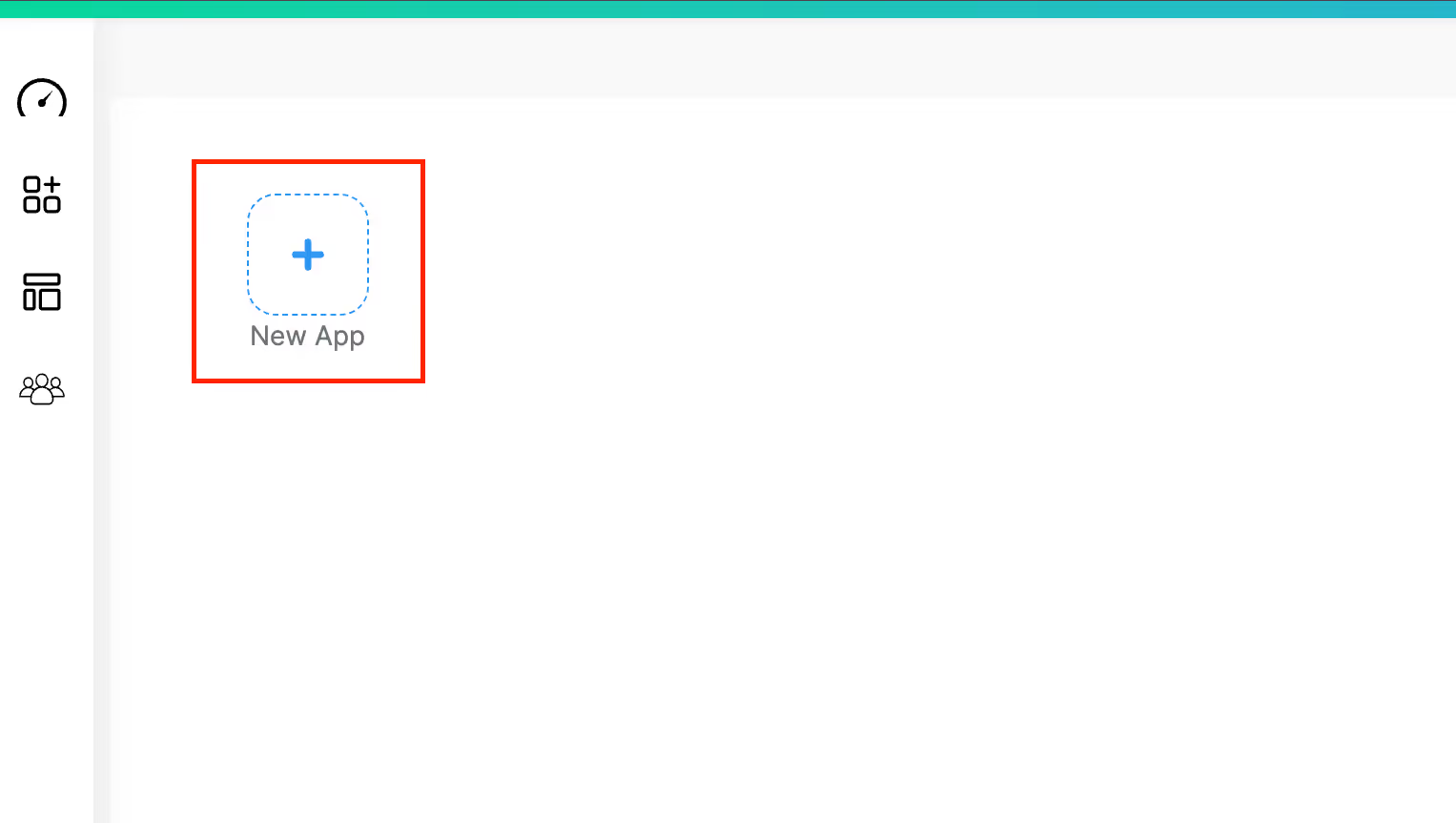
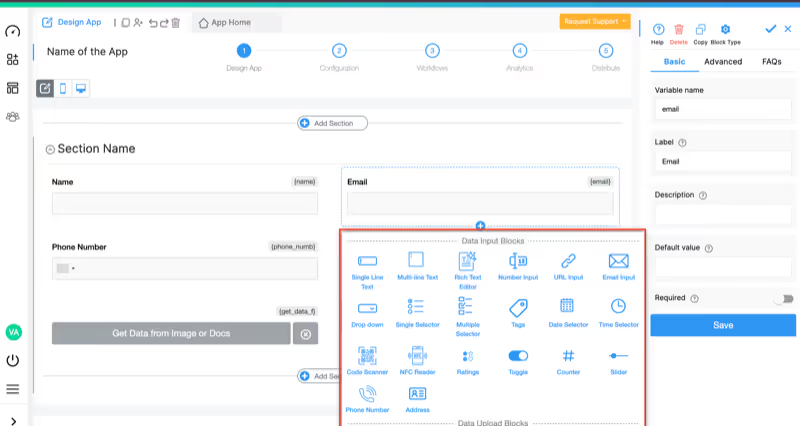
Since the AI Workflow Node will extract and populate test results, design the app to receive PDF upload and store extracted data:
Fields for Lab Tech to Fill:
Fields Populated by AI Workflow Node (leave empty initially):
For Complete Blood Count (CBC) example:
Note: Create similar fields based on your most common lab test panels. AI Workflow will populate these via Edit Submission Node.
Additional Fields:
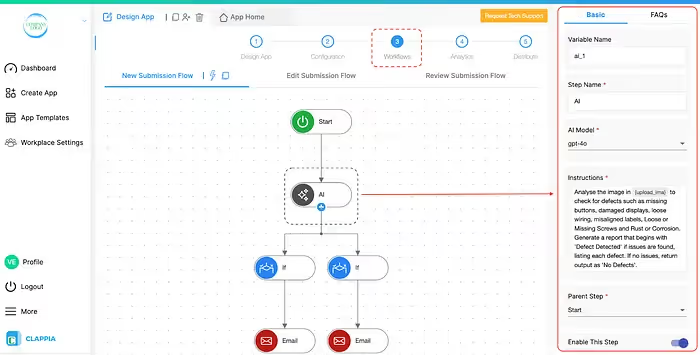
Navigate to the Workflows tab. The workflow will automatically trigger when lab tech submits the form with PDF.
Add AI Workflow Node below the Start node:
Step Name: Lab Test Extractor
LLM: Claude (Anthropic) or OpenAI
AI Model: claude-sonnet-4 or gpt-4o
Instructions:
You are a medical laboratory data extraction specialist. Analyze the uploaded PDF lab test report and extract ALL test parameters with their corresponding result values.
LAB REPORT PDF: {lab_pdf}
REPORT TYPE: {lab_report_type}
EXTRACTION TASK:
Identify every test parameter name and its numeric or text result value from the lab report table. Extract systematically in the order they appear.
Return ONLY valid JSON in this exact format:
{
"extraction_status": "Success or Partial or Failed",
"parameters": {
"Hemoglobin": "14.2",
"WBC_Count": "7500",
"RBC_Count": "4.8",
"Platelet_Count": "250000",
"Hematocrit": "42",
"MCV": "88",
"MCH": "29",
"MCHC": "33"
},
"critical_values": "Yes or No",
"critical_list": "Hemoglobin: 6.2 (Critical Low)",
"missing_parameters": "None or list of missing standard parameters"
}
EXTRACTION RULES:
* Extract ONLY the numeric result value (exclude units, reference ranges)
* Use parameter names exactly as they appear in the report
* For parameters with multiple values (e.g., Blood Pressure 120/80), use format "120/80"
* Mark extraction_status as "Success" if all standard parameters found, "Partial" if some missing, "Failed" if extraction error
* Set critical_values to "Yes" if any result is outside normal physiological range
* List specific critical values in critical_list field
* Use underscores in parameter names for multi-word tests (e.g., "WBC_Count")
COMMON PARAMETER NAMES BY TEST TYPE:
Complete Blood Count (CBC):
Hemoglobin, WBC_Count, RBC_Count, Platelet_Count, Hematocrit, MCV, MCH, MCHC, Neutrophils, Lymphocytes, Monocytes, Eosinophils, Basophils
Lipid Panel:
Total_Cholesterol, HDL_Cholesterol, LDL_Cholesterol, Triglycerides, VLDL_Cholesterol, Cholesterol_HDL_Ratio
Liver Function Test:
Total_Bilirubin, Direct_Bilirubin, Indirect_Bilirubin, SGOT_AST, SGPT_ALT, Alkaline_Phosphatase, Total_Protein, Albumin, Globulin, AG_Ratio
Kidney Function Test:
Blood_Urea, Serum_Creatinine, Uric_Acid, BUN_Creatinine_Ratio, Sodium, Potassium, Chloride
Thyroid Panel:
TSH, T3_Total, T4_Total, Free_T3, Free_T4
Return ONLY the JSON object. No markdown, no explanation, no additional text.
Variable Name: {ai_extraction}
Next Steps in Workflow:
2: Parse JSON and Extract Individual Parameters
Code:
javascript
// Parse AI extraction response
const extractedData = JSON.parse(WORKFLOW.ai_extraction);

// Extract individual values
const status = extractedData.extraction_status;
const params = extractedData.parameters;
const critical = extractedData.critical_values;
const criticalList = extractedData.critical_list || "None";

// Return individual parameter values for Edit Submission
return {
  extraction_status_value: status,
  hemoglobin_value: params.Hemoglobin || "",
  wbc_value: params.WBC_Count || "",
  rbc_value: params.RBC_Count || "",
  platelet_value: params.Platelet_Count || "",
  hematocrit_value: params.Hematocrit || "",
  mcv_value: params.MCV || "",
  mch_value: params.MCH || "",
  mchc_value: params.MCHC || "",
  critical_detected: critical,
  critical_values_list: criticalList
};
3: Update Submission with Extracted Values
{extraction_status_value}{hemoglobin_value}{wbc_value}{rbc_value}{platelet_value}{hematocrit_value}{mcv_value}{mch_value}{mchc_value}{critical_detected}After extraction completes and fields are updated, add conditional routing for critical values and system integration:
Critical Value Alert Workflow:

Add If Node with condition: {critical_detected} = "Yes"
If Critical Values Detected:
Normal Results Integration:
Add another If Node with condition: {critical_detected} = "No" AND {extraction_status_value} = "Success"
If Normal Results:
Extraction Failure Handling:
Add If Node with condition: {extraction_status_value} = "Failed" OR {extraction_status_value} = "Partial"
If Extraction Issues:
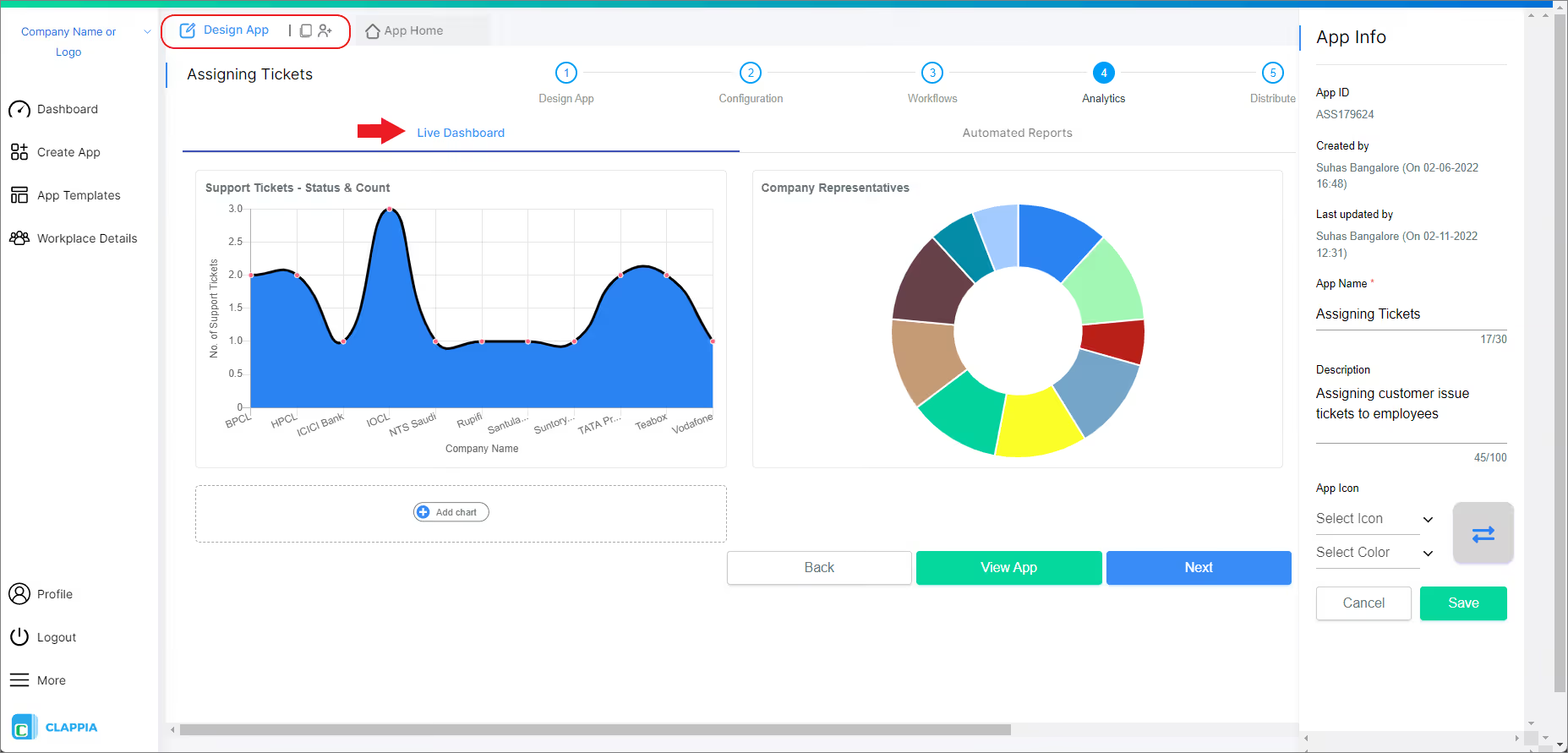
Create dashboard views for:
Challenge: Processing 500+ lab test PDF reports daily from multiple analyzers and reference labs. Manual entry by lab technicians taking 2-3 minutes per report, creating bottlenecks in result delivery and increasing overtime costs.
Solution: Lab staff upload PDFs or forward via email. Upon submission, AI Workflow Node triggers automatically in background. System extracts complete test panels (CBC, metabolic panel, lipid profile) and populates individual parameter fields via Edit Submission Node. Critical values (e.g., Hemoglobin < 7, Potassium > 6) automatically trigger Email + SMS alerts to ordering physicians. Normal results flow directly to hospital EHR system via REST API integration. LIMS database updates simultaneously. Billing system receives completion notification. Technicians only review flagged items requiring manual verification.
Results: 85% reduction in data entry time, 99% extraction accuracy validated against manual entry, same-hour result availability for clinicians (previously 4-6 hours), zero billing delays, 40% reduction in lab technician overtime.
Challenge: Aggregating test results from 20+ lab locations using different report formats (Quest, LabCorp, local reference labs) for centralized database and patient portal. Each location has different PDF layouts making standardization difficult.
Solution: Each lab location uses the extraction app with AI Block. Lab technician uploads PDF, clicks "Extract Test Data" button, and immediately sees extracted parameters displayed. AI Block handles format variations automatically across different lab vendors. Technician verifies accuracy on screen, makes minor corrections if needed, then approves. Standardized data feeds into central data warehouse. Patient portal updates in real-time showing results in consistent format regardless of source lab.
Results: Unified data structure across all 20 locations, 70% faster result posting to patient portal (from 48 hours to 14 hours average), 95% patient satisfaction scores for result access, elimination of format conversion errors between labs.
Challenge: Extracting lab data from 10,000+ historical PDF reports stored in archives for retrospective oncology study analysis. Manual extraction estimated to take 6 months and require 3 full-time data entry specialists.
Solution: Bulk upload of archived lab PDFs via API submission. Scheduled workflow processes 500 PDFs per batch overnight. AI Workflow Node extracts tumor markers (CA 19-9, CEA, AFP), complete blood counts, and liver function tests from each report. Code Block parses JSON and maps to standardized research database schema. Edit Submission Node populates extraction results. Database Node syncs structured data to PostgreSQL research database with complete audit trail linking original PDFs. Extraction failures flagged for manual review queue (typically <5% of reports).
Results: 3-month data collection project completed in 2 weeks, 95% extraction accuracy validated against random sample set of 500 manually verified reports, complete audit trail for IRB compliance, research timeline accelerated by 10 weeks.
Challenge: Receiving lab reports from external reference labs (Mayo Clinic, Cleveland Clinic) as PDF email attachments, requiring manual entry into specialty clinic management system. Reception staff spending 45+ minutes daily downloading PDFs from emails and manually transcribing lab result data.
Solution: Reception staff downloads PDF attachment from email and uploads to Clappia app. Staff enters patient ID to link record. Clicks "Extract Lab Results" AI Block button. Extracted parameters appear immediately on screen for verification. Staff reviews accuracy (typically takes 30 seconds), corrects any misread values if needed, then submits. Results integrate with clinic EMR system via REST API. Billing codes auto-populate based on test panel type.
Alternative Workflow: External reference lab integrates directly with Clappia via REST API. Lab's system automatically submits PDF and patient metadata when report is finalized. This triggers AI Workflow Node for automated extraction and EMR integration without reception staff involvement.
Results: Zero manual transcription of lab values, same-day result availability (previously 24-48 hour delay), reduced billing delays from 3 days to same-day, reception staff redeployed to patient scheduling tasks, 98% extraction accuracy requiring minimal corrections.
Clappia's AI Block supports multiple AI models:
Test different models with your actual lab report formats to optimize accuracy.
Connect your lab test extraction app with healthcare systems through Clappia's integration options:
Clappia ensures your patient data and lab results remain secure and compliant:
Ready to eliminate manual lab result entry and transform your laboratory operations? Here's how to begin:
The best part? You can start with Clappia's free plan and test everything with real lab reports before committing. No credit card required, no technical setup needed.
Can the AI extract data from any lab report format?
Clappia's AI Block handles most standard lab report formats including CBC, metabolic panels, lipid panels, thyroid tests, liver function tests, and more. The AI adapts to layout variations automatically. For highly specialized or unusual formats, you may need to refine the extraction prompt.
What happens if the AI makes an extraction error?
Lab technicians review extracted data before approval. You can set up validation rules to flag unusual values or missing parameters. Any errors are corrected manually and the system learns from corrections. Critical results always undergo human verification before clinical use.
Is this solution HIPAA compliant?
Yes, Clappia is HIPAA compliant and provides Business Associate Agreements (BAA) for healthcare organizations. All patient data is encrypted, access is controlled, and complete audit trails are maintained for regulatory requirements.
Can we process scanned PDFs or only digital reports?
The AI can process both digital PDFs and scanned images of lab reports. However, scanned documents should be at least 300 DPI resolution for optimal accuracy. Digital PDFs (text-based) provide the best extraction accuracy.
How accurate is the AI extraction?
With clear, well-formatted lab reports, accuracy typically exceeds 95-99%. Accuracy varies based on PDF quality, table complexity, and report format consistency. The system flags low-confidence extractions for manual review.
Can I use my own AI API key to avoid usage limits?
Yes, Clappia allows you to connect your own AI API key from OpenAI, Anthropic Claude, Google Gemini, or Mistral. This removes Clappia's usage limits and gives you full control over AI processing costs.
How long does it take to set up the extraction app?
Most healthcare organizations complete a basic lab test extraction app in 2-4 hours following this guide. Additional time is needed for testing with your specific report formats, integration setup, and workflow customization.
Can we extract reference ranges and units along with test values?
Yes, modify the AI instruction prompt to include reference ranges and units in the extraction. The AI can capture these additional data points and structure them appropriately.
Does it work with handwritten values on lab reports?
AI extraction works best with typed or printed values. Handwritten numbers may be recognized but with lower confidence. For critical handwritten values, manual verification is recommended.
How do we integrate extracted data with our EHR system?
Use Clappia's REST API integration to push extracted data to your EHR via HL7, FHIR, or custom APIs. Most modern EHR systems provide API endpoints for lab result integration. Clappia can also connect via database integration if your EHR has a database interface.
Manual transcription of lab test results from PDF reports is a costly, error-prone process that healthcare organizations can no longer afford. With AI-powered PDF extraction, you can automate the entire workflow from report receipt to EHR integration.
Clappia makes it possible to build professional-grade medical data extraction applications without writing code. The AI Block handles the complex document processing while you focus on designing workflows that match your laboratory's needs.
Whether you're processing complete blood counts, metabolic panels, or specialized diagnostic tests, this approach delivers faster turnaround times, higher accuracy, and better compliance documentation.
Start building your AI-powered lab test extraction app with Clappia today—because every minute spent on manual data entry is a minute that could be spent on patient care.
L374, 1st Floor, 5th Main Rd, Sector 6, HSR Layout, Bengaluru, Karnataka 560102, India
3500 S DuPont Hwy, Dover,
Kent 19901, Delaware, USA


.svg)




3500 S DuPont Hwy, Dover,
Kent 19901, Delaware, USA
L374, 1st Floor, 5th Main Rd, Sector 6, HSR Layout, Bengaluru, Karnataka 560102, India